
1. Introduction
This manual provides detailed instructions for the safe and effective use of the JBM 54013 Tire Puncture Repair Kit. This kit is designed for temporary emergency repair of small punctures in vehicle tires, allowing you to reach a service station for a permanent repair. It includes a liquid sealant and an air compressor.
2. Product Overview
The JBM 54013 kit consists of the following main components:
- Liquid Tire Sealant: A bottle containing a specialized liquid designed to seal small punctures.
- Air Compressor: An electric air compressor used to inflate the tire and force the sealant into the puncture.
- Connecting Hoses/Cables: Hoses for connecting to the tire valve and power cables for the compressor.
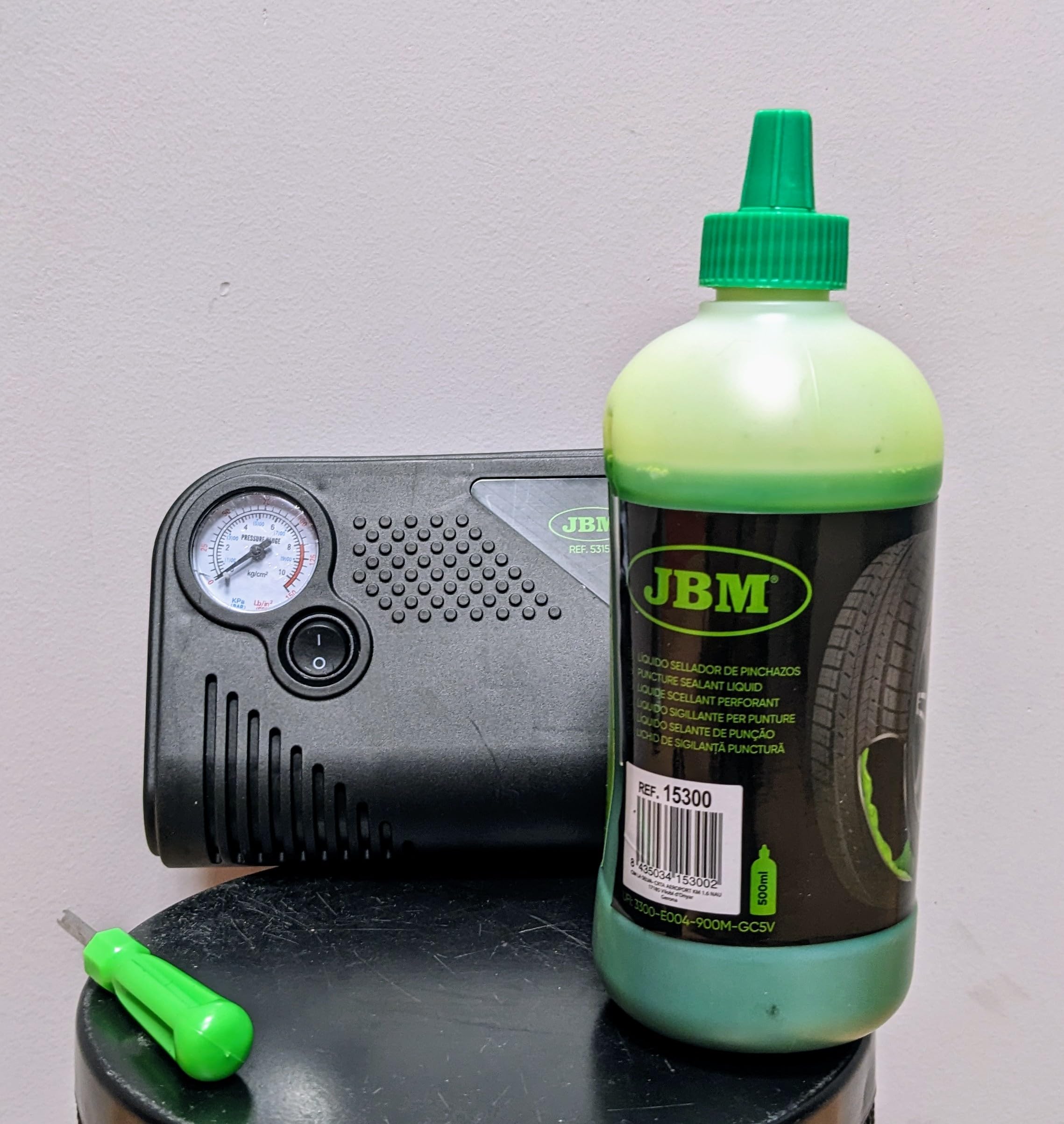
Image 1: JBM 54013 Tire Puncture Repair Kit components. This image displays the liquid sealant bottle and the compact air compressor, along with their connecting hoses.
3. Safety Instructions
Read all safety warnings and instructions before using this product. Failure to follow these instructions may result in electric shock, fire, or serious injury.
- Always wear appropriate personal protective equipment, such as gloves and eye protection, when handling the sealant.
- Ensure the vehicle is parked on a level surface, the engine is off, and the parking brake is engaged before attempting any repair.
- Do not use the kit if the tire has a large cut, sidewall damage, or if the tire is completely off the rim. This kit is for small tread punctures only.
- Keep children and bystanders away from the work area.
- Do not overinflate the tire. Refer to your vehicle's recommended tire pressure.
- The sealant is for temporary repair only. Drive cautiously to the nearest service station for a professional, permanent repair.
- Avoid contact of the sealant with skin and eyes. In case of contact, rinse thoroughly with water.
- Do not operate the compressor in wet conditions or near flammable liquids or gases.
- Disconnect the compressor from the power source when not in use.
4. Setup
- Locate the Puncture: Carefully inspect the tire tread for the puncture. If an object (nail, screw) is still embedded, leave it in place.
- Prepare the Sealant: Shake the sealant bottle well before use.
- Connect Sealant to Tire: Remove the valve cap from the tire. Connect the sealant bottle's hose directly to the tire valve stem. Ensure a tight connection.
- Connect Compressor: Connect the air compressor's hose to the sealant bottle's inlet or directly to the tire valve if the sealant bottle has a pass-through. Connect the compressor's power cable to your vehicle's 12V accessory outlet (cigarette lighter).
5. Operating Instructions
- Start the Vehicle Engine: For optimal compressor performance and to avoid draining the vehicle battery, start the vehicle engine.
- Activate Compressor: Turn on the air compressor. The sealant will be forced into the tire, followed by air to inflate it.
- Monitor Pressure: Continuously monitor the tire pressure gauge on the compressor. Inflate the tire to the pressure recommended by your vehicle manufacturer (usually found on a sticker inside the driver's door jamb or in the owner's manual).
- Disconnect: Once the desired pressure is reached, turn off the compressor and disconnect it from the power source and the tire valve. Replace the valve cap.
- Drive Immediately: Drive the vehicle immediately for a short distance (approx. 5-10 km or 3-6 miles) at a moderate speed (not exceeding 80 km/h or 50 mph). This helps distribute the sealant evenly inside the tire.
- Recheck Pressure: After driving, recheck the tire pressure. If the pressure has dropped significantly, the puncture may be too large for the kit to seal, and professional assistance is required. If the pressure is stable, proceed to a service station for a permanent repair.
6. Maintenance
- Compressor Cleaning: Keep the air compressor clean and free from dirt and debris. Wipe with a dry cloth.
- Sealant Expiration: Check the expiration date on the sealant bottle. Replace expired sealant to ensure effectiveness.
- Storage: Store the kit in a cool, dry place, away from direct sunlight and extreme temperatures.
- Hose Inspection: Periodically inspect hoses and connections for cracks or damage.
7. Troubleshooting
| Problem | Possible Cause | Solution |
|---|---|---|
| Compressor does not turn on. | No power from 12V outlet; Blown fuse in vehicle or compressor. | Check vehicle's 12V outlet and fuse. Check compressor's inline fuse if applicable. Ensure vehicle engine is running. |
| Tire does not inflate or inflates slowly. | Loose connection; Large puncture; Sealant blockage. | Ensure all connections are tight. The puncture may be too large for the kit. Check for sealant blockage in hoses. |
| Sealant leaks from tire valve. | Loose connection to valve stem. | Tighten the connection of the sealant hose to the tire valve stem. |
| Tire pressure drops after driving. | Puncture too large or sealant did not fully seal. | The kit is for temporary repair only. Seek immediate professional tire service. Do not continue driving on a deflating tire. |
8. Specifications
- Model Number: JBM 54013
- Manufacturer: JBM CAMPLLONG, S.L.U.
- Product Weight: 150 g (0.33 lbs)
- Package Dimensions: 12 x 10 x 10 cm (4.7 x 3.9 x 3.9 inches)
- Power Source: 12V DC (typically via vehicle accessory outlet)
- Batteries Required: No
- Units in Package: 1 kit
Note: Specifications are approximate and subject to change without notice.
9. Warranty and Support
Information regarding specific warranty terms and customer support for the JBM 54013 Tire Puncture Repair Kit is not provided in the available product data. Please refer to the product packaging or contact JBM CAMPLLONG, S.L.U. directly for warranty details and technical assistance.