
1. Introduction
This manual provides essential instructions for the Fossil Gen 6 Smartwatch, model FTW6079. It covers initial setup, operational guidance, maintenance tips, troubleshooting, and detailed product specifications. Please read this manual thoroughly to ensure proper use and longevity of your device.

Image: Front view of the Fossil Gen 6 Smartwatch FTW6079, showcasing its round display and grey strap.
2. Setup
2.1 Initial Charging
Before first use, fully charge your Fossil Gen 6 Smartwatch. Use the included charger to connect the smartwatch to a power source. A full charge typically provides up to 24 hours of battery life, depending on usage.
2.2 Powering On/Off
- To Power On: Press and hold the crown button until the Fossil logo appears.
- To Power Off: Swipe down from the top of the screen, tap the settings icon, then navigate to System > Power Off. Alternatively, press and hold the crown button, then select "Power Off".
2.3 Pairing with Your Smartphone
- Ensure your smartphone (iPhone or Android) is running the latest operating system version.
- Download and install the Wear OS by Google app from your phone's app store.
- Open the Wear OS by Google app on your smartphone.
- Follow the on-screen instructions in the app and on your smartwatch to pair the devices via Bluetooth.
- Grant necessary permissions for full functionality.

Image: The Fossil Gen 6 Smartwatch interface, highlighting its compatibility with Wear OS by Google for seamless smartphone integration.
3. Operation
3.1 Basic Navigation
The Fossil Gen 6 Smartwatch features a touchscreen display and a rotating crown for navigation.
- Touchscreen: Swipe up, down, left, or right to navigate through menus and notifications. Tap to select items.
- Crown Button: Press to return to the watch face or app drawer. Rotate to scroll through lists and notifications.
- Side Buttons: Customizable for quick access to frequently used apps or functions.

Image: Side view of the Fossil Gen 6 Smartwatch, illustrating the crown button and additional side buttons for interaction.
3.2 Key Features
- Heart Rate Monitoring: Continuous heart rate tracking is available through the built-in sensor. Access heart rate data via the pre-installed wellness app.
- GPS Tracking: The integrated GPS allows for accurate tracking of distance and routes during outdoor activities without needing your phone.
- Sleep Monitoring: Track your sleep patterns and quality through the sleep monitor function.
- Activity Tracking: The wellness app tracks various activities, including steps, calories burned, and distance.
- Notifications: Receive smartphone notifications directly on your wrist for calls, messages, and app alerts.
- Making and Receiving Calls: When connected to your smartphone, you can make and receive calls directly from the smartwatch.
- Google Assistant: Utilize Google Assistant for voice commands, managing tasks, and getting information.
- Amazon Alexa: The Gen 6 Smartwatch supports Amazon Alexa (requires tethering to an Android device) for voice commands and smart home control.
- Customizable Dials and Straps: Personalize your smartwatch with various watch faces and interchangeable straps.

Image: Overview of Fossil Gen 6 Smartwatch features, including Amazon Alexa integration, SpO2 sensor, water resistance, rapid charging, and Bluetooth 5.0 LE connectivity.

Image: The Fossil Gen 6 Smartwatch displaying various customizable watch faces, the ability to make and take calls, and integration with Google Assistant.

Image: The Fossil Gen 6 Smartwatch demonstrating its capability to track activity statistics and continuous heart rate monitoring.

Image: The Fossil Gen 6 Smartwatch illustrating features such as sleep tracking, music playback control, smartphone notifications, social watch faces, and smart home device control.
4. Maintenance
4.1 Cleaning Your Smartwatch
To maintain the appearance and functionality of your smartwatch, regularly clean the case and strap.
- Use a soft, lint-free cloth to wipe the screen and case.
- For silicone straps, a mild soap and water solution can be used, then rinse thoroughly and dry.
- Avoid harsh chemicals or abrasive materials, as these can damage the finish.
4.2 Water Resistance
The Fossil Gen 6 Smartwatch is water resistant up to 30 meters (3 ATM). This means it is suitable for short periods of exposure to water, such as rain, splashes, or showering. It is not recommended for swimming, diving, or high-velocity water sports.
4.3 Charging Best Practices
- Always use the charger provided with your smartwatch.
- Ensure the charging contacts on the watch and charger are clean and dry before charging.
- Avoid exposing the watch to extreme temperatures during charging.
5. Troubleshooting
If you encounter issues with your Fossil Gen 6 Smartwatch, try the following steps:
- Device Not Powering On: Ensure the watch is fully charged. Connect it to the charger for at least 30 minutes.
- Connectivity Issues:
- Check if Bluetooth is enabled on both your smartwatch and smartphone.
- Ensure the Wear OS by Google app is running on your phone.
- Try restarting both devices.
- If issues persist, try unpairing and re-pairing the devices.
- Short Battery Life:
- Reduce screen brightness.
- Disable always-on display.
- Limit background app refresh.
- Turn off unnecessary notifications.
- Ensure all apps are updated.
- Apps Not Responding: Try restarting the smartwatch. If an app consistently malfunctions, try uninstalling and reinstalling it via the Wear OS app on your phone.
For further assistance, refer to the official Fossil support website or contact customer service.
6. Specifications
| Model Number | FTW6079 |
| Brand | Fossil |
| Operating System | Wear OS by Google (compatible with iOS and Android) |
| Connectivity | Bluetooth, GPS, USB, 4G Cellular Technology (via phone tethering) |
| Display Type | Digital Touchscreen |
| Screen Size | 1.28 Inches |
| Case Material | Stainless Steel |
| Band Material | Silicone |
| Band Width | 18 Millimetres |
| Band Length | 220 Millimetres |
| Case Size | 42 Millimetres |
| Case Thickness | 11.5 Millimetres |
| Item Weight | 140 Grams |
| Water Resistance | 30 Metres (3 ATM) |
| Battery Type | Lithium Ion |
| Average Battery Life | 24 Hours (usage dependent) |
| Sensors | Heart Rate Monitor, GPS, Distance Tracker, Sleep Monitor |
| Box Contents | Smartwatch, Charger |
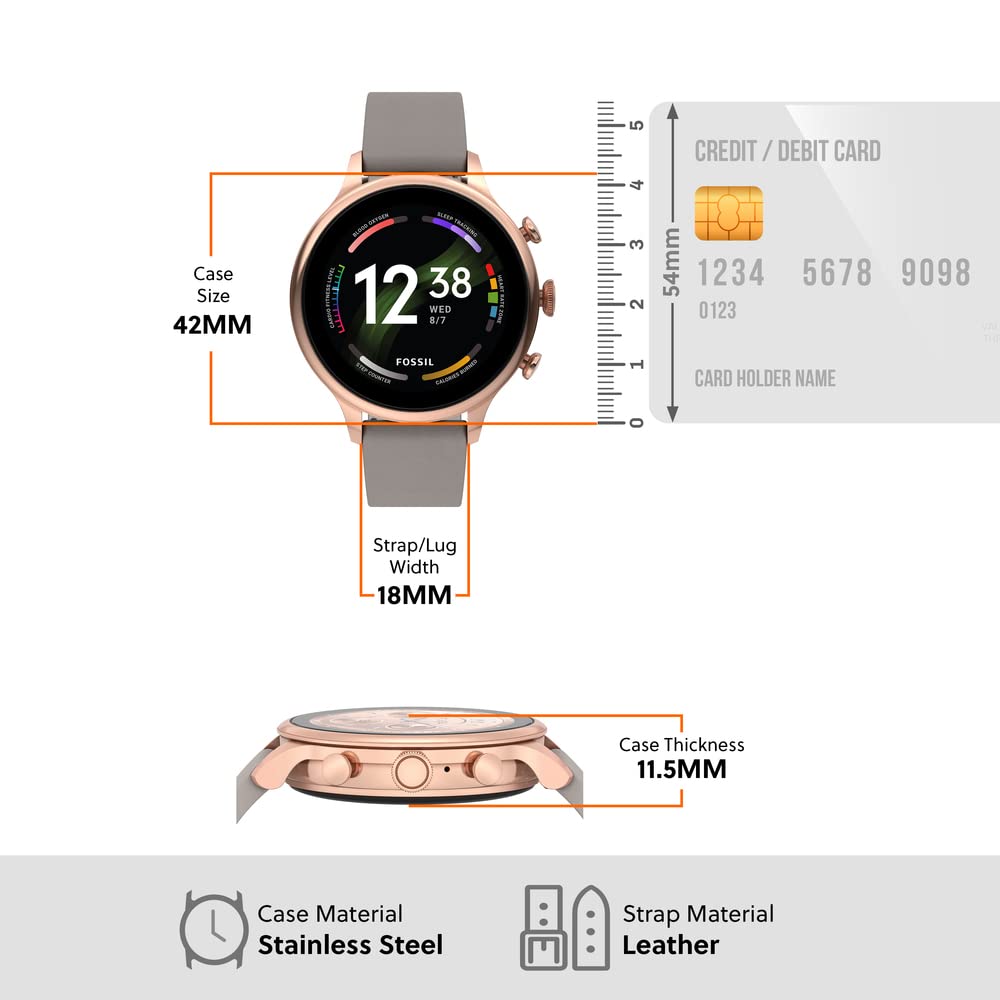
Image: Diagram illustrating the dimensions of the Fossil Gen 6 Smartwatch, including case size (42mm), strap width (18mm), and case thickness (11.5mm).
7. Warranty and Support
7.1 Warranty Information
The Fossil Gen 6 Smartwatch FTW6079 comes with a 1-year International Manufacturer's Warranty. This warranty covers manufacturing defects under normal use. Please retain your proof of purchase for warranty claims.
7.2 Customer Support
For technical support, service, or warranty claims, please contact Fossil customer service. You can find contact details on the official Fossil website or refer to the documentation included with your product.
Manufacturer Contact Information:
Fossil India Pvt. Ltd.
Khata Khatoni No-147/150 Min, Khasra No-190/3 &188,191, Village-Tipra, Barotiwala, Tehsil Baddi, District Solan (H.P) - 174103
OR
Foshan Nanhai NanHua Metal & Gem Crafts Co. Ltd. Su Village, Yinhe, DanZhao Town, Nanhai, Foshan, Guangdong province, PRC
OR
TianWei Watch Enterprise (Shenzhen) Co. Ltd. BLK A. B1. FuChengAo New Industrial District.FuChengAo. PingHu. LongGang County, Shenzhen, PRC


