
MSZ-FH09NA, MSZ-FH12NA, MSZ-FH15NA, MSZ-FE09NA, MSZ-FE12NA, MSZ-FE18NA
User Manual for Mitsubishi Air Conditioning Remote Control
Compatible Models: MSZ-FH09NA, MSZ-FH12NA, MSZ-FH15NA, MSZ-FE09NA, MSZ-FE12NA, MSZ-FE18NA
1. Introduction
This manual provides comprehensive instructions for the operation and maintenance of your new replacement remote control for Mitsubishi Air Conditioning units. Please read this manual thoroughly before use to ensure proper functionality and to maximize the lifespan of your remote control.
2. Product Overview
This remote control is designed as a direct replacement for various Mitsubishi Air Conditioning models, offering seamless compatibility and full functionality. It utilizes infrared (IR) communication for reliable control of your air conditioning unit.

Figure 2.1: Angled view of the remote control, highlighting the display and button layout.
Compatible Air Conditioning Models:
- MSZ-FH09NA
- MSZ-FH12NA
- MSZ-FH15NA
- MSZ-FE09NA
- MSZ-FE12NA
- MSZ-FE18NA
3. Setup
Before using the remote control, you must install batteries.
- Open the Battery Compartment: Locate the battery cover on the back of the remote control. Slide the cover downwards or press the latch and lift to open.
- Insert Batteries: Insert two new AAA batteries (not included) into the compartment. Ensure the positive (+) and negative (-) terminals align correctly with the markings inside the compartment.
- Close the Battery Compartment: Slide the battery cover back into place until it clicks securely.
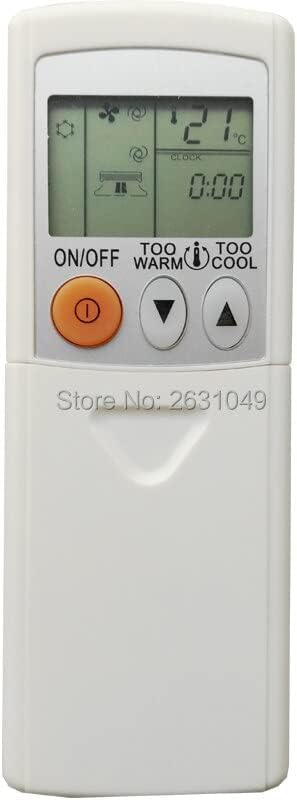
Figure 3.1: Top section of the remote control, displaying the screen and primary controls.
Note: If the remote control does not respond after battery installation, check the battery orientation or replace with fresh batteries.
4. Operating Instructions
Familiarize yourself with the buttons and their functions to effectively control your air conditioning unit.

Figure 4.1: Full view of the remote control, detailing all available buttons.
| Button | Function |
|---|---|
| ON/OFF | Turns the air conditioning unit on or off. |
| TOO WARM / TOO COOL (Temperature ▲/▼) | Adjusts the desired temperature setting. Press 'TOO WARM' to increase temperature, 'TOO COOL' to decrease. |
| MODE | Cycles through operating modes: Auto, Cool, Dry, Fan, Heat (availability depends on AC unit). |
| FAN | Adjusts the fan speed (e.g., Auto, Low, Medium, High). |
| VANE / WIDE VANE | Controls the vertical and horizontal airflow direction of the air conditioner louvers. |
| ECONO COOL | Activates energy-saving cooling operation. |
| SLEEP | Activates sleep mode, which adjusts temperature gradually for comfortable sleep and energy saving. |
| POWERFUL COOL | Initiates rapid cooling for a short period. |
| STOP / START (Timer) | Used to set or cancel the ON/OFF timer function. |
| TIME (▲/▼) | Adjusts the time for timer settings. |
| RESET CLOCK | Resets the internal clock of the remote control. |
5. Maintenance
Proper maintenance ensures the longevity and optimal performance of your remote control.
- Battery Replacement: Replace batteries when the display becomes dim or the remote control stops responding. Always replace both batteries at the same time with new ones of the same type.
- Cleaning: Wipe the remote control with a soft, dry cloth. Do not use liquid cleaners, abrasive cleaners, or chemical sprays, as these can damage the remote's surface or internal components.
- Storage: If the remote control will not be used for an extended period, remove the batteries to prevent leakage and corrosion. Store in a cool, dry place.
6. Troubleshooting
If you encounter issues with your remote control, refer to the following table for common problems and solutions.
| Problem | Possible Cause / Solution |
|---|---|
| Remote control does not work. |
|
| Display is dim or blank. | Batteries are low. Replace with new batteries. |
| AC unit does not respond to specific buttons. | The button function may not be supported by your specific AC unit model, or the remote may require a reset (remove and reinsert batteries). |
7. Specifications
| Feature | Detail |
|---|---|
| Use | Air Conditioner |
| Wireless Communication | Infrared (IR) |
| Support APP | No |
| Channel | 1 |
| Package | Yes |
| Frequency | 433 MHz |
| Max Number of Supported Devices | 1 |
| Compatible Devices | Air Conditioner |
| Special Feature | Ergonomic |
8. Warranty and Support
This product is covered by a standard manufacturer's warranty against defects in materials and workmanship. For specific warranty terms and conditions, please refer to the product packaging or contact the seller directly. For technical support or further assistance, please reach out to the point of purchase or the manufacturer's customer service.
Related Documents - MSZ-FH09NA, MSZ-FH12NA, MSZ-FH15NA, MSZ-FE09NA, MSZ-FE12NA, MSZ-FE18NA
 |
Mitsubishi Electric MSZ-EF Series Split-Type Air Conditioners Indoor Unit Operating Instructions Operating instructions for Mitsubishi Electric MSZ-EF series split-type air conditioners, covering safety precautions, detailed operation modes (COOL, HEAT, DRY, FAN, AUTO), fan speed and airflow adjustments, timer functions, cleaning procedures, Wi-Fi interface setup (VGK type), troubleshooting, and product specifications. This manual ensures correct and safe use of the indoor unit models MSZ-EF22VGW, MSZ-EF25VGW, MSZ-EF35VGW, MSZ-EF42VGW, MSZ-EF50VGW, MSZ-EF22VGB, MSZ-EF25VGB, MSZ-EF35VGB, MSZ-EF42VGB, MSZ-EF50VGB, MSZ-EF22VGS, MSZ-EF25VGS, MSZ-EF35VGS, MSZ-EF42VGS, MSZ-EF50VGS, MSZ-EF22VGKW, MSZ-EF25VGKW, MSZ-EF35VGKW, MSZ-EF42VGKW, MSZ-EF50VGKW, MSZ-EF22VGKB, MSZ-EF25VGKB, MSZ-EF35VGKB, MSZ-EF42VGKB, MSZ-EF50VGKB, MSZ-EF22VGKS, MSZ-EF25VGKS, MSZ-EF35VGKS, MSZ-EF42VGKS, MSZ-EF50VGKS. |
 |
Mitsubishi Electric MSZ-FH Series Indoor Unit Service Manual This service manual provides detailed information for the Mitsubishi Electric MSZ-FH series indoor units, including technical specifications, part names, functions, wiring diagrams, troubleshooting, and disassembly instructions. |
 |
Mitsubishi Electric Split-Type Air Conditioners - Operating Instructions This document provides operating instructions, safety precautions, and maintenance guidance for Mitsubishi Electric Split-Type Air Conditioners, Indoor Unit models MSZ-LN series. Access full manuals and detailed information online. |
 |
Mitsubishi Electric MSZ-LN Series Split-Type Air Conditioner Operating Instructions and Specifications This document provides comprehensive operating instructions, safety precautions, cleaning guides, detailed specifications, and Wi-Fi interface setup information for the Mitsubishi Electric MSZ-LN series split-type air conditioners. |
 |
Mitsubishi Electric MSZ-FS Remote Control User Guide Comprehensive user guide for the Mitsubishi Electric MSZ-FS remote control, detailing features, operation, and compatibility for optimal comfort and energy efficiency. |
 |
Mitsubishi Electric MSZ-LN Series Split-Type Air Conditioners: Operating Instructions This official operating instructions manual provides comprehensive guidance for Mitsubishi Electric MSZ-LN series split-type indoor air conditioners, covering setup, operation, maintenance, and troubleshooting for optimal performance and comfort. |