
Introduction
This manual provides comprehensive instructions for the installation, maintenance, and general information regarding your ABUSVEX Back Glass Replacement for iPhone 13 Pro Max. Please read these instructions carefully before beginning the replacement process to ensure proper installation and to avoid damage to your device.
Compatibility
This back glass replacement is specifically designed for the iPhone 13 Pro Max (6.7 inches) and is compatible with all carriers. Please verify your phone model before proceeding with the installation.
Setup and Installation
Important Considerations
- Power Off Device: Always power off your iPhone completely before starting any repair.
- Heat Gun Required: A heat gun is necessary to soften the strong adhesive holding the original back glass. This tool is not included in the package.
- Pre-installed Adhesive: The new back glass comes with strong 3M adhesive pre-installed. No additional glue is required. Remember to peel off the yellow protective film before installation.
- Wider Camera Hole: The replacement back glass features a wider camera hole, eliminating the need to remove the camera lens or frame during installation.
Tools Required
- Repair Tool Kit (included)
- Heat Gun (not included)
Step-by-Step Installation Guide
- Preparation: Ensure your iPhone is powered off. Use a heat gun to gently warm the edges of the cracked back glass. This softens the adhesive, making removal easier.
- Old Glass Removal: Carefully use the provided repair tools to pry and remove the broken back glass fragments. This is often the most challenging and time-consuming step due to the strong original adhesive. Exercise patience and caution to avoid damaging internal components. This process can take several hours.

This image illustrates the initial steps of replacing the back glass, showing a heat gun being used to loosen the adhesive on a cracked iPhone back, followed by careful prying to remove the broken glass fragments. This process requires patience and caution.
- Surface Cleaning: After removing all broken glass, thoroughly clean the phone's frame to remove any remaining old adhesive. A clean surface ensures optimal adhesion for the new back glass.
- New Glass Installation: Carefully peel off the yellow protective film from the pre-installed adhesive on the new back glass. Align the new back glass precisely with the phone's frame, ensuring the camera cutouts match. Gently press down firmly around all edges to secure the adhesive.

This image showcases the new back glass replacement, emphasizing the easy-to-peel protective film over the strong 3M adhesive. It also points out the wide camera hole, which simplifies installation by eliminating the need to remove the original camera bracket.
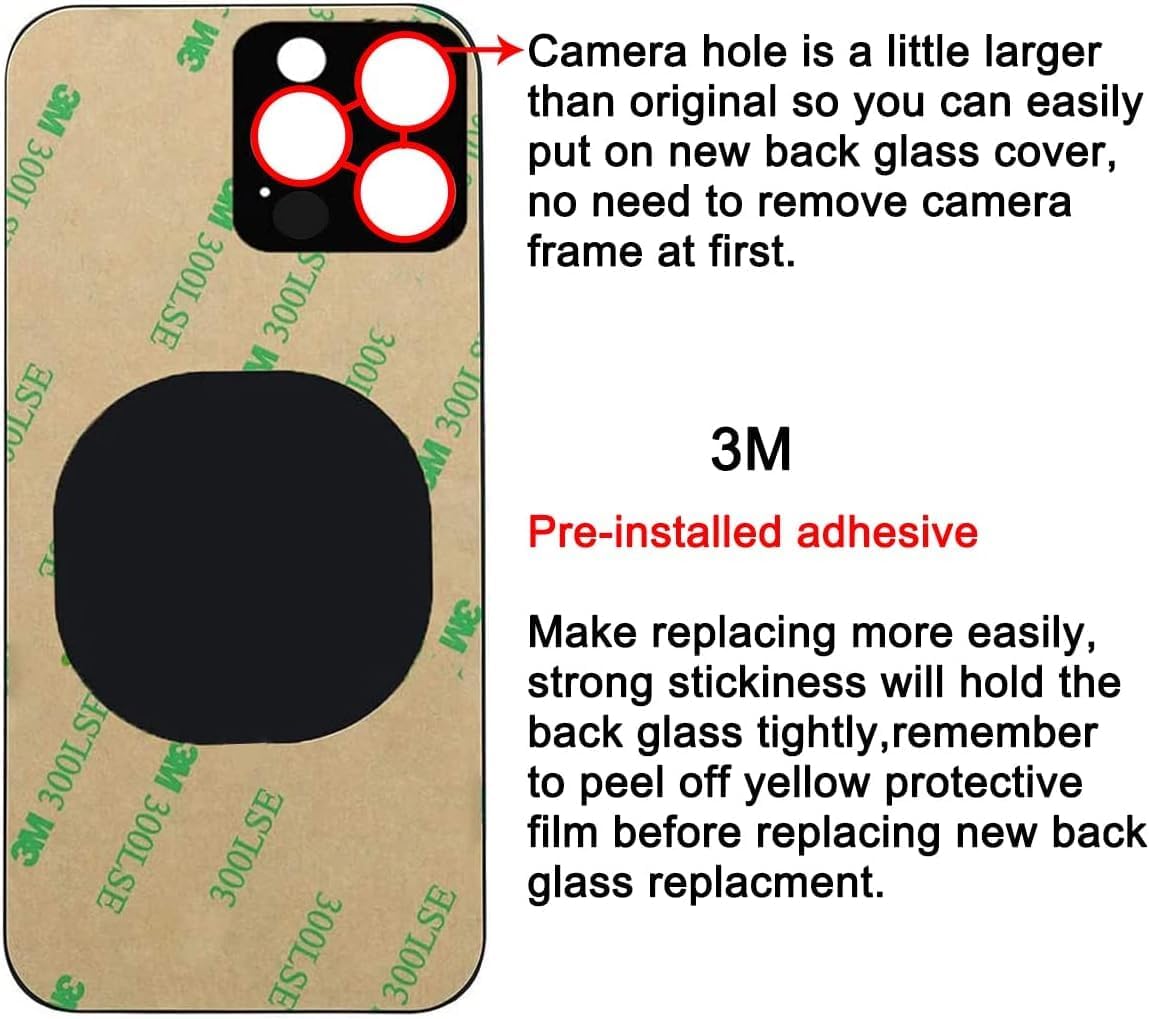
This image displays the ABUSVEX back glass replacement for iPhone 13 Pro Max. It highlights the pre-installed 3M adhesive backing and the larger camera cutouts designed for easier installation without removing the camera frame.
Operating and Handling
After successful installation, handle your device with care. The new back glass is designed to restore the original aesthetic and protection. Avoid dropping the device or exposing it to excessive force, as this can damage the back glass.
Maintenance
To maintain the appearance of your new back glass, clean it regularly with a soft, lint-free cloth. For smudges or fingerprints, a slightly damp cloth with water or a screen-safe cleaner can be used. Avoid abrasive materials or harsh chemicals.
Troubleshooting
Adhesion Issues
If the new back glass does not adhere properly, ensure that all old adhesive residue was completely removed from the phone's frame before installation. A clean surface is critical for strong adhesion. Re-apply gentle pressure around the edges. If issues persist, contact customer support.
Specifications
| Brand | ABUSVEX |
| Compatible Phone Models | iPhone 13 Pro Max |
| Color | Sierra Blue |
| Material | Corning glass |
| Screen Size | 6.7 inches |
| Adhesive | Pre-installed 3M adhesive |
| Water Resistance Level | Water Repellent |
| Item Dimensions | 6.3 x 3.03 x 0.03 inches |
Warranty Information
ABUSVEX provides a 12-month warranty for this back glass cover replacement. If you are not 100% satisfied with the item or encounter any issues, please contact our customer service team for assistance. We can arrange for a replacement as per your decision.
Customer Support
Our customer service team is available to assist you with any questions regarding installation or product performance. Please refer to your purchase platform for contact details or visit the official ABUSVEX website for support options.