
1. Product Overview
This Lifoarey 1080P Wired Security Camera System provides comprehensive surveillance for your home or business. It includes an 8-channel 2MP DVR with a pre-installed 1TB HDD and four 2MP outdoor CCTV cameras. The system supports 24/7 recording, full-color night vision, motion detection with customizable areas, and remote access via a mobile application. The cameras are designed for outdoor use with IP66 weatherproof rating.

Image: Overview of the Lifoarey 1080P Security Camera System components.
2. What's in the Box
Please check the package contents to ensure all items are present:
- 1 x DVR with built-in 1TB HDD
- 4 x Security Cameras
- 4 x 18m BNC Cables
- 1 x Power Adapter
- 1 x HDMI Cable
- 1 x 1m Ethernet Cable
- 1 x Pack of Screws
- 1 x Power Splitters
- 1 x Positioning Sticker
- 1 x Wrench
- 1 x USB Mouse
- 1 x Instructions Manual
- 1 x Surveillance Card

Image: Visual representation of all items included in the product package.
3. Setup Instructions
3.1. Connecting the DVR
- Connect DVR to Monitor: Power on the DVR and connect it to a monitor using the provided HDMI cable.
- Connect Cameras to DVR: Use the BNC cables to connect each camera to the DVR's video input ports. Power the cameras by connecting the power splitters cable to the DC12VIN interface of the BNC cable, then connect the cameras to the BNC cable.
- Connect DVR to Router: Connect the DVR to your network router using the Ethernet cable for remote access functionalities.
Video: Detailed guide on connecting analog CCTV cameras to the DVR and setting up the security system.

Image: Illustrates the connection points on the DVR and a camera, showing how cables are attached.
3.2. Camera Installation
The outdoor cameras are IP66 weatherproof, suitable for various environmental conditions. Use the provided screws and positioning stickers to mount the cameras securely in desired locations. Ensure the cameras have a clear field of view and are positioned to cover critical areas.

Image: Demonstrates the weatherproof design of the camera, suitable for outdoor installation in various weather conditions.
4. Operating the System
4.1. Recording Modes
The DVR supports two primary recording modes: 24/7 continuous recording and motion-triggered recording. The system utilizes H.265+ compression technology, which optimizes storage space and extends recording duration. The built-in 1TB HDD can store approximately 15 days of footage, and the system supports up to a 10TB HDD for expanded storage.

Image: Highlights the DVR's built-in 1TB hard drive and its capability for 24/7 recording, with support for up to 10TB.
4.2. Full Color Night Vision
Equipped with two warm lights, the outdoor cameras provide vivid, full-color images and videos even in low-light conditions, enhancing night surveillance capabilities.

Image: Illustrates the difference between daytime and full-color night vision provided by the cameras.
4.3. Motion Detection
The system features advanced motion detection. When motion is detected, you can receive instant push alerts via the mobile app or email notifications (requires initial setup). You can also customize specific areas within the camera's view to trigger motion detection, reducing false alarms.

Image: Depicts the motion detection feature, showing how alerts are triggered and areas can be customized for monitoring.

Image: Shows an example of a customized motion detection area, highlighting specific zones for surveillance.
Video: A short clip demonstrating security camera video capturing a delivery person, useful for illustrating motion detection.
4.4. Remote Access and Playback
Access your security system remotely using the free Clink app on your smartphone, laptop, or tablet. You can live view camera feeds and playback recorded footage from anywhere with a WiFi or 4G/5G connection.
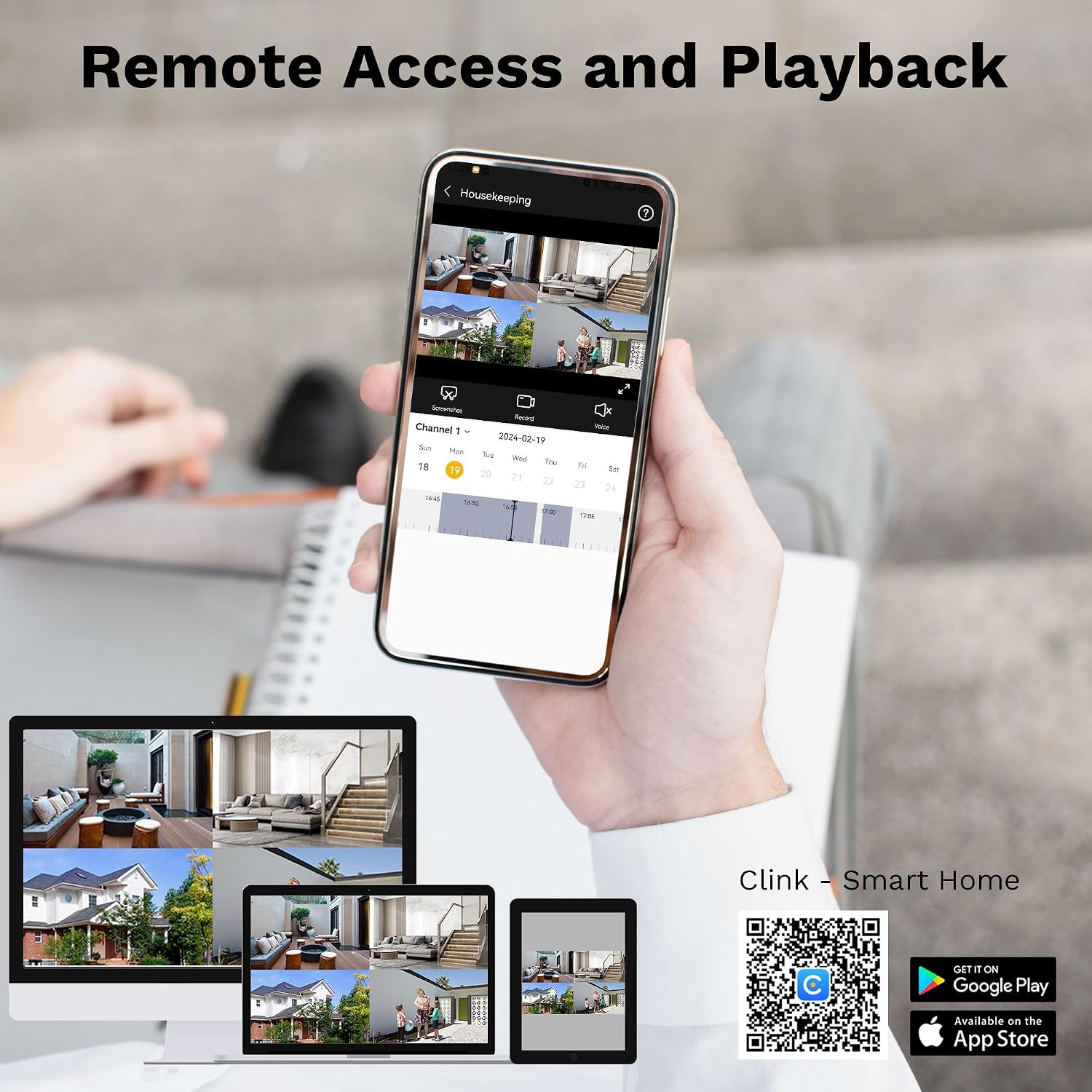
Image: Illustrates remote access and playback features on various smart devices, including a QR code for the Clink app.
Download Clink - Smart Home AppVideo: Instructions on how to add the Lifoarey DVR to the Clink App for remote monitoring.
5. Maintenance
- Camera Cleaning: Regularly clean the camera lenses with a soft, damp cloth to ensure clear image quality. Avoid abrasive cleaners.
- DVR Placement: Ensure the DVR is placed in a well-ventilated area, away from direct sunlight, heat sources, and moisture to prevent overheating and damage.
- Cable Inspection: Periodically check all cables for any signs of wear, damage, or loose connections. Secure or replace damaged cables as needed.
- Software Updates: Check the manufacturer's website or app for any available firmware or software updates to ensure optimal performance and security.
6. Troubleshooting
- No Video Signal:
- Check all BNC cable connections between cameras and DVR.
- Ensure cameras are receiving power from the power splitters and adapter.
- Verify the monitor is correctly connected to the DVR via HDMI or VGA and is set to the correct input source.
- DVR Not Powering On:
- Check the power adapter connection to the DVR and the power outlet.
- Ensure the power outlet is functional.
- Mouse Control Freezes:
- Disconnect and reconnect the USB mouse.
- Try a different USB port on the DVR.
- Reboot the DVR system.
- Remote Access Issues:
- Ensure the DVR is connected to the internet via the Ethernet cable.
- Verify your mobile device has a stable internet connection.
- Check if the Clink app is updated to the latest version.
- Confirm the DVR is correctly added to your Clink app account.
- Poor Night Vision:
- Ensure the camera lens is clean and free from obstructions.
- Verify the warm lights on the camera are functioning.
7. Specifications
| Feature | Detail |
|---|---|
| Brand | lifoarey |
| Model Number | RL-KH1081N-4W0B-U1 |
| Connectivity Technology | Wired |
| Video Capture Resolution | 1080p |
| Special Features | App Control, Colorful Night Vision, Motion Sensor, Smart Playback, Video Recording |
| Number of Channels | 8 |
| Memory Storage Capacity | 1 TB (supports up to 10 TB) |
| Power Source | Corded Electric |
| Compatible Devices | Laptops, Personal Computers, Smartphones, TV, Tablets |
| Signal Format | Analog |
| Night Vision Range | 100 Feet |
| Frame Rate | 30fps |
| Recording Mode | Event, 24/7 |
| Hardware Interface | Ethernet, HDMI, USB 2.0, VGA |
| Video Input | BNC |
| Viewing Angle | 82 Degrees |
| Color | White |
| Item Dimensions | 14.7 x 11.7 x 7.7 inches |
8. Warranty and Support
This Lifoarey security camera system comes with a 2-Year Limited Warranty. Lifoarey also provides 24/7 Online Support and Lifetime Technical Support.
For any questions, technical assistance, or warranty claims, please contact customer support:
Email: support@lifoarey.com

Image: Details on after-sales support, including warranty and technical assistance availability.
