
1. Product Overview
The Tangkula Corner Desk is designed to maximize space utilization in small areas, fitting perfectly into 90-degree wall corners. It features a triangular design with integrated storage shelves and a dedicated CPU stand area, making it suitable for various applications such as a computer desk, study desk, or vanity table.
- Vertical Corner Design: Optimizes limited space by fitting into wall corners. Can be oriented for left or right corners.
- Excellent Storage: Provides a spacious tabletop, cable management holes, and storage shelves for a host, books, and office supplies.
- Sturdy Construction: Made from premium E0 Engineered Wood, supporting up to 200 lbs on the desktop and 22 lbs per shelf. Features scratch and water resistance.
- Multi-scene Application: Ideal for living rooms, bedrooms, and studies, or as a vanity table.

Image 1.1: Overview of the Tangkula Corner Desk highlighting its key features and space-saving design.
2. Safety Information
- Ensure the desk is properly assembled according to the instructions.
- Do not exceed the maximum weight capacity: 200 lbs for the tabletop and 22 lbs for each shelf.
- Keep small parts away from children during assembly to prevent choking hazards.
- Place the desk on a flat, stable surface to prevent wobbling or tipping.
- Avoid placing hot items directly on the desk surface without protection.
3. Setup and Assembly
The Tangkula Corner Desk is designed for straightforward assembly. Please ensure all parts are present before beginning. A detailed manual is included with the product for step-by-step guidance. It is recommended that two people assemble the desk.
3.1 Unpacking and Part Identification
- Carefully open the packaging and lay out all components on a clean, soft surface to prevent scratches.
- Refer to the included parts list to identify each piece of hardware and wooden panel.
- If any parts are missing or damaged, contact customer support immediately.
3.2 Assembly Steps (General Guidance)
- Attach the cam lock studs to the designated holes in the panels.
- Connect the side panels to the central support structure using cam locks and dowels.
- Install the lower storage shelves into their respective positions.
- Secure the tabletop to the assembled base structure. Ensure all connections are tight.
- Apply the provided foam/felt pads to the bottom of the desk legs to protect your flooring.

Image 3.1: Dimensional diagram of the Tangkula Corner Desk, useful for planning placement and assembly.

Image 3.2: The desk's adaptable design allows placement in either left or right room corners.
3.3 Assembly Video
Video 3.1: Official Tangkula video demonstrating the assembly and features of the Corner Desk.
4. Operation and Usage
The Tangkula Corner Desk is designed for versatile use in various settings. Its triangular shape and integrated storage are optimized for efficiency.
- Placement: Position the desk in a corner of your room. The design allows for placement in either left or right-hand corners.
- Workspace: Utilize the spacious tabletop for your computer, laptop, notebooks, or other work essentials.
- Storage: The integrated shelves are suitable for storing a CPU tower, books, office supplies, or decorative items.
- Cable Management: Use the cable management holes on the desktop and under the desk to organize power cords and maintain a tidy workspace.
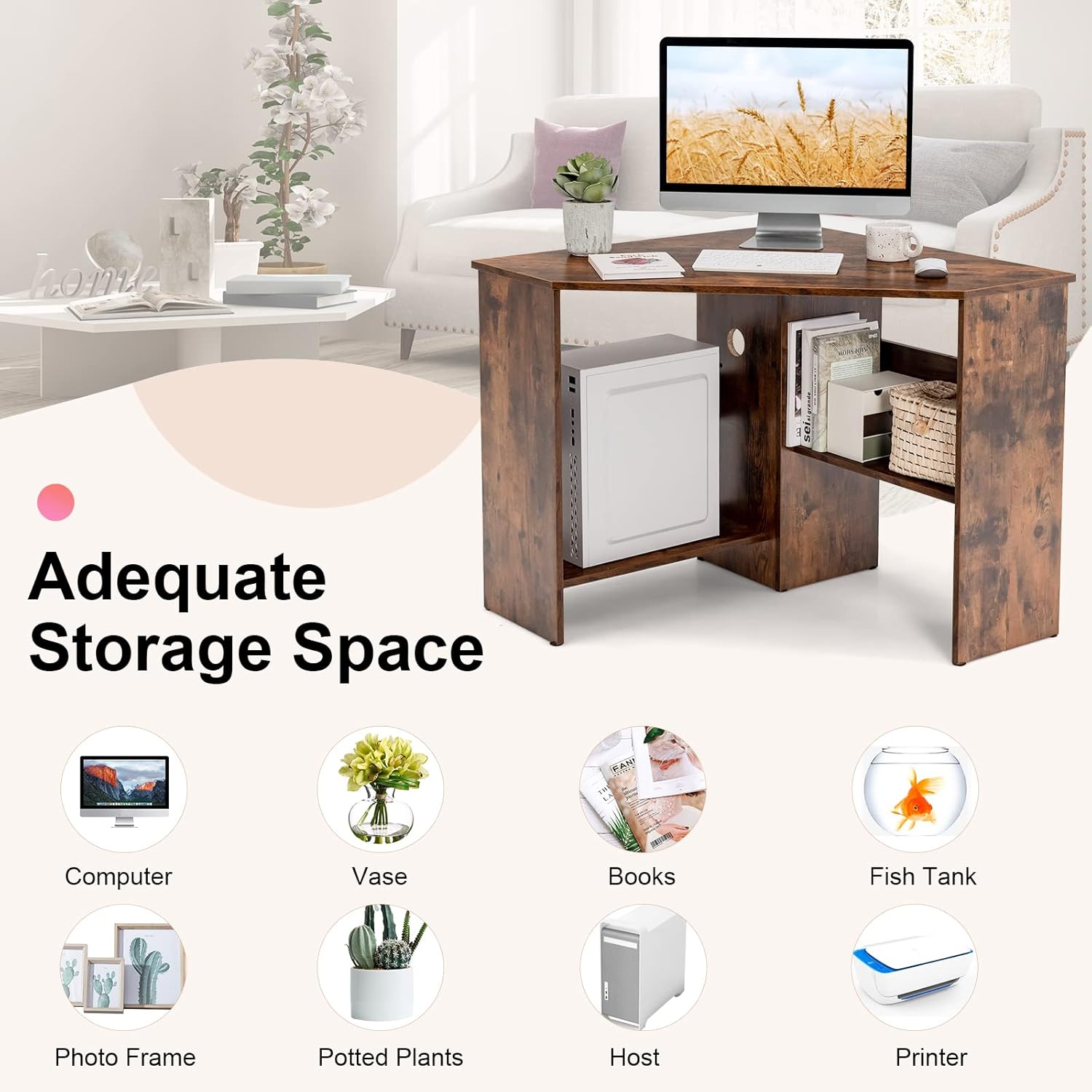
Image 4.1: Examples of items that can be stored on and around the Tangkula Corner Desk.

Image 4.2: Details of the desk's construction, including the cable management feature and storage shelf.
5. Maintenance
Maintaining your Tangkula Corner Desk is simple and helps preserve its appearance and longevity.
- Cleaning: Wipe the desk surface with a soft, damp cloth. Avoid abrasive cleaners or harsh chemicals that could damage the laminated finish.
- Spills: The desk surface is water-resistant. In case of spills, wipe them immediately to prevent moisture absorption.
- Inspection: Periodically check all screws and connections to ensure they remain tight. Retighten if necessary.
- Protection: Use coasters for drinks and protective pads under hot items to prevent marks or damage.

Image 5.1: The desk's water-resistant and easy-to-clean surface.
6. Troubleshooting
If you encounter issues with your Tangkula Corner Desk, refer to the following common troubleshooting tips:
- Wobbling Desk:
- Ensure all screws and cam locks are fully tightened.
- Verify that the desk is placed on a level surface. Adjust the floor pads if necessary.
- Recheck assembly steps to confirm all parts are correctly installed.
- Missing or Damaged Parts:
- Before assembly, carefully check the contents against the parts list.
- If parts are missing or damaged upon arrival, contact Tangkula customer support for replacements.
- Difficulty with Assembly:
- Review the instruction manual carefully, paying close attention to illustrations.
- Ensure you are using the correct hardware for each step.
- It is recommended to have two people for assembly to assist with alignment and stability.
7. Specifications
| Feature | Detail |
|---|---|
| Brand | Tangkula |
| Model Number | CA3141HM |
| Product Dimensions (D x W x H) | 33.5" x 48" x 29" |
| Shape | Triangular |
| Color | Rustic Brown |
| Material Type | E0 Engineered Wood |
| Finish Type | Laminated |
| Item Weight | 43 pounds |
| Tabletop Thickness | 1 inch |
| Tabletop Weight Capacity | 200 lbs |
| Shelf Weight Capacity (Each) | 22 lbs |
| Number of Shelves | 2 |
| Recommended Assembly People | 2 |
8. Warranty and Support
This Tangkula Corner Desk comes with a limited warranty.
- Warranty Type: Limited
- Warranty Period: 90 Days (Parts and Labor)
For warranty claims, missing parts, or any product-related inquiries, please contact Tangkula customer support. Refer to your purchase documentation for specific contact details or visit the official Tangkula website.