
1. Product Overview
The zatagen Mini Digital Protractor is a compact and precise instrument designed for measuring angles. It features a clear digital display for easy reading and a magnetic base for convenient attachment to metal surfaces, making it ideal for various applications in woodworking, construction, automotive, and machinery setup.

Image 1.1: Front view of the zatagen Mini Digital Protractor. The device is black with a silver base. The digital display shows "0.20" and below it are four circular buttons: ON/OFF (red), UNIT (yellow), CALIBRATE (yellow), and HOLD (yellow).
2. Package Contents
- 1 x zatagen Mini Digital Protractor
- 1 x User Manual (this document)
- (Battery not included, typically CR2032 or AAA depending on model)
3. Key Features
- Digital Display: Provides clear and precise angle readings.
- Magnetic Base: Allows for secure attachment to ferrous metal surfaces for hands-free operation.
- Multiple Measurement Units: Switch between degrees (°), percentage (%), or other units as available.
- Zero Calibration: Ability to set any surface as a relative zero point.
- Hold Function: Freezes the current measurement on the display.
- Compact Design: Portable and easy to carry.
4. Setup
4.1 Battery Installation
The device typically uses a CR2032 button cell battery. Ensure correct polarity when installing.
- Locate the battery compartment cover on the back of the device.
- Use a small screwdriver or coin to open the battery compartment.
- Insert the battery with the positive (+) side facing up.
- Replace the battery compartment cover and secure it.
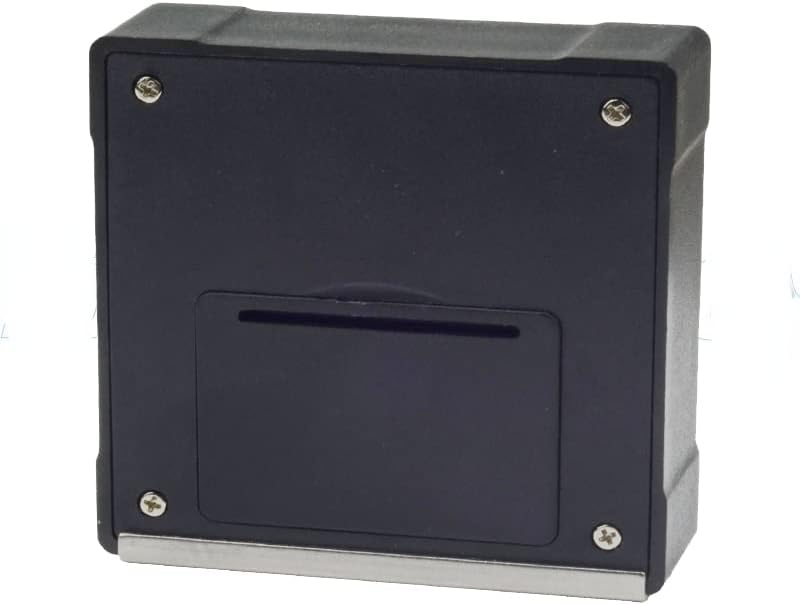
Image 4.1: Back view of the zatagen Mini Digital Protractor. The back panel is black with four visible screws in the corners and a rectangular battery compartment cover in the center.
4.2 Initial Power On
Press the ON/OFF button to power on the device. The digital display will illuminate and show the current angle reading.
5. Operation
5.1 Power On/Off
- Press the ON/OFF button once to turn the device on.
- Press and hold the ON/OFF button for approximately 3 seconds to turn the device off.
5.2 Unit Selection
Press the UNIT button repeatedly to cycle through available measurement units (e.g., degrees (°), percentage (%), mm/m, in/ft).
5.3 Zero Calibration
To set a relative zero point:
- Place the protractor on the surface you wish to use as your reference (zero) angle.
- Press the CALIBRATE button. The display will show "0.00°", indicating that this surface is now the reference point.
- Move the protractor to measure the angle relative to this zero point.
5.4 Hold Function
Press the HOLD button to freeze the current reading on the display. Press it again to release the hold and resume live measurement.
5.5 Taking a Measurement
Place the base of the protractor firmly against the surface or object whose angle you wish to measure. The digital display will show the angle relative to the horizontal plane (or your calibrated zero point).
6. Maintenance
- Cleaning: Wipe the device with a soft, dry cloth. Do not use abrasive cleaners or solvents.
- Battery Replacement: Replace the battery when the display becomes dim or the device fails to power on. Refer to Section 4.1 for instructions.
- Storage: Store the protractor in a dry place, away from extreme temperatures and direct sunlight.
- Magnetic Base: Keep the magnetic base clean and free of debris to ensure proper adhesion.
7. Troubleshooting
| Problem | Possible Cause | Solution |
|---|---|---|
| Display is blank or dim. | Low or dead battery. | Replace the battery (refer to Section 4.1). |
| Inaccurate readings. | Needs calibration; device not placed flat. | Perform zero calibration (refer to Section 5.3). Ensure the device is placed on a stable, level surface. |
| Buttons are unresponsive. | Battery issue; internal malfunction. | Replace battery. If problem persists, contact support. |
8. Specifications
| Model Number | Digital Display Mini Inclinometer |
| Manufacturer | zatagen |
| ASIN | B0BGSZL33T |
| Measurement Range | 0-360° (Assumed, typical for protractors) |
| Accuracy | ±0.2° (Assumed, typical for digital inclinometers) |
| Resolution | 0.05° (Assumed, typical for digital inclinometers) |
| Power Source | CR2032 Lithium Battery (Assumed) |
| Operating Temperature | 0°C to 40°C (32°F to 104°F) (Assumed) |
9. Warranty & Support
This zatagen Mini Digital Protractor comes with a 120-day warranty from the date of purchase, covering manufacturing defects. Please retain your proof of purchase for warranty claims.
For technical support, troubleshooting assistance, or warranty inquiries, please contact your retailer or the manufacturer directly. Refer to the product packaging or the seller's information for contact details.