
1. Product Overview
The Walker Products Position Sensor, model 200-1407, is an essential component designed for precision and reliability in automotive systems. It is engineered with high-quality materials to ensure durability and longevity, providing consistent and accurate performance for optimal results.
Key features include:
- Precision and Reliability: Designed for accurate position sensing.
- Durable Construction: Built with high-quality materials for extended lifespan.
- Seamless Compatibility: Engineered for easy integration with various systems.
- Consistent Performance: Delivers accurate data for optimal system operation.
- Enhanced Features: Offers additional functionalities to improve user experience.
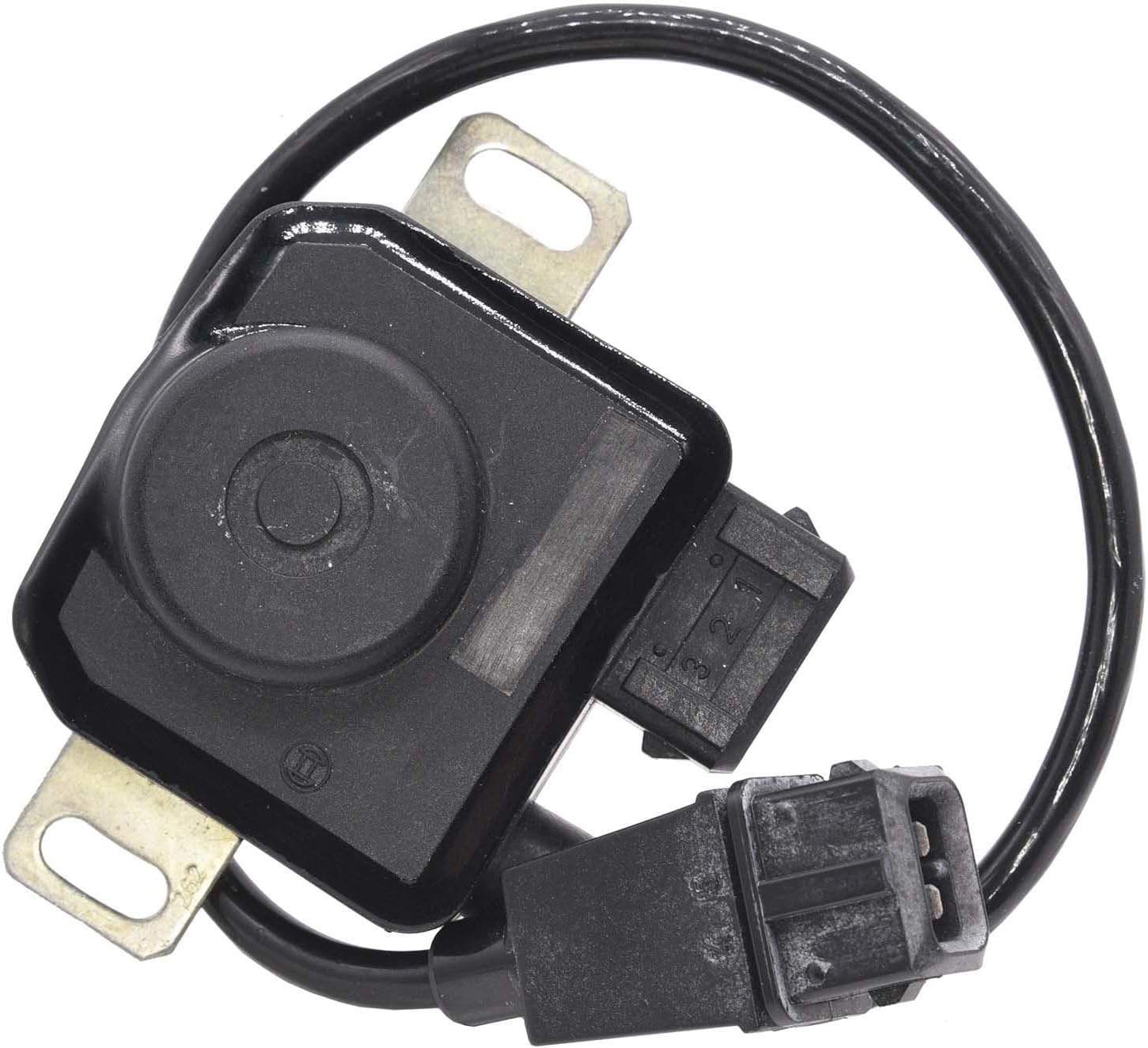
Figure 1: Top view of the Walker Products Position Sensor 200-1407, showing the main body and connected wiring.
2. Installation and Setup
Proper installation is crucial for the optimal performance of your Walker Products Position Sensor. Always refer to your vehicle's specific service manual for detailed instructions and safety precautions before beginning any installation.
2.1. Pre-Installation Checklist
- Ensure the vehicle's ignition is off and the battery is disconnected.
- Verify that the new sensor (Model 200-1407) is compatible with your vehicle's make and model.
- Gather necessary tools, which may include wrenches, screwdrivers, and electrical contact cleaner.
- Inspect the new sensor for any visible damage before installation.
2.2. Installation Steps
- Locate the existing position sensor on your vehicle. This is typically found near the throttle body or crankshaft, depending on the sensor type.
- Carefully disconnect the electrical connector from the old sensor.
- Remove any mounting bolts or clips securing the old sensor.
- Gently remove the old sensor from its mounting location.
- Clean the mounting surface and electrical connector area to ensure good contact.
- Align the new Walker Products Position Sensor (200-1407) with the mounting points.
- Secure the new sensor using the appropriate mounting bolts or clips. Do not overtighten.
- Reconnect the electrical connector to the new sensor, ensuring a secure and snug fit.
- Reconnect the vehicle's battery.
- Start the vehicle and check for proper operation and any diagnostic trouble codes (DTCs).

Figure 2: Side view of the sensor, highlighting the mounting tabs for secure installation.

Figure 3: Rear view of the sensor, showing the electrical connector port.
3. Operating Principles
The Walker Products Position Sensor 200-1407 functions by accurately measuring the angular or linear position of a specific component within the vehicle's system, such as a throttle plate or crankshaft. This measurement is then converted into an electrical signal that is sent to the vehicle's Engine Control Unit (ECU).
The ECU uses this signal to make critical adjustments to engine operation, including fuel delivery, ignition timing, and idle speed, ensuring optimal performance, fuel efficiency, and emissions control. The sensor provides continuous and real-time data, allowing the ECU to respond dynamically to changing operating conditions.
3.1. Expected Behavior
- Once installed and the vehicle is operating, the sensor should provide a smooth and consistent signal to the ECU.
- There should be no noticeable hesitation or erratic behavior related to the component the sensor is monitoring.
- The vehicle's diagnostic system should not report any fault codes related to the position sensor.
4. Maintenance
The Walker Products Position Sensor 200-1407 is designed for long-term reliability and typically requires minimal maintenance. However, periodic inspection can help ensure its continued optimal performance.
4.1. Inspection Guidelines
- Visual Check: Periodically inspect the sensor and its wiring for any signs of physical damage, corrosion, or loose connections.
- Wiring Integrity: Ensure that the wiring harness connected to the sensor is not frayed, pinched, or exposed.
- Connector Cleanliness: If accessible, ensure the electrical connector pins are clean and free of dirt or moisture. Use an electrical contact cleaner if necessary.
- Mounting Security: Verify that the sensor remains securely mounted and that mounting bolts are not loose.
Note: Avoid using harsh chemicals or abrasive materials when cleaning the sensor, as this may damage its components.

Figure 4: Angled view of the sensor, illustrating the integrated wiring and connector.
5. Troubleshooting
If you experience issues that you suspect are related to the position sensor, consider the following troubleshooting steps. Always consult a qualified automotive technician for complex diagnostics and repairs.
| Symptom | Possible Cause | Action |
|---|---|---|
| Check Engine Light (CEL) with related DTCs | Faulty sensor, wiring issue, or ECU problem. | Retrieve diagnostic trouble codes (DTCs) using an OBD-II scanner. Inspect sensor wiring and connector. Test sensor signal if possible. |
| Erratic engine idle or poor acceleration | Inaccurate sensor readings. | Check sensor mounting and electrical connection. Verify sensor output signal with a multimeter or oscilloscope if equipped. |
| No signal from sensor | Disconnected wiring, damaged sensor, or power supply issue. | Ensure connector is fully seated. Check for continuity in wiring. Verify power and ground supply to the sensor. |
If troubleshooting steps do not resolve the issue, professional diagnosis is recommended.
6. Product Specifications
The following are the technical specifications for the Walker Products Position Sensor, Model 200-1407:
- Manufacturer: Walker Products
- Brand: Walker Products
- Model: Position Sensor
- Item Model Number: 200-1407
- Item Weight: 3.71 ounces
- Package Dimensions: 5.13 x 2.81 x 2.63 inches
- Exterior: Machined
- Manufacturer Part Number: 200-1407
- ASIN: B0BGSSGL8B
- UPC: 724620133664
- Global Trade Identification Number (GTIN): 00724620133664
- First Available Date: September 18, 2023

Figure 5: Close-up view of the sensor's electrical connectors, showing pin configuration.
7. Warranty Information
Specific warranty terms and conditions for the Walker Products Position Sensor 200-1407 are provided by the manufacturer. Please refer to the documentation included with your purchase or visit the official Walker Products website for detailed warranty coverage, limitations, and claim procedures.
It is recommended to retain your proof of purchase for warranty purposes.
8. Customer Support
For technical assistance, product inquiries, or support regarding your Walker Products Position Sensor 200-1407, please contact Walker Products directly.
- Manufacturer: Walker Products
- Website: Visit the Walker Products Store on Amazon (for general product information)
- Refer to the product packaging or the official Walker Products website for direct contact information (phone, email).
When contacting support, please have your product model number (200-1407) and purchase details readily available.