Introduction
This manual provides comprehensive instructions for the ASRock X670E Steel Legend motherboard, designed to support AMD AM5 Ryzen 7000 Series Processors. It covers setup, operation, maintenance, and troubleshooting to ensure optimal performance and longevity of your system.

Figure 1: ASRock X670E Steel Legend Motherboard and Packaging.
Setup
Proper installation is crucial for the stability and performance of your system. Follow these steps carefully.
1. Component Overview
Familiarize yourself with the motherboard's layout and key components.

Figure 2: Top-down view of the ASRock X670E Steel Legend Motherboard.
- CPU Socket: AMD AM5, supporting Ryzen 7000 Series Processors.
- Memory Slots: 4 x DDR5 DIMM slots, supporting Dual Channel, up to 128GB.
- PCIe Slots: 1 x PCIe 5.0 x16, 1 x PCIe 3.0 x16, 1 x PCIe 3.0 x1.
- M.2 Slots: 3 x Hyper M.2, 1 x Vertical M.2 for storage.
- SATA Ports: 4 x SATA3 6.0 Gb/s ports.
- Integrated I/O Shield: For simplified installation and enhanced durability.
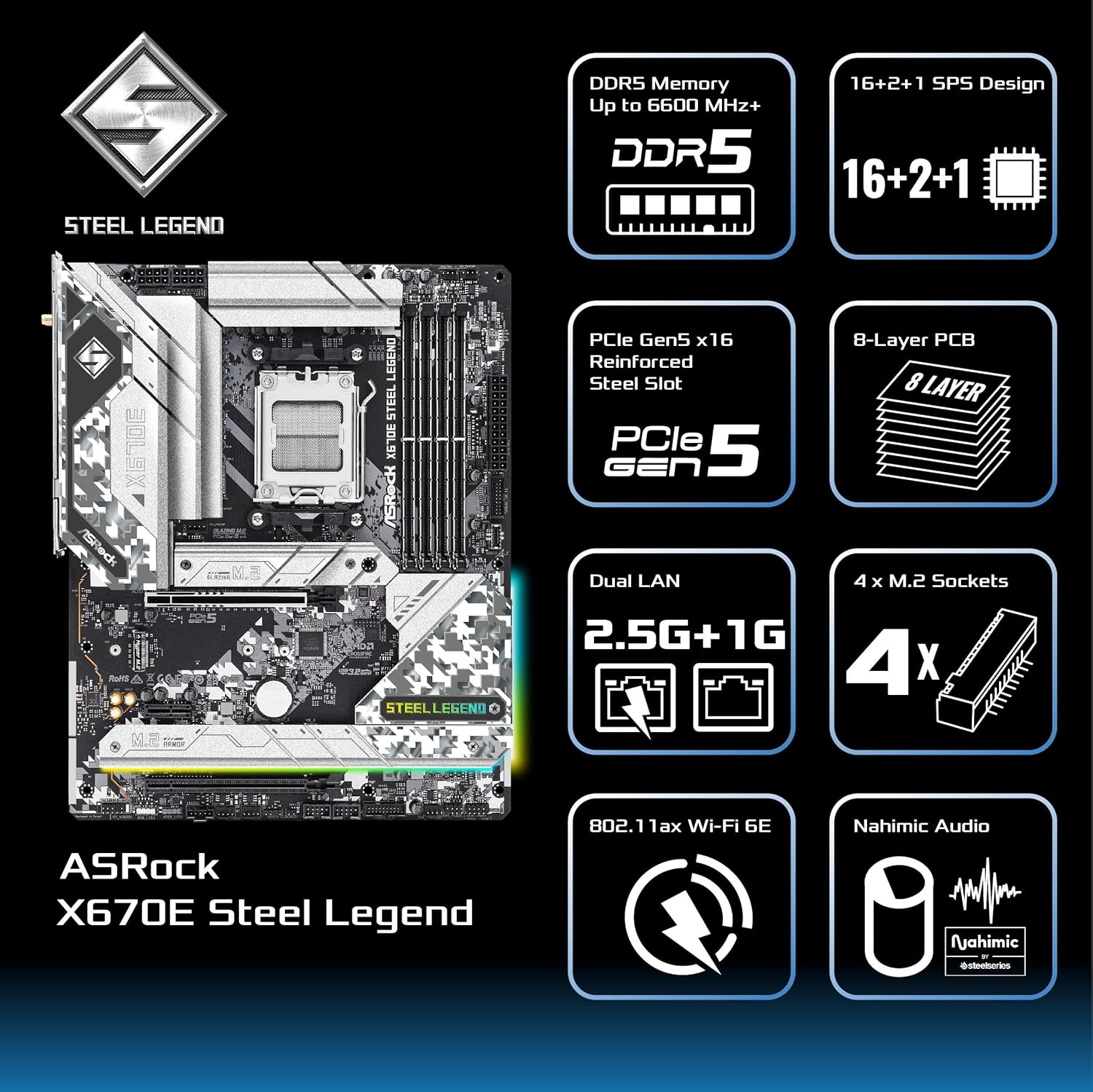
Figure 3: Key Features of the ASRock X670E Steel Legend.
2. Rear I/O Panel
The rear I/O panel provides various connectivity options for your peripherals.

Figure 4: Rear I/O Panel Overview.
- USB Ports: 8 x USB 3.2 (various generations), 2 x USB 2.0.
- Video Outputs: 1 x HDMI, 1 x DisplayPort (actual support varies by CPU).
- Network Ports: 1 x 2.5 Gigabit LAN (Dragon RTL8125BG), 1 x Gigabit LAN (Realtek RTL8111).
- Wireless: Wi-Fi 6E and Bluetooth (via 2 x Antenna Ports).
- Audio: 7.1-CH HD Audio (Realtek ALC1200).
- BIOS Flashback Button: For convenient BIOS updates without a CPU or RAM installed.

Figure 5: Detailed view of Rear I/O Ports.
3. Installation Steps
- Prepare your Case: Ensure your PC case is compatible with ATX motherboards and has adequate space for components.
- Install CPU: Carefully place your AMD AM5 Ryzen 7000 Series Processor into the CPU socket.
- Install CPU Cooler: Attach your CPU cooler (AIO or air cooler) according to its manufacturer's instructions.
- Install RAM: Insert DDR5 memory modules into the DIMM slots. Ensure they are fully seated.
- Mount Motherboard: Secure the motherboard to the standoffs in your PC case.
- Install Graphics Card: Insert your graphics card into the PCIe 5.0 x16 slot.
- Install M.2 SSDs: Install M.2 SSDs into the available slots, utilizing the provided heatsinks for optimal thermal performance.
- Connect Power Cables: Connect the 24-pin ATX power connector and 8-pin/4-pin CPU power connectors from your power supply to the motherboard.
- Connect Front Panel Cables: Connect USB, audio, and power/reset switch cables from your case to the motherboard headers.
- Connect SATA Devices: If using SATA drives, connect them to the SATA3 ports.
- Connect Antennas: Screw in the Wi-Fi 6E antennas to the rear I/O panel for wireless connectivity.

Figure 6: Included accessories and components.
Product Demonstration
Watch this official product demonstration video for a visual guide on the motherboard's features and capabilities.
Video 1: ASRock X670E Steel Legend Product Demonstration. This video showcases the physical aspects and features of the motherboard.
Operating
Once assembled, power on your system. The motherboard's UEFI BIOS provides extensive options for configuration and optimization.
- UEFI BIOS: Access by pressing Del or F2 during boot. Configure boot order, enable XMP for memory, adjust fan curves, and manage storage settings.
- ASRock Auto Driver Installer (ADI): This feature can automatically detect and install necessary drivers after OS installation, simplifying the setup process.
- Polychrome SYNC: Control the integrated RGB lighting and synchronize it with compatible components.
Maintenance
Regular maintenance helps ensure the longevity and stable performance of your motherboard and PC components.
- Dust Removal: Periodically clean dust from inside your PC case, especially around fans, heatsinks, and the motherboard surface, using compressed air.
- Driver Updates: Keep your motherboard drivers (chipset, LAN, audio, etc.) and BIOS firmware updated. Visit the ASRock official website for the latest versions.
- BIOS Updates: Use the BIOS Flashback feature for safe and convenient BIOS updates. Refer to the official ASRock manual for detailed instructions.
- Cable Management: Ensure cables are neatly routed to improve airflow and prevent interference.
Troubleshooting
If you encounter issues, consider the following common troubleshooting steps:
- No Post/Display:
- Ensure all power cables (24-pin ATX, CPU) are securely connected.
- Reseat RAM modules. Incorrectly seated RAM is a common cause of no-post issues.
- Check CPU installation and cooler mounting.
- Verify graphics card is properly seated in its PCIe slot and has adequate power.
- Try booting with only essential components (CPU, one RAM stick, graphics card).
- Driver Issues:
- Download the latest drivers directly from the ASRock support website.
- Use Device Manager in Windows to check for any unrecognized devices or driver conflicts.
- System Instability/Crashes:
- Check CPU and GPU temperatures using monitoring software.
- Ensure RAM is running at stable speeds (disable XMP profile if unstable).
- Verify power supply is sufficient for all components.
- BIOS Reset: If system becomes unbootable due to BIOS settings, clear the CMOS (Complementary Metal-Oxide-Semiconductor) by removing the CMOS battery for a few minutes or using the dedicated clear CMOS jumper/button on the motherboard.
Specifications
| Feature | Detail |
|---|---|
| Brand | ASRock |
| Model Name | X670E STEEL LEGEND |
| CPU Socket | Socket AM5 |
| Compatible Processors | AMD Ryzen 7000 series |
| Chipset Type | AMD X670 |
| RAM Memory Technology | DDR5 |
| Memory Speed | Up to 6600 MHz+ (OC) |
| Max RAM Supported | 128GB |
| Graphics Interface | Integrated AMD RDNA2 Graphics (CPU dependent) |
| PCIe Slots | 1x PCIe 5.0 x16, 1x PCIe 3.0 x16, 1x PCIe 3.0 x1 |
| M.2 Slots | 3x Hyper M.2, 1x Vertical M.2 |
| Storage | 4x SATA3 6.0 Gb/s |
| LAN | 1x 2.5 Gigabit LAN, 1x Gigabit LAN |
| Wireless Type | Bluetooth, 802.11ax (Wi-Fi 6E) |
| USB Ports (Rear) | 2x USB 3.2 Gen2x2 Type-C, 1x USB 3.2 Gen2 Type-A, 8x USB 3.2 Gen1, 2x USB 2.0 |
| Audio | 7.1-CH HD Audio (Realtek ALC1200) |
| Form Factor | ATX (12 x 9.6 inches / 30.5 x 24.4 cm) |
Warranty and Support
For detailed warranty information and technical support, please refer to the official ASRock website or the included User Manual PDF.
- User Manual (PDF): Download User Manual
- ASRock Support: Visit the ASRock Store on Amazon or their official website for drivers, BIOS updates, and further assistance.


