
1. Introduction
This user manual provides comprehensive instructions for the installation, operation, and maintenance of your UMEKEN 200 Position Digital Key Cabinet. Please read this manual thoroughly before using the product to ensure proper function and safety. Keep this manual for future reference.
2. Product Overview
The UMEKEN 200 Position Digital Key Cabinet is a robust and secure solution designed for organizing and safeguarding a large number of keys. It features a digital keypad for convenient access and a durable steel construction for enhanced security. This key box is ideal for various environments including offices, property management, apartment complexes, and automotive repair shops.
2.1. Key Features
- 200 Key Capacity: Equipped with individual metal hooks to accommodate up to 200 keys or key sets.
- Digital Keypad Access: Programmable electronic lock for keyless entry.
- Backup Key Access: Includes two physical backup keys for manual override in case of power failure or forgotten code.
- Durable Construction: Manufactured from heavy-duty welded alloy steel with a powder-coated, scratch-resistant black finish for long-lasting use and security.
- Wall Mount Design: Pre-drilled mounting holes and included hardware facilitate easy and secure wall installation.
- Included Accessories: Comes with 200 colored key tags, 4 AA batteries, and mounting hardware.
2.2. Product Dimensions
The key cabinet measures approximately 5.2 inches (D) x 16 inches (W) x 36 inches (H).
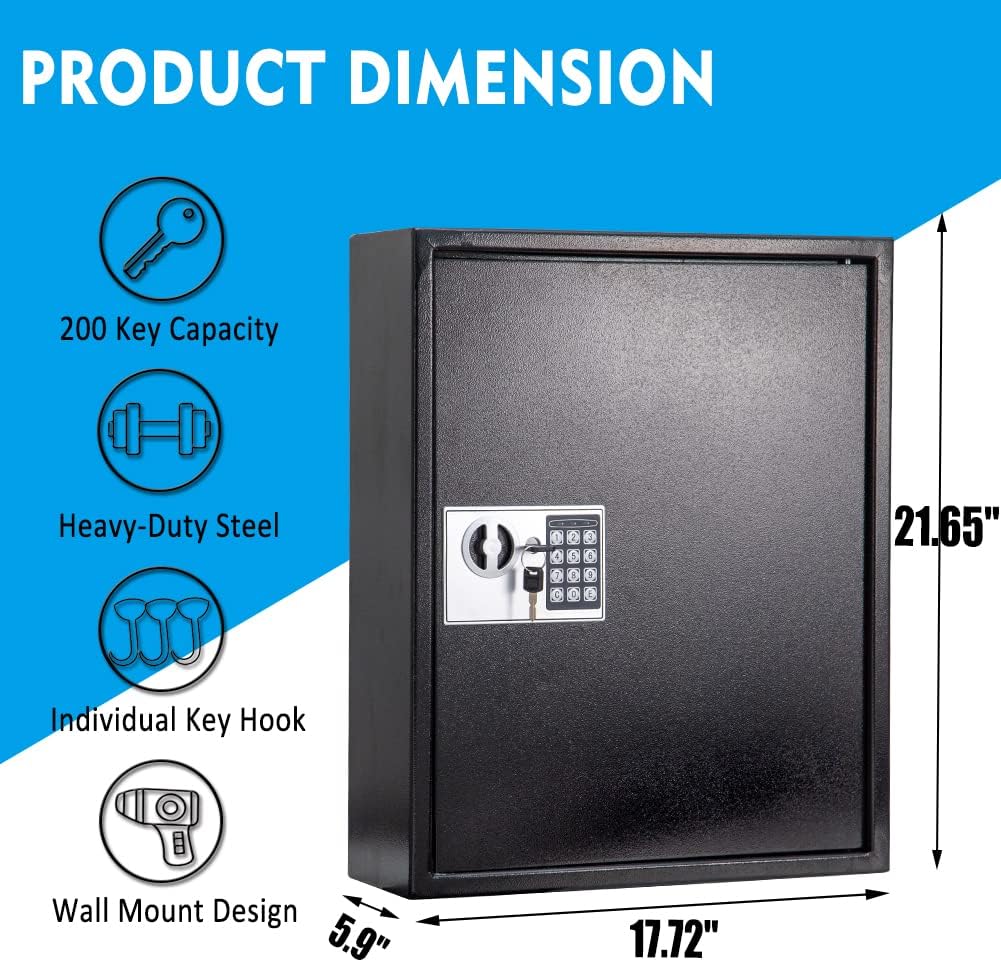
Figure 2.2.1: Product dimensions and key features. The image shows the key box with measurements of 17.72 inches width, 21.65 inches height, and 5.9 inches depth. Icons indicate 200 key capacity, heavy-duty steel, individual key hooks, and wall mount design.

Figure 2.2.2: UMEKEN 200 Position Digital Key Cabinet with included accessories. The main image shows the closed key box with its digital keypad. Smaller insets display the two backup keys, four wall anchors, a pile of colorful key tags, and the key box opened to reveal its internal key hooks.
3. Setup
3.1. Unpacking
Carefully remove the key cabinet from its packaging. Inspect the unit for any signs of damage. Ensure all included components are present:
- UMEKEN 200 Position Digital Key Cabinet
- 2 Backup Keys
- 200 Colored Key Tags
- 4 AA Batteries
- Mounting Hardware (screws and wall anchors)
3.2. Battery Installation
The digital keypad requires 4 AA batteries for operation. The battery compartment is typically located on the inside of the door or behind the keypad panel. Refer to the diagram below for typical battery placement.
- Open the key cabinet using one of the backup keys.
- Locate the battery compartment on the inside of the door or behind the removable faceplate of the keypad.
- Insert 4 AA batteries, ensuring correct polarity (+/-).
- Close the battery compartment cover.

Figure 3.2.1: Two ways to open the UMEKEN Key Box. Option 1 shows opening with physical backup keys. Option 2 shows opening with the digital keypad. The image also highlights the inclusion of 4 AA batteries for digital use and 60 key tags.
3.3. Wall Mounting
The key cabinet is designed for secure wall mounting. Choose a sturdy wall location that can support the weight of the cabinet and its contents. Avoid mounting on drywall without proper anchors or into studs.
- Hold the key cabinet against the desired wall location and mark the positions of the pre-drilled mounting holes.
- Using an appropriate drill bit for your wall type, drill pilot holes at the marked locations.
- Insert the provided wall anchors into the pilot holes (if applicable).
- Align the key cabinet with the drilled holes and secure it to the wall using the provided mounting screws. Ensure the cabinet is level and securely fastened.

Figure 3.3.1: Illustration of the wall mount design. The image shows the back of the key box with four pre-drilled mounting holes and an inset of the included mounting hardware (screws and wall anchors).

Figure 3.3.2: The UMEKEN Key Box securely mounted on a wall, demonstrating its intended installation and discreet appearance.
4. Operating Instructions
4.1. Setting Your Digital Code
Upon first use, you will need to set your personal digital access code. Refer to the specific instructions provided with your keypad model, as procedures may vary slightly. A common procedure is as follows:
- With the door open, locate the reset button (often a small red button) on the inside of the door or near the battery compartment.
- Press the reset button. The indicator light on the keypad should illuminate.
- Enter your desired new code (typically 3-8 digits) on the keypad.
- Press the "E" or "Lock" button to confirm. The indicator light should flash green, indicating successful programming.
- Test your new code with the door open to ensure it works correctly before closing the door.
Important: Do not close the door until you have successfully tested your new code. Keep your backup keys in a secure location outside the key cabinet.
4.2. Opening the Key Cabinet with Digital Code
- Enter your programmed digital code on the keypad.
- Press the "E" or "Lock" button.
- The indicator light should turn green, and you will hear a click, indicating the lock has disengaged.
- Turn the handle or knob to open the door.
4.3. Opening the Key Cabinet with Backup Key
In case of battery depletion or forgotten code, the backup keys can be used.
- Locate the keyhole, typically hidden behind a removable faceplate on the keypad.
- Insert one of the backup keys into the keyhole.
- Turn the key clockwise (or counter-clockwise, depending on the lock) to unlock.
- Turn the handle or knob to open the door.
4.4. Organizing Keys
The cabinet features individual metal hooks for each key. Use the provided colored key tags to label and organize your keys efficiently.
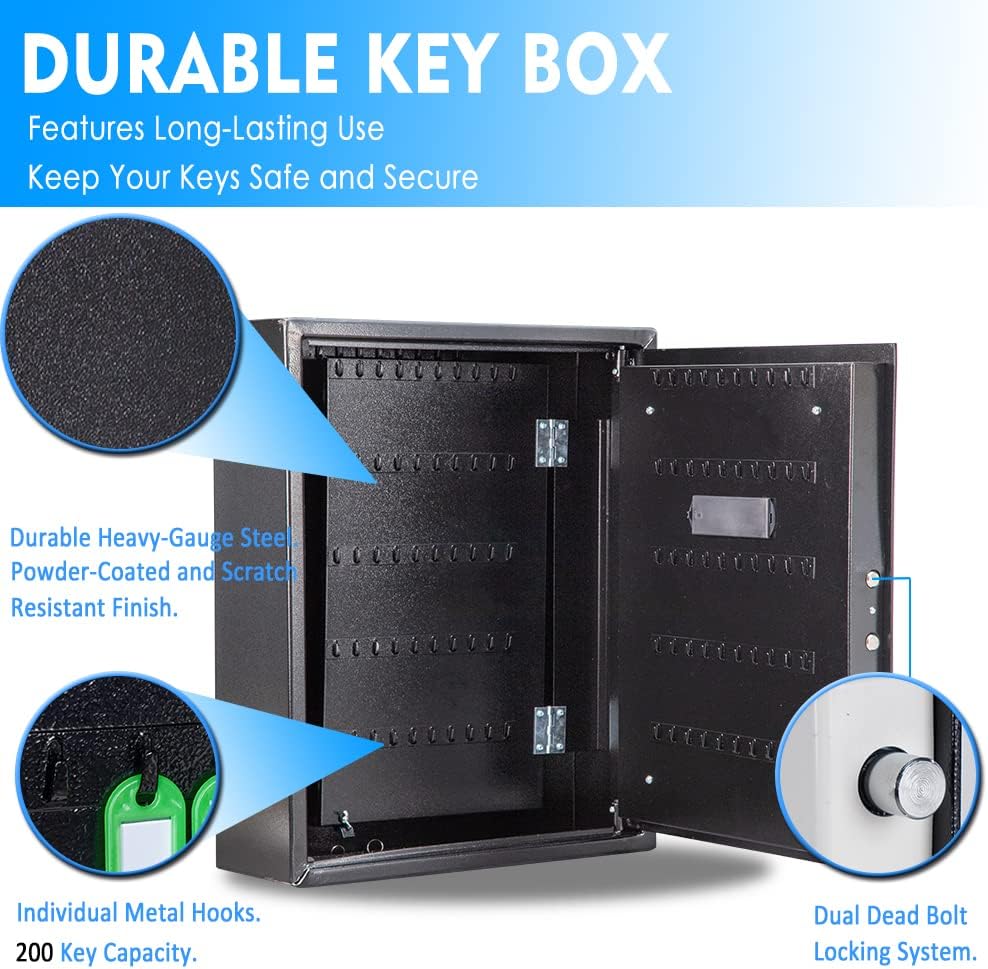
Figure 4.4.1: Internal view of the UMEKEN Key Box, highlighting its durable heavy-gauge steel construction with powder-coated finish, individual metal hooks for 200 key capacity, and the dual dead bolt locking system.
5. Maintenance
5.1. Cleaning
Wipe the exterior of the key cabinet with a soft, damp cloth. Avoid using abrasive cleaners or solvents, as these can damage the finish.
5.2. Battery Replacement
Replace the AA batteries when the keypad indicator light signals low battery (e.g., a red light or multiple beeps after entry). It is recommended to replace all batteries simultaneously with new, high-quality alkaline batteries.
5.3. Lock Mechanism
Periodically check the lock mechanism for smooth operation. Do not lubricate the electronic lock components. If the mechanical key lock feels stiff, a small amount of graphite lubricant can be applied to the keyhole, but avoid spraying directly into the electronic components.
6. Troubleshooting
| Problem | Possible Cause | Solution |
|---|---|---|
| Keypad does not respond. | Dead or low batteries. | Replace all 4 AA batteries. |
| Keypad beeps but door does not open. | Incorrect code entered. | Re-enter the correct code carefully. |
| Cannot open with digital code after battery replacement. | Code may need to be re-programmed. | Use backup key to open, then re-program your digital code following Section 4.1. |
| Backup key does not turn. | Keyhole obstructed or lock mechanism stiff. | Ensure key is fully inserted. Apply a small amount of graphite lubricant to the keyhole if stiff. Do not force the key. |
| Door does not close properly. | Obstruction or misalignment. | Check for any objects blocking the door. Ensure the cabinet is securely mounted and not warped. |
7. Specifications
| Feature | Detail |
|---|---|
| Brand | UMEKEN |
| Model Number | 755291749564 |
| Product Dimensions (D x W x H) | 5.2" x 16" x 36" |
| Lock Type | Electronic Combination Lock with Key Backup |
| Color | Black |
| Key Capacity | 200 Keys |
| Material | Alloy Steel |
| Mounting Type | Wall Mount |
| Power Source | 4 x AA Batteries (included) |
| Water Resistance Level | Not Water Resistant |
| Item Weight | 45.4 pounds |
| Date First Available | September 28, 2022 |
8. Warranty and Support
UMEKEN is committed to providing premium products and caring service. For any questions, concerns, or support needs regarding your UMEKEN Key Box, please contact UMEKEN customer service. Refer to the product packaging or the official UMEKEN website for the most current contact information.
Please retain your proof of purchase for warranty claims.