
1. Introduction
This manual provides comprehensive instructions for the assembly and installation of your TRAWOLF Universal TV Stand Feet. These feet are designed to provide a stable and secure base for a wide range of television models, from 27 to 55 inches, including LCD, LED, and OLED Smart TVs. Please read all instructions carefully before beginning installation to ensure proper setup and safe operation.

Image: The universal base design of the TV stand feet, highlighting compatibility with various TV models.
2. Safety Information
- Ensure the television is placed on a clean, flat, and stable surface during assembly to prevent scratches or damage to the screen.
- Always handle the television with care, preferably with two people, to avoid dropping or injury.
- Verify that all screws are securely tightened before placing the television in its final position.
- Do not exceed the maximum weight capacity of 50 kg (110 lbs) for these TV stand feet.
- Keep small parts and packaging materials away from children to prevent choking hazards.
3. Package Contents
Please check that all components are present before beginning assembly:
- 2 x TV Stand Feet
- 1 x Set of Screws (various sizes for compatibility)
- 1 x Instruction Manual
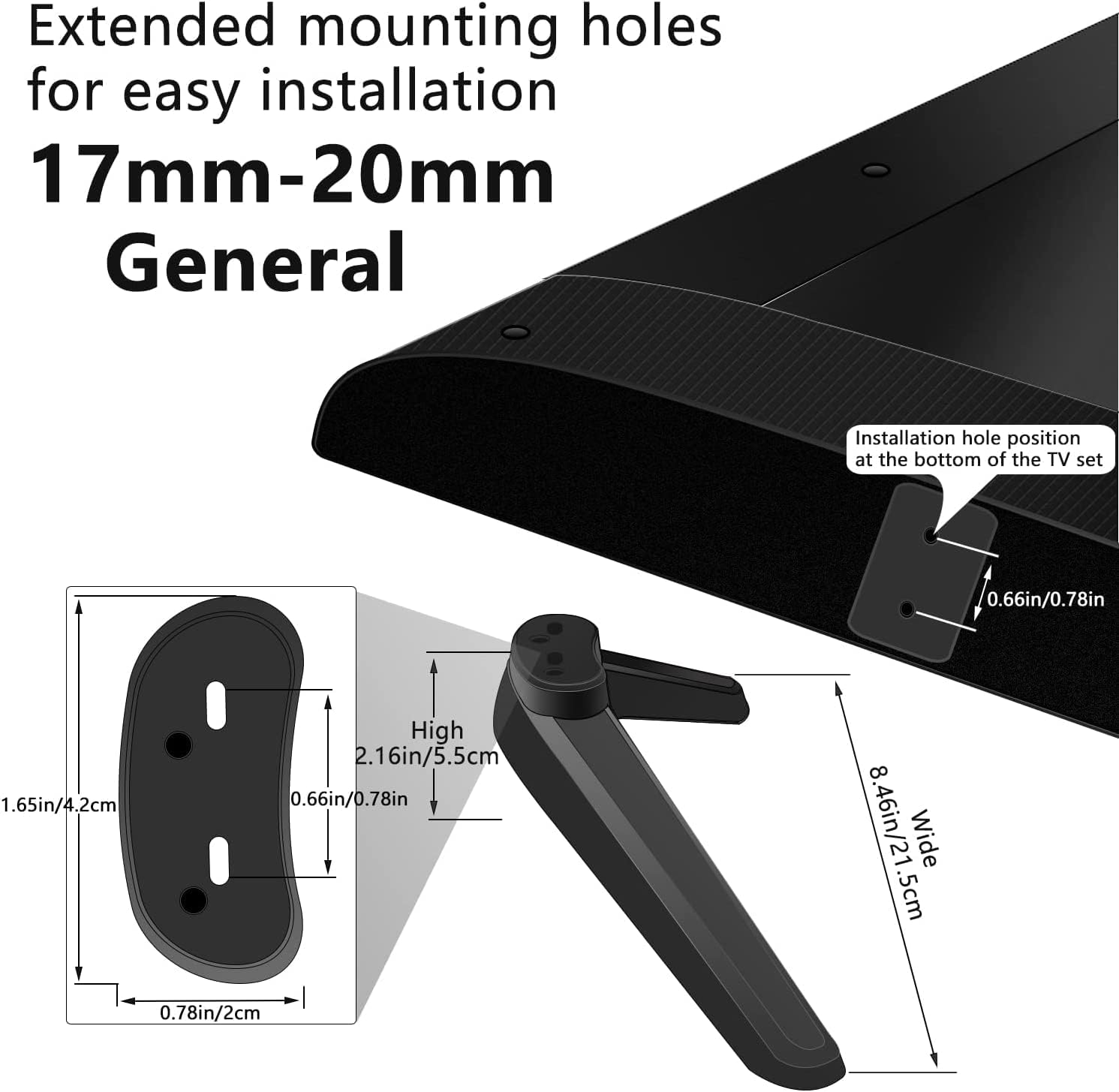
Image: A detailed view of the TV stand components, including the two feet and a variety of screws for different TV models.
4. Setup and Assembly
Follow these steps to assemble and install your universal TV stand feet:
Step 1: Prepare the TV and Feet
Place your television face down on a clean, soft surface (e.g., a blanket or soft cloth) to protect the screen. Identify the mounting holes on the back of your TV. The stand feet feature extended mounting holes (17mm-20mm general) for easy installation.
Image: Close-up of the TV stand feet showing the extended mounting holes, designed for versatile TV compatibility.
Step 2: Attach the Feet to the TV
Select the appropriate screws from the provided kit that match your TV's mounting holes. If your TV has recessed mounting holes, use the plastic spacers provided to ensure a flush fit. Securely attach each TV stand foot to the back of your television using the selected screws. Ensure the feet are oriented correctly (left and right sides are often marked).

Image: A person demonstrating the easy and secure installation of the TV stand feet onto the back of a television.
The feet are designed for a "no punching" assembly, meaning no drilling into walls is required. This design helps protect your walls and offers a tidy, comfortable setup.

Image: A visual comparison illustrating the benefit of hole-free assembly with the TV stand feet, contrasting it with a wall-mounted TV.
Step 3: Position the TV
Carefully lift the television with the attached feet and place it on your desired flat surface, such as a TV cabinet or table. Ensure the surface is stable and can support the weight of the TV. The feet are equipped with EVA rubber mats to prevent scratches on your desktop surfaces.

Image: A television securely placed on a cabinet using the newly installed stand feet.

Image: A close-up view of the scratch-resistant EVA rubber mat on the TV stand feet, designed to protect various countertop materials.
Assembly Video (Rfiver Star Collections)
Video: This video from Rfiver Star Collections demonstrates the assembly process of universal TV stand feet, showing how to attach them to a television and adjust height.
Installation Video (LXUXUHANN)
Video: This video from LXUXUHANN provides a quick overview of installing universal TV stand feet for LCD LED televisions.
Assembly and Features Video (GRIFEMA)
Video: This video from GRIFEMA demonstrates the assembly and key features of their universal TV stand feet, suitable for televisions from 22 to 65 inches.
5. Operating Instructions
Once installed, the TRAWOLF Universal TV Stand Feet provide a stable base for your television. No specific operating procedures are required for the feet themselves. Ensure the television is always placed on a level surface to maintain stability. Avoid placing heavy objects on the television or applying excessive force, which could compromise the stability of the stand.
6. Maintenance
- Cleaning: Wipe the TV stand feet with a soft, dry cloth. Avoid using abrasive cleaners or solvents, as these may damage the finish.
- Inspection: Periodically check all screws and connections to ensure they remain tight. Re-tighten if necessary.
- Surface Protection: The integrated EVA rubber mats protect your furniture from scratches. Ensure these mats are clean and intact.
7. Troubleshooting
Issue: TV feels unstable after installation.
- Solution:
- Ensure all screws attaching the feet to the TV are fully tightened.
- Verify that the television is placed on a completely flat and level surface.
- Check that the TV's weight does not exceed the maximum capacity of 50 kg (110 lbs).
Issue: Feet do not fit TV mounting holes.
- Solution:
- Refer to your TV's manual for the correct VESA mounting pattern and screw size.
- Use the various screws and plastic spacers provided in the kit to find the best fit.
- Ensure the feet are compatible with your TV's size (27-55 inches).
8. Specifications
| Brand: | TRAWOLF |
| Color: | Black |
| Compatible Devices: | Televisions (LCD, LED, OLED Smart TV) |
| Compatible TV Sizes: | 27, 28, 29, 30, 32, 37, 40, 55 inches |
| Material: | Acrylonitrile Butadiene Styrene (ABS) |
| Mounting Type: | Tabletop Stand (replaces wall mount) |
| Movement Type: | Swivel (Note: While product specifications list 'Swivel', these feet provide a static tabletop base. The 'Swivel' attribute may refer to general TV mount capabilities, not specific to this product's function.) |
| Max Weight Capacity: | 50 kg (110 lbs) |
| UPC: | 738086237705 |
9. Warranty and Support
Manufacturer Warranty: This product comes with a 1-year manufacturer warranty.
For technical support or warranty claims, please contact your retailer or the manufacturer directly. Information regarding spare parts availability is currently unavailable.