1. Introduction
This manual provides instructions for the operation and maintenance of your new Generic replacement remote control, compatible with various Inventor and Senville air conditioner models. Please read this manual thoroughly before using the remote control to ensure proper function and longevity.
Note: This is a replacement remote control. Some advanced functions of your original air conditioner remote may not be fully supported or may operate differently. Refer to your air conditioner's original manual for specific unit functions.
2. Setup: Battery Installation
The remote control requires two (2) AAA batteries for operation. Batteries are not included with this product.
- Locate the battery compartment cover on the back of the remote control.
- Slide the cover downwards or press the latch and lift to open the compartment.
- Insert two new AAA batteries, ensuring the positive (+) and negative (-) terminals align correctly with the markings inside the compartment.
- Replace the battery compartment cover by sliding it back into position until it clicks securely.

Image 2.1: Back of the remote control with the battery cover removed, illustrating the battery compartment. This image shows the two slots for AAA batteries and the correct orientation markings.

Image 2.2: A view of the remote control's back, with the battery cover detached and placed beside it. This clearly displays the open battery compartment and the cover piece.
3. Operating Instructions
After installing batteries, the remote control is ready for use. Point the remote control directly at your air conditioner unit's receiver. The display on the remote will show the current settings.
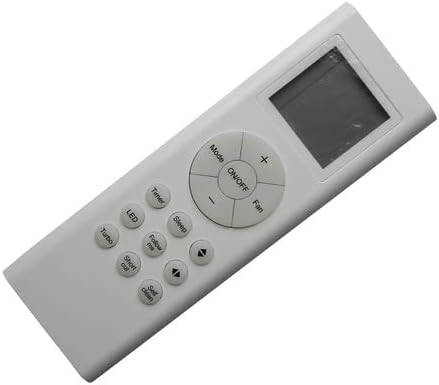
Image 3.1: Front view of the remote control, displaying the LCD screen and all functional buttons for air conditioner operation.
Button Functions:
- ON/OFF: Press to turn the air conditioner unit on or off.
- Mode: Cycles through operating modes (e.g., Cool, Heat, Fan, Dry, Auto).
- +/- (Temperature Adjustment): Increases or decreases the set temperature.
- Fan: Adjusts the fan speed (e.g., Auto, Low, Medium, High).
- Timer: Sets the timer for automatic on/off operations.
- LED: Controls the display light on the air conditioner unit.
- Sleep: Activates or deactivates sleep mode, which adjusts temperature for comfortable sleep.
- Follow me: Activates the "Follow Me" function, where the remote acts as a thermostat.
- Turbo: Initiates rapid cooling or heating for a short period.
- Short cut: Recalls preferred settings with a single press.
- Self clean: Activates the self-cleaning function of the indoor unit.
- Directional Arrows (Up/Down/Left/Right): Used for navigation within menus or adjusting swing/louver direction if supported by the air conditioner.
Note: The specific functionality of some buttons may vary depending on your air conditioner model.
4. Maintenance
Battery Replacement:
Replace batteries when the remote control's display becomes dim or the remote fails to operate the air conditioner unit. Always replace both batteries simultaneously with new AAA batteries.
Cleaning:
Wipe the remote control with a soft, dry cloth. Do not use liquid cleaners or abrasive materials, as these can damage the remote's surface or internal components.
Storage:
If the remote control will not be used for an extended period, remove the batteries to prevent leakage and potential damage to the remote.
5. Troubleshooting
- Remote not responding:
- Ensure the remote is pointed directly at the air conditioner's receiver.
- Check if the batteries are inserted correctly with the correct polarity.
- Replace old batteries with new ones.
- Ensure there are no obstructions between the remote and the air conditioner.
- Some functions do not work:
- This is a replacement remote. It may not support all advanced or unique functions of your specific air conditioner model.
- Verify that your air conditioner model is listed as compatible. If your model is not explicitly listed, full functionality cannot be guaranteed.
- Display shows incorrect time/settings:
- The remote's internal clock or timer display may not synchronize with the air conditioner unit. Focus on the air conditioner's display for accurate operational status.
6. Specifications
| Model Type | RG66A1/BGEF (Compatible with various Inventor and Senville models) |
| Power Source | 2 x AAA Batteries (not included) |
| Compatible Devices | Air Conditioners (Specific Inventor and Senville models) |
| Special Feature | Display in Celsius Only (as per product specifications) |
| Color | Random (as per product specifications) |
7. Warranty and Support
This product is a replacement remote control. For specific warranty information, please refer to the terms provided by the seller at the time of purchase. For technical support or further inquiries, please contact the seller directly.
Please retain your purchase receipt for any warranty claims.


