1. Introduction
Thank you for choosing the Generic X7 Max Smartwatch. This device is designed to enhance your daily life with features such as Bluetooth calling, health monitoring, and smart notifications. This manual provides essential information on how to set up, operate, and maintain your smartwatch to ensure optimal performance and longevity.
Please read this manual thoroughly before using your smartwatch and retain it for future reference.
2. Package Contents
Upon opening the package, please verify that all the following items are present:
- Generic X7 Max Smartwatch
- Charging Cable (Magnetic USB)
- User Manual (this document)

Image 2.1: The Generic X7 Max Smartwatch and its accessories, including the watch body, a silicone strap, and a magnetic USB charging cable, neatly arranged within its retail packaging.
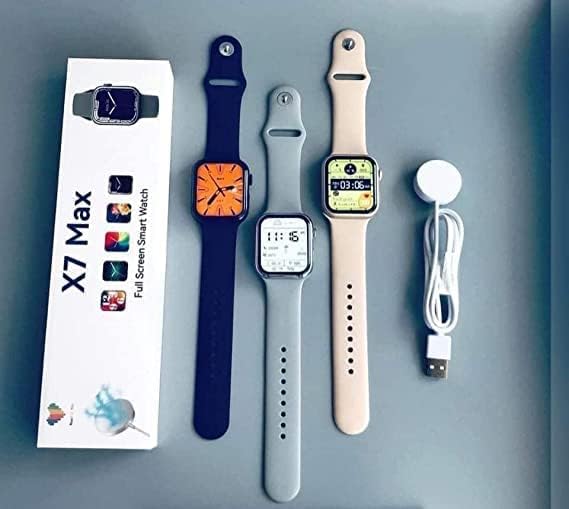
Image 2.2: An overhead view displaying three Generic X7 Max Smartwatches in various colors (black, grey, and beige), alongside their individual packaging boxes and a magnetic USB charging cable, illustrating the full product set.

Image 2.3: A close-up view of three Generic X7 Max Smartwatches, showcasing their square displays with vibrant watch faces and different colored straps (black, silver, and pink).
3. Setup
3.1. Charging the Smartwatch
Before initial use, fully charge your smartwatch. Connect the magnetic charging cable to the charging points on the back of the watch and plug the USB end into a standard USB power adapter (5V/1A recommended) or a computer's USB port. The watch display will indicate charging status.
- Ensure the charging pins are clean and dry.
- A full charge typically takes approximately 2 hours.
3.2. Powering On/Off
- Power On: Press and hold the side button for a few seconds until the screen lights up.
- Power Off: Press and hold the side button, then select the "Power Off" option on the screen.
3.3. App Installation (Wearfit Pro)
To unlock the full functionality of your X7 Max Smartwatch, you need to install the "Wearfit Pro" application on your smartphone.
- Scan the QR code provided in the watch's packaging or on the watch itself (if available) to download the "Wearfit Pro" app. Alternatively, search for "Wearfit Pro" in your smartphone's app store (Google Play Store for Android, Apple App Store for iOS).
- Install the application on your smartphone.
- Open the app and follow the on-screen instructions to create an account or log in.
3.4. Pairing with Your Smartphone
Ensure your smartphone's Bluetooth is enabled before proceeding.
- Open the "Wearfit Pro" app on your smartphone.
- Navigate to the "Device" or "Add Device" section within the app.
- The app will search for available devices. Select "X7 Max" from the list of detected devices.
- Confirm the pairing request on both your smartphone and the smartwatch.
- Once paired, the app will synchronize data with your smartwatch.
Note: For Bluetooth call functionality, you may need to pair the watch separately as an audio device in your phone's Bluetooth settings after the initial app pairing. Look for a device named "X7 Max_Audio" or similar.
4. Operating Instructions
4.1. Basic Navigation (Touch Control)
- Swipe Up: Access quick settings or notifications (depending on the watch face).
- Swipe Down: Access quick settings or notifications (depending on the watch face).
- Swipe Left/Right: Navigate through different widgets or main menu screens.
- Tap: Select an item or open an application.
- Press Side Button: Return to the main watch face or access the app menu.
4.2. Bluetooth Calls
After successfully pairing the watch for Bluetooth calls (as described in Section 3.4), you can make and receive calls directly from your smartwatch.
- Making a Call: Access the dialer or contacts list on your watch to initiate a call.
- Receiving a Call: When a call comes in, the watch will display the caller ID. You can answer or reject the call directly from the watch screen.
4.3. Notifications
Once connected to the "Wearfit Pro" app, your smartwatch can receive notifications from various communication software installed on your phone, such as SMS, Facebook, Twitter, WhatsApp, and more. Ensure notification permissions are granted in both your phone's settings and the "Wearfit Pro" app.
4.4. Health Monitoring
The X7 Max Smartwatch includes several health monitoring features:
- Heart Rate Monitor: Measures your heart rate throughout the day. Access this feature from the watch menu or app.
- Sleep Tracker: Monitors your sleep patterns, including deep sleep, light sleep, and wake times. Data is synchronized with the app.
- Pedometer: Counts your steps, distance traveled, and calories burned.
- Sedentary Reminder: Alerts you when you have been inactive for too long, encouraging you to move.
4.5. Sports Modes
The smartwatch supports various sports modes to track your workouts. Select the desired sport from the watch's menu to begin tracking metrics such as duration, distance, and calories burned.
4.6. AI Voice Assistant
Activate the AI voice assistant feature on your watch to perform tasks using voice commands. Ensure your watch is connected to your phone and the voice assistant feature is enabled in the app.
4.7. Watch Faces
The X7 Max Smartwatch offers a variety of watch faces. You can change the watch face directly on the watch by long-pressing the screen or through the "Wearfit Pro" app, which provides access to over 100 online watch faces.
5. Maintenance
5.1. Cleaning
- Regularly clean your smartwatch and strap with a soft, dry, lint-free cloth.
- If necessary, use a slightly damp cloth with mild soap, then wipe dry.
- Avoid using harsh chemicals, abrasive cleaners, or solvents, as these can damage the watch's finish and seals.
- Ensure the charging contacts are kept clean to maintain efficient charging.
5.2. Water Resistance
The X7 Max Smartwatch is designed to be waterproof. However, it is important to note that "waterproof" ratings vary. Avoid exposing the watch to hot water, steam, or high-pressure water jets, as this can compromise its water resistance. It is generally suitable for daily use, such as hand washing or light rain, but not recommended for swimming or diving unless explicitly stated otherwise in the product specifications.
6. Troubleshooting
- Watch not turning on: Ensure the watch is fully charged. Connect it to the charger for at least 30 minutes.
- Unable to pair with phone:
- Ensure Bluetooth is enabled on your phone.
- Make sure the watch is within range of your phone.
- Restart both your phone and the smartwatch.
- Clear Bluetooth cache on your phone (Android) or forget the device and re-pair.
- Ensure the "Wearfit Pro" app has necessary permissions.
- Notifications not received:
- Check if the watch is properly connected to the "Wearfit Pro" app.
- Verify that notification permissions are enabled for the "Wearfit Pro" app in your phone's settings.
- Ensure notification access is granted to "Wearfit Pro" in your phone's accessibility settings (Android).
- Inaccurate health data:
- Ensure the watch is worn snugly on your wrist, not too loose or too tight.
- Keep the sensor area on the back of the watch clean.
- Note that smartwatches are not medical devices and data should be used for reference only.
7. Specifications
| Feature | Description |
|---|---|
| Model Name | X7 Max |
| Brand | Generic |
| Operating System | Smartwatch OS |
| Connectivity Technology | Bluetooth |
| Wireless Communication Standard | Bluetooth |
| Memory Storage Capacity | 128 MB |
| Special Features | Heart Rate Monitor, Sleep Tracker, Pedometer, AI Voice Assistant, Bluetooth Call |
| GPS | No GPS |
| Item Shape | Square |
| Style | Modern |
| Display Resolution | 240 x 240 |
| Control Type | Touch Control |
| Water Resistance | Waterproof |
8. Warranty and Support
This product comes with a standard manufacturer's warranty. Please refer to the warranty card included in your package for specific terms and conditions, including warranty duration and coverage details. For technical support, troubleshooting assistance, or warranty claims, please contact the retailer or the manufacturer's customer service department using the contact information provided with your purchase documentation.
Keep your purchase receipt as proof of purchase for warranty purposes.