
bseah light 02
bseah Grow Light Plant Lamp (Model: light 02) Instruction Manual
Model: light 02 | Brand: bseah
1. Introduction
This manual provides instructions for the bseah Full Spectrum Grow Light, designed for indoor plants. This grow light promotes photosynthesis and supports plant growth through various stages.

Image 1.1: The bseah Grow Light in use, illuminating several indoor potted plants with its flexible light bars.
2. Product Components
The bseah Grow Light package includes the following components:
- Grow Light unit with multiple flexible goosenecks and LED light bars.
- Integrated control panel for dimming, spectrum selection, and timer functions.
- USB connector for power.
- High-efficiency adapter for wall outlet connection.
- Sturdy clip with anti-slip mat for secure attachment to surfaces up to 2.5 inches thick.
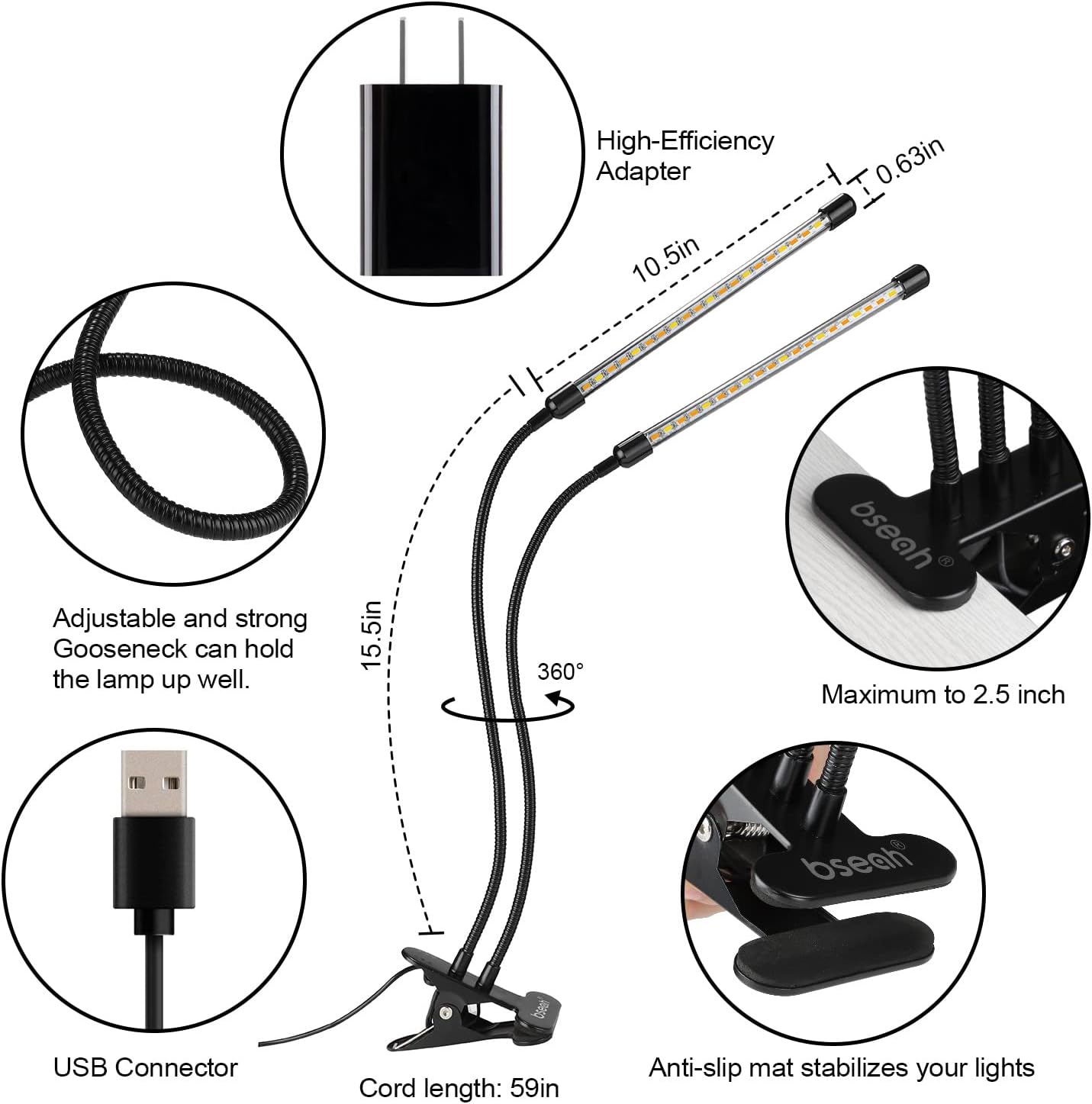
Image 2.1: Detailed diagram illustrating the various components of the bseah Grow Light, including its flexible goosenecks, USB connector, power adapter, and secure clip.

Image 2.2: The bseah Grow Light as it appears unboxed, displaying the two LED light bars, the central clip, and the inline controller.
3. Setup Instructions
- Unpack the Grow Light: Carefully remove all components from the packaging.
- Attach the Clip: Securely attach the grow light's clip to a stable surface, such as a shelf or desk edge. The clip can accommodate surfaces up to 2.5 inches thick.
- Connect Power: Insert the USB connector into the provided high-efficiency adapter, then plug the adapter into a standard wall outlet.
- Position the Lights: Adjust the flexible goosenecks to position the LED light bars over your plants. The goosenecks can be rotated 360 degrees to direct light precisely.
Video 3.1: An official product video demonstrating the setup and basic operation of the bseah Grow Light, including clamping it to a surface and adjusting the light bars.
4. Operating Instructions
The bseah Grow Light features an inline controller with multiple buttons for easy operation:

Image 4.1: The inline controller for the bseah Grow Light, highlighting buttons for adjusting brightness, light spectrum, and timer settings.
4.1 Power On/Off
- Press the Power Button (U icon) to turn the grow light on or off.
4.2 Adjusting Brightness (Dimming)
- The light offers 10 dimmable modes. Use the +/- Buttons to increase or decrease the brightness from 0% to 100%.

Image 4.2: Visual representation of the 3 available lighting modes and 10 dimming levels, demonstrating the versatility of the bseah Grow Light.
4.3 Selecting Light Spectrum
- The grow light provides 3 switch modes (spectrum options):
- Yellow Light Only
- White Light Only
- Combination of Yellow and White Light (Full Spectrum)
- Press the Spectrum Button (circular arrow icon) to cycle through these modes.

Image 4.3: A diagram explaining the full spectrum light output, indicating its suitability for seeding, growing, blooming, and fruiting stages of plants.
4.4 Setting the Timer
- The grow light has an automatic cycle memory timer function with 3 settings: 3 hours, 9 hours, and 12 hours.
- Press the Timer Button (clock icon) to select the desired duration. The corresponding indicator light will change color (e.g., blue for 3H, green for 9H, red for 12H).
- Once set, the light will automatically turn on and off at the same time every day for the selected duration, provided continuous power supply.
5. Usage Tips
- Optimal Distance: Maintain an appropriate distance between the light bars and your plants. Adjust the flexible goosenecks as plants grow.
- Plant Stages: Utilize the different dimming and spectrum modes to match the specific needs of your plants during germination, vegetative growth, flowering, and fruiting stages.
- Placement: The clip design allows for versatile placement on various surfaces, ensuring your plants receive adequate light even in areas with limited natural sunlight.

Image 5.1: A visual comparison demonstrating enhanced plant growth and vitality when utilizing the bseah Full Spectrum Plant Grow Light.
6. Specifications
| Brand | bseah |
| Model Number | light 02 |
| Light Source Type | LED |
| Number of Light Sources | 40 |
| Wattage | 10 watts |
| Voltage | 5 Volts |
| Power Source | DC |
| Connectivity Technology | USB |
| Control Method | Touch, Push Button |
| Additional Features | Dimmable |
| Material Type | Aluminum |
| Product Dimensions | 9.5"D x 4.7"W x 3.5"H |
| Item Weight | 1.2 Pounds |
| Indoor/Outdoor Usage | Indoor |
7. Troubleshooting
- Light not turning on:
- Ensure the USB connector is fully inserted into the adapter and the adapter is securely plugged into a working wall outlet.
- Verify that the power button on the inline controller has been pressed.
- Timer not functioning correctly:
- Confirm that the timer setting (3H, 9H, or 12H) is selected on the controller. The corresponding indicator light should be illuminated.
- Ensure continuous power supply to the unit. The memory function requires uninterrupted power to maintain the daily cycle.
- Lights are too dim or too bright:
- Use the +/- buttons on the controller to adjust the brightness level (10 dimmable modes available).
- Plants not responding to light:
- Adjust the light spectrum using the spectrum button to match the plant's growth stage (yellow, white, or mixed).
- Ensure the light bars are positioned at an optimal distance from the plants.
- Verify that the timer duration is appropriate for the plant species.
8. Warranty and Support
The bseah Grow Light comes with a 24-month warranty service. If you encounter any issues or have questions regarding your product, please contact bseah customer support for assistance.
For warranty claims or technical support, refer to the contact information provided with your purchase or visit the official bseah website.
Ask a question about this manual
Ask about setup, troubleshooting, compatibility, parts, safety, or missing instructions. Manuals+ will review the question and use this page’s manual context to help answer it.