
BLACK+DECKER BCKM1011K10
BLACK+DECKER Kitchen Wand Cordless Immersion Blender (Model BCKM1011K10) User Manual
Your comprehensive guide to safe and efficient operation.
Introduction
Thank you for choosing the BLACK+DECKER Kitchen Wand Cordless Immersion Blender. This manual provides essential information for the safe and effective use of your appliance. Please read all instructions carefully before first use and retain for future reference.

Image: The BLACK+DECKER Kitchen Wand Cordless Immersion Blender kit, including the wand base, immersion blender attachment, measuring cup with lid, pan guard, and charging dock with cord.
Important Safety Information
Always follow basic safety precautions when using electrical appliances to reduce the risk of fire, electric shock, and/or injury, including the following:
- Read all instructions before using the appliance.
- Do not immerse the motor base in water or other liquids.
- Keep hands, hair, and clothing away from moving parts during operation.
- Unplug from the charging dock when not in use, before putting on or taking off parts, and before cleaning.
- Do not operate any appliance with a damaged cord or plug, or after the appliance malfunctions or has been dropped or damaged in any manner.
- Close supervision is necessary when any appliance is used by or near children.
- Avoid contact with moving parts.
- The use of attachments not recommended or sold by the manufacturer may cause fire, electric shock, or injury.
- Do not use outdoors.
- Do not let cord hang over edge of table or counter.
- Do not let cord contact hot surfaces.
- Blades are sharp. Handle carefully.
- Ensure the appliance is fully assembled before operation.
Product Components
The BLACK+DECKER Kitchen Wand Cordless Immersion Blender kit includes the following items:
- Wand Base (Motor Unit)
- Immersion Blender Attachment
- Immersion Blender Guard (Pan Guard)
- Charging Dock
- Charging Cord
- Measuring Cup with Lid

Image: A diagram illustrating the main components of the Kitchen Wand system, including the immersion blender guard, variable speed dial, and LED battery charge indicator.
Setup and Initial Charge
- Unpack Components: Carefully remove all parts from the packaging.
- Clean Before First Use: Wash the immersion blender attachment, pan guard, and measuring cup with lid in warm, soapy water. Rinse thoroughly and dry. The wand base should only be wiped with a damp cloth.
- Assemble Immersion Blender: Align the immersion blender attachment with the wand base and twist until it clicks securely into place.
- Charge the Wand Base:
- Connect the charging cord to the charging dock.
- Plug the charging cord into a standard electrical outlet.
- Place the wand base onto the charging dock. The LED battery charge indicator lights on the wand base will illuminate to show charging status.
- Allow the unit to charge fully before first use. A full charge provides up to 30 minutes of continuous runtime.


Image: The charging dock with its power adapter, and the wand base placed on the charging dock for charging.
Operating Instructions
Using the Immersion Blender
- Prepare Ingredients: Place ingredients to be blended into a tall container or pot. For best results, ensure liquids cover the immersion blender attachment blades.
- Attach Pan Guard (Optional): If blending in non-stick cookware, attach the pan guard to the immersion blender attachment to protect surfaces.
- Immerse Blender: Submerge the immersion blender attachment into the ingredients before turning it on.
- Activate Blender:
- Press and hold the safety switch (located on the top of the wand base).
- While holding the safety switch, press the power button (located on the front of the wand base) to start blending.
- Adjust Speed: Rotate the variable speed dial on the top of the wand base to increase or decrease blending speed as needed.
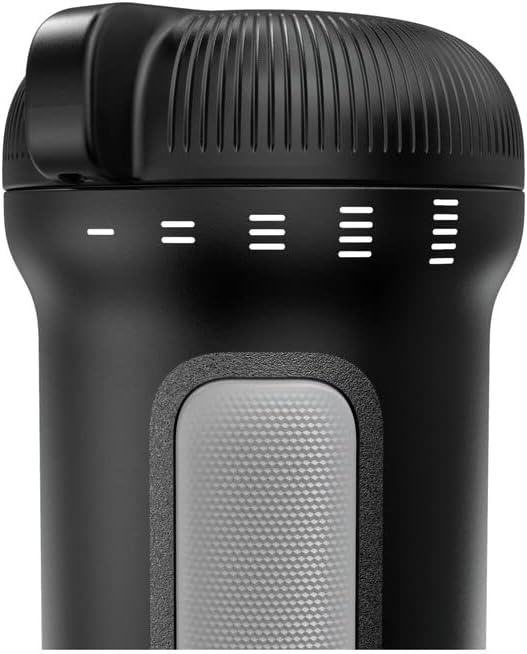
Image: Close-up of the top of the wand base, highlighting the variable speed dial and the LED battery charge indicator lights.
- Blend: Move the blender up and down and in circular motions to ensure thorough blending. Do not operate continuously for more than 1 minute to prevent overheating. Allow a short rest period between cycles.
- Stop Blending: Release the power button to stop the blender.
- Remove Blender: Wait for the blades to stop completely before removing the immersion blender from the ingredients.
Common Applications
The BLACK+DECKER Kitchen Wand is versatile for various kitchen tasks:
- Smoothies: Blend fruits, vegetables, and liquids directly in a glass or the included measuring cup.
- Soups: Puree hot soups directly in the pot for a smooth consistency.
- Baby Food: Prepare fresh, homemade baby food with ease.
- Sauces and Dressings: Emulsify dressings or create smooth sauces.

Image: A composite image showing the immersion blender being used to prepare smoothies, blend soups in a pot, and make baby food.
Maintenance and Cleaning
Proper cleaning ensures the longevity and hygiene of your appliance.
- Disconnect Power: Always ensure the wand base is removed from the charging dock before cleaning.
- Remove Attachment: Twist and detach the immersion blender attachment from the wand base.
- Clean Immersion Blender Attachment, Pan Guard, and Measuring Cup: These parts are dishwasher safe (top rack recommended) or can be washed by hand in warm, soapy water. Rinse thoroughly and dry immediately. Handle blades with extreme care as they are sharp.
- Clean Wand Base: Wipe the wand base with a damp cloth. Do not immerse the wand base in water or any other liquid.
- Storage: Store the clean and dry appliance and its accessories in a safe, dry place.
Troubleshooting
| Problem | Possible Cause | Solution |
|---|---|---|
| Blender does not turn on. |
|
|
| Blender stops during operation. |
|
|
| Poor blending performance. |
|
|
Specifications
| Brand | BLACK+DECKER |
| Model Number | BCKM1011K10 |
| Color | Black |
| Special Feature | Cordless |
| Capacity | 354 Milliliters (Measuring Cup) |
| Power Source | Battery Powered |
| Voltage | 3.7 Volts (DC) |
| Controls Type | Knob (Variable Speed Dial) |
| Item Weight | 3.95 pounds |
| UPC | 885911836159 |
Warranty and Support
This BLACK+DECKER Kitchen Wand Cordless Immersion Blender comes with a Limited Warranty.
For detailed warranty information, product support, or to inquire about additional attachments, please visit the official BLACK+DECKER website or contact their customer service. You can also find more information on the BLACK+DECKER Store on Amazon.
Related Documents - BCKM1011K10
 |
BLACK+DECKER BXHBA1500E Hand Blender User Manual and Safety Guide Comprehensive user manual for the BLACK+DECKER BXHBA1500E hand blender, covering safety instructions, operation, accessories, cleaning, and technical support. |
 |
BLACK+DECKER BCKM101 8V Cordless Hand Blender Instruction Manual User manual for the BLACK+DECKER BCKM101 8V Cordless Hand Blender and its attachments, detailing operation, safety, and maintenance for optimal performance. |
 |
BLACK+DECKER IceCrush 8-Speed Blender Use and Care Manual Comprehensive use and care manual for the BLACK+DECKER IceCrush 8-Speed Blender (Model BL2208PB), covering safety, operation, cleaning, troubleshooting, and recipes. Includes detailed instructions and warranty information. |
 |
Black+Decker CHV1410L Cordless Hand Vac Instruction Manual Official instruction manual for the Black+Decker CHV1410L Cordless Hand Vac, providing detailed guidance on operation, safety, charging, maintenance, and troubleshooting for this household appliance. |
 |
Black+Decker Quiet Blender with Cyclone Glass Jar - Use and Care Manual This manual provides instructions for the safe use, care, and maintenance of the Black+Decker Quiet Blender with Cyclone Glass Jar (Model BL1400DG-P). It includes important safety precautions, operating instructions, cleaning tips, troubleshooting, and recipes. |
 |
Manual de Uso y Cuidado BLACK+DECKER BL1300 Series Licuadora Silenciosa Descubra cómo usar y cuidar su licuadora BLACK+DECKER BL1300 Series con tecnología Quiet Technology. Incluye instrucciones, consejos de seguridad, limpieza y recetas. |
Ask a question about this manual
Ask about setup, troubleshooting, compatibility, parts, safety, or missing instructions. Manuals+ will review the question and use this page’s manual context to help answer it.