
1. Introduction
The Kenwood MultiPro XL Weigh+ FDM72.990SS is a compact food processor designed to assist with a wide range of kitchen tasks. It features an integrated digital scale, a timer function, and a powerful 1000W motor. The appliance comes with various accessories, including a 3-liter work bowl, a 1.5-liter ThermoResist glass blender, and specialized discs for slicing, grating, and dicing. This manual provides essential information for the safe and efficient operation, maintenance, and troubleshooting of your food processor.

Figure 1: The Kenwood MultiPro XL Weigh+ Food Processor shown with its main unit, work bowl, blender, and various attachments including slicing/grating discs and the Express Dice accessory.
2. Safety Instructions
Always follow basic safety precautions when using electrical appliances to prevent injury or damage.
- Read all instructions before use.
- Do not immerse the motor unit in water or any other liquid.
- Ensure the appliance is unplugged before assembling, disassembling, or cleaning.
- Keep hands and utensils away from moving blades during operation.
- Do not operate the appliance with a damaged cord or plug.
- Supervise children when the appliance is in use.
- Use only Kenwood recommended attachments.
- Avoid contact with moving parts.
- Do not overload the appliance.
- Always ensure the lid is securely locked before operating.
3. Components and Accessories
Your Kenwood MultiPro XL Weigh+ FDM72.990SS comes with the following components and accessories:
- Motor Unit: The main base housing the 1000W motor, control dial, and digital display.
- 3L Work Bowl: The primary processing bowl for chopping, mixing, and kneading.
- 1.5L ThermoResist Glass Blender: For blending hot and cold liquids, smoothies, and crushing ice.
- EverSharp Knife Blade: A versatile blade for chopping, pureeing, and mixing.
- 6-in-1 Adjustable Slicing Disc: Allows for various slicing thicknesses.
- 2 Reversible Grating Discs: For fine and coarse grating and slicing.
- Extra Fine Grating Disc: Ideal for hard cheeses like Parmesan.
- Express Dice Function: An attachment for precise dicing of vegetables and fruits.
- Citrus Juicer: For extracting juice from citrus fruits.
- Dough Hook: For kneading dough.
- Double Whisk: For whipping cream and egg whites.
- Spatula: For scraping down the bowl.
- Storage Bag: For convenient storage of accessories.
4. Setup
Before first use, wash all removable parts in warm soapy water, rinse thoroughly, and dry.
- Place the motor unit on a stable, flat, and dry surface.
- Ensure the control dial is in the 'OFF' position.
- Attach the desired accessory (work bowl or blender) to the motor unit by aligning it and twisting clockwise until it locks into place.
- Insert the appropriate blade or disc into the bowl/blender.
- Secure the lid onto the bowl/blender, ensuring it clicks into place. The appliance will not operate unless the lid is correctly fitted.
- Plug the appliance into a suitable power outlet.
5. Operating Instructions
5.1. Using the Digital Scale and Timer
The integrated digital scale allows for precise weighing directly in the work bowl or on the weighing tray.
- Place the work bowl (without lid or blade) or the weighing tray onto the motor unit.
- Press the 'ON/ZERO' button to turn on the scale and zero the display.
- Press the 'kg/lb' button to switch between kilograms and pounds.
- Add ingredients to weigh. To weigh multiple ingredients, press 'ON/ZERO' after each ingredient to tare the scale.
- The timer function can be used independently or in conjunction with the scale. Press the timer button to start/stop the countdown.

Figure 2: Close-up view of the Kenwood MultiPro XL Weigh+ digital display, showing the integrated scale in operation with nuts being weighed on the top tray.
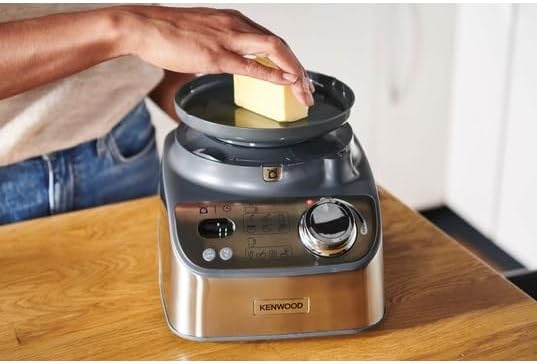
Figure 3: A user demonstrating the use of the integrated digital scale by placing a block of butter directly onto the weighing tray of the food processor.
5.2. Food Processing (Chopping, Slicing, Grating)
For chopping, use the EverSharp knife blade. For slicing and grating, use the appropriate discs.
- Assemble the work bowl with the chosen blade or disc.
- Add ingredients to the work bowl. For slicing/grating, use the XL feed chute.
- Secure the lid.
- Turn the control dial to the desired speed setting (variable speed control is available). Use the 'Pulse' setting for short bursts.
- Process until desired consistency is achieved.

Figure 4: The extra-large feed chute of the Kenwood MultiPro XL Weigh+ food processor, demonstrating its capacity to accommodate whole or large pieces of vegetables like zucchini, reducing the need for pre-cutting.

Figure 5: An illustration of the food processor's slicing and dicing capabilities, showing zucchini being processed into uniform slices and diced pieces by the adjustable disc.
5.3. Blending
Use the 1.5L ThermoResist glass blender for liquids.
- Attach the glass blender to the motor unit.
- Add ingredients to the blender jug. Do not exceed the maximum fill line.
- Secure the blender lid.
- Turn the control dial to the desired speed. Use the 'Pulse' setting for crushing ice or quick blending.
- Blend until smooth.

Figure 6: The Kenwood MultiPro XL Weigh+ food processor with the 1.5L ThermoResist glass blender attachment, demonstrating its capability to blend both liquids and ice.
6. Cleaning and Maintenance
Regular cleaning ensures the longevity and hygiene of your food processor.
- Before Cleaning: Always unplug the appliance from the power outlet.
- Motor Unit: Wipe the motor unit with a damp cloth. Do not immerse it in water.
- Removable Parts: The work bowl, blender jug, blades, and discs are dishwasher safe for easy cleaning. Alternatively, wash them in warm soapy water, rinse, and dry thoroughly.
- Blades: Handle blades with extreme care as they are very sharp. Use a brush for cleaning if necessary.
- Storage: Store the appliance and its accessories in a dry place, preferably in the provided storage bag.
7. Troubleshooting
If you encounter issues with your food processor, refer to the table below for common problems and solutions.
| Problem | Possible Cause | Solution |
|---|---|---|
| Appliance does not turn on. | Not plugged in; lid not secured; bowl not locked. | Check power connection; ensure lid is clicked into place; ensure bowl is twisted and locked. |
| Motor stops during operation. | Overloaded; motor overheating. | Reduce load; turn off and let cool for 30 minutes before restarting. |
| Ingredients not processing evenly. | Too many ingredients; ingredients too large. | Process in smaller batches; cut ingredients into smaller pieces. |
| Loud noise during operation. | Improper assembly; foreign object in bowl. | Check assembly of blade/disc and lid; remove any foreign objects. |
8. Specifications
- Model: FDM72.990SS
- Power: 1000 Watts
- Voltage: 230 Volts (AC)
- Work Bowl Capacity: 3 Liters
- Blender Capacity: 1.5 Liters (ThermoResist Glass)
- Number of Speeds: 3 (Variable) + Pulse
- Dimensions (L x W x H): Approximately 36 x 49 x 41 cm
- Weight: 4.9 Kilograms
- Material: Plastic, Stainless Steel
- Special Features: Integrated Digital Scale, Timer Function, XL Feed Chute, Express Dice
9. Warranty and Support
Your Kenwood MultiPro XL Weigh+ FDM72.990SS Food Processor is covered by a manufacturer's warranty. Please refer to the warranty card included with your purchase for specific terms and conditions, including the warranty period and coverage details.
For technical support, spare parts, or service inquiries, please contact Kenwood customer service. Contact information can typically be found on the Kenwood official website or in the documentation provided with your appliance.


