
PEUKC Metal Storage Cabinet
PEUKC Metal Garage Storage Cabinet Instruction Manual
Model: Metal Storage Cabinet
Brand: PEUKC
Introduction
This manual provides comprehensive instructions for the assembly, operation, and maintenance of your PEUKC Metal Garage Storage Cabinet. Designed with a heavy-duty steel frame and adjustable shelves, this cabinet offers a secure and versatile storage solution for various environments, including garages, offices, homes, schools, and gyms. Its durable construction ensures long-term use, resisting scratches and corrosion.

Figure 1: Fully assembled PEUKC Metal Garage Storage Cabinet.
Included Components
Before beginning assembly, please ensure all parts listed below are present and undamaged. If any parts are missing or damaged, please contact PEUKC customer service.
- 1 x Metal Storage Cabinet (disassembled panels)
- 1 x Installation Instruction Manual
- 1 x Installation Tool (screwdriver)
- All necessary screws and fasteners
- Adjustable feet (4 pieces)
- Shelf clips (16 pieces)
- Handles (2 pieces)
- Keys (2 pieces)
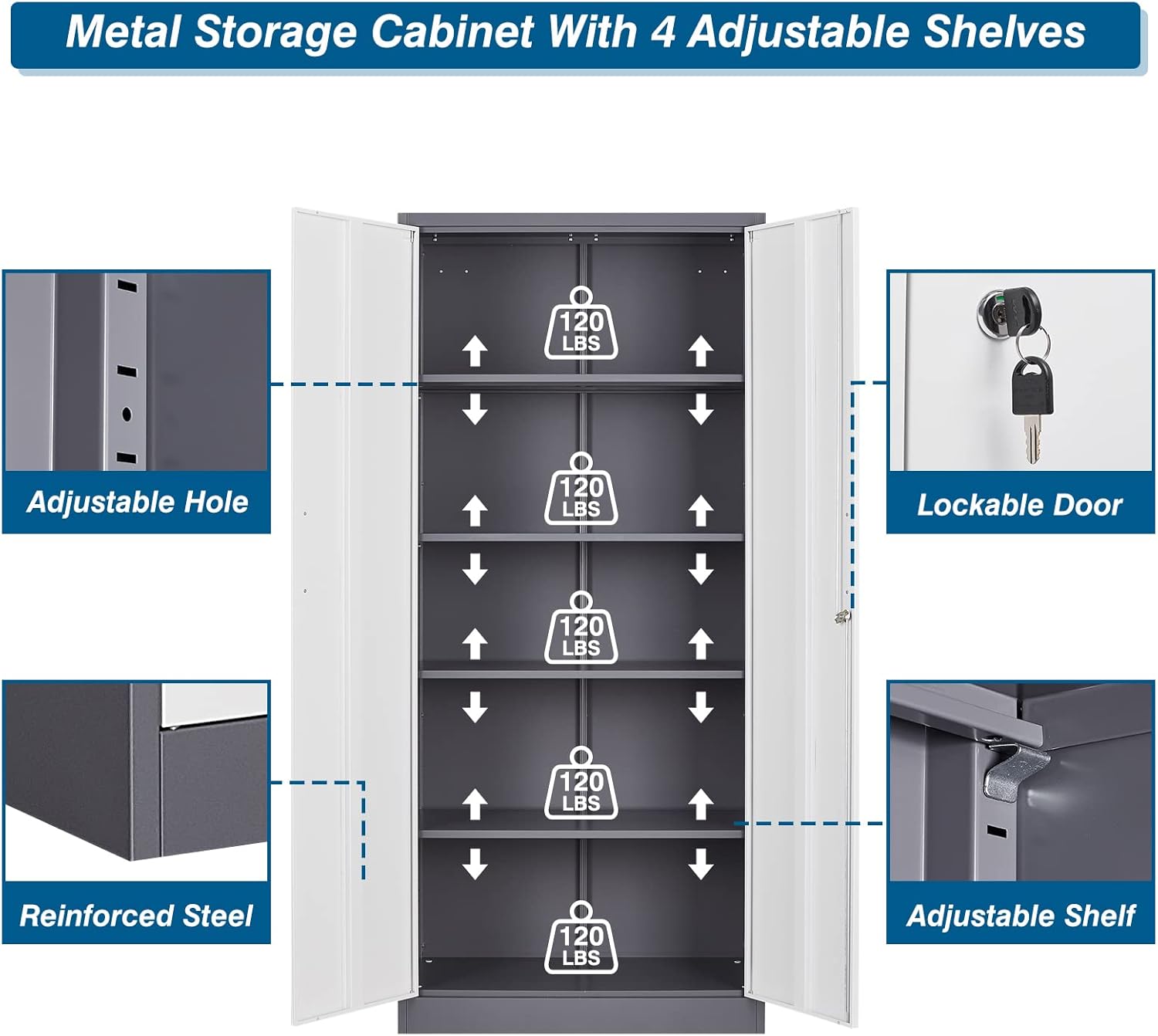
Figure 2: Key features and components of the cabinet.
Assembly Instructions
Follow these steps carefully for proper assembly. It is recommended to have a second person assist with certain steps for ease and safety.
Official Installation Video
Video 1: Step-by-step guide for assembling the 71-inch metal storage cabinet. This video provides a visual walkthrough of the entire installation process, from unboxing to final touches.
Step-by-Step Assembly Guide
- Unpack and Identify Components: Carefully unbox all parts and lay them out. Refer to the included parts list to ensure all components (labeled A-V) are present.
- Assemble the Base: Connect the bottom panels (D1 and C1) using the provided O screws. Ensure they are aligned correctly.
- Attach Side Panels: Securely attach side panel A1 and then side panel B1 to the assembled base using the N screws. Ensure all screws are tightened for stability.
- Install Crossbars: Attach the J1 crossbar to the top front of the cabinet frame. Then, install the H1 back support and the I1 top crossbar, ensuring a rigid structure.
- Insert Back Panel: Slide the G1 back panel into place.
- Attach Side Brackets: Secure the K2 side brackets to the interior corners of the cabinet.
- Install Adjustable Feet: Screw the M4 adjustable feet into the designated holes at the bottom of the cabinet. These allow for leveling on uneven surfaces.
- Stand Cabinet Upright: With assistance, carefully lift and stand the cabinet upright.
- Insert Shelf Clips: Place the Q16 shelf clips into the desired slots along the interior sides of the cabinet. There are multiple height options for customization.
- Install Shelves: Carefully place the L4 shelves onto the installed shelf clips. Ensure they are level and secure.
- Attach Door Pivots: Install the R2 door pivots at the bottom of the cabinet frame where the doors will attach.
- Mount Doors: Attach the F1 (left) and E1 (right, with lock) doors by aligning their bottom and top pivots with the cabinet frame.
- Install Door Stoppers: Secure the S4 door stoppers at the top and bottom of the doors to ensure proper closure.
- Attach Handles: Fasten the U2 handles to the exterior of the doors using the V4 screws.
- Test Locking Mechanism: Insert the key into the lock on the right door and test its functionality to ensure it locks and unlocks smoothly.

Figure 3: Detailed view of product dimensions, keys, and locking mechanism.
Operating Instructions
Adjustable Shelves
The PEUKC Metal Storage Cabinet features 5 adjustable shelves, allowing you to customize the storage space to fit items of various sizes. To adjust a shelf, simply remove all items from the shelf, lift the shelf, and reposition the shelf clips (Q) into the desired height slots along the cabinet's interior side panels. Ensure all four clips are securely inserted and the shelf is level before placing items back on it.

Figure 4: Demonstrating the adjustable shelf capability for flexible storage.
Locking Mechanism
The cabinet is equipped with a three-point lock system for enhanced security. To lock the cabinet, ensure both doors are fully closed. Insert one of the provided keys into the lock on the right door and turn it clockwise until the locking mechanism engages. To unlock, turn the key counter-clockwise. This feature is ideal for securing valuables, important documents, or keeping hazardous tools away from children.

Figure 5: Security features of the cabinet, including the robust lock.
Maintenance
To ensure the longevity and appearance of your metal storage cabinet, follow these simple maintenance guidelines:
- Cleaning: Wipe down the cabinet's surfaces regularly with a soft, damp cloth. For stubborn dirt, use a mild soap solution and dry thoroughly immediately to prevent water spots or rust.
- Avoid Abrasives: Do not use abrasive cleaners, scouring pads, or harsh chemicals, as these can damage the environmentally friendly paint finish.
- Corrosion Prevention: The cabinet's surface is designed to resist corrosion. However, avoid prolonged exposure to excessive moisture or highly corrosive substances.
- Lubrication: Periodically apply a small amount of lubricant to the door hinges and locking mechanism to ensure smooth operation.
- Weight Distribution: Distribute weight evenly across the shelves to prevent warping or damage. Each shelf can hold up to 120 pounds.
Troubleshooting
If you encounter any issues with your PEUKC Metal Garage Storage Cabinet, please refer to the common solutions below:
- Doors Not Closing Properly:
Ensure the cabinet is placed on a level surface. Use the adjustable feet (M) to level the cabinet if necessary. Check that all assembly screws, especially those connecting the side panels and crossbars, are securely tightened. Sometimes, slight adjustments to the door hinges or the locking mechanism can resolve alignment issues.
- Difficulty with Assembly:
Double-check the orientation of each panel against the instruction manual. Ensure you are using the correct screws for each step. Do not overtighten screws initially; hand-tighten them first, then fully tighten once all components are in place. Refer to the installation video for visual guidance.
- Scratches or Dents:
While the cabinet is designed to resist scratches, minor cosmetic damage can occur. For small scratches, touch-up paint (not included) matching the cabinet's color may be used. For significant dents, contact customer service for potential solutions.
Specifications
| Brand | PEUKC |
| Model Number | Metal Storage Cabinet |
| Color | White Grey |
| Product Dimensions | 15.7"D x 31.5"W x 70.87"H |
| Item Weight | 81.1 Pounds |
| Material | Metal (Heavy-duty steel frame, 0.8mm thick) |
| Finish Type | Powder Coated |
| Number of Shelves | 5 (Adjustable) |
| Weight Limit per Shelf | 120 Pounds |
| Special Feature | Lockable (Three-point lock system) |
| Mounting Type | Floor Mount (with wall-mounting pre-holes) |
| Assembly Required | Yes |
Warranty and Support
PEUKC is committed to providing high-quality products and excellent customer service. Your metal storage cabinet is shipped from our US warehouse, ensuring efficient delivery.
- Returns: The product is eligible for 30-day easy returns. Please refer to the retailer's return policy for detailed information.
- Customer Service: If you have any questions regarding the product, shipment, assembly, or require any assistance, please do not hesitate to contact the professional PEUKC service team. They are available to help solve any problems you may encounter.
- Official Documents: An official installation manual in PDF format is available for download: Installation Manual (PDF).
Ask a question about this manual
Ask about setup, troubleshooting, compatibility, parts, safety, or missing instructions. Manuals+ will review the question and use this page’s manual context to help answer it.