
KEG TW-Wifi-4BN
KEG Smart WiFi Towel Warmer Instruction Manual
Model: TW-Wifi-4BN
Introduction
Thank you for purchasing the KEG Smart WiFi Towel Warmer. This wall-mounted electric towel rack is designed to dry towels more rapidly, keeping them fresher, and can also provide supplemental heat to your bathroom. It features smart WiFi functionality, allowing control via a mobile application, as well as a built-in timer and temperature adjustment controls. Please read this manual thoroughly before installation and operation to ensure safe and efficient use of your new towel warmer.
Important Safety Information
To reduce the risk of fire, electric shock, or injury, please observe the following:
- Read all instructions before using this appliance.
- Use this appliance only for its intended use as described in this manual.
- Do not use outdoors.
- Do not immerse the towel warmer in water or other liquids.
- Ensure the power cord is not damaged. If damaged, it must be replaced by the manufacturer, its service agent, or similarly qualified persons to avoid a hazard.
- This appliance is not intended for use by persons (including children) with reduced physical, sensory or mental capabilities, or lack of experience and knowledge, unless they have been given supervision or instruction concerning use of the appliance by a person responsible for their safety.
- Children should be supervised to ensure that they do not play with the appliance.
- Always unplug the appliance from the electrical outlet when not in use or before cleaning.
- Do not operate any appliance with a damaged cord or plug, or after the appliance malfunctions or has been dropped or damaged in any manner.
- Keep the cord away from heated surfaces.
- Do not hang heavy items on the towel warmer.
- The towel warmer is designed for drying towels and similar items. Do not use it for drying wet clothes or other items that may drip water onto electrical components.
- Ensure proper ventilation in the bathroom to prevent excessive humidity.
Product Features
- Material: Durable 304 Stainless Steel.
- Control: Smart WiFi function (App Control via SmartLife app), Voice Control (Alexa, Google Home), and Touch Screen Control.
- Timer: Countdown Timer function from 1 hour to 8 hours.
- Temperature Control: Adjustable from 100°F to 140°F.
- Installation: Wall-mounted design, supports both Plug-in (6 ft long power cord for standard 120V outlet) and Hardwired installation.
- Safety: IP56 Waterproof standard, Overheat Protection.
- Design: Elegant Brushed Nickel finish, 4 curved bars.
- Connectivity: Works with 2.4GHz Wi-Fi network (No Hub Required).

Image: The KEG Smart WiFi Towel Warmer in brushed nickel, showing its 4-bar design, integrated control panel, and a smartphone screen demonstrating the WiFi app control. A folded towel is placed below the warmer.

Image: A visual representation highlighting the remote control capabilities of the towel warmer via a smartphone app, compatible with Smart Life, Amazon Alexa, and Google Voice Speaker, all connected via WiFi.

Image: A detailed view of the towel warmer's touch screen control panel, illustrating the intuitive buttons for power on/off, temperature adjustment (ranging from 100°F to 140°F), and setting schedules or timers.
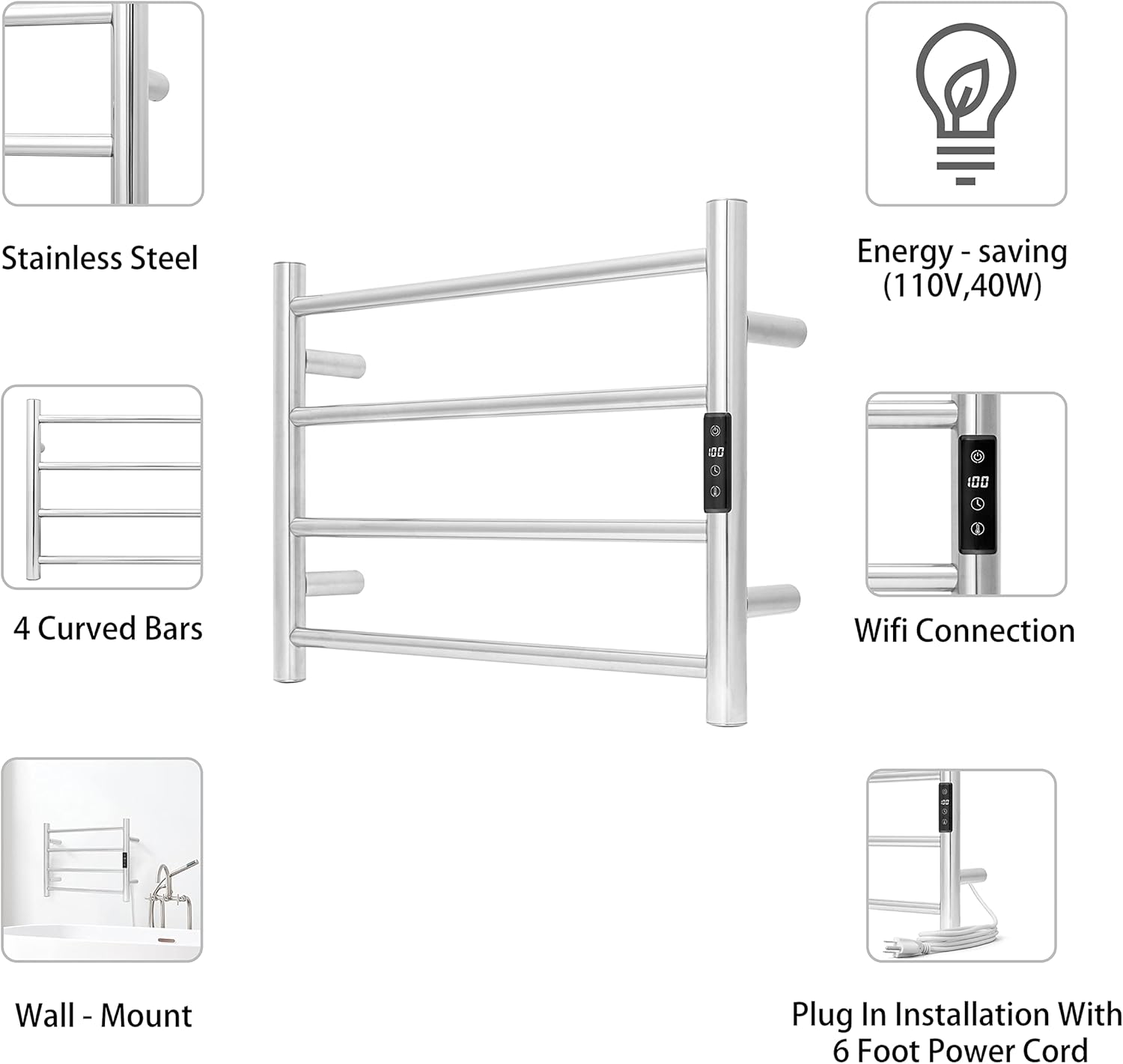
Image: An infographic detailing the key attributes of the towel warmer, including its stainless steel construction, four curved bars, WiFi capability, wall-mount design, energy efficiency (110V, 40W), and the convenience of a 6-foot plug-in power cord.
Specifications
| Feature | Detail |
|---|---|
| Product Dimensions | 22 x 17 x 2.5 inches |
| Item Weight | 5.59 pounds |
| Material | 304 Stainless Steel |
| Power | 40 Watts (110V) |
| Temperature Range | 100°F to 140°F |
| Timer Settings | 1 to 8 hours |
| Connectivity | 2.4GHz WiFi |
| Waterproof Standard | IP56 |
| Power Cord Length | 6 ft |
| Model Number | TW-Wifi-4BN |
| Country of Origin | China |

Image: A technical diagram illustrating the precise dimensions of the KEG Smart WiFi Towel Warmer, including overall height, width, and bar spacing, measured in inches.
Setup and Installation
The KEG Smart WiFi Towel Warmer supports both Plug-in and Hardwired installation. All necessary hardware and tools are included in the packaging.
Before Installation:
- Ensure the installation location is suitable for a wall-mounted appliance and can support its weight.
- For hardwired installation, ensure power is turned off at the circuit breaker before beginning.
- Gather basic tools such as a drill, level, measuring tape, and screwdriver.
Installation Steps (General):
- Determine the desired mounting height and location on the wall. Ensure it is away from direct water spray.
- Mark the drilling points for the mounting brackets using a pencil and a level. Refer to the provided template or measure carefully.
- Drill holes at the marked points. Insert wall anchors if drilling into drywall.
- Attach the mounting brackets securely to the wall.
- For hardwired installation, connect the electrical wiring according to local electrical codes. For plug-in, ensure the power cord can reach a standard 120V outlet.
- Mount the towel warmer onto the installed brackets. Secure it in place using the provided screws.
- Ensure all connections are secure and the unit is stable on the wall.

Image: A diagram explaining the towel warmer's heating mechanism, highlighting its rapid heating capability (reaching 104°F in 5 minutes), energy efficiency (40 Watts), built-in overheat protection, and WiFi connectivity.
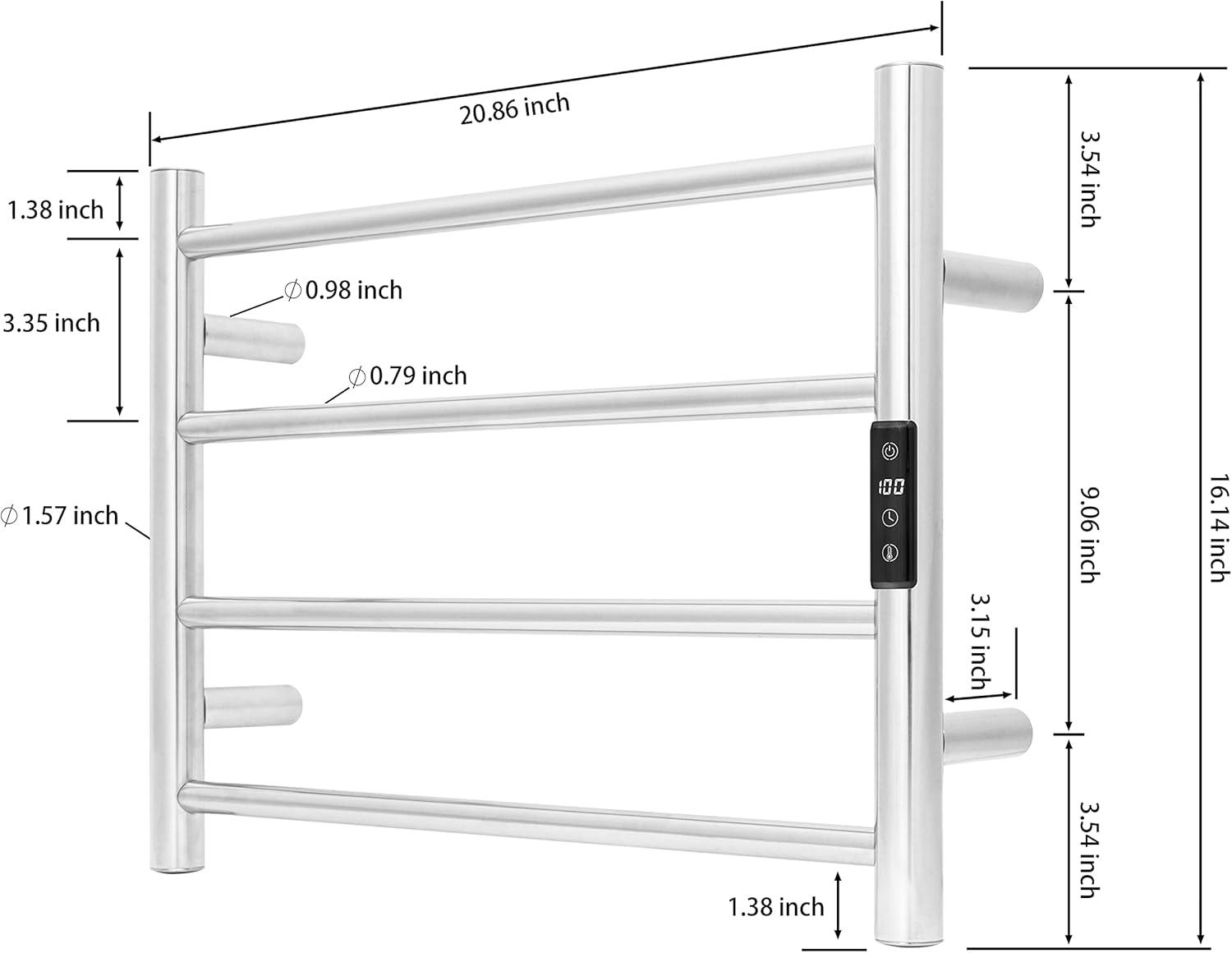
Image: The KEG Smart WiFi Towel Warmer elegantly mounted on a bathroom wall, positioned above a freestanding bathtub, demonstrating its aesthetic integration into a contemporary bathroom setting.
Operating Instructions
Manual Control (Touch Screen):
- Power On/Off: Press the power button on the touch screen to turn the unit on or off.
- Temperature Adjustment: Use the temperature control buttons to set the desired temperature between 100°F and 140°F.
- Timer Function: Press the timer button to cycle through available countdown timer settings (1 hour, 2 hours, 4 hours, 8 hours). The unit will automatically turn off after the set time.
Smart WiFi Control (SmartLife App):
- Download App: Download the "SmartLife" app from your smartphone's app store (iOS or Android).
- Register/Login: Create an account or log in to the SmartLife app.
- Add Device: Follow the in-app instructions to add a new device. Ensure your phone is connected to a 2.4GHz Wi-Fi network.
- Pairing: Put the towel warmer into pairing mode (refer to app instructions for specific steps, usually involves holding a button on the unit).
- Control: Once paired, you can control the towel warmer from anywhere, including turning it on/off, adjusting temperature, and setting smart schedules.
Voice Control (Alexa/Google Home):
- Link Account: In your Alexa or Google Home app, enable the "SmartLife" skill/service and link your SmartLife account.
- Discover Devices: Ask Alexa or Google to "discover devices."
- Voice Commands: You can now use voice commands to control your towel warmer, e.g., "Alexa, turn on the towel warmer," or "Hey Google, set towel warmer temperature to 120 degrees."
Maintenance and Care
- Cleaning: Always unplug the towel warmer before cleaning. Use a soft, damp cloth to wipe down the surface. Do not use abrasive cleaners, solvents, or harsh chemicals, as these may damage the finish.
- Regular Inspection: Periodically check the power cord for any signs of damage. Ensure all mounting screws are tight and the unit is securely fastened to the wall.
- Storage: If storing the towel warmer for an extended period, ensure it is clean and dry. Store in a cool, dry place.
Troubleshooting
| Problem | Possible Cause | Solution |
|---|---|---|
| Towel warmer does not turn on. | No power supply. | Check if the unit is properly plugged in or hardwired. Check the circuit breaker. |
| Unit is not heating. | Temperature setting too low or timer expired. | Increase the temperature setting. Check the timer setting and ensure it's active. |
| WiFi connection issues. | Incorrect Wi-Fi band (not 2.4GHz), weak signal, or incorrect pairing. | Ensure your router is broadcasting a 2.4GHz network. Move the unit closer to the router. Re-attempt the pairing process in the SmartLife app. |
| Towel warmer is not drying towels effectively. | Overloaded with too many towels, or towels are too thick/wet. | Do not overload the warmer. Ensure towels are wrung out before placing them on the warmer. Allow sufficient time for drying. |
Warranty and Support
For warranty information or technical support, please contact KEG customer service. Details can typically be found on the product packaging or the official KEG website. Please have your model number (TW-Wifi-4BN) and purchase date ready when contacting support.
For further assistance, you may also refer to the product page on Amazon: KEG Smart WiFi Towel Warmer on Amazon.
Related Documents - TW-Wifi-4BN
 |
SAMEAT TW-ST1912 Towel Warmer User Manual | Safety, Operation, and Specifications Comprehensive user manual for the SAMEAT TW-ST1912 Towel Warmer. Includes important safety instructions, operating guide, parts identification, timer settings, care instructions, product specifications, FCC information, and warranty details. |
 |
WarmlyYours Riviera Dual Connection Towel Warmer Installation and Operation Manual This manual provides comprehensive installation, operation, and safety guidelines for the WarmlyYours Riviera Dual Connection Towel Warmers, models TW-R09BS-HP and TW-R09PS-HP. It includes details on mounting, wiring, cleaning, specifications, and warranty information. |
 |
WarmlyYours Summit Dual Connection Towel Warmers: Installation & Operation Manual Comprehensive installation and operation manual for WarmlyYours Summit Dual Connection Towel Warmers, including safety guidelines, cleaning instructions, assembly steps, hardwired and plug-in installation, operation, specifications, and warranty information. |
 |
WarmlyYours Riviera Towel Warmer Installation Manual This manual provides installation and operation instructions for the WarmlyYours Riviera Towel Warmer. It covers safety information, cleaning, installation steps for both plug-in and hardwired models, and specifications. |
 |
WarmlyYours Infinity Towel Warmer: Installation Manual, Operation, and Specifications This document provides comprehensive installation, operation, safety, and specification details for the WarmlyYours Infinity Towel Warmer series, including models TW-F10BS-HP, TW-F10PS-HP, TW-F10KS-HP, and TW-F10GS-HP. It covers mounting, wiring, usage, and warranty information. |
 |
WarmlyYours Infinity Towel Warmer Installation Manual - Model Guide Comprehensive installation and operation manual for WarmlyYours Infinity Towel Warmers, including safety guidelines, parts list, assembly instructions, wiring diagrams, and warranty information for models TW-F10BS-HP, TW-F10PS-HP, TW-F10KS-HP, and TW-F10GS-HP. |