1. Introduction and Overview
Thank you for choosing the Powools Handheld Cordless Vacuum Cleaner AK-007A. This manual provides essential information for the safe and efficient operation, maintenance, and care of your new vacuum cleaner. Please read it thoroughly before first use and keep it for future reference.
The Powools Handheld Cordless Vacuum Cleaner is designed for versatile cleaning tasks in both home and car environments. Its lightweight and portable design, combined with powerful suction, makes it ideal for quick clean-ups of dirt, dust, and pet hair.
Key features include:
- Cordless Design: Offers freedom of movement for cleaning stairs, kitchens, cars, and hard-to-reach corners.
- Powerful Suction: Equipped with a strong motor for deep cleaning.
- Large-Capacity Battery: A 2,000mAh battery provides approximately 20 minutes of continuous use after a 2.5-3 hour charge, with over-charging protection.
- Improved HEPA Filter: Features an enhanced HEPA filter with a premium wrap to extend lifespan and prevent clogging.
- Bright LED Light: Illuminates dark areas to easily locate debris, pet hair, and tiny dust.
2. What's in the Box
Upon unpacking, please ensure all components are present and in good condition. The package should contain:
- Powools Handheld Cordless Vacuum Cleaner (Main Unit)
- Nozzle attachment
- Brush attachment
- Crevice tool
- HEPA Filter (pre-installed)
- Additional HEPA Filter
- Charging Cable/Adapter
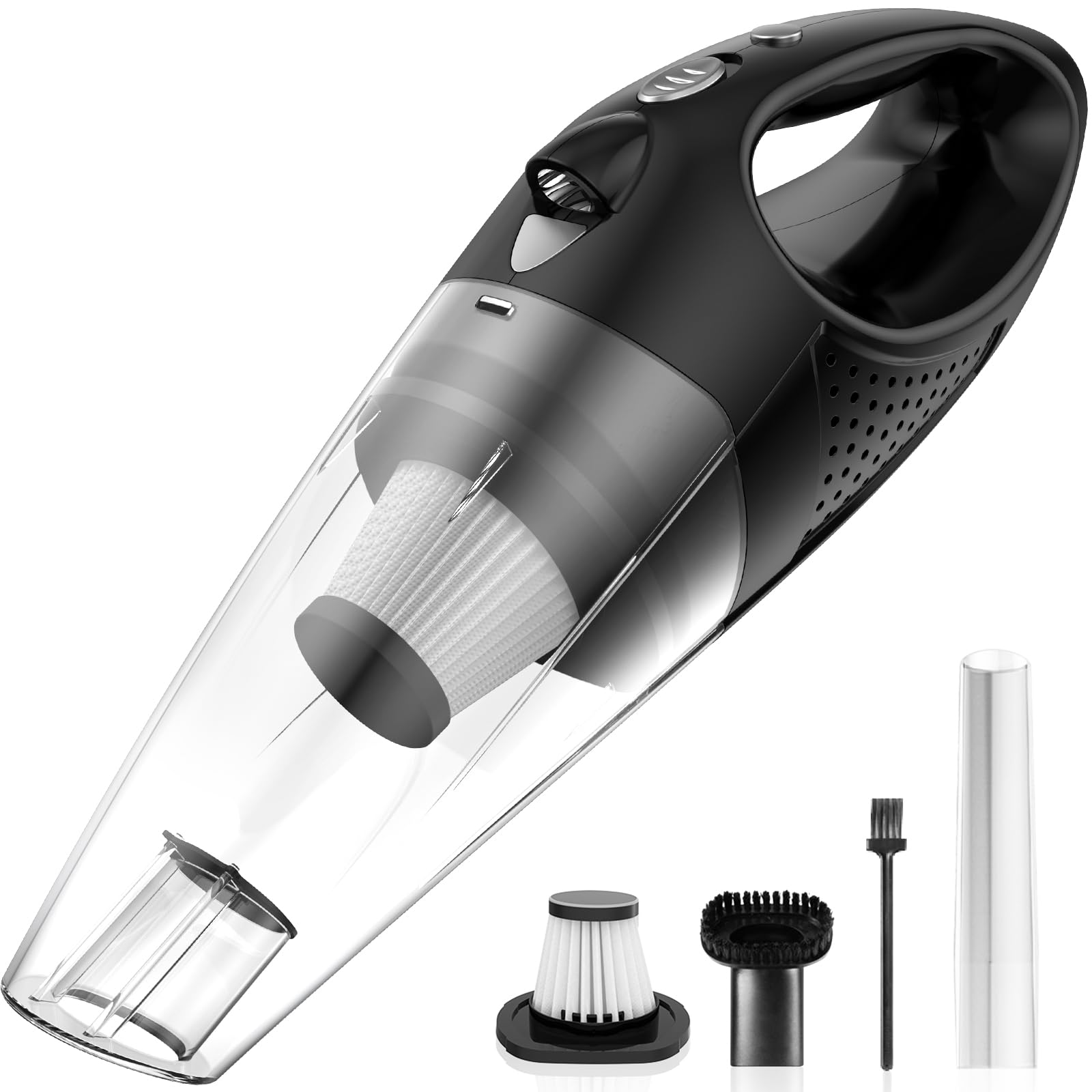
Figure 1: Powools Handheld Cordless Vacuum Cleaner with dimensions: 14.5 inches long and 4.6 inches wide.

Figure 2: Powools Handheld Cordless Vacuum Cleaner shown with its various attachments, including nozzles and brushes.
3. Setup
3.1 Initial Charging
- Before first use, fully charge the vacuum cleaner.
- Connect the charging cable to the charging port on the vacuum cleaner.
- Plug the adapter into a standard wall outlet.
- The charging indicator light will illuminate (color may vary, refer to specific product indicator).
- A full charge typically takes 2.5 to 3 hours. The indicator light will change or turn off once charging is complete.
- Unplug the charger once the battery is fully charged to ensure optimal battery life.
3.2 Attaching Accessories
To attach any accessory (nozzle, brush, crevice tool), align the accessory with the vacuum's suction opening and push firmly until it clicks into place. To remove, gently twist and pull the accessory off.
4. Operating Instructions
4.1 Powering On/Off
To turn the vacuum cleaner ON, slide the power button located on the handle to the 'ON' position. To turn it OFF, slide the button back to the 'OFF' position.
4.2 Using the LED Light
The vacuum cleaner features a bright LED light to assist with cleaning in dimly lit areas. The LED light can be activated or deactivated independently using its dedicated switch, typically located near the power button. This allows you to conserve battery power when the light is not needed.
4.3 Effective Cleaning Tips
- For general debris, use the main nozzle.
- For tight spaces, corners, or between car seats, attach the crevice tool.
- For upholstery, pet hair on fabrics, or delicate surfaces, use the brush attachment.
- Ensure the dustbin is not overfilled for optimal suction performance.
5. Maintenance
Regular maintenance ensures the longevity and performance of your Powools Handheld Cordless Vacuum Cleaner.
5.1 Emptying the Dustbin
- Ensure the vacuum cleaner is turned OFF.
- Locate the dustbin release button (usually near the handle or main body).
- Press the release button and detach the dustbin from the main unit.
- Hold the dustbin over a trash receptacle and empty its contents.
- Reattach the dustbin to the main unit, ensuring it clicks securely into place.
5.2 Cleaning the HEPA Filter
The HEPA filter is washable and reusable. Clean it regularly to maintain suction power.
- Remove the dustbin as described above.
- Carefully remove the HEPA filter from inside the dustbin.
- Tap the filter gently over a trash can to dislodge loose dust and debris.
- Rinse the filter under cool, running water until the water runs clear. Do not use hot water or detergents.
- Allow the filter to air dry completely for at least 24 hours before reinserting it into the dustbin. Ensure it is completely dry to prevent damage to the motor.
- Replace the filter and dustbin.
It is recommended to replace the HEPA filter every 3-6 months, or more frequently with heavy use, to ensure optimal performance. An additional filter is included for your convenience.
6. Specifications
| Feature | Specification |
|---|---|
| Brand | Powools |
| Model Name | AK-007A |
| Special Feature | Cordless |
| Filter Type | HEPA Filter |
| Included Components | Nozzle, Battery, HEPA Filter, Crevice tool, Brush |
| Capacity | 0.45 Liters |
| Wattage | 100 watts |
| Charging Time | 2.75 Hours |
| Form Factor | Handheld |
| Color | Silver |
| Product Dimensions | 14.5"L x 4.6"W x 4"H |
| Battery Description | Lithium-Ion |
| Noise Level | 75 Decibels |
| Battery Life | 20 minutes |
| Power Source | Battery Powered |
7. Troubleshooting
If you encounter any issues with your Powools Handheld Cordless Vacuum Cleaner, please refer to the following common troubleshooting steps:
- No Power/Not Turning On:
- Ensure the battery is fully charged. Connect the charger and allow the unit to charge for the recommended 2.5-3 hours.
- Check the power button to ensure it is fully slid to the 'ON' position.
- Weak Suction:
- Empty the dustbin. A full dustbin can significantly reduce suction power.
- Clean the HEPA filter. A clogged filter restricts airflow. Ensure it is completely dry before reinserting.
- Check for any blockages in the nozzle or the vacuum's intake opening.
- Charging Indicator Issues:
- If the charging indicator light behaves erratically (e.g., turns green too quickly or doesn't indicate a full charge after the recommended time), ensure the charging cable and adapter are securely connected to both the vacuum and the power outlet.
- Verify that the power outlet is functional.
If these steps do not resolve the issue, please contact Powools customer support for further assistance.
8. Warranty and Support
The Powools Handheld Cordless Vacuum Cleaner AK-007A comes with a 2-year warranty. This warranty covers defects in materials and workmanship under normal use. Please retain your proof of purchase for warranty claims.
For warranty service, technical support, or any questions regarding your product, please contact Powools customer service through the contact information provided on your product packaging or the official Powools website.


