
1. Introduction
Thank you for choosing the Hyper Tough 20-Inch Drum Fan, Model SFDE-500B3-1. This powerful and versatile fan is engineered with a sealed motor and durable metal construction to provide efficient air circulation in various indoor settings, including homes, offices, workshops, and garages. Its pivoting head and 3-speed settings allow for customized airflow to meet your cooling and ventilation needs. Please read this manual thoroughly before operation to ensure safe and proper use.

Figure 1: Hyper Tough 20-Inch Drum Fan (SFDE-500B3-1)
This image shows the Hyper Tough 20-Inch Drum Fan from an angled front view, highlighting its robust black metal frame and five bright red fan blades. The fan is designed for floor placement, supported by a sturdy U-shaped stand.
2. Setup and Installation
2.1 Unpacking
- Carefully remove the fan and all packaging materials from the box.
- Inspect the fan for any signs of damage during transit. Do not operate if damaged.
- Ensure all components are present: fan unit, stand, and any included mounting hardware (if applicable for wall mount).
2.2 Placement Options
The Hyper Tough Drum Fan offers versatile placement options:
- Floor Placement: Position the fan on a stable, flat surface. The sturdy U-shaped stand provides excellent stability.
- Wall Mounting: The fan can be wall-mounted for elevated air circulation. Ensure the wall is capable of supporting the fan's weight and use appropriate mounting hardware (not always included, check packaging).

Figure 2: Front View of the Fan
This image provides a direct front view of the Hyper Tough 20-Inch Drum Fan, showcasing the protective metal grille and the red fan blades. The fan's robust construction is evident, designed for efficient airflow.
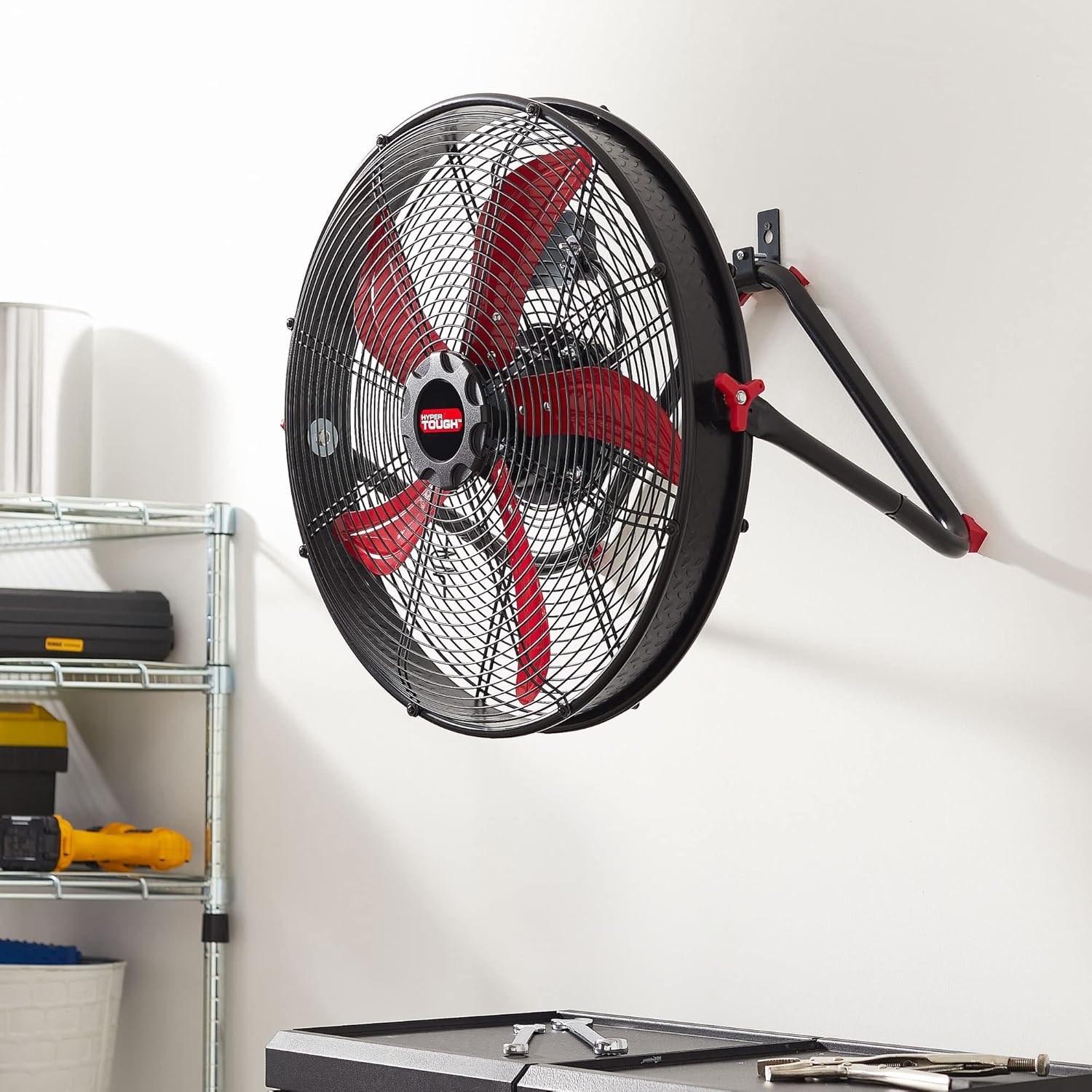
Figure 3: Wall-Mounted Fan
This image demonstrates the Hyper Tough 20-Inch Drum Fan installed on a wall, showing its versatility beyond floor placement. The fan is angled downwards, suggesting its pivoting head feature for directing airflow.
2.3 Pivoting Head Adjustment
The fan features a pivoting head that allows you to direct airflow precisely where needed. To adjust the angle:
- Loosen the adjustment knobs located on both sides of the fan frame.
- Tilt the fan head to the desired upward or downward angle.
- Tighten the adjustment knobs securely to lock the fan head in place.
3. Operating Instructions
3.1 Power Connection
Before operating, ensure the fan is properly connected to a standard electrical outlet (NEMA 1-15). The fan operates on 60 watts.
3.2 Speed Control
The Hyper Tough Drum Fan features a 3-speed rotary switch located on the back of the motor housing. To select a speed setting:
- Turn the rotary knob to "1" for low speed.
- Turn the rotary knob to "2" for medium speed.
- Turn the rotary knob to "3" for high speed.
- Turn the rotary knob to "0" or "OFF" to turn the fan off.

Figure 4: Speed Control Knob Location
This image displays the rear view of the Hyper Tough 20-Inch Drum Fan, specifically highlighting the speed control knob located on the motor housing. The knob is clearly marked with settings 0, 1, 2, and 3 for off, low, medium, and high speeds, respectively.
4. Maintenance
Regular maintenance ensures optimal performance and longevity of your fan.
4.1 Cleaning
- Always unplug the fan from the power outlet before cleaning.
- Use a soft, damp cloth to wipe down the exterior surfaces of the fan.
- To clean the fan blades and inside the grille, use a vacuum cleaner with a brush attachment or compressed air to remove dust and debris. Do not use water directly on the motor or electrical components.
- Ensure the fan is completely dry before plugging it back in.
4.2 Storage
When not in use for extended periods, store the fan in a cool, dry place, away from direct sunlight and moisture. It is recommended to cover the fan to protect it from dust.
5. Troubleshooting
| Problem | Possible Cause | Solution |
|---|---|---|
| Fan does not turn on. | Not plugged in; Power outlet not working; Speed control knob is off. | Ensure the power cord is securely plugged into a working outlet. Test the outlet with another device. Turn the speed control knob to a numbered setting (1, 2, or 3). |
| Reduced airflow. | Dust buildup on blades or grille. | Unplug the fan and clean the blades and grille as described in the Maintenance section. |
| Unusual noise or vibration. | Loose parts; Fan not on a stable surface; Obstruction in fan blades. | Check for any loose screws or components and tighten them. Ensure the fan is placed on a firm, level surface. Unplug the fan and check for any foreign objects caught in the blades or grille. |
6. Specifications
- Brand: Hyper Tough
- Model: SFDE-500B3-1
- Electric Fan Design: Floor Fan
- Product Dimensions: 11.22"D x 23.43"W x 23.43"H
- Blade Length: 20 Inches
- Number of Power Levels: 3
- Wattage: 60 watts
- Main Power Connector Type: NEMA 1-15
- Item Weight: 18.36 pounds
- Blade Material: Plastic
- Indoor/Outdoor Usage: Indoor
- Special Feature: High Velocity
- Color: Black & Red
7. Warranty and Support
This product is offered as a renewed item. For specific warranty details and support, please refer to the terms and conditions provided by the retailer or the "Amazon Renewed" program at the time of purchase. Additional protection plans may be available for extended coverage.
For further assistance or inquiries, please contact the customer support channels provided by your point of purchase.
8. Product Videos
No official seller videos are available for this product at this time.