
1. Introduction
Thank you for choosing the FREEZE2TRIM Secure Lite Cam Light Bulb Security Camera. This manual provides essential information for the proper installation, operation, and maintenance of your device. Please read this manual thoroughly before use and retain it for future reference.
2. Safety Information
- Ensure the power is off before installing or removing the camera from any light socket.
- This camera is designed for use with standard E27 light sockets. Do not force it into incompatible sockets.
- The camera is rated IP54 for international protection, indicating resistance to dust and splashing water. It is suitable for outdoor use in sheltered locations but should not be submerged in water or exposed to heavy rain.
- Operate the device within the specified temperature and humidity ranges.
- Keep the device away from strong magnetic fields or sources of interference.
- Do not attempt to disassemble or repair the camera yourself. Contact customer support for assistance.
3. Product Overview
3.1 Package Contents
- Secure Lite Cam Light Bulb Security Camera
- Wall Mount (optional accessory for alternative mounting)
- User Manual (this document)
3.2 Camera Components
Familiarize yourself with the various parts of your Secure Lite Cam:
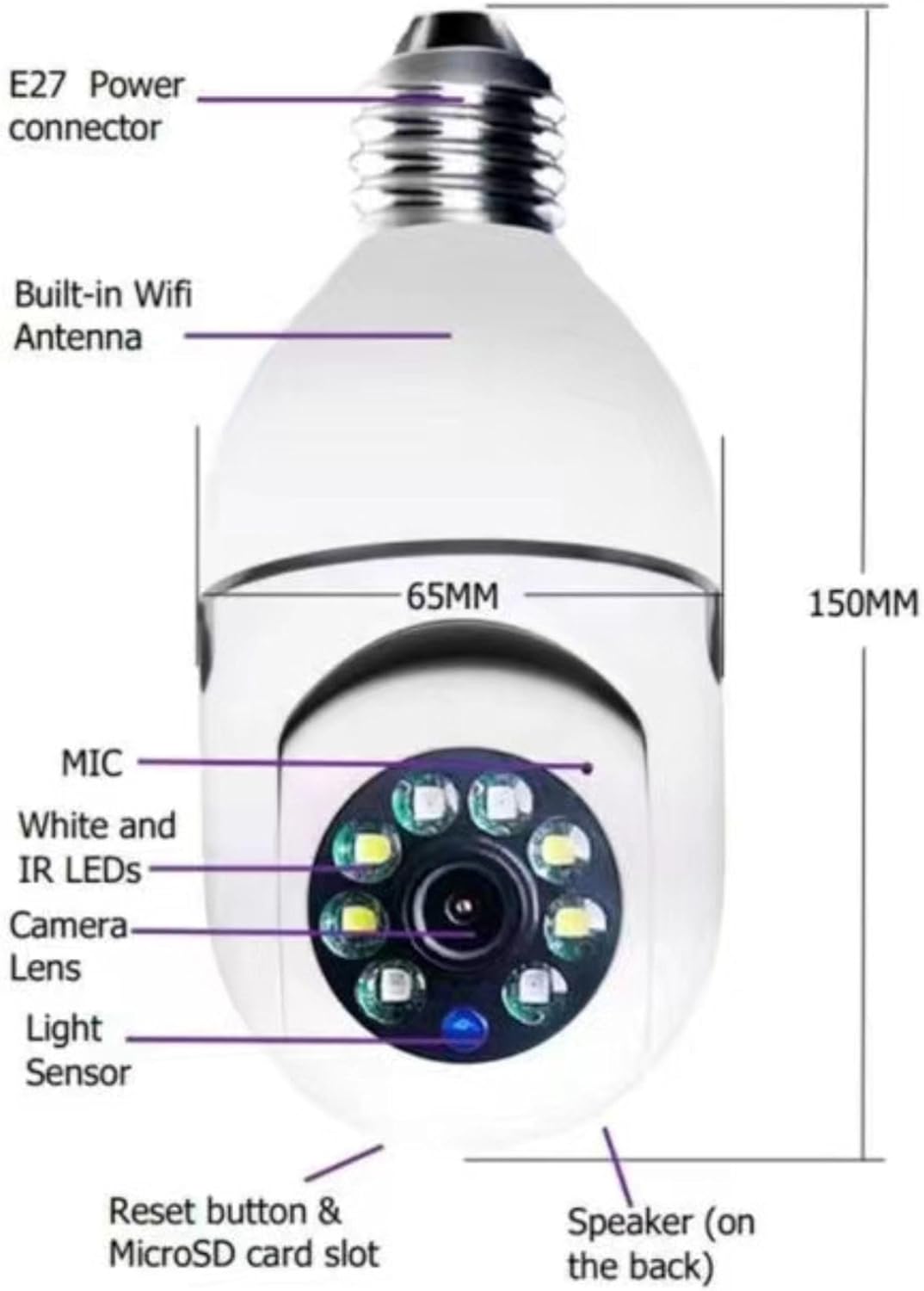
Figure 1: Camera Components Diagram
A technical diagram outlining the various parts of the camera, including its E27 power connector for standard light sockets, integrated WiFi antenna, microphone, white and infrared LEDs for illumination and night vision, camera lens, light sensor, reset button, MicroSD card slot for local storage, and speaker for two-way audio.
- E27 Power Connector: Standard screw-in base for light sockets.
- Built-in WiFi Antenna: For wireless network connectivity.
- MIC: Microphone for audio input during two-way communication and recording.
- White and IR LEDs: Provide illumination for night vision and can function as a light source.
- Camera Lens: Captures 1080P FHD video.
- Light Sensor: Detects ambient light levels to automatically switch between day and night modes.
- Reset Button & MicroSD Card Slot: Located on the back, used for resetting the device and inserting a MicroSD card for local storage (card not included).
- Speaker: For audio output during two-way communication.
3.3 Key Features

Figure 2: Key Features Overview
An illustration detailing the primary features of the Secure Lite Cam, including its 1080P 360° panoramic view, two-way audio communication, wireless connectivity, ease of installation, night vision capabilities, and real-time motion tracking with alerts.
- 1080P FHD Video: High-definition video capture for clear images.
- 360° Panoramic View: Wide-angle lens combined with pan/tilt functionality for comprehensive coverage.
- Day and Night Vision: Automatic switching between color day vision and infrared night vision.
- Two-Way Audio: Built-in microphone and speaker for real-time communication.
- Motion Tracking & Alerts: Detects movement and sends real-time notifications to your smartphone.
- Wireless Connectivity: Connects to your home network via 2.4 GHz WiFi.
- Local Storage: Supports Micro SD card (up to 128GB, not included) for video recording.
- VI365 Smart App: Remote control and monitoring via a dedicated smartphone application.
4. Setup Guide
4.1 App Installation
- Download the VI365 Smart App from the Apple App Store (for iOS devices) or Google Play Store (for Android devices). Search for "VI365".
- Install the app on your smartphone.
- Open the app and follow the on-screen instructions to create a new account or log in if you already have one.
4.2 Device Installation
The Secure Lite Cam is designed for easy installation into a standard E27 light socket. Ensure the power to the socket is OFF before proceeding.

Figure 3: Indoor Installation Example
The camera is shown discreetly installed within a kitchen light fixture, demonstrating its integration into a home environment for indoor surveillance.
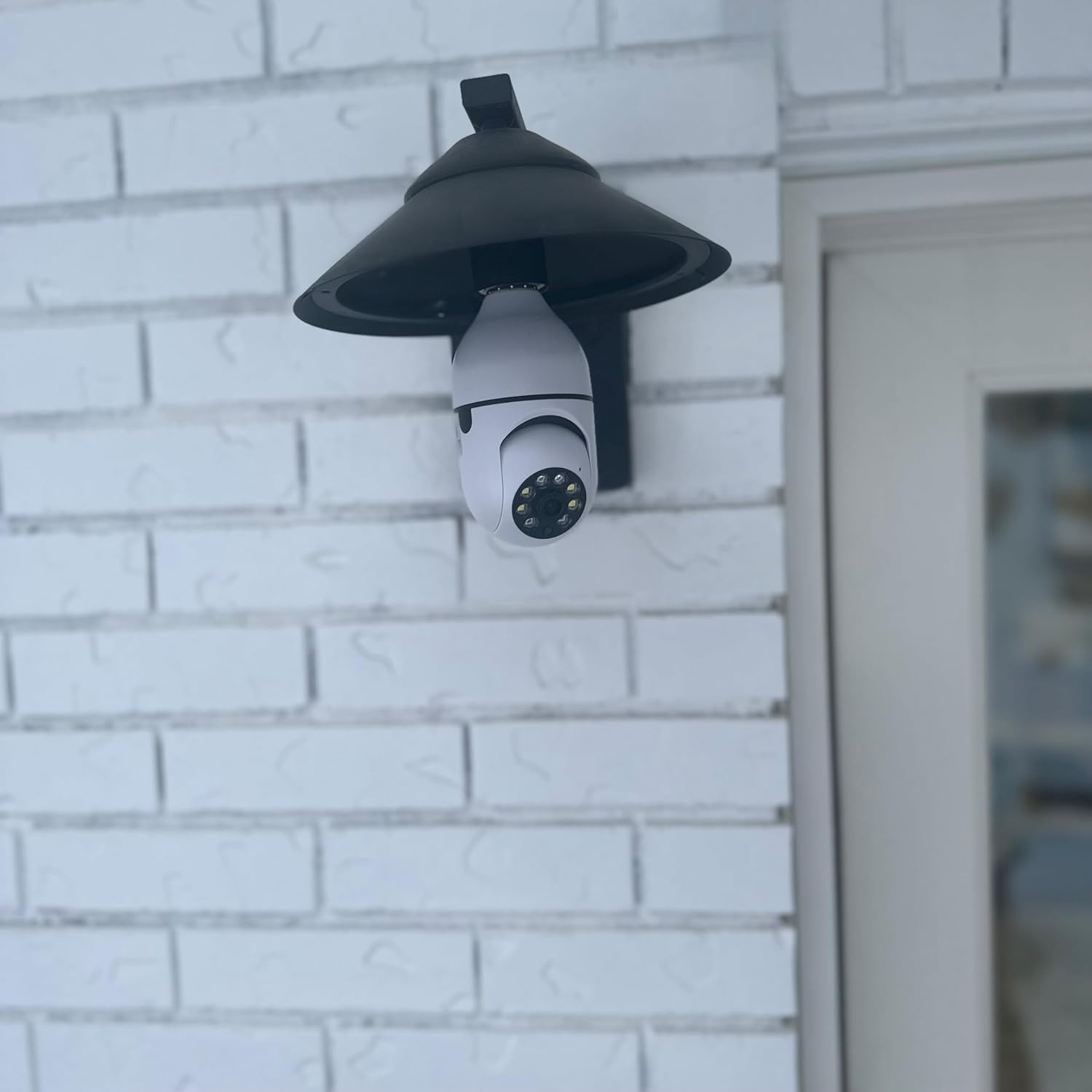
Figure 4: Outdoor Installation Example
This image illustrates the camera's outdoor installation in a wall-mounted light fixture, highlighting its suitability for monitoring exterior areas of a property.
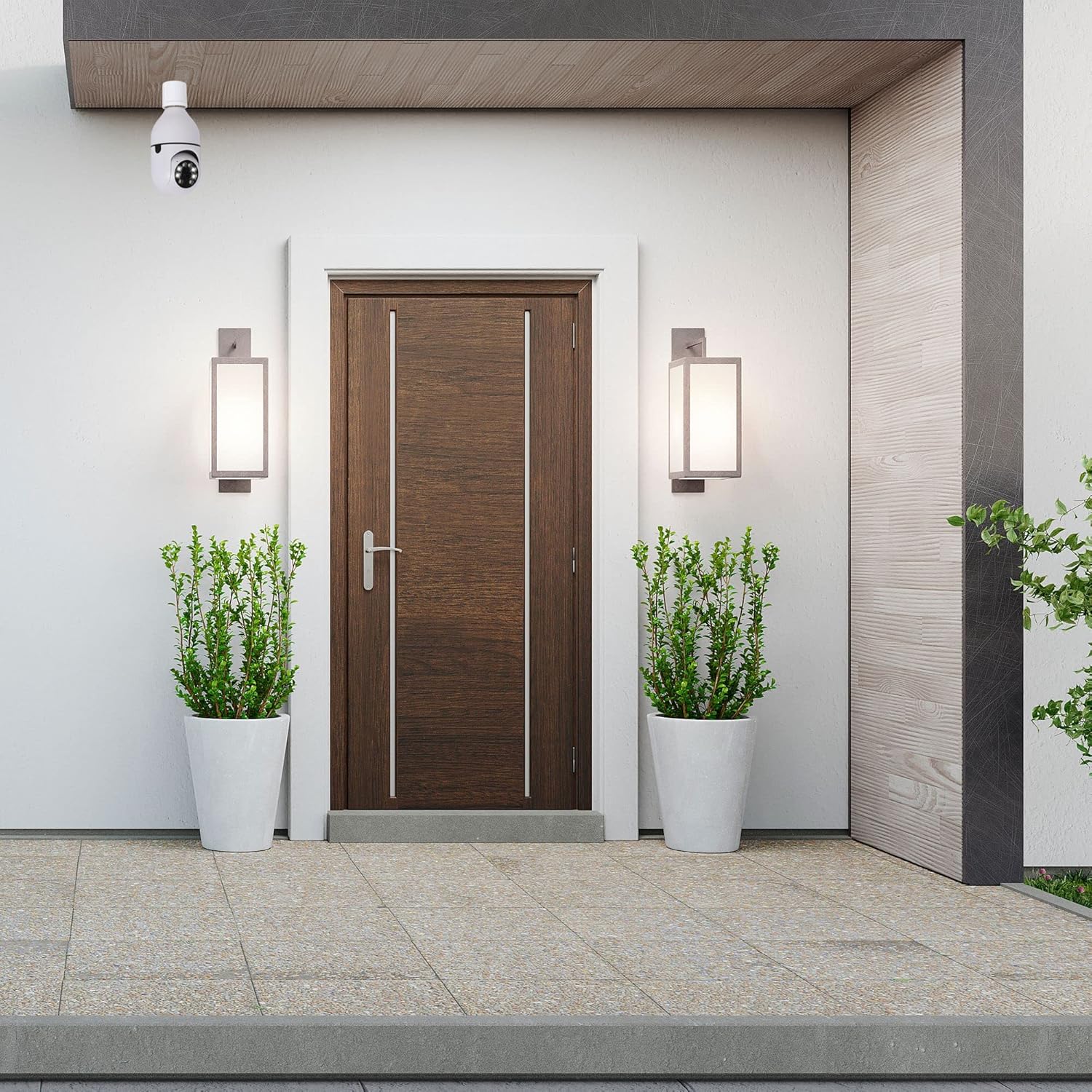
Figure 5: Front Door Surveillance Example
The camera is positioned above a residential front door, showcasing its use for monitoring entry points and enhancing home security.
- Locate an E27 light socket in your desired monitoring area (indoor or sheltered outdoor).
- Ensure the power to the light socket is completely OFF at the circuit breaker.
- Carefully screw the Secure Lite Cam into the E27 socket until it is snug. Do not overtighten.
- If using a Micro SD card for local storage, insert it into the designated slot before powering on the device.
- Turn the power back ON at the circuit breaker. The camera will power on and initiate its startup sequence.
4.3 Network Connection & Pairing
The camera only supports 2.4 GHz WiFi networks. Ensure your smartphone is connected to a 2.4 GHz WiFi network during the pairing process.

Figure 6: Camera and App Interface
This image displays the Secure Lite Cam Light Bulb Security Camera alongside a smartphone, illustrating the camera's compact design and the user interface of the VI365 Smart App for remote control and monitoring.
- Once powered on, the camera will enter pairing mode (indicated by a specific light pattern or voice prompt).
- Open the VI365 Smart App on your smartphone.
- Tap the "+" icon or "Add Device" to begin the pairing process.
- Select your camera model from the list or choose the appropriate pairing method (e.g., QR code scan, AP mode).
- Follow the in-app instructions to connect the camera to your 2.4 GHz WiFi network. You will need to enter your WiFi password.
- Once successfully connected, the camera will confirm with a voice prompt, and its status indicator light will change.
- You can now name your camera and begin monitoring.
5. Operating Instructions
5.1 Live View and Remote Access
Access your camera's live feed from anywhere using the VI365 Smart App.

Figure 7: Remote Monitoring on Tablet
This image depicts a user accessing live camera feeds from multiple Secure Lite Cams on a tablet, emphasizing the convenience of remote monitoring from anywhere.
- Open the VI365 Smart App and select your camera from the device list.
- The live video feed will appear. You can switch between standard definition (SD) and high definition (HD) for optimal viewing based on your network speed.
5.2 Pan and Tilt Control
The camera offers 360° horizontal pan and 90° vertical tilt capabilities.

Figure 8: Pan and Tilt Functionality
This image shows the camera's ability to pan 360 degrees horizontally and tilt 90 degrees vertically, allowing for comprehensive area coverage. The smartphone screen displays the live feed and control options within the VI365 Smart App.
- In the live view interface of the app, use the directional controls (usually a joystick or arrow icons) to adjust the camera's viewing angle.
5.3 Two-Way Audio
Communicate with people near the camera using the two-way audio feature.

Figure 9: Two-Way Audio Communication
An illustration demonstrating the two-way audio function, allowing users to communicate remotely through the camera using their smartphone, useful for interacting with family members or pets.
- In the live view, tap the microphone icon to speak through the camera's speaker. Release the icon to listen.
5.4 Motion Detection and Alerts
Receive instant notifications when motion is detected.
- Navigate to the camera settings in the VI365 Smart App.
- Enable "Motion Detection" and adjust sensitivity levels as needed.
- Configure alert settings, including notification frequency and schedule.
5.5 Recording and Playback
Record video footage to a Micro SD card for later review.
- Ensure a Micro SD card (up to 128GB, not included) is inserted into the camera.
- In the app settings, configure recording options (e.g., continuous recording, event-triggered recording).
- To view recorded footage, go to the playback section in the app and select the desired date and time.
5.6 Night Vision
The camera automatically switches to night vision in low-light conditions.

Figure 10: 1080p and Night Vision
This image highlights the camera's 1080p high-definition video quality and its night vision feature, ensuring clear monitoring both day and night in a typical home environment.
- The camera's light sensor detects ambient light and activates infrared (IR) LEDs for clear black-and-white video in darkness.
- The white LEDs can also be manually activated via the app to provide color night vision or act as a deterrent.
6. Maintenance
- Cleaning: Gently wipe the camera lens and body with a soft, dry cloth. Do not use harsh chemicals or abrasive cleaners.
- Firmware Updates: Regularly check the VI365 Smart App for available firmware updates to ensure optimal performance and security.
- Storage: If storing the camera for an extended period, remove the Micro SD card, power off the device, and store it in a cool, dry place.
7. Troubleshooting
| Problem | Possible Solution |
|---|---|
| Camera does not power on. | Ensure the light socket has power and the camera is screwed in correctly. Check the circuit breaker. |
| Unable to connect to WiFi. | Verify your WiFi network is 2.4 GHz. Ensure your phone is connected to the 2.4 GHz network during setup. Check WiFi password. Move the camera closer to the router. Reset the camera and try pairing again. |
| App cannot find the camera. | Ensure the camera is in pairing mode. Check your phone's network connection. Try resetting the camera. |
| Motion alerts are too frequent/infrequent. | Adjust the motion detection sensitivity in the app settings. Configure alert schedules. |
| Video quality is poor. | Switch to HD mode in the app. Ensure a stable and strong WiFi signal. Clean the camera lens. |
| Two-way audio not working. | Check microphone and speaker permissions for the app on your phone. Ensure volume is up on both ends. |
| Micro SD card not recording. | Ensure the Micro SD card is inserted correctly and formatted within the app. Check recording settings. The card may be full or faulty. |
8. Specifications
- Model: 360 Bulb Cam
- Brand: FREEZE2TRIM
- Video Resolution: 1080P FHD
- Connectivity: Wireless (Wi-Fi 2.4 GHz only)
- Power Source: Corded Electric (E27 Power Connector)
- Pan/Tilt: 360° Horizontal, 90° Vertical
- Storage: Micro SD Card (up to 128GB, not included)
- Audio: Two-Way Audio (Built-in MIC and Speaker)
- Night Vision: Infrared (IR) and White LEDs
- Motion Detection: Yes, with real-time alerts
- App Compatibility: VI365 Smart App (iOS, Android)
- Indoor/Outdoor Usage: Indoor / Sheltered Outdoor (IP54 rated)
- Dimensions (L x W x H): 6.3 x 2.75 x 2.5 inches
- Item Weight: 8.1 ounces
- UPC: 860008919076
9. Warranty and Support
For warranty information, technical support, or any questions regarding your FREEZE2TRIM Secure Lite Cam Light Bulb Security Camera, please contact the seller or manufacturer directly through your purchase platform. Please refer to your purchase documentation for specific contact details.