
1. Introduction
The ZGOOD JT-26B Lab Digital Double Impeller Dust Collector is designed for efficient dust extraction in laboratory environments. This unit is suitable for use with various equipment such as sandblasters, lathes, grinders, and workstations. It features a 550W bilobed wheel motor, providing strong power, high efficiency, and low noise operation. The device incorporates voltage stepless regulation and an automatic time system for carbon brush abradability, including a prewarning system to protect the motor and extend its service life.
2. Safety Instructions
- Always ensure the power supply matches the voltage specified on the unit (220V/110V 50/60Hz).
- Do not operate the dust collector in wet conditions or near flammable liquids or gases.
- Keep hands, hair, and loose clothing away from moving parts and suction inlets during operation.
- Regularly inspect the power cord for damage. Do not use if the cord is damaged.
- Disconnect the power supply before performing any maintenance, cleaning, or when replacing parts.
- Ensure proper ventilation in the work area.
- This appliance is not intended for use by persons (including children) with reduced physical, sensory or mental capabilities, or lack of experience and knowledge, unless they have been given supervision or instruction concerning use of the appliance by a person responsible for their safety.
3. Parts Included
Please check the package contents upon receipt to ensure all parts are present:
- Dust Collector Machine × 1
- User Manual × 1
- Power Cord × 1
- Fuse × 2
- Dust Pipe × 1
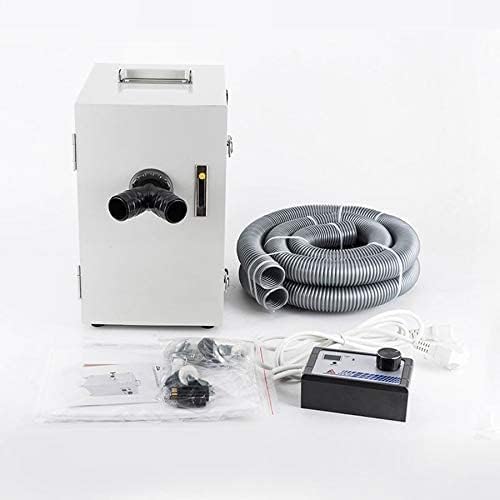
Figure 1: ZGOOD JT-26B Dust Collector with accessories.
4. Setup
4.1 Unpacking
Carefully remove the dust collector and all accessories from the packaging. Retain the packaging for future transport or storage.
4.2 Connecting the Dust Pipe
- Locate the dust pipe connection port(s) on the rear of the unit. The JT-26B features a "Y" type suction inlet, allowing for connection to two separate workstations simultaneously.
- Attach the provided dust pipe(s) securely to the inlet port(s).
- Connect the other end of the dust pipe(s) to your sandblaster, lathe, grinder, or workstation's dust extraction outlet.
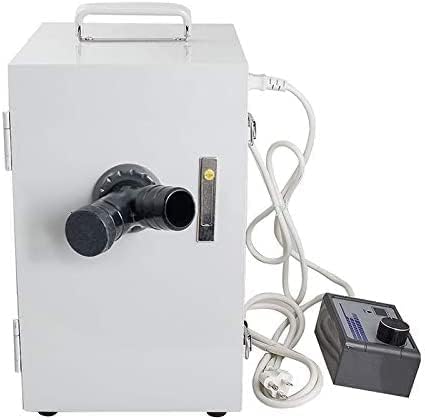
Figure 2: Rear view with Y-type suction inlet.
4.3 Power Connection
- Ensure the dust collector's power switch is in the "OFF" position.
- Connect the power cord to the power inlet on the unit.
- Plug the power cord into a grounded electrical outlet that matches the specified voltage (220V or 110V).
5. Operating Instructions
5.1 Powering On/Off
To power on the unit, flip the main power switch to the "ON" position. To power off, flip the switch to "OFF".
5.2 Adjusting Suction Power
The JT-26B features voltage stepless regulation. Use the control knob on the external control box to adjust the suction power as needed for your application. Turn the knob clockwise to increase suction and counter-clockwise to decrease it.
5.3 Carbon Brush Monitoring System
This dust collector is equipped with an automatic time system for carbon brush abradability and a prewarning system. When the carbon brush wear approaches a critical point, the system will automatically trigger an alarm and cut off the power supply. This feature protects the motor from damage and extends its operational lifespan. When the alarm sounds, it indicates that the carbon brushes require inspection and potential replacement.
5.4 Dual Workstation Use
The "Y" type suction inlet allows two users to work simultaneously, connecting two separate dust-generating devices to the single dust collector.
6. Maintenance
Regular maintenance ensures optimal performance and extends the life of your dust collector. Always disconnect the power before performing any maintenance.
6.1 Dust Bag Replacement
- Open the front door of the dust collector.
- Carefully remove the full dust bag.
- Install a new dust bag, ensuring it is properly seated and sealed within the compartment.
- Close the front door securely.
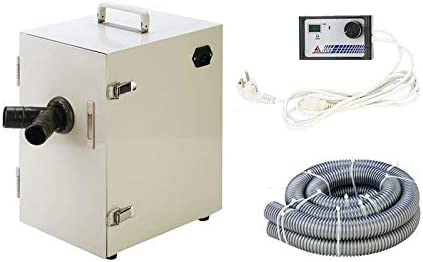
Figure 3: Interior view with filter and dust bag.
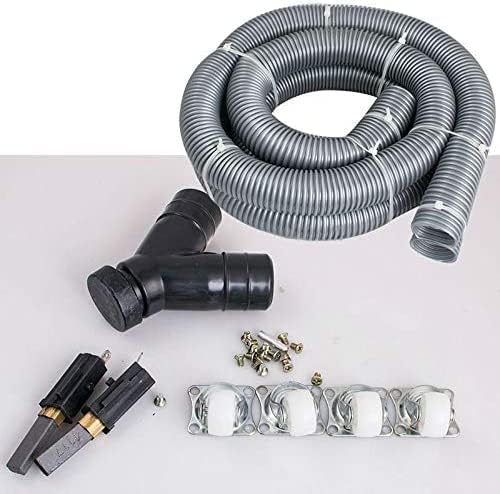
Figure 4: Replacement dust bag.
6.2 Filter Cleaning/Replacement
The internal filter should be regularly inspected and cleaned to maintain optimal suction. Depending on usage, the filter may need to be replaced periodically. Refer to the filter manufacturer's guidelines for cleaning and replacement intervals.
6.3 Carbon Brush Inspection/Replacement
When the prewarning system activates, it indicates that the carbon brushes are nearing the end of their service life. Disconnect power and consult a qualified technician or the manufacturer's support for carbon brush inspection and replacement to prevent motor damage.
6.4 General Cleaning
Wipe the exterior of the unit with a soft, damp cloth. Do not use abrasive cleaners or solvents.
7. Troubleshooting
| Problem | Possible Cause | Solution |
|---|---|---|
| Unit does not power on | No power supply Power cord damaged Fuse blown | Check power outlet and connections Inspect power cord, replace if damaged Replace fuse (refer to specifications for type) |
| Low suction power | Dust bag full Filter clogged Dust pipe obstructed Suction power knob set too low | Replace dust bag Clean or replace filter Check and clear dust pipe Adjust suction power knob clockwise |
| Unit stops unexpectedly / Alarm sounds | Carbon brushes worn out | Disconnect power. Inspect and replace carbon brushes. Contact support if unsure. |
| Excessive noise | Foreign object in impeller Motor issue | Disconnect power and inspect for obstructions. If noise persists, contact support. |
8. Specifications
| Feature | Detail |
|---|---|
| Model | JT-26B |
| Power Supply | 220V/110V 50/60Hz |
| Power Consumption | 550W |
| Max. Pressure | 26kPa |
| Max. Vacuum | -16kPa |
| Max. Noise | <50dB |
| Diameter of Dust Pipe | 4cm |
| Airflow Rate | 120m³/h |
| Item Weight | 10 Pounds |
| Dimensions (Approx.) | 3 x 3 x 3 inches (Package Dimensions) |
| Color | Silver |
| Recommended Use | Indoor |
9. Warranty and Support
For warranty information, technical support, or service inquiries, please contact your retailer or the manufacturer directly. Please have your model number (JT-26B) and purchase date available when contacting support.