
Introduction
This manual provides detailed instructions for the setup, operation, and maintenance of your SMAHEAT 1.0-inch 9-bit Red LED Countdown Clock. This versatile device functions as a real-time clock, countdown timer, and up-timer, suitable for various environments and time management needs.
Product Features
- Multi-functional Display: Bright red 1.0-inch LED numbers for clear visibility. Functions include real-time clock (12/24 hour), countdown timer, and up-timer.
- Extensive Timing Range: Supports countdowns and up-timers from 000 days 00:00:00 up to 999 days 59:59:59.
- Adjustable Brightness: 5 levels of brightness adjustment for optimal viewing in different lighting conditions.
- Built-in Buzzer: Integrated buzzer for alerts, controllable via remote.
- Durable Construction: The clock case is made of sturdy and durable aluminum alloy.
- Remote Control Operation: All functions are easily set and controlled using the included wireless remote control.
Package Contents
The SMAHEAT LED Countdown Clock package includes:
- 1x SMAHEAT 1.0-inch 9-bit Red LED Countdown Clock
- 1x 100-240V AC input 6V DC output power adapter
- 1x Wireless Remote Control (requires 2x AAA batteries, not included)
- 1x Product Manual
- Wall mount brackets and screws
Setup
1. Power Connection
Connect the provided 6V DC power adapter to the clock's power input port and then plug the adapter into a standard 100-240V AC outlet. The clock will power on automatically.
2. Remote Control Battery Installation
Insert 2x AAA batteries (not included) into the remote control. Ensure correct polarity.
3. Mounting Options
The clock can be installed on a wall using the included wall mount brackets and screws, or placed on a table or other flat surface.
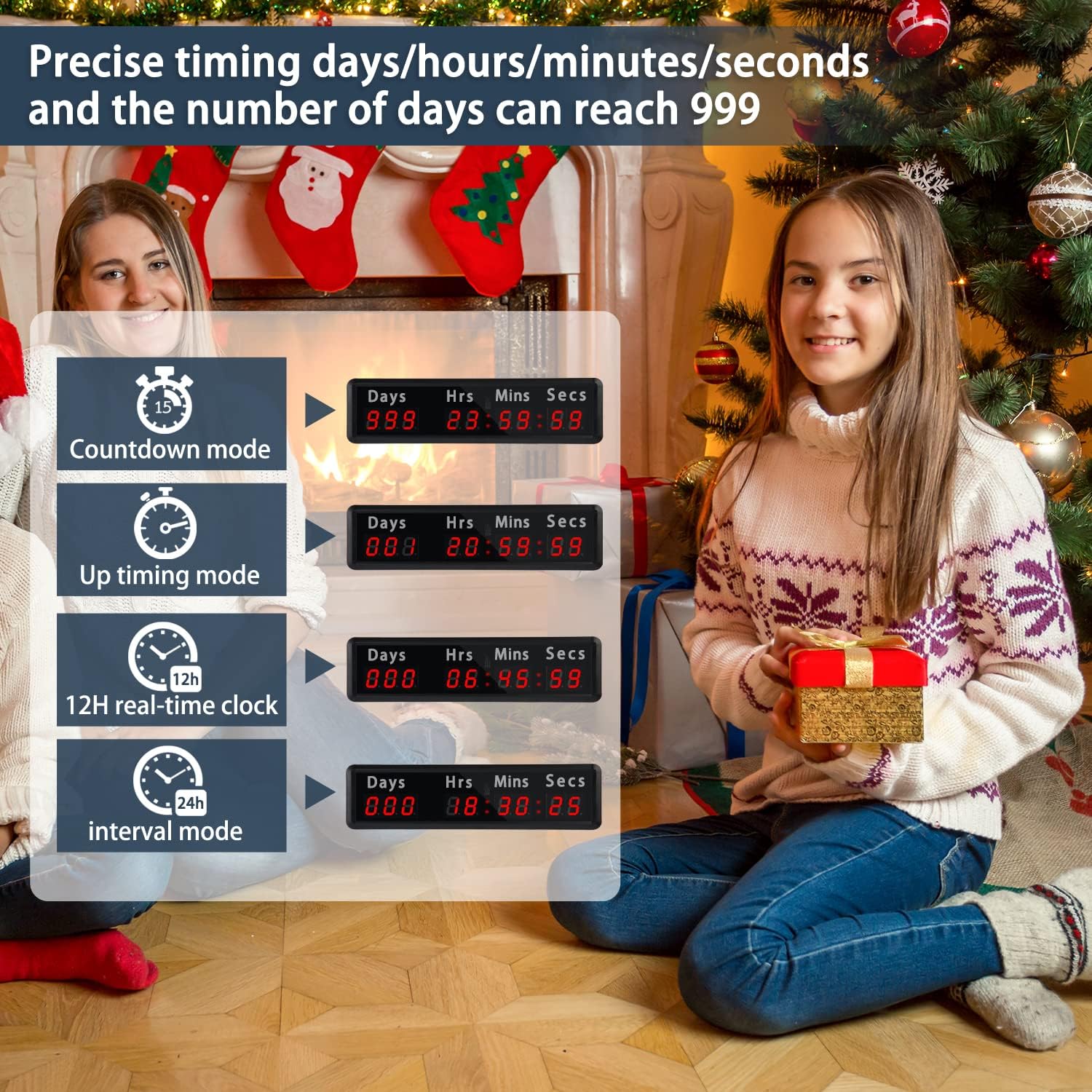
Figure 1: Remote control layout with function labels.
Video 1: Demonstration of the 1.0 inch LED Christmas countdown clock, showcasing its display and functionality.
Operating Instructions
1. Real-time Clock Display
The clock supports both 12-hour and 24-hour formats. Use the "12Hour" or "24Hour" buttons on the remote control to switch between modes. To set the current time, press the "SET" button, then use the number keys and navigation buttons (OK, left/right/up/down) to adjust hours, minutes, and seconds. Press "SET" again to confirm.
2. Countdown Timer Mode
To activate countdown mode, press the "Countdown" button (often labeled with a clock icon or a specific color like blue/yellow/red for different modes if available). Press "SET" to enter the time setting. Use the number keys and navigation buttons to input the desired days, hours, minutes, and seconds for the countdown. The maximum duration is 999 days, 23 hours, 59 minutes, and 59 seconds. Press "OK" to confirm and "START" to begin the countdown. Press "STOP" to pause or "RESET" to clear.
3. Up-Timer Function
To use the up-timer, select the appropriate mode (if available, often indicated by a specific button or sequence). Press "START" to begin counting upwards from 000 days 00:00:00. Press "STOP" to pause or "RESET" to clear.

Figure 2: Various display modes of the SMAHEAT Countdown Clock.
4. Brightness Adjustment
The clock features 5 levels of brightness. Use the brightness adjustment button (often indicated by a sun icon) on the remote control to cycle through the brightness settings.
5. Buzzer Control
The built-in buzzer can be turned on or off using the dedicated "Buzzer on/off" button on the remote control.

Figure 3: Clock display with features like brightness and buzzer highlighted.
Video 2: Demonstration of the countdown clock displaying days, seconds, and minutes, highlighting its clear digital display.
Maintenance
To ensure the longevity and optimal performance of your SMAHEAT LED Countdown Clock, follow these maintenance guidelines:
- Cleaning: Use a soft, dry cloth to wipe the display and casing. Avoid abrasive cleaners or solvents that may damage the surface.
- Power: Always use the original power adapter provided with the device.
- Remote Control: Keep the remote control in a safe place. If lost, contact customer support for assistance. Replace AAA batteries as needed.
- Environment: Avoid exposing the clock to extreme temperatures, direct sunlight for prolonged periods, or high humidity.
Troubleshooting
- Clock Not Displaying: Ensure the power adapter is securely connected to both the clock and a working power outlet.
- Remote Control Not Responding: Check if the AAA batteries in the remote control are correctly inserted and have sufficient charge. Replace if necessary. Ensure there are no obstructions between the remote and the clock.
- Time Inaccuracy: If the clock's time becomes inaccurate, reset it using the remote control as described in the "Operating Instructions" section.
- Buzzer Not Working: Verify that the buzzer is enabled via the remote control's "Buzzer on/off" button.
Specifications
| Brand | SMAHEAT |
| Model Number | 1.0 inch |
| Display Type | 9-bit Red LED |
| Screen Size | 1 Inches |
| Max Countdown/Up-timer | 999 Days, 23 Hours, 59 Minutes, 59 Seconds |
| Time Formats | 12-hour / 24-hour |
| Brightness Levels | 5 |
| Material | Aluminum Alloy |
| Product Dimensions | 13.42"(W) x 3.58"(H) x 1.57"(D) (approx. 34.08cm x 9.09cm x 4cm) |
| Item Weight | 1.1 Pounds |
| Remote Control Battery | 2x AAA (not included) |
| UPC | 755630424541 |
Warranty and Support
SMAHEAT offers a one-year warranty from the date of purchase. If the clock experiences quality issues within this period, it will be replaced free of charge.
For custom designs or further support, please contact the seller through the provided information.