
1. Introduction
The VDIAGTOOL V200 Automotive Circuit Tester is a versatile diagnostic tool designed for electrical system testing in 12V-24V vehicles. It combines multiple functions to assist in identifying and troubleshooting electrical faults efficiently.

Figure 1: VDIAGTOOL V200 Automotive Circuit Tester and included accessories.
2. What's in the Box
- Circuit Probe Tester
- Extension Cable (20 ft)
- Cigarette Lighter Adapter
- User Manual
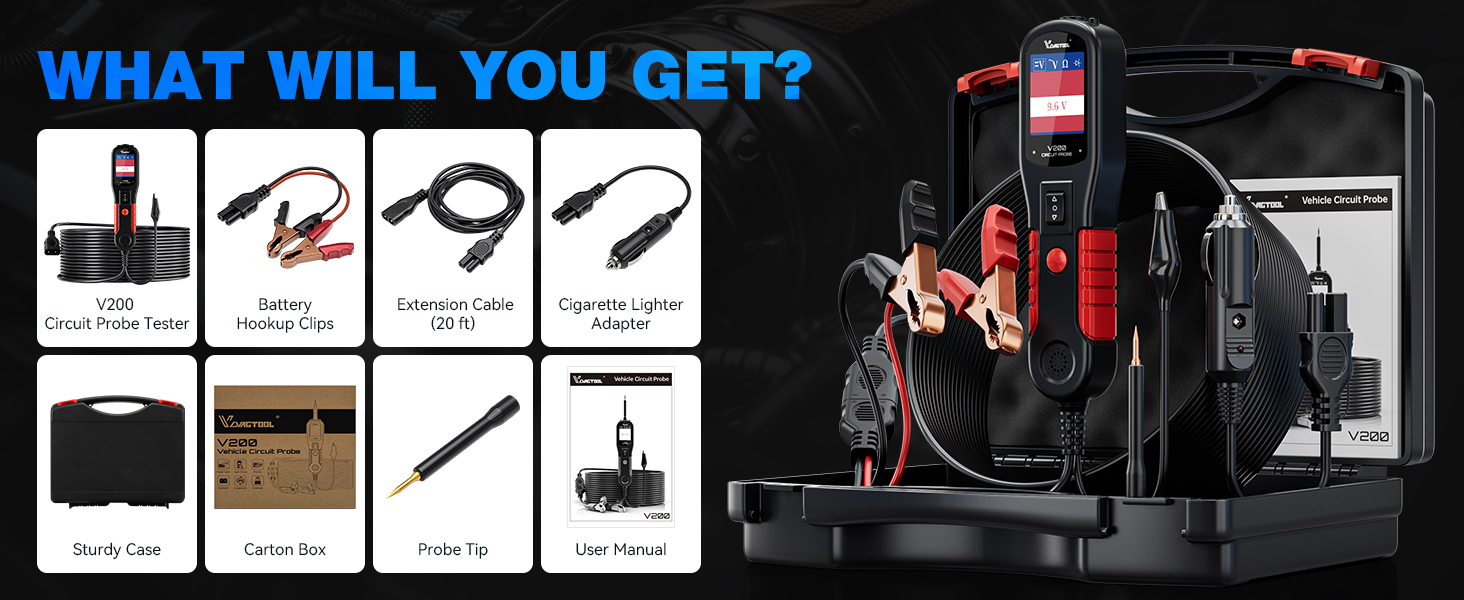
Figure 2: All components included in the VDIAGTOOL V200 kit.
3. Setup
The V200 is powered by the vehicle's 12V-24V battery. Connect the red alligator clip to the positive (+) terminal and the black alligator clip to the negative (-) terminal of the vehicle battery. Alternatively, use the provided cigarette lighter adapter for power.
3.1 Powering the Device
- Battery Connection: Attach the red clamp to the positive battery terminal and the black clamp to the negative battery terminal.
- Cigarette Lighter Connection: Insert the cigarette lighter adapter into the vehicle's 12V accessory socket.
Video 1: Demonstrates the unboxing and initial setup of the VDIAGTOOL V200, including connecting to a car battery.
4. Operating Modes
The V200 supports four primary working modes, easily switchable with a single button press.
- DC Voltage Test: Detects the DC voltage value of the circuit under test with 0.1V resolution.
- AC Voltage Test: Detects Max/Min voltage, frequency, and duty cycle of the AC circuit.
- Resistance Test: Measures resistance between the probe tip and the auxiliary ground lead.
- Diode Test: Determines the operation and conductivity of diode assemblies.

Figure 3: The V200 display interface illustrating the four main working modes.
5. Key Functions
5.1 Polarity Identification
The V200 automatically identifies circuit polarity. A red LED indicates a positive connection, while a green LED indicates a negative connection. No LED indicates an open circuit.

Figure 4: Visual representation of polarity identification using the V200's LED indicators.
5.2 Component Activation
This feature allows you to activate components (e.g., lights, motors, relays) by supplying power or ground directly from the probe, aiding in troubleshooting. Use caution to avoid damaging components by applying incorrect polarity or excessive current.

Figure 5: Illustration of component activation for testing a car bulb.
5.3 Continuity, Sensor/Signal Circuit Test
Perform continuity tests, check sensor states, and verify signal integrity within circuits. The tool can also help locate short circuits and bad grounds.
6. Safety Features
6.1 Overload Protection
The V200 features a built-in 8-amp circuit breaker. In case of an overload, the device will automatically shut down to protect itself and the tested components. A beep warning will also occur.

Figure 6: Visual indicator of the overload protection feature.
7. Specifications
- Product Dimensions: 1.85 x 1.1 x 7 inches
- Item Weight: 1.17 Kilograms (2.58 Pounds)
- Power Source: Corded Electric (12V-24V vehicle battery or cigarette lighter)
- Model Number: VDT-V200-P
- Cord Length: 20FT main cord + 20FT extension cord (Total 40FT)
- Additional Features: Built-in flashlight, Tone On/Off Design
8. Maintenance
To ensure the longevity and optimal performance of your VDIAGTOOL V200, follow these general maintenance guidelines:
- Keep the device clean and free from dust, dirt, and moisture.
- Store the tester and its accessories in the provided sturdy case when not in use.
- Inspect cables and connectors regularly for any signs of wear or damage. Replace if necessary.
- Avoid exposing the device to extreme temperatures or direct sunlight for prolonged periods.
9. Troubleshooting
If you encounter issues with your VDIAGTOOL V200, consider the following:
- Device Not Powering On: Ensure secure connections to the vehicle's battery or cigarette lighter. Verify the vehicle's power source is active.
- No Reading/Incorrect Reading: Check that the probe tip is making good contact with the circuit. Ensure the correct operating mode is selected.
- Overload Protection Triggered: If the device shuts down with a beep, it indicates an overload. Disconnect the probe, allow a few moments, and then reconnect. Reduce the load or verify the circuit's specifications before retesting.
- Screen Issues: If the screen is blank or unresponsive, try disconnecting and reconnecting the power source.
10. Warranty & Support
VDIAGTOOL offers comprehensive support for the V200 Automotive Circuit Tester:
- Warranty: 3 Years Warranty.
- Technical Assistance: Lifetime technical assistance.
- Returns: 60 Days No-Reason-asked Return for refund.
- Probe Replacement: Free probe replacement.
- Contact Support: For any questions or assistance, kindly reach us via vdiagtool2@outlook.com.


