
1. Introduction
This manual provides detailed instructions for the setup, operation, maintenance, and troubleshooting of your Yujin Robot iClebo Arte Charger Docking Station with AC 120V Adapter. This product is designed to provide a reliable charging solution for compatible iClebo robot vacuum cleaner models, including YCR-M05-10, YCR-M05-12, YCR-M05-30, YCR-M05-50, and YCR-M05-90.
Please read this manual thoroughly before using the product to ensure proper function and longevity.
2. Safety Information
Observe the following safety precautions to prevent damage to the product or injury to yourself:
- Do not expose the charging dock or adapter to water or excessive moisture.
- Use only the provided AC 120V adapter with the charging dock.
- Do not attempt to disassemble or modify the product.
- Keep the charging dock away from heat sources and direct sunlight.
- Ensure the power outlet is easily accessible for quick disconnection if needed.
- Unplug the adapter from the wall outlet before cleaning or if the product will not be used for an extended period.
- Keep out of reach of children and pets.
3. Package Contents
Verify that all items are present in your package:
- 1 x Charging Dock Station
- 1 x AC 120V Power Adapter
- 1 x Cleaning Comb Tool (for maintenance of contact pins)
Note: The robot vacuum cleaner is sold separately and is not included with this charging station.
4. Product Overview
Familiarize yourself with the components of your charging dock station:
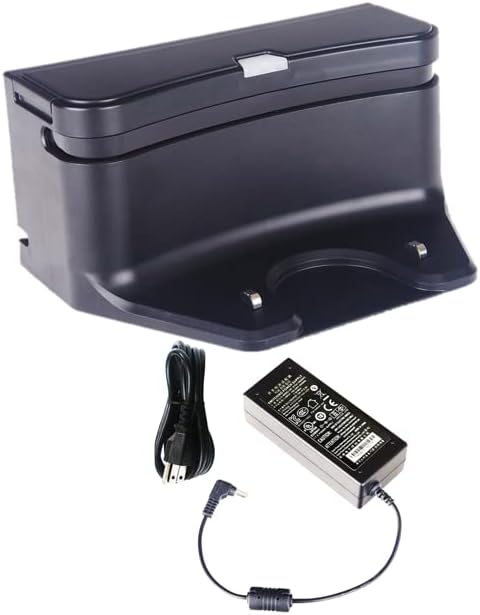
Figure 4.1: The Yujin Robot iClebo Arte Charger Docking Station shown with its accompanying AC 120V power adapter and power cord. The dock is black with a silver accent, featuring two metal contact pins at the base for charging the robot vacuum.

Figure 4.2: A closer view of the Yujin Robot iClebo Arte Charger Docking Station, highlighting its compact black design and the two prominent metal contact pins where the robot vacuum connects for charging.
Key Features:
- Built-in infrared sensors: For precise docking of the robot vacuum.
- Status light indicator: Provides visual feedback on charging status.
- Metal contact pins: Ensure efficient power transfer to the robot vacuum.
- Cleaning comb tool: Included for maintaining the contact pins and surrounding area.
5. Setup
Follow these steps to set up your charging dock station:
- Choose a Location: Select a flat, stable surface against a wall with clear space around it. Ensure there are no obstacles within 1 meter (3 feet) in front of the dock and 0.5 meters (1.5 feet) on either side. This allows the robot vacuum to dock easily.
- Connect the Adapter: Insert the small plug of the AC 120V power adapter into the power input port located on the back or side of the charging dock station.
- Plug into Power: Plug the other end of the AC 120V power adapter into a standard wall outlet.
- Verify Power: Once plugged in, the status light indicator on the charging dock should illuminate, indicating that it is receiving power.
6. Operating Instructions
The charging dock station is designed for automatic and manual charging of your iClebo robot vacuum.
Automatic Charging:
When the robot vacuum's battery is low, it will automatically return to the charging dock to recharge. Ensure the dock is powered on and unobstructed.
Manual Charging:
To manually charge your robot vacuum:
- Align the robot vacuum with the charging dock, ensuring the charging contacts on the robot align with the metal contact pins on the dock.
- Gently push the robot onto the dock until it clicks into place and the status light indicator on the dock (and/or robot) confirms charging has begun.
The charging process typically takes approximately 2 hours for a full charge, depending on the robot's battery level.
7. Maintenance
Regular maintenance ensures optimal performance and extends the lifespan of your charging dock station.
- Cleaning the Dock: Use a soft, dry cloth to wipe down the exterior of the charging dock. Do not use abrasive cleaners or solvents.
- Cleaning Contact Pins: Periodically inspect the metal contact pins on the charging dock and the corresponding contacts on your robot vacuum. Use the included cleaning comb tool or a clean, dry cloth to remove any dust, dirt, or debris that may accumulate on these contacts. Clean contacts ensure efficient charging.
- Power Cord Inspection: Regularly check the power cord and adapter for any signs of damage, fraying, or kinks. If any damage is observed, discontinue use and contact support.
8. Troubleshooting
If you encounter issues with your charging dock station, refer to the following common problems and solutions:
| Problem | Possible Cause | Solution |
|---|---|---|
| Dock status light is off. | No power supply. | Ensure the AC adapter is securely plugged into both the dock and a working wall outlet. Try a different outlet. |
| Robot vacuum not charging when docked. |
|
|
| Robot vacuum cannot find the dock. |
|
|
If the problem persists after trying these solutions, please contact customer support for further assistance.
9. Specifications
| Feature | Detail |
|---|---|
| Brand | Generic |
| Model Name | Arte, Alpha, POP, Light, eX300/500 (Compatible with) |
| Item Model Number | YCRM05CGR |
| Special Feature | Bagless (refers to the compatible vacuum, not the dock itself) |
| Color | Black |
| Product Dimensions | 6"L x 3"W x 3"H (15.24 cm L x 7.62 cm W x 7.62 cm H) |
| Included Components | Adaptor, Charging Dock |
| Power Source | Corded Electric (AC 120V Adapter) |
| Compatible Devices | iClebo Alpha, Arte, Light, POP, eX300/500 Robot Vacuums |
| Form Factor | Plastic, ABS |
| Item Weight | 1 pound (approx. 0.45 kg) |
| Manufacturer | Yujin Robot |
| First Available Date | September 16, 2022 |
10. Warranty and Support
For warranty information or technical support, please refer to the documentation provided with your original robot vacuum cleaner or contact the manufacturer, Yujin Robot, or the seller, Robot Vacuum Co, directly. Keep your purchase receipt as proof of purchase.
For general inquiries or troubleshooting not covered in this manual, please visit the manufacturer's official website or contact their customer service department.