
Auromie N-556
Auromie Nightstand User Manual
Model: N-556
1. Introduction
This manual provides detailed instructions for the assembly, operation, and maintenance of your Auromie Nightstand with Charging Station and LED Lights. Please read this manual thoroughly before use to ensure proper functionality and safety.
The Auromie Nightstand is designed to offer convenient bedside storage with integrated charging capabilities, customizable LED lighting, and a secure, hidden compartment featuring an RFID lock for valuables. Its design prioritizes both functionality and security, making it a versatile addition to any room.
2. Safety Information
Please observe the following safety precautions to prevent injury or damage to the product:
- Ensure all components are securely fastened during assembly.
- Do not overload the power outlets or USB ports.
- Keep liquids away from electrical components.
- Do not attempt to modify the product or its electrical system.
- Electronic locks require a continuous power supply to function. If power is cut, the lock will not operate.
- Keep RFID cards away from strong magnetic fields to prevent demagnetization.
3. Package Contents
Verify that all parts are present before beginning assembly. If any parts are missing or damaged, please contact customer support.
- Nightstand components (MDF panels, drawer slides, hardware)
- Power strip with 2 AC Outlets & 2 USB Ports
- RFID Lock mechanism
- 2 RFID Cards
- LED Light Strip (50 RGB color changeable)
- 24-Keys Remote Control for LED lights
- Assembly Instructions
4. Setup and Assembly
Assembly typically takes approximately 2 hours. Follow the included assembly instructions carefully. Ensure you have a clear workspace and the necessary tools (e.g., screwdriver).
4.1. General Assembly
Assemble the main nightstand frame, drawer, and open shelf according to the step-by-step guide provided in the separate assembly manual. Pay close attention to the orientation of panels and hardware.
4.2. Installing the Charging Station
The nightstand includes a built-in charging station. Insert the power strip into the designated slot on the side of the nightstand. Ensure it is flush and secure. Connect the power cord to a wall outlet.
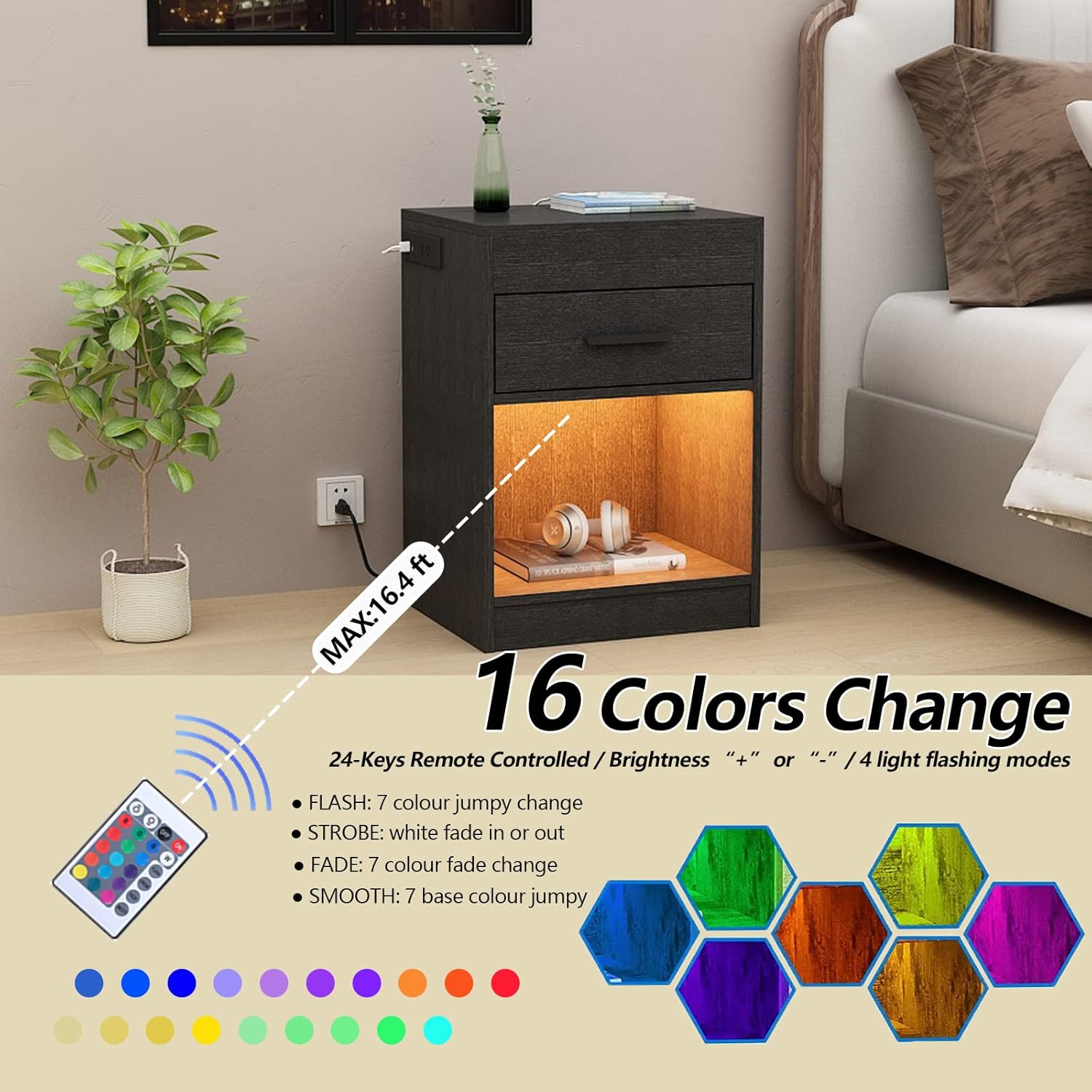
Image: Close-up of the integrated charging station with 2 AC outlets and 2 USB ports, showing a phone charging.
4.3. Installing the RFID Lock
The RFID lock secures the hidden top compartment. Install the lock mechanism inside the compartment as per the assembly instructions. One USB port from the charging station is dedicated to powering this electronic lock. Ensure this connection is made.

Image: Diagram showing the invisible cabinet lock mechanism and the two included RFID cards.
4.4. Installing the LED Lights
The LED light strip is designed for the open shelf area. Apply the LED strip using its adhesive backing tape. Connect the LED control cable to the designated USB port on the charging station. The lights are controlled by the included 24-key remote.

Image: The nightstand with the open shelf illuminated by LED lights, showing the remote control and color options.

Image: Diagram illustrating the connections for the charging station cable, electronic cabinet lock cable, and LED control cable.
5. Operating Instructions
5.1. Using the Charging Station
Plug your electronic devices into the 2 AC outlets (125V/12A) or 2 USB ports (5V/2A) located on the side of the nightstand. Ensure the nightstand's main power cord is connected to a live wall outlet.
5.2. Operating the RFID Lock
To unlock the hidden compartment, place one of the provided RFID cards in the induction area of the lock. You will hear a beep, and the lock will disengage, allowing you to open the compartment. To lock, simply close the compartment lid; the lock will automatically engage.
Important Note:
The electronic lock requires continuous power. If the power supply is interrupted (e.g., power outage, unplugged), the lock will not function. Ensure the nightstand is always connected to a power source for the lock to operate.

Image: A hand holding an RFID card near the induction area of the nightstand to unlock the hidden compartment.
5.3. Controlling the LED Lights
Use the 24-key remote control to manage the LED lights. The remote has a maximum control distance of 16.4 feet (5 meters).
- Brightness Adjustment: Use the "Brightness +" or "Brightness -" buttons when a single color is selected.
- FLASH Mode: Cycles through 7 colors with a jumpy change.
- STROBE Mode: White color fades in and out.
- FADE Mode: Cycles through 7 colors with a smooth fade change.
- SMOOTH Mode: Cycles through 7 base colors with a jumpy change.
- When in FLASH, STROBE, FADE, or SMOOTH modes, the brightness adjustment buttons will control the speed of the color changes.
6. Maintenance
- Cleaning: Wipe the nightstand surfaces with a soft, damp cloth. Avoid abrasive cleaners or harsh chemicals.
- Electrical Components: Periodically check the power cord and connections for any signs of wear or damage.
- RFID Lock: Ensure the RFID lock area is clean and free of obstructions.
- General Care: Avoid placing excessively hot or cold items directly on the surface without protection.
7. Troubleshooting
| Problem | Possible Cause | Solution |
|---|---|---|
| RFID lock not opening. | No power to the lock; RFID card not placed correctly; Damaged RFID card. | Ensure nightstand is plugged in and receiving power. Place RFID card directly over the induction area. Try a different RFID card if available. |
| LED lights not turning on. | LED cable unplugged; Remote control battery dead; Remote out of range. | Check LED control cable connection to USB port. Replace remote battery. Ensure remote is within 16.4 ft (5m) of the nightstand. |
| Charging station not working. | Nightstand unplugged; Device cable faulty; Overload. | Verify nightstand is plugged into a live outlet. Try a different charging cable. Unplug some devices to reduce load. |
| Nightstand feels unstable. | Loose assembly hardware. | Check and tighten all screws and fasteners. |
8. Specifications
- Model: N-556
- Color: Black
- Material: Engineered Wood (MDF)
- Approximate Dimensions (L x W x H): 19.69 x 13.78 x 16.93 inches (50 x 35 x 43 cm)
- Hidden Compartment Dimensions (L x W x D): 15.55 x 13.98 x 2.56 inches
- Item Weight: 36.26 lbs (16.45 kg)
- Power Outlets: 2 x 125V/12A AC Outlets
- USB Ports: 2 x 5V/2A USB Ports
- LED Lights: 50 RGB Color Changeable LED Strips
- LED Control: 24-Key Remote Control (Max. 16.4 ft range)
- Lock Type: Electronic RFID Lock

Image: Detailed diagram showing the dimensions of the Auromie Nightstand, including the hidden compartment and drawer.
9. Warranty and Support
For warranty information or technical support, please refer to the contact details provided with your purchase documentation or visit the official Auromie website. Please have your model number (N-556) and purchase date ready when contacting support.
Manufacturer: Auromie