
1. Introduction
The Intendvision HT605 Digital Anemometer is a versatile handheld device designed for accurate measurement of wind speed, temperature, and humidity. Featuring a high-precision sensor and sensitive fan blades, it provides reliable data for various applications including wind energy, meteorology, industrial use, agriculture, hydrology, environmental protection, and outdoor activities like sailing, surfing, drone flying, and golf. Its compact design and clear backlit LCD make it easy to use and carry.

Figure 1.1: Portable Design. This image highlights the compact and lightweight design of the HT605 Anemometer, showing it easily fitting into a pocket, emphasizing its portability for outdoor activities.
2. Product Overview
Familiarize yourself with the components and controls of your HT605 Digital Anemometer.

Figure 2.1: HT605 Anemometer Components. This image displays the front view of the Intendvision HT605 Digital Anemometer with key parts labeled, including the fan blades, LCD display, power key, data hold/backlight button, unit of temperature button, unit of wind speed button, and Max/Min value button.
Key Components:
- Fan Blades: Measures wind speed. Features 8 blades for accurate and sensitive response.
- LCD Display: Large, clear screen with backlight for easy data reading in various lighting conditions. Displays wind speed, temperature, and humidity.
- Power Key (⏻): Turns the device ON/OFF.
- Data Hold/Backlight Button (H/*): Short press to hold current data; long press to toggle backlight ON/OFF.
- Max/Min Button (MAX/MIN): Displays maximum, minimum, and average wind speed readings.
- Unit Button (UNIT): Cycles through wind speed units (m/s, km/h, mil/h, ft/m, ft/s, knots).
- Temperature Unit Button (°C/°F): Toggles between Celsius and Fahrenheit temperature units.

Figure 2.2: 8 Fan Blades & Bearing Sensor. This diagram illustrates the internal structure of the anemometer's fan, highlighting the 8 fan blades and the bearing sensor technology that ensures short response time, strong anti-interference, and accurate data acquisition.
3. Setup
3.1 Battery Installation
The HT605 Anemometer is powered by 3 AAA batteries (not included). Follow these steps to install the batteries:
- Locate the battery compartment cover on the back of the device.
- Slide the cover downwards to open the compartment.
- Insert 3 AAA batteries, ensuring correct polarity (+ and -) as indicated inside the compartment.
- Close the battery compartment cover by sliding it upwards until it clicks into place.

Figure 3.1: Battery Compartment. This image shows the open battery compartment of the HT605 Anemometer, illustrating where to insert the 3 AAA batteries.
3.2 Initial Power On
After installing the batteries, press the Power Key (⏻) to turn on the device. The LCD display will light up, showing current readings.
4. Operating Instructions
4.1 Measuring Wind Speed, Temperature, and Humidity
Once powered on, the device automatically begins measuring wind speed, ambient temperature, and humidity. Ensure the fan blades are exposed to the airflow for accurate wind speed readings.
4.2 Changing Wind Speed Units
Press the UNIT button to cycle through the available wind speed units: m/s, km/h, mil/h, ft/m, ft/s, and knots. The selected unit will be displayed on the LCD.

Figure 4.1: Wind Speed Units. This image illustrates the various wind speed units available on the HT605 Anemometer's display, including ft/m, ft/s, mil/h, knots, km/h, and m/s.
4.3 Changing Temperature Units
Press the °C/°F button to switch between Celsius (°C) and Fahrenheit (°F) temperature readings.
4.4 Data Hold Function
To freeze the current readings on the display, short press the Data Hold/Backlight button (H/*). Press it again to release the data hold and resume live readings.
4.5 Max/Min/Average Readings
Press the MAX/MIN button to view the maximum, minimum, and average wind speed readings recorded since the device was powered on or reset. Press repeatedly to cycle through these values.
4.6 Backlight Control
Long press the Data Hold/Backlight button (H/*) to turn the LCD backlight ON or OFF, improving visibility in low-light conditions.
4.7 Auto Power Off
To conserve battery life, the HT605 Anemometer will automatically power off after 10 minutes of inactivity (no button presses or significant measurement signal changes).
4.8 Wide Applications
The HT605 is suitable for a variety of uses, as shown below:
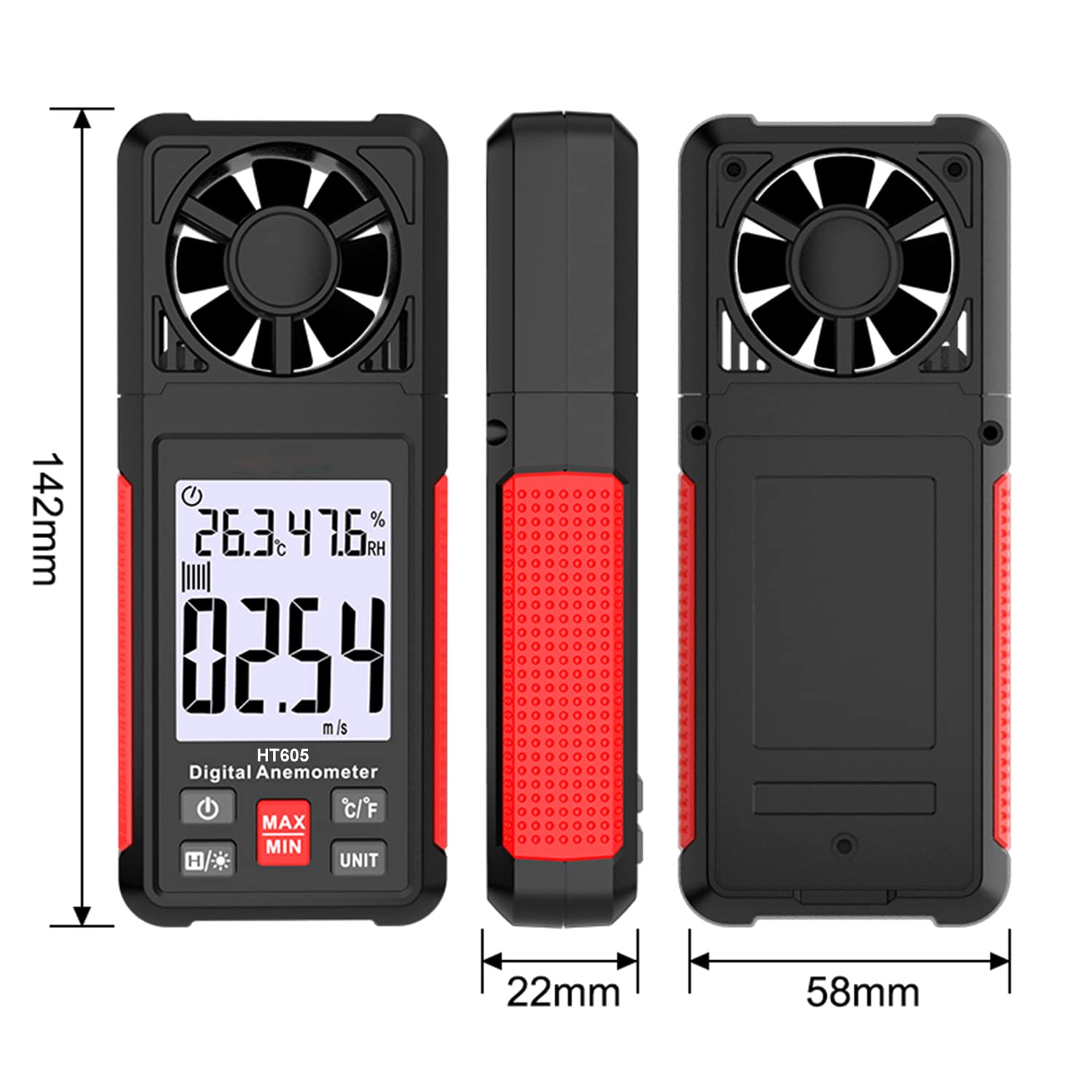
Figure 4.2: Wide Applications. This image displays several practical applications for the HT605 Digital Anemometer, including weather monitoring, wind power assessment, nautical surveys, fan detection, surface wind direction monitoring, coal mine wind speed measurement, outdoor environmental measurement, and ventilation system measurement.
5. Maintenance
- Cleaning: Use a soft, dry cloth to clean the device. Do not use abrasive cleaners or solvents.
- Storage: When not in use for extended periods, remove the batteries to prevent leakage. Store the device in a cool, dry place, away from direct sunlight and extreme temperatures.
- Fan Blades: Ensure the fan blades are free from dust and debris for accurate readings. Do not attempt to lubricate the bearings.
6. Troubleshooting
| Problem | Possible Cause | Solution |
|---|---|---|
| Device does not power on. | Low or dead batteries; incorrect battery installation. | Replace batteries with new ones; ensure correct polarity. |
| Inaccurate wind speed readings. | Fan blades obstructed or dirty; device not positioned correctly in airflow. | Clean fan blades gently; ensure unobstructed airflow to the sensor. |
| LCD display is dim or flickering. | Low battery power. | Replace batteries. |
| Auto power off too quickly. | Normal operation (10 minutes inactivity). | This is a power-saving feature. Press any button to reactivate. |
7. Specifications
| Feature | Detail |
|---|---|
| Product Dimensions | 5.59 x 2.28 x 0.87 inches |
| Item Weight | 115 Grams (4.06 ounces) |
| Brand | Intendvision |
| Model | HT605 |
| Material | Acrylonitrile Butadiene Styrene (ABS) |
| Screen Size | 2.2 Inches |
| Wind Speed Range | 0.70~30.00m/s; 2.50~108.00km/h; 2.30~98.50ft/s; 1.30~58.30knots; 1.50~67.10mile/h; 137.0~5900ft/m |
| Power Source | 3*AAA Batteries |
| Auto Power Off | After 10 minutes of inactivity |
8. Warranty and Support
Intendvision offers a 36-Month Warranty for the HT605 Digital Anemometer, ensuring peace of mind regarding your purchase. For any questions, technical assistance, or warranty claims, please contact Intendvision customer service. Our friendly customer service team is ready to assist you.
Please refer to the official Intendvision website or your purchase documentation for the most up-to-date contact information and warranty details.