
Better Homes & Gardens BHS136111442001
Better Homes & Gardens 9" Dual Power Portable Fan
Model: BHS136111442001
Introduction
Thank you for purchasing the Better Homes & Gardens 9" Dual Power Portable Fan. This fan is designed for versatile use, offering both AC plug-in and battery power options, making it ideal for various indoor and outdoor settings such as travel, camping, bedrooms, offices, and dorms. Its compact design, three-speed settings, and 130-degree tilting head provide efficient and customizable cooling.
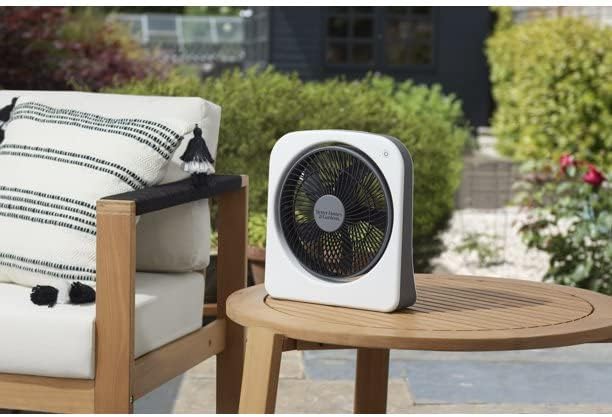
The Better Homes & Gardens 9" Dual Power Portable Fan is suitable for outdoor use, as shown here on a patio table.
Important Safety Information
Please read all instructions carefully before using this fan and retain them for future reference. Failure to follow these instructions may result in electric shock, fire, or serious personal injury.
- Always unplug the fan from the power outlet or remove batteries before cleaning, servicing, or moving.
- Do not operate any fan with a damaged cord or plug. Discard fan or return to an authorized service facility for examination and/or repair.
- Do not run cord under carpeting. Do not cover cord with throw rugs, runners, or similar coverings. Arrange cord away from traffic area and where it will not be tripped over.
- Do not insert or allow fingers or foreign objects to enter any ventilation or exhaust opening as this may cause an electric shock or fire, or damage the fan.
- Do not block air intakes or exhaust in any manner. Do not use on any soft surface, like a bed, where openings may become blocked.
- This fan is not intended for use in wet or damp locations. Do not use near water, such as bathtubs, sinks, or swimming pools.
- Keep children and pets away from the fan during operation.
Package Contents
- Better Homes & Gardens 9" Dual Power Portable Fan
- AC Adapter (Cord)
- User Manual
Note: 6 D batteries are required for battery operation and are not included.
Setup
AC Power Connection
- Ensure the fan is turned off.
- Locate the AC power input port on the back of the fan.
- Insert the small end of the included AC adapter cord into the fan's power input port.
- Plug the other end of the AC adapter into a standard electrical outlet (120V AC, 60Hz).

The AC power input port is located on the back of the fan for easy connection.
Battery Installation (for Portable Use)
- Ensure the fan is turned off and unplugged from AC power.
- Locate the battery compartment on the back of the fan.
- Open the battery compartment cover.
- Insert 6 "D" size batteries (not included) into the compartment, ensuring correct polarity (+/-) as indicated inside the compartment.
- Close the battery compartment cover securely.
Operating Instructions
Power On/Off and Speed Settings
- Ensure the fan is connected to AC power or has batteries installed.
- Locate the power button on the top right of the fan's front panel.
- Press the power button once to turn the fan on to the lowest speed setting.
- Press the power button repeatedly to cycle through the 3 speed settings (Low, Medium, High).
- Press the power button a fourth time to turn the fan off.
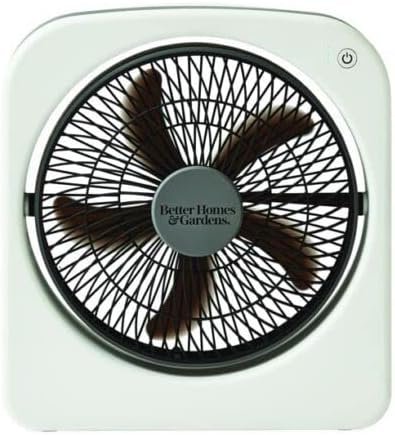
The power button and speed indicators are located on the top right of the fan's front panel.
Adjusting Fan Angle (Tilting Head)
The fan features a 130-degree tilting head, allowing you to direct airflow precisely where needed.
- Gently hold the fan body with one hand.
- With the other hand, grasp the fan head and tilt it up or down to your desired angle. The fan head will hold its position once adjusted.

The fan head can be tilted up to 130 degrees to direct airflow.
Maintenance
Cleaning
- Always unplug the fan and remove batteries before cleaning.
- Use a soft, damp cloth to wipe the exterior surfaces of the fan. Do not use abrasive cleaners or solvents.
- To clean the fan blades, use a vacuum cleaner with a brush attachment or compressed air to remove dust from the grilles. Do not attempt to disassemble the fan for cleaning.
- Ensure the fan is completely dry before plugging it back in or reinstalling batteries.
Storage
When not in use, store the fan in a cool, dry place. If storing for an extended period, remove the batteries to prevent leakage and damage to the fan.
Troubleshooting
| Problem | Possible Cause | Solution |
|---|---|---|
| Fan does not turn on. | No power supply. Batteries are dead or incorrectly installed. | Ensure AC adapter is securely plugged into both the fan and a working outlet. Replace batteries with new "D" size batteries, ensuring correct polarity. |
| Weak airflow. | Fan grilles are obstructed by dust. Fan is on lowest speed setting. | Clean fan grilles and blades as per maintenance instructions. Increase fan speed by pressing the power button. |
| Unusual noise during operation. | Fan is not on a stable surface. Debris caught in fan blades. | Place fan on a flat, stable surface. Unplug fan and carefully check for and remove any debris from the blades. |
Specifications
- Model Name: 9" Dual Power Portable Fan Indoor Outdoor Use 3 Speeds
- Item Model Number: BHS136111442001
- Brand: Better Homes & Gardens
- Power Source: AC Plug-in Adapter or 6 x "D" Batteries (not included)
- Number of Power Levels: 3 Speeds
- Tilting Head: 130 degrees
- Product Dimensions: 3.54"D x 12.2"W x 13.2"H
- Indoor/Outdoor Usage: Indoor/Outdoor
- Switch Type: Push Button
- UPC: 671227012734
Warranty and Support
This product is sold as "Renewed" and may come with a limited warranty provided by the seller or Amazon Renewed. Please refer to your purchase documentation or contact the seller directly for specific warranty terms and support inquiries. For general product information or assistance, please visit the Better Homes & Gardens official website or contact their customer service.
Ask a question about this manual
Ask about setup, troubleshooting, compatibility, parts, safety, or missing instructions. Manuals+ will review the question and use this page’s manual context to help answer it.