
1. Introduction
Thank you for choosing the PULWTOP USB C Hub Docking Station. This versatile device is designed to expand the connectivity and functionality of your USB-C enabled tablets, including iPad Pro, iPad M4, and iPad Mini 6th Gen. It integrates multiple ports for data transfer, video output, power delivery, and storage expansion, all within a compact and adjustable stand design.
Note: This device does not support iPads with a Lightning port or Lightning to USB-C adapters.
2. Product Overview and Package Contents
The PULWTOP USB C Hub Docking Station provides a comprehensive solution for your tablet's expansion needs. Please ensure all components are present upon unboxing.
Package Contents:
- PULWTOP USB C Hub Docking Station
- Instruction Manual
- SSD Installation Accessories (screws, thermal pad)
Key Features:
- 1 x 4K@60Hz HDMI Port
- 1 x M.2 PCIe NVMe SSD Enclosure (supports up to 2TB)
- 1 x 100W Power Delivery (PD) Charging Port
- 1 x USB-A 3.2 Gen2 (10Gbps)
- 1 x USB-C 3.2 Gen2 (10Gbps)
- 1 x USB-A 2.0
- 1 x SD Card Slot
- 1 x TF Card Slot
- 1 x 3.5mm Audio/Mic Jack
- Adjustable Stand with 45°, 60°, 65° folding angles
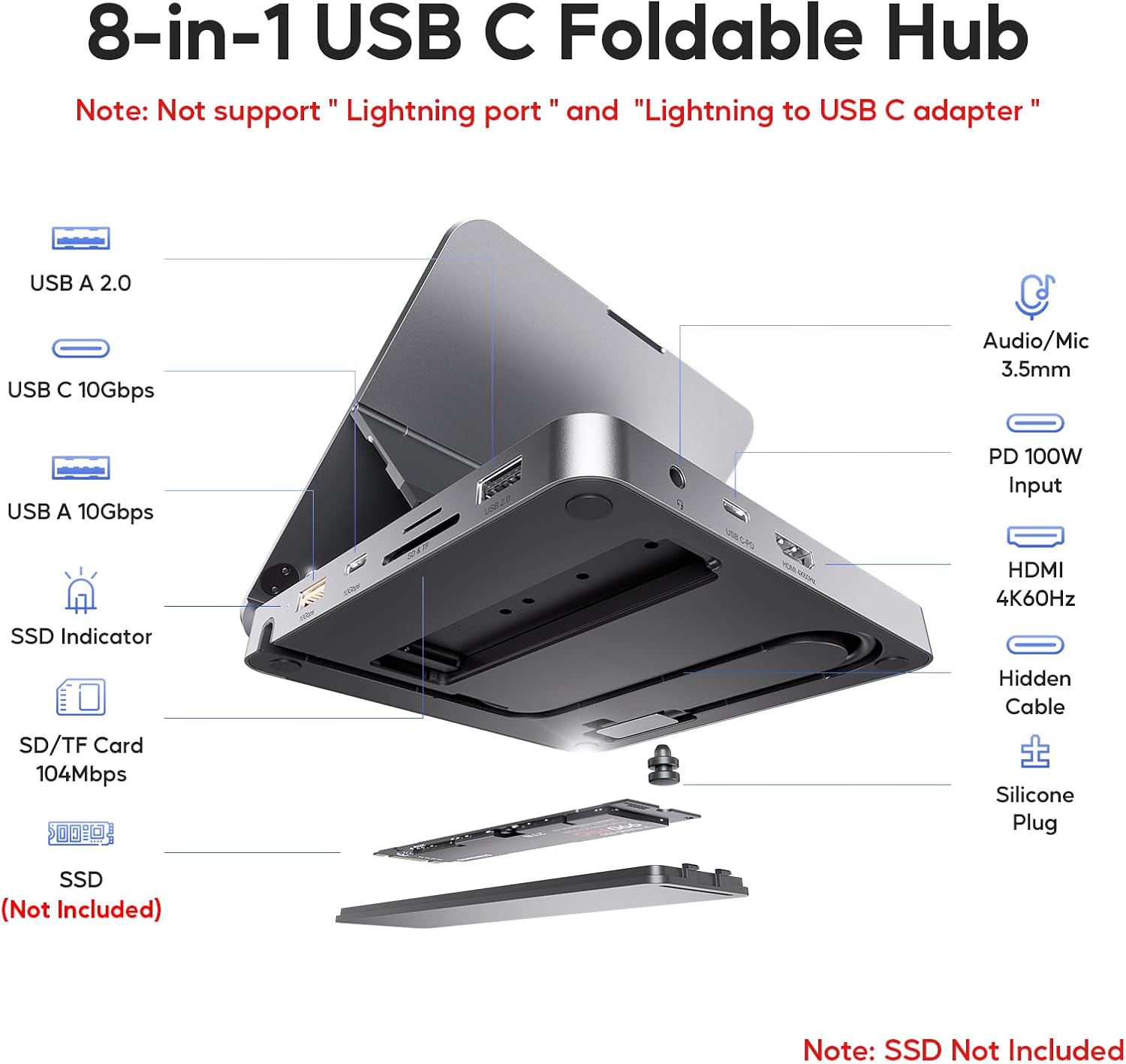
Figure 1: Overview of the PULWTOP USB C Hub Docking Station with labeled ports.
3. Setup
3.1 Unfolding the Stand
- Gently lift the top panel of the docking station.
- Adjust the stand to your desired viewing angle (45°, 60°, or 65°). The stand features a magnetic design for secure closure when folded.

Figure 2: The docking station can be adjusted to 45°, 60°, or 65° angles.
3.2 Connecting Your Tablet
- Locate the integrated USB-C cable on the docking station.
- Connect the USB-C cable firmly into the USB-C port of your compatible tablet.
- Ensure the tablet is securely placed on the stand.

Figure 3: An iPad connected to the docking station, ready for use.
3.3 Installing an M.2 NVMe SSD (Optional)
The docking station features an M.2 PCIe NVMe SSD enclosure for expanding your storage. It supports M.2 NVMe SSDs of sizes 2230, 2242, 2260, and 2280, up to 2TB. Note: Only PCIe NVMe SSDs are supported, not SATA SSDs. SSD is not included.
- Open the SSD enclosure cover on the docking station.
- Carefully insert your M.2 NVMe SSD into the slot.
- Secure the SSD with the provided screw and thermal pad.
- Close the enclosure cover.
- If it's a new SSD, format it to "exFat" or "apfs" format on your device for proper recognition.

Figure 4: Step-by-step guide for M.2 NVMe SSD installation.
4. Operating Instructions
4.1 Data Transfer
The docking station offers high-speed data transfer capabilities:
- USB-A 3.2 Gen2 & USB-C 3.2 Gen2: Supports speeds up to 10Gbps for rapid file transfers.
- USB-A 2.0: Standard USB port for connecting peripherals like keyboards, mice, or older USB devices.
- SD & TF Card Slots: Supports simultaneous read and write operations for memory cards.

Figure 5: High-speed data transfer with multiple connected devices.
4.2 Video Output (HDMI)
Connect an external display via the HDMI port for enhanced visual experiences:
- Supports up to 4K@60Hz resolution for crisp, clear video.
- Windows Systems: Supports extending or mirroring the external display.
- iOS Systems: Supports SST mirror mode.

Figure 6: Utilizing the 4K@60Hz HDMI output for an external display.
4.3 Power Delivery (PD) Charging
The dedicated USB-C PD port supports fast charging for your tablet:
- 100W input and 89W output for efficient charging.
- Note: A power adapter (65W or above recommended) is not included. The USB-C PD port is for charging only, not for data transmission. Ensure your device's USB-C port supports charging.

Figure 7: Power Delivery functionality for fast charging.
5. Compatibility
The PULWTOP USB C Hub Docking Station is compatible with a wide range of devices:
- iPad Pro (11-inch) 2018 / iPad Pro 2018 (12.9-inch) (3rd generation)
- iPad Pro 2020 (11-inch) (2nd generation) / iPad Pro 2020 (12.9-inch) (4th generation)
- iPad Pro M1 2021 (11-inch) (3rd generation) / iPad Pro M1 2021 (12.9-inch) (5th generation)
- iPad Pro M2 2022 (11-inch) (4th generation) / iPad Pro M2 2022 (12.9-inch) (6th generation)
- iPad Air 2020 (10.9-inch) (4th Generation) / iPad Air 2022 M1 (10.9-inch) (5th Generation)
- iPad Mini 6 2021 (8.3-inch)
- iPad 2022 (10.9-inch) (10th Generation)
- iPad Pro M4 2024 (11-inch) / iPad Pro M4 2024 (13-inch)
- iPad Air M2 2024 (11-inch) / iPad Air M2 2024 (13-inch)
- Windows tablets equipped with a full-featured USB-C port with DP signal supporting data, charging, and video.
Important Notes:
- Do not support iPad/iPad Pro with Lightning port.
- Do not support tablets with cases that obstruct the USB-C connection.

Figure 8: Compatibility details and important notes.
6. Maintenance
- Keep the docking station clean and free from dust. Use a soft, dry cloth for cleaning.
- Avoid exposing the device to extreme temperatures, humidity, or direct sunlight.
- Do not attempt to disassemble or repair the device yourself. Contact customer support if issues arise.
- Ensure proper ventilation around the device during extended use.
7. Troubleshooting
- No Display Output via HDMI: Ensure your tablet's USB-C port supports video output (DP Alt Mode). Check HDMI cable connections and try a different monitor or cable. For iOS, only SST mirror mode is supported.
- Slow Data Transfer: Verify that connected devices and cables support 10Gbps speeds. Ensure the SSD is correctly installed and formatted.
- Charging Issues: Confirm that a power adapter of 65W or above is connected to the PD port. Ensure your tablet's USB-C port supports charging. The PD port is for power input only, not data.
- SSD Not Recognized: Double-check that the SSD is an M.2 PCIe NVMe type (not SATA) and is correctly inserted. If new, ensure it's formatted to "exFat" or "apfs".
- Intermittent Connections: Ensure all cables are securely connected. Avoid connecting more than 3 additional USB peripherals if the PD port is used for charging cellphones, tablets, or earphones, as this may lead to disconnection of the last connected peripherals.
8. Specifications
| Feature | Detail |
|---|---|
| Model Number | iPad Pro Docking Station |
| Package Dimensions | 7.05 x 5.31 x 1.18 inches |
| Item Weight | 15.6 ounces (441.69 Grams) |
| Hardware Interface | HDMI, SATA 6.0 Gb/s, USB, USB 2.0 Type A, USB 3.1 Type C |
| Total USB Ports | 4 (1x USB-A 3.2 Gen2, 1x USB-C 3.2 Gen2, 1x USB-A 2.0, 1x USB-C PD) |
| Number of Ports | 9-in-1 |
| Total HDMI Ports | 1 (4K@60Hz) |
| Power Delivery | 100W Input, 89W Output |
| SSD Compatibility | M.2 PCIe NVMe SSD (2230/2242/2260/2280), up to 2TB |
| Card Reader | SD & TF (104Mbps) |
| Audio Jack | 3.5mm Audio/Mic |
9. Warranty and Support
PULWTOP products are designed for reliability and performance. For warranty information, technical support, or any questions regarding your product, please refer to the contact information provided with your purchase or visit the official PULWTOP website. Keep your purchase receipt for warranty claims.