
1. Introduction
Thank you for choosing the HOSEOKA Narrow End Table with Charging Station, Model VM8010. This versatile and compact furniture piece is designed to enhance your living space with convenient storage and integrated power solutions. Featuring a built-in charging station with USB ports and standard outlets, a storage drawer, and two open shelves, this end table is ideal for small spaces in living rooms, bedrooms, or home offices.
This manual provides detailed instructions for assembly, operation, maintenance, and troubleshooting to ensure you get the most out of your new end table.
2. Safety Information
- Always follow the assembly instructions carefully.
- Do not exceed the maximum weight recommendation of 40 pounds (18.1 kg) for safe use.
- Ensure the power supply cord is not pinched or damaged during assembly or placement.
- Do not expose the charging station to liquids or excessive moisture.
- Unplug the power cord from the wall outlet before cleaning or if the charging station is not in use for an extended period.
- Keep small children and pets away from the assembly area and small parts.
3. Package Contents
Before beginning assembly, ensure all parts are present and undamaged. If any parts are missing or damaged, please contact customer support.
- Narrow End Table components (various panels and legs)
- Storage Drawer components
- Integrated Charging Station (2 AC outlets, 2 USB ports, 4.9 ft power cord)
- Hardware pack (screws, cam locks, wood dowels, drawer slides, handle)
- Illustrated Assembly Guide
- Installation Tool (Allen wrench, screwdriver, etc. - specific tools may vary)
4. Assembly Instructions
Assembly is designed to be straightforward. Please follow the illustrated instructions provided in your package. It is recommended to have a small screwdriver available for certain steps, especially for securing the charging station and drawer slides.
Assembly Overview
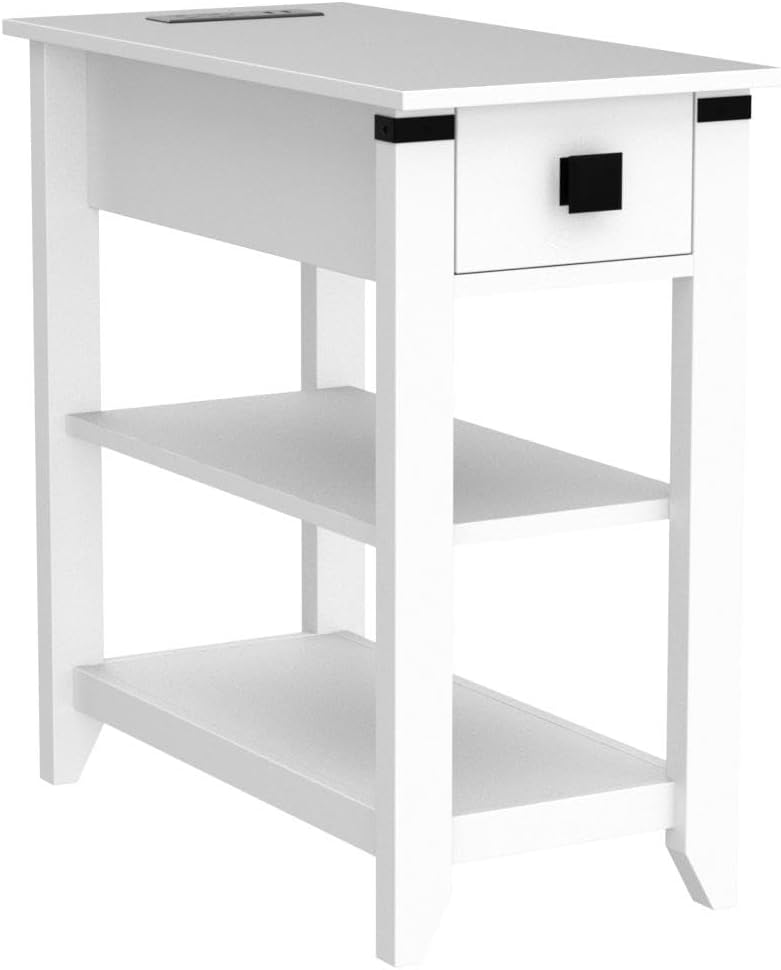
Figure 4.1: Exploded view of all components and hardware for assembly.
Step-by-Step Assembly
- Prepare Components: Unpack all components and hardware. Identify each part by referring to the included parts list in your assembly guide.
- Assemble Frame: Attach the side panels to the bottom and middle shelves using the provided cam locks and wood dowels. Ensure all connections are secure.
- Install Drawer Slides: Carefully attach the drawer slides to the designated side panels of the table frame. Pay attention to the orientation as indicated in the manual.
- Assemble Drawer: Construct the drawer box using the drawer panels and hardware. Attach the drawer handle.
- Insert Drawer: Slide the assembled drawer into the installed drawer slides on the table frame.
- Attach Top Panel: Secure the top panel to the assembled frame.
- Install Charging Station: Carefully place the integrated charging station into the pre-cut opening on the top panel and secure it with the provided screws. Ensure the power cord is routed correctly.
- Final Checks: Verify all screws and connections are tight. Place the end table in its desired location.
Assembly Video Guide
Video 4.2: A visual guide demonstrating the assembly process for the HOSEOKA Narrow End Table.
5. Operating Instructions
5.1 Using the Charging Station

Figure 5.1: Detail of the charging station on the table top.
The integrated charging station is located on the top surface of the end table. It features two standard 125V/12A AC outlets and two 5V/2A USB ports. To use:
- Plug the end table's 4.9-foot power cord into a wall outlet.
- Connect your devices to the available AC outlets or USB ports.
- The charging station is always active when plugged in.
5.2 Storage Drawer

Figure 5.2: The convenient storage drawer for small items.
The small hidden drawer provides a convenient space to store remotes, game controllers, phone charger cords, or other small items, keeping your tabletop clutter-free.
5.3 Open Shelves

Figure 5.3: The two-tier open shelves for display and storage.
The two-tier wooden shelves offer additional storage or display space for books, decorative items, or other essentials.
5.4 Product Overview Video
Video 5.4: A comprehensive overview of the HOSEOKA Narrow End Table's features and design.
5.5 Charging Station Feature Video
Video 5.5: A short demonstration focusing on the functionality of the integrated charging station.
6. Maintenance
- Cleaning: Wipe the table surfaces with a soft, damp cloth. Avoid harsh chemicals or abrasive cleaners that may damage the finish.
- Dusting: Regularly dust the table with a dry, soft cloth.
- Charging Station: Keep the charging ports free of dust and debris. Do not attempt to disassemble the charging station.
- Hardware: Periodically check all screws and connections to ensure they remain tight. Retighten if necessary.
7. Troubleshooting
| Problem | Possible Cause | Solution |
|---|---|---|
| Charging station not working | Power cord unplugged; Wall outlet not functioning; Device not properly connected. | Ensure the table's power cord is securely plugged into a working wall outlet. Check device connections. Try a different wall outlet. |
| Drawer does not slide smoothly | Drawer slides misaligned; Obstruction in the slide mechanism. | Check the alignment of the drawer slides. Ensure no objects are blocking the slides. Refer to assembly instructions for proper slide installation. |
| Table feels wobbly | Loose screws or connections. | Carefully inspect all assembly points and tighten any loose screws or cam locks. |
8. Specifications
| Feature | Detail |
|---|---|
| Brand | HOSEOKA |
| Model Number | VM8010 |
| Color | White |
| Product Dimensions (L x W x H) | 23.6" x 11.8" x 23.6" (60cm x 30cm x 60cm) |
| Item Weight | 23 Pounds (10.4 kg) |
| Maximum Weight Recommendation | 40 Pounds (18.1 kg) |
| Frame Material | Engineered Wood |
| Charging Station | 2 AC Outlets (125V/12A), 2 USB Ports (5V/2A) |
| Power Cord Length | 4.9 feet (1.5 meters) |
| Assembly Required | Yes |
9. Warranty & Support
HOSEOKA is committed to providing quality products and customer satisfaction. While specific warranty details are not provided, we offer comprehensive customer support.
If you encounter any problems with your HOSEOKA Narrow End Table, please feel free to contact us. Our customer service team is available online 24 hours a day to provide the best solution.
For support, please visit the HOSEOKA Store on Amazon or refer to your purchase documentation for direct contact information.