
Introduction
This manual provides comprehensive instructions for the assembly, operation, and maintenance of your usikey Large Vanity Table Set. Please read all instructions carefully before assembly and use to ensure safe and proper functionality. Keep this manual for future reference.
Important Safety Information
- Assembly: Always follow the provided instructions to avoid injury. Keep hands and tools away from electrical components during assembly.
- Usage: Do not use the vanity if the power cord is damaged or if the charging station or lights are not functioning properly.
- Maintenance: Unplug the vanity before cleaning. Use only a dry cloth to clean the surface. Do not use any liquid or harsh chemicals.
- Stability: For enhanced stability, consider securing the vanity to a wall using appropriate anchoring hardware (not included).
Product Overview
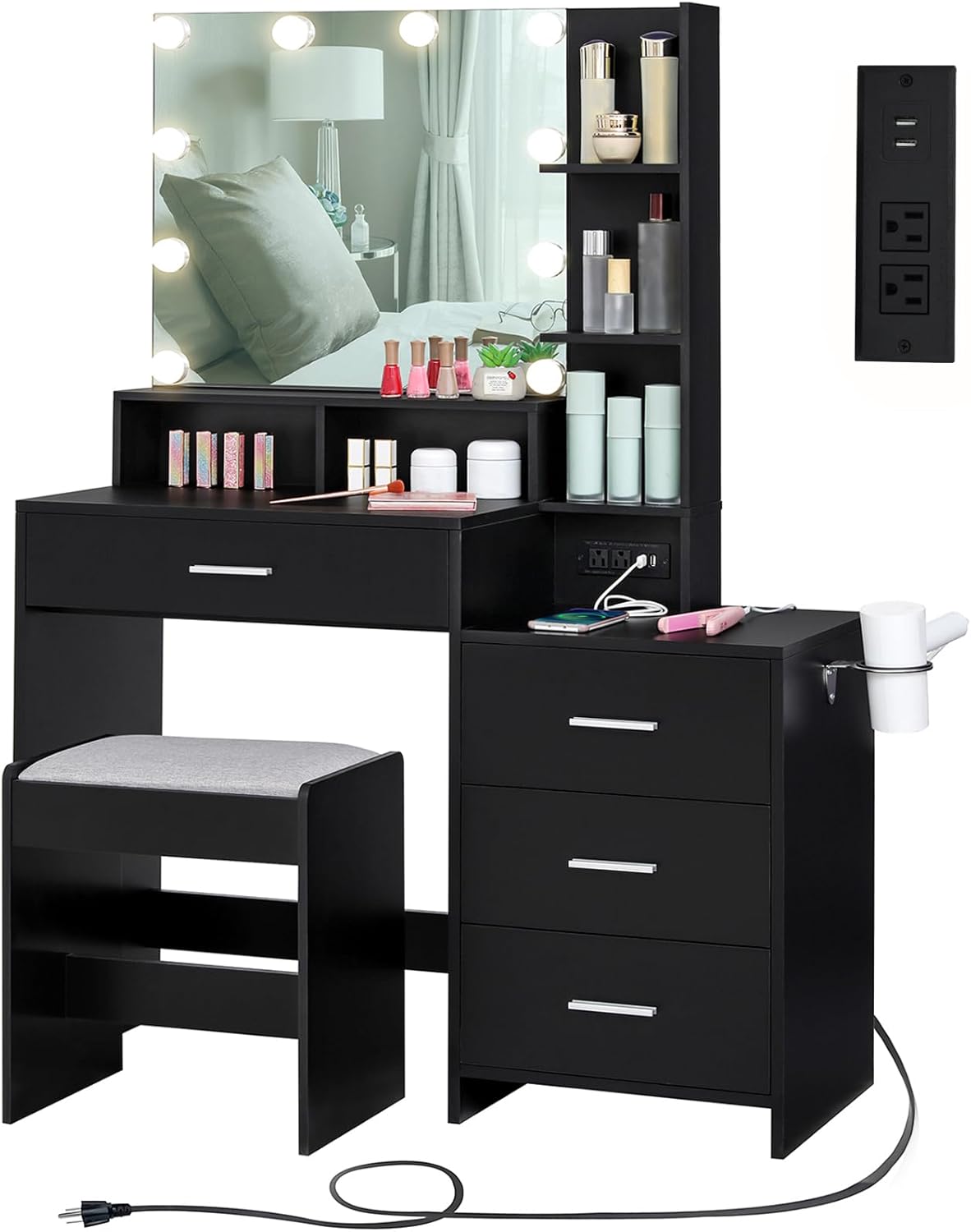
The usikey Large Vanity Table Set is designed for makeup application and personal grooming, featuring integrated lighting, a charging station, and ample storage. The set includes a vanity desk, a lighted mirror, a 3-drawer chest, and a cushioned stool.
Setup and Assembly
Detailed assembly instructions are included with your product packaging. Please refer to the step-by-step guide and diagrams provided to ensure correct assembly. All parts and accessories are labeled for ease of identification.
Key Assembly Considerations:
- Unpacking: Carefully unpack all components and verify against the parts list in your instruction manual.
- Tools: Ensure you have the necessary tools as specified in the assembly guide. A power drill may expedite the process.
- Wall Anchor: If using the optional wall anchor for stability, install it before attaching the tabletop to ensure proper placement.

Operating Instructions
1. Lighted Mirror Operation
The vanity mirror features 10 embedded LED bulbs with adjustable settings.
- Power On/Off: Press the touch switch to turn the lights on or off.
- Change Color Mode: Short press the touch switch to cycle through 3 color modes: Cold White (3500K), Warm White (4500K), and Warm Yellow (6500K).
- Adjust Brightness: Long press the touch switch to adjust the brightness level. Release when the desired brightness is achieved.

2. Charging Station Usage
The integrated charging station provides convenient power access for your electronic devices and styling tools.
- Components: The charging station includes 2 standard AC outlets (120V/12A) and 2 USB ports (5V/2A).
- Connection: Plug the vanity's power cord into a wall outlet.
- Usage: Connect your hair dryer, curling iron, phone charger, or other compatible devices to the available outlets or USB ports.

3. Storage Features
The vanity set offers various storage options to keep your items organized.
- Open Storage Shelves: Four open shelves are available for frequently used lotions, perfumes, and decorative items.
- Large Drawer: A spacious drawer beneath the main desk surface provides storage for cosmetics, jewelry, and accessories.
- 3-Drawer Chest: An additional chest with three drawers offers extensive storage capacity. This chest can also function as a bedside table.
- Hair Dryer Holder: A dedicated holder on the side of the 3-drawer chest keeps your hair dryer accessible.


4. Cushioned Stool
The included stool provides comfortable seating for extended use.
- Comfort: The stool features a thick, soft padded cushion (5cm / 2.0 inches) for comfort.
- Durability: Constructed with sturdy solid wood legs for stability and longevity.

Maintenance and Care
- Cleaning: Unplug the vanity from the power source before cleaning. Wipe all surfaces with a dry, soft cloth. Avoid using abrasive cleaners, harsh chemicals, or excessive moisture, as these can damage the finish and electrical components.
- Mirror Care: Use a glass cleaner specifically designed for mirrors and a lint-free cloth to clean the mirror surface.
- Electrical Components: Ensure the charging station and light bulbs are free from dust and debris. Do not attempt to repair electrical components yourself. Contact qualified personnel if issues arise.
- General Inspection: Periodically check all screws and fasteners to ensure they are tight. Retighten if necessary.
Troubleshooting
If you encounter any issues with your usikey vanity table set, please refer to the following common solutions:
- Lights Not Working:
- Ensure the vanity is properly plugged into a functional power outlet.
- Check the connection of the light power cable to the vanity's electrical system.
- Verify that the touch switch is functioning correctly.
- Charging Station Not Functioning:
- Confirm the vanity is plugged in and receiving power.
- Test the outlets and USB ports with different devices to rule out device-specific issues.
- Ensure no liquid has spilled onto the power board.
- Drawers Sticking/Not Sliding Smoothly:
- Check for any obstructions within the drawer slides.
- Ensure the drawer slides are properly aligned and secured.
- Vanity Instability:
- Verify all assembly screws are tightened.
- Ensure the vanity is placed on a flat, level surface.
- Consider using the wall anchor for added stability if not already installed.
For issues not covered here, please contact usikey customer support.
Product Specifications
| Feature | Specification |
|---|---|
| Brand | usikey |
| Model Number | YSZT033HN |
| Product Dimensions | 39"D x 15.7"W x 55.2"H |
| Item Weight | 88.2 pounds |
| Frame Material | Iron |
| Seat Material Type | Synthetic Leather |
| Assembly Required | Yes |
| Product Care Instructions | Wipe with Dry Cloth |
| Charging Station | 2 AC Outlets (120V/12A), 2 USB Ports (5V/2A) |
| Mirror Lighting | 10 LED Bulbs, 3 Color Modes (3500K, 4500K, 6500K), Adjustable Brightness |
Official Product Video
Warranty and Support
For warranty information, replacement parts, or further assistance, please contact usikey customer support through the retailer where the product was purchased or visit the official usikey website. Please have your model number (YSZT033HN) and purchase details ready when contacting support.