
1. Introduction
This manual provides detailed instructions for the safe and efficient use of your PoKat Farmhouse 3-Way Dimmable Touch Ceramic Table Lamp, Model AMZ-T1080AW-TU. Please read this manual thoroughly before assembly and operation, and retain it for future reference.
2. Important Safety Instructions
To reduce the risk of fire, electric shock, or injury, please follow these guidelines:
- Ensure the power supply is disconnected before assembly, disassembly, or cleaning.
- Do not operate the lamp with a damaged cord or plug. If damaged, contact qualified service personnel.
- Avoid placing the lamp in unstable locations or near water.
- Use only the specified bulb type and wattage. The lamp is designed for 3-way dimmable LED bulbs.
- Do not attempt to modify the lamp's electrical components.
- Keep the lamp away from flammable materials.
- The USB charging ports are for charging electronic devices only. Do not use them for other purposes or exceed their rated output.
3. Package Contents
Verify that all components are present and undamaged upon opening the package. If any parts are missing or damaged, contact customer support.
- Ceramic Lamp Base (x2)
- Fabric Lampshade (x2)
- Harp and Finial (x2 sets)
- 3-Way Dimmable LED Bulb (x2)
- Instruction Manual (this document)

4. Setup Instructions
Follow these steps to assemble your table lamp:
- Carefully unpack all components from the packaging.
- Attach the harp to the saddle on the lamp base. The harp is the U-shaped metal frame.
- Place the lampshade onto the harp. Ensure it sits evenly.
- Secure the lampshade by screwing the finial onto the top of the harp. Tighten gently until snug.
- Insert the included 3-way dimmable LED bulb into the lamp socket. Turn clockwise until secure.
- Plug the lamp's power cord into a standard electrical outlet.

5. Operating Instructions
5.1. Touch Control and 3-Way Dimming
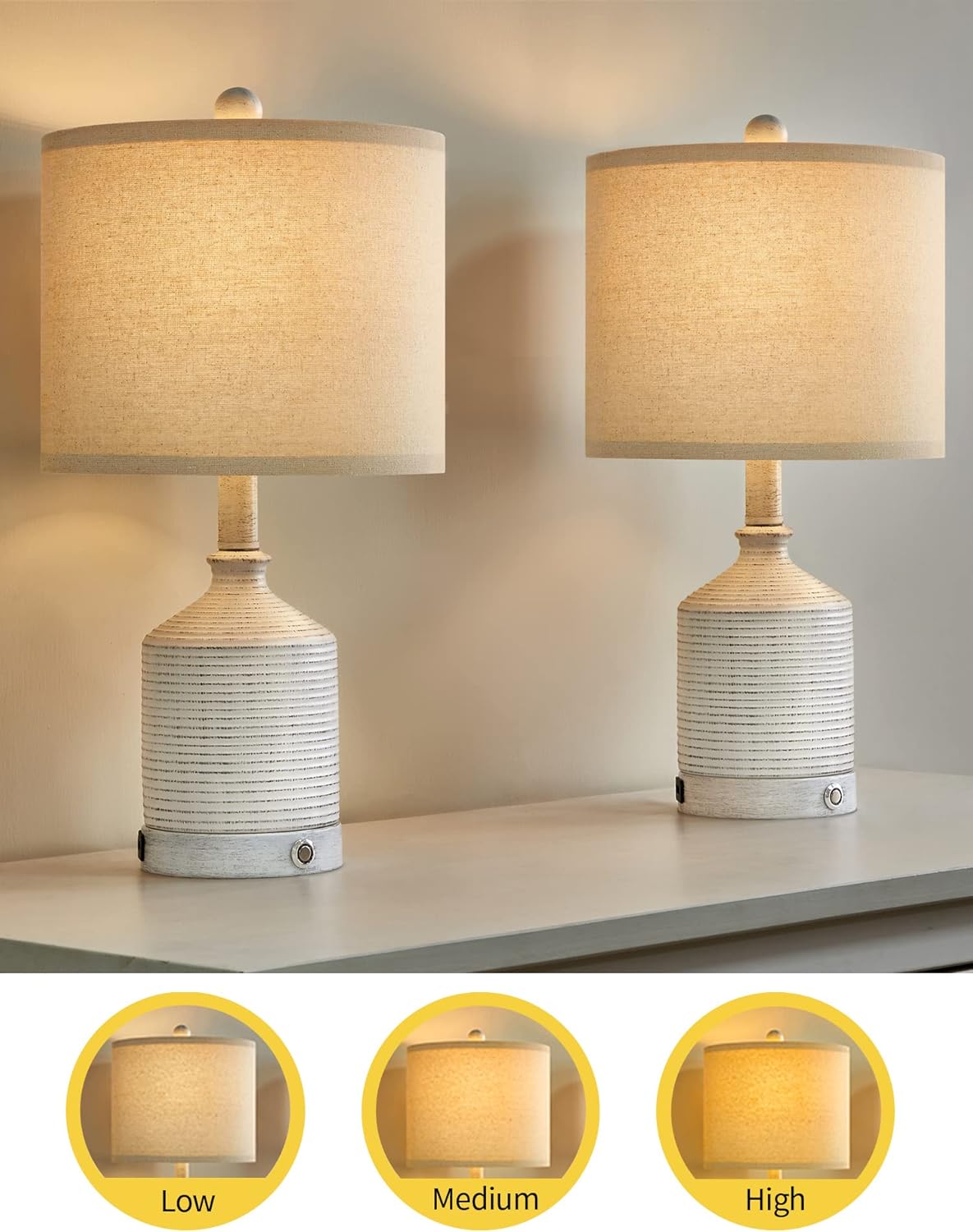
The lamp features a touch-sensitive base for easy operation and 3-way dimming functionality. To operate:
- First Touch: Turns the lamp ON to Low brightness.
- Second Touch: Adjusts the brightness to Medium.
- Third Touch: Adjusts the brightness to High.
- Fourth Touch: Turns the lamp OFF.
Ensure you are using a compatible 3-way dimmable LED bulb for this feature to function correctly. The included bulbs are compatible.
5.2. USB Charging Ports
Each lamp is equipped with two USB charging ports located on the base. These ports provide convenient charging for your electronic devices, such as smartphones and tablets, even when the lamp is turned off, as long as the lamp is plugged into a power outlet.
- Connect your device's USB charging cable to one of the lamp's USB ports.
- Ensure the lamp is plugged into a wall outlet for the USB ports to function.
6. Maintenance
Regular maintenance ensures the longevity and optimal performance of your lamp.
- Cleaning: Disconnect the power before cleaning. Wipe the lamp base with a soft, dry cloth. Do not use abrasive cleaners or solvents. The lampshade can be gently dusted.
- Bulb Replacement: Ensure the lamp is unplugged and the bulb has cooled before attempting to replace it. Use only 3-way dimmable LED bulbs of appropriate wattage.
- Cord Care: Periodically inspect the power cord for any signs of damage. Do not bend or pull the cord excessively.
7. Troubleshooting
If you encounter issues with your lamp, refer to the following common problems and solutions:
| Problem | Possible Cause | Solution |
|---|---|---|
| Lamp does not turn on. |
|
|
| 3-Way dimming not working. |
|
|
| USB ports not charging. |
|
|
8. Specifications
| Feature | Detail |
|---|---|
| Model Number | AMZ-T1080AW-TU |
| Brand | PoKat |
| Dimensions (L x W x H) | 25.4 x 25.4 x 50.8 cm (10 x 10 x 20 inches) |
| Weight | 1.81 kg (4 pounds) per lamp |
| Switch Type | Touch Control |
| Dimming | 3-Way Dimmable (Low, Medium, High) |
| USB Ports | 2 per lamp (for charging electronic devices) |
| Bulb Type | E26 Base, 3-Way Dimmable LED (2 bulbs included) |
| Room Type | Living Room, Bedroom |

9. Warranty and Support
Information regarding product warranty and customer support was not available in the provided product data. Please refer to the product packaging or contact the retailer/manufacturer directly for warranty details and support inquiries.


