
Craig Frames Colori 125
Craig Frames Colori 125 Picture Frame
User Manual
Introduction
Thank you for choosing the Craig Frames Colori 125 picture frame. This frame features clean rectilinear lines and a square profile, making it an ideal choice for modern decor. Crafted with a composite wood core and a laminate wrap, this sleek 1.25-inch frame is designed to beautifully display your cherished photos, prints, or posters. This manual provides essential information for the proper setup, use, and care of your new frame.

Image: Front view of the Craig Frames Colori 125 in Verde Green, highlighting its modern design and the included matting.
Safety Information
Please read and follow these safety guidelines to ensure safe handling and installation of your picture frame:
- Handle the frame with care to avoid scratches or damage to the finish.
- The frame includes an acrylic facing. While durable, avoid using abrasive cleaners that may scratch its surface.
- Ensure the wall hanging hardware is securely installed into a stud or appropriate wall anchor to prevent the frame from falling.
- Keep small components of the hanging kit away from children and pets.
Components
Your Craig Frames Colori 125 picture frame package includes the following components:
- Picture Frame: The main frame with a Verde Green finish, measuring 1.25 inches wide.
- Acrylic Facing: A clear, protective sheet that covers your photo/print.
- Cardboard Backing: Provides support for your photo/print within the frame.
- Hanging Kit: Includes necessary hardware for wall mounting (some assembly required).
Setup
Follow these steps to insert your photo or print and prepare your frame for hanging:
- Prepare the Frame: Carefully remove the cardboard backing and acrylic facing from the back of the frame. Some frames may have small metal tabs that need to be bent upwards.
- Remove Protective Film: Peel off the protective film from both sides of the acrylic facing. This film ensures the acrylic remains scratch-free during transit.
- Insert Artwork: Place your 17x22 inch photo, print, or poster into the frame. Ensure it is centered and aligned as desired. The viewable area is approximately 16.5x21.5 inches.
- Reassemble: Place the acrylic facing over your artwork, followed by the cardboard backing. Secure the backing by bending the metal tabs back down or re-inserting any clips.
- Install Hanging Hardware: Attach the included hanging kit components (e.g., D-rings and wire) to the back of the frame according to the instructions provided with the kit. The frame is designed for wall hanging only and supports both portrait and landscape orientations.
- Mount on Wall: Choose a suitable location on your wall. Use appropriate wall anchors or locate a wall stud for secure mounting. Hang the frame using the installed hardware.
Operating
The Craig Frames Colori 125 is a static display item. Its primary operation involves displaying your chosen artwork. You can easily change the orientation of your display:
- Changing Orientation: The included hanging hardware allows for both portrait (vertical) and landscape (horizontal) orientation. Simply adjust the placement of the hanging wire or hooks on the back of the frame to suit your display needs.
Maintenance
To keep your Craig Frames Colori 125 picture frame looking its best, follow these maintenance tips:
- Cleaning the Frame: Wipe the frame moulding with a soft, dry, lint-free cloth. Avoid using harsh chemicals or abrasive cleaners, as they may damage the laminate finish.
- Cleaning the Acrylic Facing: For the acrylic facing, use a soft cloth and a mild, non-abrasive cleaner specifically designed for acrylic or plastic. Do not use glass cleaner, as it can cause damage. Gently wipe to remove dust or smudges.
- Dusting: Regularly dust the frame and acrylic with a soft, dry cloth to prevent buildup.
- Avoid Direct Sunlight: Prolonged exposure to direct sunlight can cause fading of your artwork and potentially affect the frame's finish over time.
Troubleshooting
Here are some common issues and their solutions:
| Problem | Solution |
|---|---|
| Artwork appears blurry or scratched. | Ensure the protective film has been removed from both sides of the acrylic facing. Clean the acrylic with a soft cloth and appropriate cleaner. |
| Frame is not hanging straight. | Check that the hanging hardware on the back of the frame is evenly spaced and securely attached. Adjust the wall hook or nail as needed. |
| Frame feels loose or unstable on the wall. | Verify that the wall anchors or screws are properly installed and can support the weight of the frame. Consider using a stud finder for more secure mounting. |
Specifications
Detailed specifications for the Craig Frames Colori 125 picture frame:
- Model: Colori 125
- Size: 17x22 inches (holds 17x22 inch photo/print)
- Viewable Area: Approximately 16.5 x 21.5 inches
- Color: Verde Green
- Frame Moulding Width: 1.25 inches
- Frame Material: Wood composite with laminate wrap
- Facing Material: Acrylic
- Mounting Type: Wall Mount (Vertical or Horizontal orientation)
- Item Weight: 8 pounds
- UPC: 195834106582
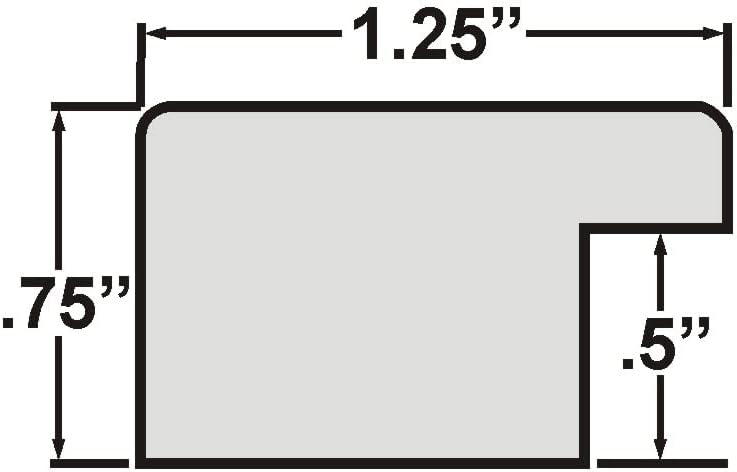
Image: Cross-section diagram illustrating the precise dimensions of the frame moulding.
Warranty
Craig Frames products are manufactured with quality and care. For specific warranty information regarding your Colori 125 picture frame, please refer to the documentation included with your purchase or visit the official Craig Frames website.
Support
If you require further assistance or have questions not covered in this manual, please contact Craig Frames customer support:
- Online Support: Visit the Craig Frames Store on Amazon for FAQs and additional product information.
- Manufacturer: Craig Frames, LLC