
HALO RL4069WZRGBWWHR
HALO 4" Smart Wi-Fi Recessed LED Light User Manual
Model: RL4069WZRGBWWHR
Introduction
This manual provides detailed instructions for the installation, operation, and maintenance of your HALO 4" Smart Wi-Fi Recessed LED Light. This smart lighting solution, powered by WiZ Pro, offers full color customization, dimming capabilities, and smart home integration, including SpaceSense motion detection. Please read this manual thoroughly before installation and use to ensure proper function and safety.

Image: The HALO 4" Smart Wi-Fi Recessed LED Light, showing its white trim and the multi-color light output, along with the included Edison socket adapter and wiring.
Product Features
- Full Customization: Utilize the WiZ app for grouping, scheduling, wireless dimming, music synchronization, and personalizing your lighting with white tuning and over 16 million colors.
- Smart Home Integration: Compatible with WiZ Pro, SpaceSense motion detection, voice control, and other smart home products for enhanced automation.
- SpaceSense Motion Detection: Activates lights with movement, aligning with daily routines and maximizing energy efficiency without additional devices.
- WiZClick Feature: Toggle between two favorite lighting modes using your existing light switch.
- Energy Efficient: Long-life LEDs provide approximately 50,000 hours of maintenance-free operation. Meets Air-Tite, ENERGY STAR, and CA Title-20 compliance.
- Durable Design: Suitable for damp or wet locations.

Image: A person wearing headphones, comfortably seated, using a smartphone to control smart lighting. Text overlays indicate features like 'Control anywhere', 'Preset modes', and 'Automation', highlighting the ease of use with the WiZ app.
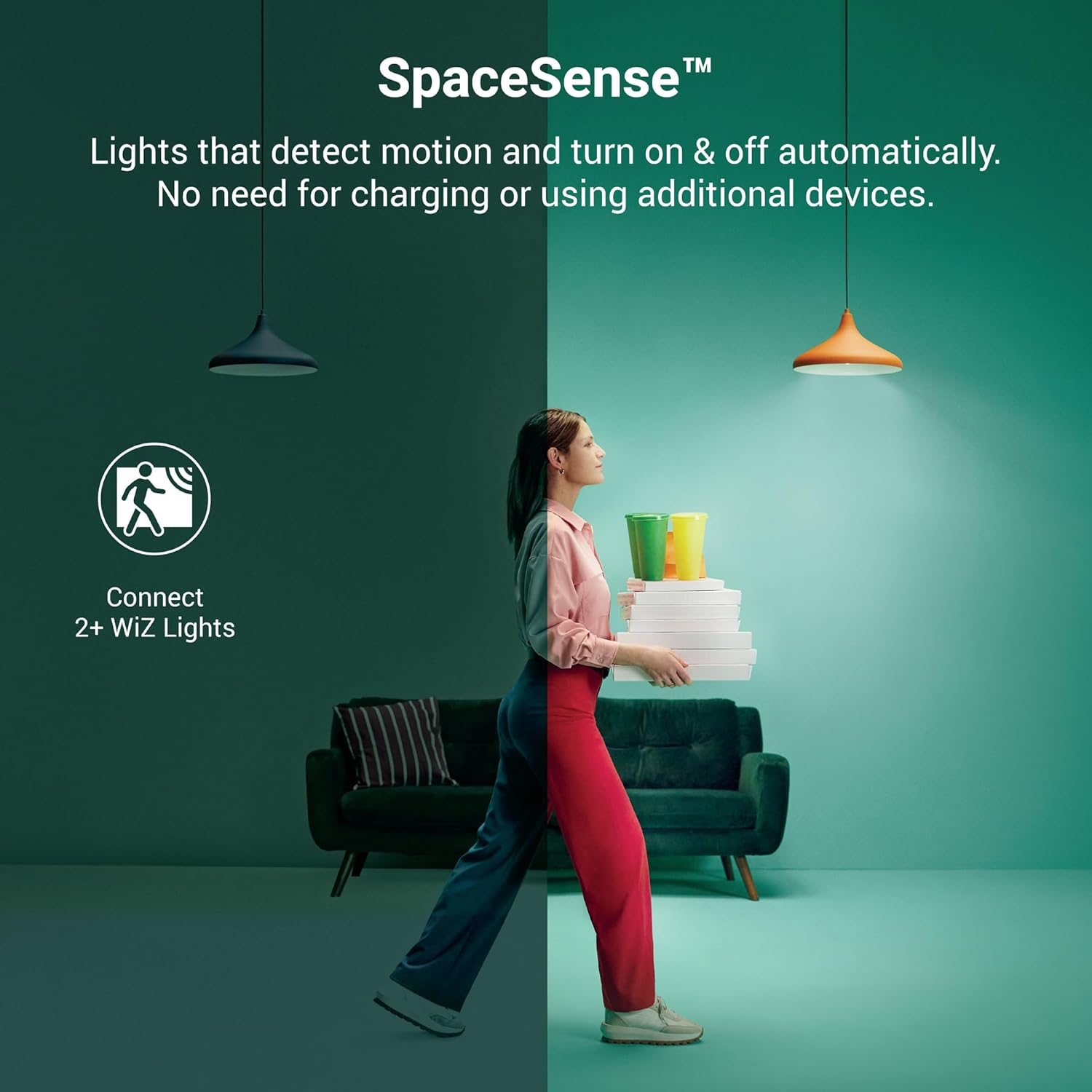
Image: An illustration demonstrating SpaceSense motion detection. One side shows a dark room with a person carrying boxes, while the other side shows the room illuminated by the smart lights, indicating automatic activation upon detecting movement.

Image: An illustration showing the WiZClick feature. A hand is shown interacting with a light switch icon, and the room lighting transitions between two different modes, demonstrating how existing light switches can be used to toggle between favorite lighting settings.
What's in the Box
Upon unpacking your HALO Smart Wi-Fi Recessed LED Light, please ensure all components are present and undamaged:
- HALO 4" Smart Wi-Fi Recessed LED Light Fixture
- Edison Socket Adapter (for installation into existing housings)
- Instruction Manual (this document)

Image: The retail packaging for the HALO 4" Smart Wi-Fi Recessed LED Light, displaying key features and specifications on the box.
Specifications
| Attribute | Detail |
|---|---|
| Model Name | Halo WiZ Recessed Lighting |
| Model Number | RL4069WZRGBWWHR |
| Size | 4 inch |
| Light Fixture Form | Recessed |
| Color | White and millions of other colors |
| Material | Plastic |
| Power Source | Corded Electric |
| Voltage | 120 Volts |
| Wattage | 7.2 watts |
| Brightness | 615 Lumen |
| Color Temperature | 2700 Kelvin (Tunable White) |
| Color Rendering Index (CRI) | 90 |
| Average Life | 50,000 Hours |
| Indoor/Outdoor Usage | Indoor (Damp or Wet Locations) |
| Product Dimensions | 5.11"L x 5.11"W x 3.16"H |
| Item Weight | 7 ounces (0.2 Kilograms) |
| Control Method | Voice, WiZ App (Wi-Fi) |
| Certifications | Air-Tite, ENERGY STAR, CA Title-20 |
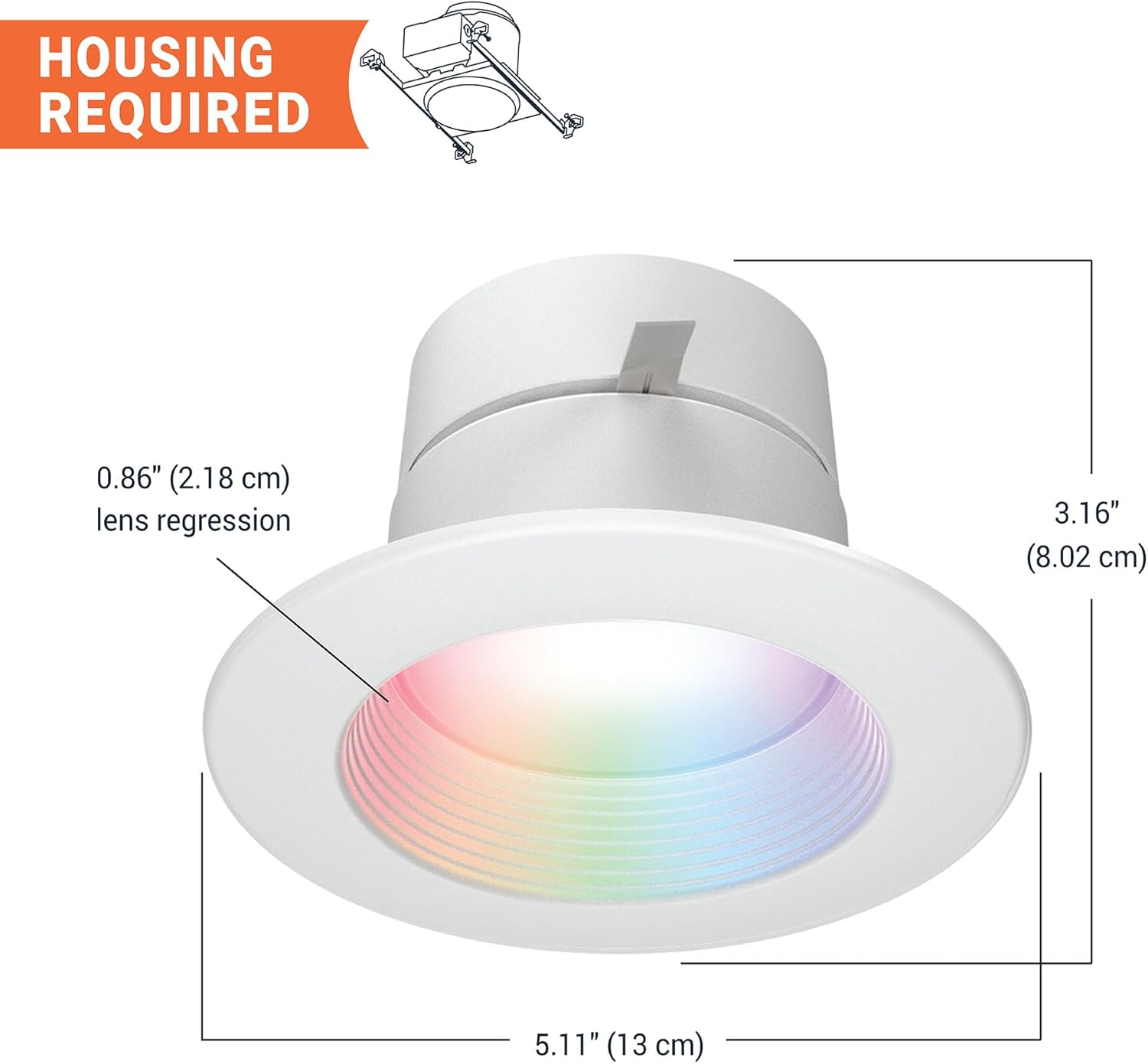
Image: A diagram showing the dimensions of the HALO 4" Recessed LED Light, including its diameter (5.11" / 13 cm), height (3.16" / 8.02 cm), and lens regression (0.86" / 2.18 cm), indicating that a housing is required for installation.
Setup and Installation
Safety Precautions
- Always turn off power at the circuit breaker before beginning installation.
- Ensure wiring is compliant with local electrical codes.
- If you are unsure about electrical installation, consult a qualified electrician.
Installation Steps
This recessed LED light is designed for retrofit into existing 4" or 5/6" housings or for new construction. The following steps outline a typical installation process:
- Prepare the Housing: Ensure the existing recessed housing is clear of debris and that the wiring is accessible.
- Connect Wiring: Use the provided Edison socket adapter. Screw the adapter into the existing light socket within the housing. Connect the light fixture's wires to the adapter's wires (typically white to white, black to black, and ground to ground if applicable). The fixture also comes with push connectors for easy wiring.
- Insert Fixture: Gently push the HALO recessed LED light fixture into the housing. The flexible mounting clips will secure the fixture in place.
- Secure and Finish: Ensure the fixture is flush with the ceiling.
Initial Setup and Wi-Fi Connection
After physical installation, connect your light to the WiZ app for smart control:
- Download the WiZ App: Download the official WiZ app from the App Store (iOS) or Google Play Store (Android) on your smartphone or tablet.
- Install and Power On: Ensure your new lights are physically installed and the power is turned on at the circuit breaker.
- Pair Lights over Wi-Fi (2.4 GHz): Open the WiZ app and follow the on-screen instructions to pair your lights. Ensure your device is connected to a 2.4 GHz Wi-Fi network during the pairing process.
- Customize Your Lighting: Once paired, you can customize settings, create schedules, and explore various lighting modes within the app.
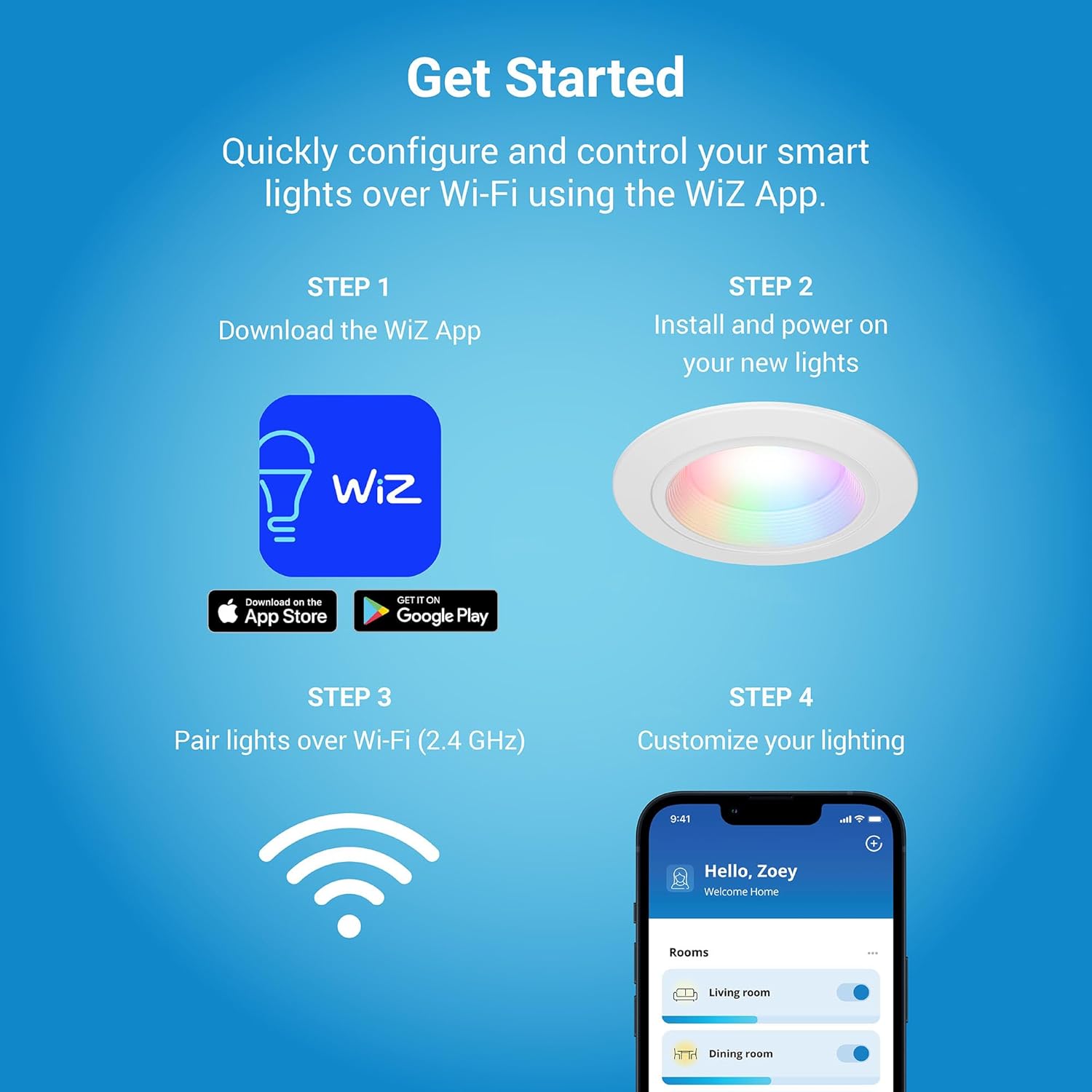
Image: A visual guide illustrating the four steps to get started with the HALO smart lights: 1. Download the WiZ App, 2. Install and power on your new lights, 3. Pair lights over Wi-Fi (2.4 GHz), and 4. Customize your lighting using the app interface.
WiZ Pro Setup (For Installers)
For professional installers, the WiZ Pro Setup App offers advanced features for managing multiple projects and pre-Wi-Fi claiming:
- App for Installers: Access specialized tools for project management.
- Pre-Wi-Fi Commissioning: Set up lights before connecting to a Wi-Fi network.
- Online Dashboard: Monitor and manage installations remotely.

Image: Two smartphones displaying the WiZ Pro Setup App interface, showing options for adding accessories, organizing products, managing connectivity, and transferring accounts, designed for professional installers.
Operating Instructions
Using the WiZ App
The WiZ app is the primary interface for controlling your HALO Smart Wi-Fi Recessed LED Light. It allows for comprehensive customization and automation:
- Color and White Tuning: Select from over 16 million colors or adjust white light from warm to cool tones to create the perfect ambiance.
- Dimming: Adjust brightness levels wirelessly from 100% down to 5%.
- Grouping: Group multiple HALO lights together to control them simultaneously.
- Schedules: Set automated schedules for lights to turn on/off or change modes at specific times.
- Scene Modes: Choose from pre-set dynamic light modes or create your own custom scenes for various activities or moods.
- Music Sync: Synchronize your lights with music for an immersive experience.

Image: A person dancing in a room illuminated by vibrant, multi-colored smart lighting, illustrating the 'Live Life in Full Color' feature. Icons below indicate compatibility with 16 Million Colors, Tunable White, Matter, Hey Google, Alexa, IFTTT, and SmartThings.
SpaceSense Motion Detection
SpaceSense uses the Wi-Fi signals from your HALO lights to detect motion in a room, activating lights automatically. To enable and configure SpaceSense:
- Ensure you have at least two WiZ lights in the room for optimal detection.
- Navigate to the SpaceSense section within the WiZ app.
- Follow the in-app instructions to calibrate and activate motion detection for your chosen room.
- Adjust sensitivity and light behavior (e.g., dimming after no motion) as desired.
WiZClick Feature
The WiZClick feature allows you to cycle between two preferred lighting modes using your standard wall switch:
- In the WiZ app, go to the settings for your light.
- Locate the WiZClick option and select your two desired lighting modes (e.g., a bright white for daily use and a soft, warm glow for evenings).
- Once configured, a quick flip of your physical light switch will toggle between these two modes.
Voice Control Integration
Your HALO Smart Wi-Fi Recessed LED Light can be integrated with popular voice assistants:
- Google Assistant / Hey Google: Link your WiZ account in the Google Home app. Use commands like "Hey Google, turn on the living room lights" or "Hey Google, set the kitchen lights to blue."
- Amazon Alexa: Enable the WiZ skill in the Alexa app. Use commands such as "Alexa, dim the bedroom lights to 50%" or "Alexa, change the dining room lights to warm white."
- IFTTT & SmartThings: Explore additional automation possibilities by connecting your WiZ lights through IFTTT applets or SmartThings routines.
Maintenance
The HALO Smart Wi-Fi Recessed LED Light is designed for long-term, maintenance-free operation. However, general care can prolong its aesthetic appeal:
- Cleaning: Ensure power is off before cleaning. Use a soft, dry, or slightly damp cloth to wipe the trim and lens. Avoid abrasive cleaners, solvents, or harsh chemicals, as these can damage the finish or electronic components.
- LED Lifespan: The integrated LEDs are rated for 50,000 hours of operation, meaning no bulb replacement is necessary under normal use.
Troubleshooting
If you encounter issues with your HALO Smart Wi-Fi Recessed LED Light, refer to the following common problems and solutions:
| Problem | Solution |
|---|---|
| Light does not turn on. | Check the circuit breaker to ensure power is supplied. Verify all wiring connections are secure. Ensure the light switch is in the 'ON' position. |
| Light is not responding to the WiZ app. | Ensure your smartphone is connected to a 2.4 GHz Wi-Fi network. Check if the light is within range of your Wi-Fi router. Restart the WiZ app. Power cycle the light (turn off at the switch for 10 seconds, then turn back on). If issues persist, try re-pairing the light in the app. |
| Light is flickering or behaving erratically. | Ensure the light is not connected to a dimmer switch that is incompatible with smart LEDs. Verify stable power supply. Check for Wi-Fi interference. |
| Cannot connect to Wi-Fi. | Confirm your Wi-Fi network is 2.4 GHz. Ensure correct Wi-Fi password. Move the light closer to the router during setup. Temporarily disable VPN or firewall settings on your phone if necessary. |
| SpaceSense is not detecting motion. | Ensure at least two WiZ lights are installed in the room. Check SpaceSense settings in the WiZ app for proper calibration and sensitivity. Ensure there are no large obstructions blocking Wi-Fi signals between lights. |
Warranty and Support
Your HALO 4" Smart Wi-Fi Recessed LED Light is backed by a 5-year limited warranty. This warranty covers defects in materials and workmanship under normal use.
For warranty claims, technical assistance, or customer service, please contact HALO customer support. HALO is a contractor-preferred brand with US-based customer service, committed to providing superior quality and reliability.
Please visit the official HALO website or refer to the product packaging for the most current contact information and detailed warranty terms.