Instruction Manual
Replacement Remote Control for Soundmax SM-LED22M05 SM-LED28M04
Model: SM-LED22M05, SM-LED28M04
1. Product Overview
This instruction manual provides essential information for the use and maintenance of your Hotsmtbang Replacement Remote Control, designed for Soundmax SM-LED22M05 and SM-LED28M04 Smart LCD LED HDTVs.
The remote control is pre-programmed and requires no additional setup. It is ready for use immediately upon battery insertion.
Package Contents:
- 1 x Replacement Remote Control
Note: Batteries and additional instructions are not included in the package.

Figure 1: Front view of the Hotsmtbang Replacement Remote Control, showing various buttons including number keys, volume, channel, and navigation controls.
2. Setup Guide
2.1 Battery Installation
To begin using your remote control, you must install two AAA batteries (not included).
- Locate the battery compartment on the back of the remote control.
- Press down on the latch and slide the battery cover downwards to open it.
- Insert two AAA batteries, ensuring the positive (+) and negative (-) terminals align correctly with the indicators inside the compartment.
- Slide the battery cover back into place until it clicks securely.
The remote control is now ready for immediate use with your compatible Soundmax TV.
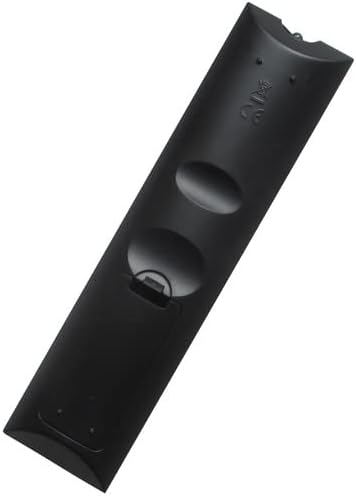
Figure 2: Back view of the remote control, showing the battery compartment cover.

Figure 3: Back view of the remote control with the battery compartment open, showing the slots for two AAA batteries.
3. Operating Instructions
This replacement remote control is designed to function identically to your original Soundmax TV remote. No programming or pairing is required.
3.1 Basic Functions
- Power Button (●): Turns the TV on or off.
- Number Buttons (0-9): Directly select channels.
- Volume Up/Down (VOL +/-): Adjusts the audio volume.
- Channel Up/Down (CH +/-): Changes the TV channel sequentially.
- Mute Button (MUTE): Silences or restores the TV audio.
- Input/Source Button (INPUT): Cycles through available input sources (HDMI, AV, etc.).
- Navigation Buttons (Up, Down, Left, Right, OK): Used to navigate menus and confirm selections.
- Menu Button (MENU): Accesses the TV's main menu.
- Exit Button (EXIT): Exits the current menu or function.
3.2 Advanced Functions
This remote includes standard buttons for smart TV functions, such as those for accessing smart features or specific apps, depending on your TV model's capabilities. Refer to your Soundmax TV's original manual for specific functions of less common buttons.
4. Maintenance
4.1 Cleaning
To maintain the remote control's appearance and functionality:
- Wipe the surface with a soft, dry cloth.
- For stubborn dirt, slightly dampen the cloth with water or a mild, non-abrasive cleaner.
- Do not use harsh chemicals, solvents, or abrasive cleaning pads.
4.2 Storage
When not in use for extended periods, it is recommended to:
- Remove the batteries to prevent leakage and potential damage to the remote.
- Store the remote in a cool, dry place, away from direct sunlight and extreme temperatures.
5. Troubleshooting
If you experience issues with your remote control, please refer to the following common solutions:
| Problem | Solution |
|---|---|
| Remote is unresponsive. |
|
| Buttons are not working. |
|
| Short operating range. |
|
| Remote does not control the TV. |
|
6. Product Specifications
| Feature | Detail |
|---|---|
| Brand | Generic (Hotsmtbang) |
| Compatibility | Soundmax SM-LED22M05, SM-LED28M04 Smart LCD LED HDTV TV |
| Power Source | 2 x AAA Batteries (not included) |
| Special Feature | No additional programming required |
| Manufacturer | Hotsmtbang |
| Country of Origin | China |
| First Available Date | September 13, 2022 |
7. Warranty and Support
This product comes with a 90-day quality warranty from the date of purchase. This warranty covers manufacturing defects and ensures hassle-free returns or replacements.
For any questions, troubleshooting assistance beyond this manual, or warranty claims, please contact the seller directly through the platform where the purchase was made. Provide your order details for prompt support.
Seller: Hotsmtbang


