
1. Introduction
Thank you for choosing ALITOVE WS2811 12V RGB Pixel String Lights. These individually addressable LED pixel lights are designed for versatile indoor and outdoor lighting decoration, offering full-color display and robust weather resistance. This manual provides essential information for safe installation, operation, and maintenance of your pixel string lights.
1.1 Safety Information
- Ensure the power supply is disconnected before installation or maintenance.
- Use only a compatible 12V DC power supply (not included).
- Do not exceed the maximum recommended length or number of lights per controller/power injection point to prevent damage.
- Avoid sharp objects or excessive force that could damage the wires or LED pixels.
- While the lights are IP68 waterproof, ensure all connections are secure and properly sealed, especially the xConnect pigtail and weatherproof cap.
2. Package Contents
Verify that all items are present in your package:
- 1x 50pcs WS2811 LED pixels string light
- 1x Female xConnect pigtail
- 1x Weatherproof cap

Image: Contents of the ALITOVE WS2811 12V RGB Pixel String Lights package, showing the 50-pixel string and the included xConnect pigtail and weatherproof cap.
3. Specifications
| Feature | Detail |
|---|---|
| Model | WS2811-12V-BK |
| Voltage | 12 Volts DC |
| Wattage | 25 watts |
| Number of Light Sources | 50 pixels |
| Pixel Spacing | 8 inches (20cm) |
| Waterproof Rating | IP68 |
| Light Source Type | LED (WS2811) |
| Light Color | Full Color (RGB) |
| Special Features | Color Changing, Dimmable, Individually Addressable |
| Connector Type | xConnect |
| Indoor/Outdoor Usage | Indoor, Outdoor |
| Average Life | 50,000 Hours |
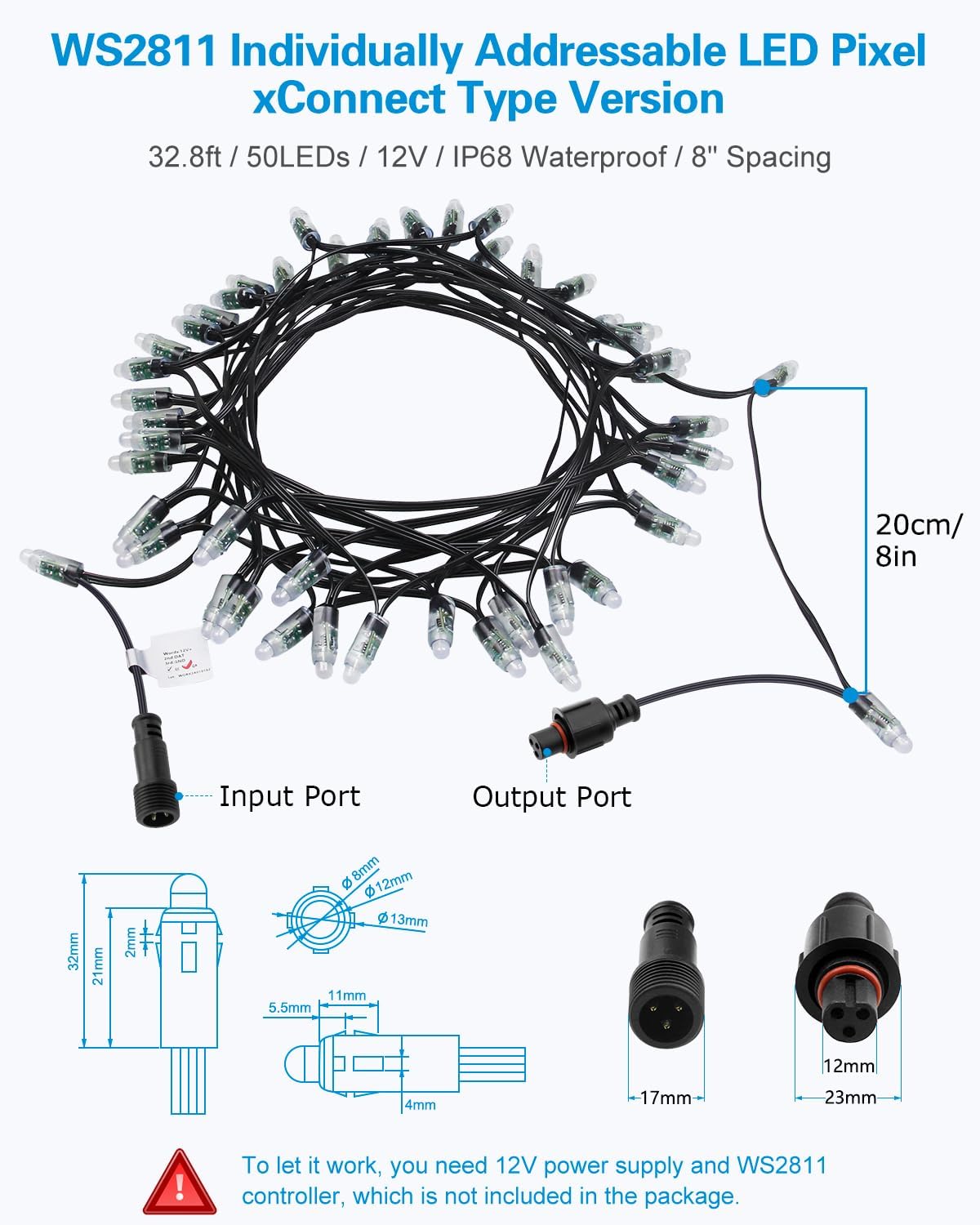
Image: Technical diagram showing the dimensions of the LED pixels, the 8-inch spacing, and the input/output xConnect ports.
4. Setup Instructions
Proper setup is crucial for the performance and longevity of your ALITOVE pixel string lights. A 12V DC power supply and a compatible WS2811 controller are required (not included).
- Prepare Components: Ensure you have your ALITOVE WS2811 pixel string lights, a 12V DC power supply, and a compatible WS2811 controller.
- Connect Power Supply: Connect the 12V DC power supply to your WS2811 controller's power input. Ensure correct polarity.
- Connect Lights to Controller:
- Locate the input port on your ALITOVE pixel string (typically marked or indicated by the direction of data flow).
- Connect the female xConnect pigtail from the controller's data output to the input port of the pixel string. The xConnect design ensures a secure, waterproof connection.
- If connecting multiple strings, use the output port of the first string to connect to the input port of the next string.
- Secure Connections: For outdoor use, ensure all xConnect connections are tightened and the weatherproof cap is used on any unused female output ports to prevent moisture ingress.
- Power Injection (for long runs): For longer installations or multiple strings, power injection may be necessary to maintain consistent brightness and color. Refer to your controller's manual for specific power injection guidelines. Additional 3-Pin xConnectors and power injectors are available (ASINs: B0D6VWTJHN, B0D6VVTSRT).
- Mounting: Securely mount the lights in your desired location. The 8-inch spacing is ideal for large-scale decorations.

Image: Visual guide illustrating the xConnect waterproof connectors, the durability of the wires, and how to connect multiple strings end-to-end.
5. Operating Instructions
These ALITOVE WS2811 pixel string lights are individually addressable, allowing for advanced control and dynamic lighting effects. Operation is managed through a compatible WS2811 controller (not included).
- Controller Compatibility: The lights are compatible with a wide range of programmable SPI controllers, including:
- Micro-controllers like Raspberry Pi and Arduino.
- Dedicated SPI controllers such as T1000S, K1000C.
- Bluetooth controllers like ALT-C01, SP105E, SP638E, SP602E, SP608E.
- Music controllers like SP107E.
- WiFi controllers like SP108E.
- Programming and Effects:
- Each LED pixel can be individually set for its red, green, and blue components, as well as its brightness. This allows for 256-level brightness and 24-bit color display, achieving 16.7 million colors.
- Refer to your specific controller's manual and software for instructions on programming custom color modes, animations, and effects (e.g., rainbow, chasing, static colors).
- Power On/Off: Use your controller or power supply switch to turn the lights on or off.
- Brightness and Color Adjustment: Adjust brightness and color patterns via your connected controller's interface (app, remote, or software).

Image: An illustration demonstrating the compatibility of ALITOVE pixel lights with various controllers, including Arduino, Raspberry Pi, and several SP series controllers.
6. Maintenance
The ALITOVE WS2811 pixel string lights are designed for durability and minimal maintenance. Following these guidelines will help ensure their longevity.
- Waterproof Integrity: The lights are IP68 rated, meaning all components are sealed in silicone to withstand extreme weather conditions like snowstorms and rainstorms. Regularly inspect connections for tightness and ensure weatherproof caps are in place on unused ports.
- Wire Durability: The wires are made of cold-resistant, UV-resistant rubber. Avoid stretching, cutting, or exposing them to excessive abrasion.
- Cleaning: If necessary, gently wipe the pixels with a soft, damp cloth. Do not use harsh chemicals or abrasive cleaners.
- Storage: When not in use for extended periods, store the lights in a cool, dry place, away from direct sunlight and extreme temperatures.

Image: ALITOVE pixel lights illuminating an outdoor scene during snowy weather, highlighting their IP68 waterproof and weather-resistant features.
7. Troubleshooting
If you encounter issues with your ALITOVE pixel string lights, refer to the following common problems and solutions:
| Problem | Solution |
|---|---|
| Lights do not turn on. |
|
| Incorrect colors or flickering. |
|
| Some pixels are not working. |
|
| Connectors do not fit. |
|
8. Applications
The ALITOVE WS2811 pixel string lights are suitable for a wide range of indoor and outdoor lighting decoration projects, including:
- Outdoor billboards and LED screens
- Hotel facades, bars, and city skylines
- Permanent Christmas lights and holiday decorations
- Architectural lighting and event displays

Image: A collage showcasing diverse applications of the ALITOVE pixel lights, from commercial signage to festive home and outdoor holiday displays.
9. Warranty and Support
ALITOVE products are designed for quality and reliability. For warranty information or technical support, please contact ALITOVE customer service through the retailer where you purchased the product or visit the official ALITOVE store on Amazon: ALITOVE Store.