
Introduction
This document provides instructions for the Generic replacement infrared remote control, designed for use with various TCL AC Air Conditioner models. This remote offers essential functions for operating your air conditioning unit. Please note that as a replacement unit, some advanced functions present on your original remote may not be supported.
Setup: Battery Installation
To begin using your remote control, you must install two AAA batteries. Lithium batteries are recommended for optimal performance.
- Locate the Battery Compartment: Turn the remote control over. The battery compartment is located on the back, typically at the bottom section.
- Open the Battery Cover: Gently press down on the tab or slide the cover in the direction indicated by an arrow (often marked "PUSH" or with an arrow symbol) to remove it.
- Insert Batteries: Insert two new AAA batteries, ensuring that the positive (+) and negative (-) terminals align correctly with the markings inside the compartment. Incorrect insertion can prevent the remote from functioning.
- Close the Battery Cover: Slide the battery cover back into place until it clicks securely.

Image: Back of the remote control with the battery cover removed, illustrating the battery compartment.
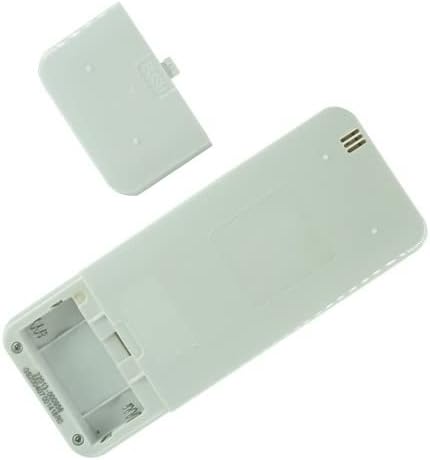
Image: Back of the remote control with the battery cover partially open.
Operating Instructions
After installing batteries, the remote is ready for use. Point the remote control directly at the infrared receiver on your TCL AC Air Conditioner unit.
- Power Button: Press to turn the air conditioner ON or OFF.
- Mode Button: Cycles through operating modes such as Cool, Heat, Fan, Dry, and Auto.
- Temperature Adjustment: Use the ▲ (Up) and ▼ (Down) buttons to increase or decrease the desired temperature.
- Fan Speed Button: Adjusts the fan speed (e.g., Low, Medium, High, Auto).
- Timer Button: Sets the ON/OFF timer for the unit. Refer to your AC unit's main manual for specific timer programming details.
Note: The specific layout and labeling of buttons may vary slightly from your original remote. This replacement remote provides core functionalities. Some advanced features or specific settings (e.g., Celsius to Fahrenheit conversion) may not be available or function differently.
Maintenance
- Cleaning: Wipe the remote control with a soft, dry cloth. Do not use liquid cleaners or abrasive materials.
- Battery Replacement: Replace batteries when the remote's range decreases or it stops responding. Always replace both batteries simultaneously with new ones of the same type.
- Storage: If the remote will not be used for an extended period, remove the batteries to prevent leakage and potential damage.
Troubleshooting
| Problem | Possible Cause | Solution |
|---|---|---|
| Remote not responding. | Dead or incorrectly installed batteries. | Replace batteries with new AAA batteries, ensuring correct polarity. |
| Remote has limited functionality. | This is a replacement remote; some original functions may not be supported. | Confirm compatibility with your specific AC model. Not all advanced features are guaranteed. |
| Cannot change temperature display from Celsius to Fahrenheit. | This specific model of remote does not support temperature unit conversion. | This is a known limitation of this replacement remote. |
| Remote works intermittently. | Weak batteries or obstruction between remote and AC unit. | Replace batteries. Ensure a clear line of sight to the AC unit's infrared receiver. |
Specifications
- Brand: Generic
- Model Number: Easytry14797
- Connectivity Technology: Infrared (IR)
- Controller Type: Button Control
- Batteries Required: 2 x AAA (Lithium recommended)
- Special Feature: Cannot change from Celsius to Fahrenheit
- ASIN: B0BF4B7738
Warranty and Support
This product comes with a 90-Day, Hassle-Free Returns policy. For any issues or support inquiries, please refer to your purchase documentation or contact the seller directly.
Seller: SZHKHXD