Introduction
This manual provides essential instructions for the setup and operation of your new Generic replacement infrared remote control for various York and Goodman air conditioner models. This remote is designed to offer basic control functionality. Please note that as a replacement unit, it may not support all advanced features or functions of your original air conditioner remote. No programming is required; simply insert batteries to begin use.
Product Overview
The remote control is an infrared (IR) device designed to operate specific York and Goodman air conditioner units. It features standard buttons for power, mode selection, temperature adjustment, fan speed, and timer functions. The remote operates on AAA batteries.

Image 1: Front view of the remote control, displaying the LCD screen, power button, mode selection, temperature controls, fan speed, and other function buttons.
Setup: Battery Installation
- Locate the battery compartment on the back of the remote control.
- Slide the battery compartment cover downwards or press the latch and lift to open.
- Insert two (2) AAA batteries, ensuring the positive (+) and negative (-) terminals align correctly with the markings inside the compartment.
- Replace the battery compartment cover, ensuring it clicks securely into place.
- The remote is now ready for use. No additional programming is required.

Image 2: Rear view of the remote control, highlighting the battery compartment cover.
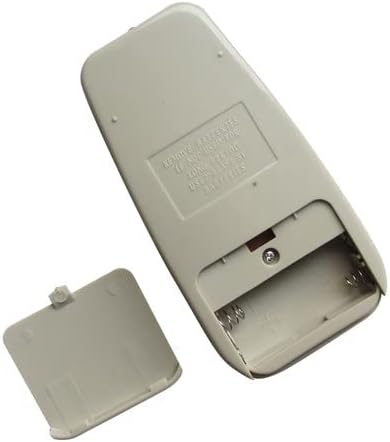
Image 3: Angled view of the remote's back with the battery cover open, revealing the empty battery slots.

Image 4: Straight view of the remote's back with the battery cover open, showing the battery terminals.
Operating Instructions
Point the remote control directly at the air conditioner's receiver window. Ensure there are no obstructions between the remote and the unit.
- Power Button: Press to turn the air conditioner ON or OFF.
- Mode Button: Cycles through available operating modes such as COOL, DRY, FAN, AUTO. (Note: This remote is specified for "Cool Only" functionality and may not fully support other modes on all compatible units.)
- Temperature Adjustment (TEMP +/-): Use the up and down arrows to increase or decrease the desired temperature setting.
- Fan Speed (FAN): Adjusts the fan speed (e.g., AUTO, HIGH, MED, LOW).
- Timer Button: Activates or adjusts the timer function for scheduled operation. Refer to your air conditioner's main manual for specific timer settings.
- Sleep Button: Activates the sleep mode, which typically adjusts temperature and fan speed for comfortable sleep.
- Swing Button: Controls the louver swing function, if available on your air conditioner.
Troubleshooting
- Remote not responding:
Ensure batteries are inserted correctly with the correct polarity.
Replace old batteries with new AAA batteries.
Check for any obstructions between the remote and the air conditioner's IR receiver.
Ensure you are within the effective range of the air conditioner's IR receiver.
- Certain functions do not work:
As a replacement remote, some advanced or specific functions of your original air conditioner remote may not be supported. This remote is primarily designed for basic operational control.
Verify that your air conditioner model is listed as compatible. Incompatibility can lead to partial or no functionality.
- Temperature display is in Celsius only:
This remote is specified to operate in Celsius only and does not support changing to Fahrenheit.
Specifications
- Product Type: Replacement Infrared (IR) Remote Control
- Power Source: 2 x AAA Batteries (not included)
- Connectivity: Infrared
- Controller Type: Button Control
- Special Feature: Cool Only, Cannot change from Celsius to Fahrenheit
- Compatible Devices: Various York and Goodman Air Conditioner models (refer to compatibility list in header)
Maintenance
- Cleaning: Wipe the remote control with a soft, dry cloth. Do not use liquid cleaners or abrasive materials.
- Battery Replacement: Replace batteries when the remote's performance degrades or if the display becomes dim. Remove batteries if the remote will not be used for an extended period to prevent leakage.
- Storage: Store the remote in a cool, dry place away from direct sunlight and extreme temperatures.
Warranty and Support
This product is a generic replacement remote control. Specific warranty information or dedicated technical support from the original air conditioner manufacturer is not typically provided for third-party replacement parts. For issues beyond basic functionality, please refer to the seller or retailer from whom the remote was purchased.


