Introduction
This manual provides detailed instructions for setting up and operating your VINABTY Universal Remote Control. Designed for ease of use, this remote is compatible with a wide range of television brands, including LG, Samsung, Philips, Panasonic, Sharp, Sanyo, TCL, Vizio, Sony, Toshiba, Magnavox, Hisense, JVC, RCA, Hitachi, Haier, Westinghouse, Vestel, and Seiki TV.
Product Overview
Familiarize yourself with the layout and functions of your VINABTY Universal Remote Control.
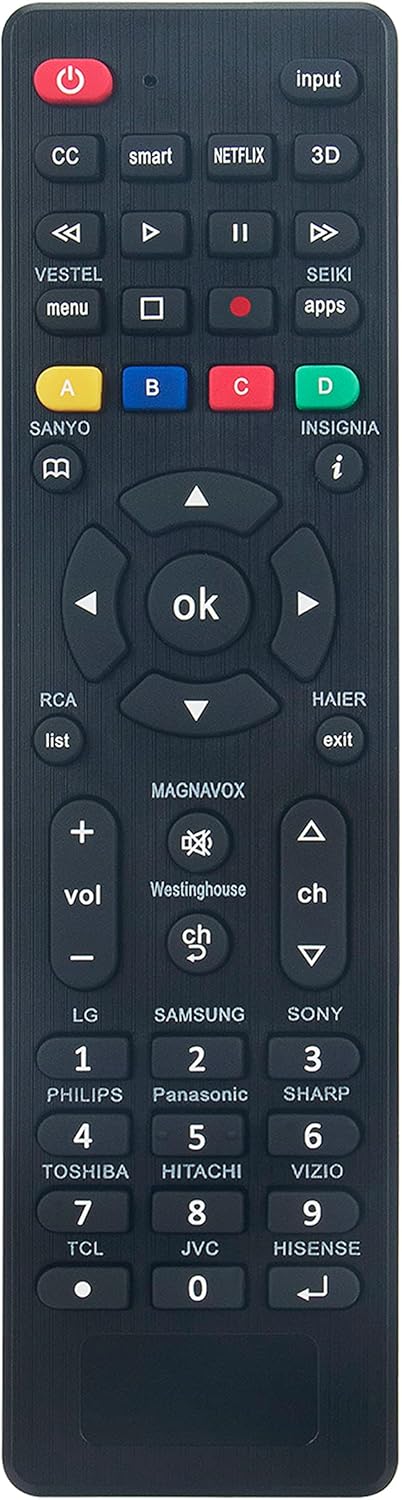
Image: Front view of the VINABTY Universal Remote Control. It is black with various gray and colored buttons.
Button Functions
- Power Button (Red, Top Left): Turns the TV on or off.
- Input Button (Top Right): Selects video input sources (e.g., HDMI, AV).
- CC (Closed Caption) Button: Toggles closed captions on/off.
- Smart Button: Accesses smart TV features or home screen.
- NETFLIX Button: Direct access to the Netflix application.
- 3D Button: Activates or deactivates 3D mode (if supported by TV).
- Media Control Buttons (Rewind, Play/Pause, Fast Forward, Stop, Record): Controls media playback.
- Menu Button (VESTEL menu): Opens the TV's main menu.
- Apps Button (SEIKI apps): Direct access to TV applications.
- Colored Buttons (A-Yellow, B-Blue, C-Red, D-Green): Multi-functional buttons, often used for specific features within menus or apps.
- Navigation Pad (Up, Down, Left, Right, OK): Navigates through menus and confirms selections.
- List Button (RCA list): Accesses channel lists or program guides.
- Exit Button (HAIER exit): Exits current menu or application.
- Volume Up/Down (Vol +/-): Adjusts the television volume.
- Mute Button (MAGNAVOX mute): Mutes or unmutes the sound.
- Channel Up/Down (Ch +/-): Changes television channels.
- Brand-Specific Number Buttons (1-9, 0): Directly selects channels or inputs. Each number button is associated with specific TV brands (e.g., '1' for LG, '2' for Samsung, '3' for Sony, '4' for Philips, '5' for Panasonic, '6' for Sharp, '7' for Toshiba/TCL, '8' for Hitachi/JVC, '9' for Vizio/Hisense).
Setup
Battery Installation
- Locate the battery compartment on the back of the remote control.
- Slide the battery cover downwards and lift it off.
- Insert two AAA batteries, ensuring the positive (+) and negative (-) terminals align with the markings inside the compartment.
- Replace the battery cover by sliding it back into place until it clicks.
Note: Always use new batteries and dispose of old batteries responsibly.
Operating Instructions
This universal remote control is designed to work with most major TV brands without complex programming. It is an infrared (IR) remote control.
Automatic Setup (Most Common)
For most compatible televisions, the remote should work directly out of the box without any special setup. Simply point the remote at your TV and press the Power button. If your TV turns on or off, the remote is ready to use.
Manual Brand Selection (If Automatic Setup Fails)
If the remote does not immediately control your TV, you may need to try the following:
- Identify your TV brand from the list of compatible brands printed on the remote (e.g., LG, Samsung, Sony, Philips, Panasonic, Sharp, Toshiba, Hitachi, Vizio, TCL, JVC, Hisense).
- Locate the corresponding number button on the remote for your TV brand. For example, if you have an LG TV, the '1' button is associated with LG.
- While pointing the remote at your TV, press and hold the number button corresponding to your TV brand for approximately 5 seconds, or until the TV responds (e.g., turns on/off, volume changes).
- Release the button. Test other functions like volume, channel, and input to ensure full compatibility.
Tip: If your TV brand is not explicitly listed on a number button, try pressing and holding the '0' button or experiment with other number buttons, as some brands may share codes.
Maintenance
- Cleaning: Use a soft, dry cloth to clean the remote control. Do not use liquid cleaners or abrasive materials.
- Battery Replacement: Replace batteries when the remote's response becomes sluggish or stops working. Always replace both batteries at the same time.
- Storage: Store the remote in a cool, dry place away from direct sunlight and extreme temperatures.
- Avoid Drops: Protect the remote from drops and impacts, which can damage internal components.
Troubleshooting
| Problem | Possible Cause | Solution |
|---|---|---|
| Remote not working at all. | Dead or incorrectly installed batteries. | Check battery orientation. Replace with new AAA batteries. |
| Remote only controls some functions. | Incorrect TV code or partial compatibility. | Try the manual brand selection method again, ensuring you hold the button long enough. Some older TVs may have limited universal remote support. |
| Remote's range is poor. | Low batteries; Obstruction between remote and TV. | Replace batteries. Ensure a clear line of sight to the TV's IR receiver. |
| TV not responding to any button presses. | Remote is not paired with the TV; TV's IR receiver is blocked or faulty. | Re-attempt manual brand selection. Check if anything is blocking the TV's IR sensor. Ensure the TV is powered on. |
Specifications
- Model Number: RC-G008
- Brand: VINABTY
- Product Dimensions: 6.9 x 2 x 0.7 inches
- Item Weight: 2.6 ounces
- Battery Type: 2 x AAA (not included)
- Color: Black
- Special Feature: Universal
- Max Number of Supported Devices: 18 (various TV brands)
- Compatible Devices: Television
Warranty and Support
For information regarding warranty coverage or technical support, please refer to the documentation included with your purchase or contact the VINABTY customer service directly. Contact details are typically available on the product packaging or the seller's website.