1. Introduction
Thank you for choosing the EASIBEST Silent Analog Alarm Clock. This manual provides detailed instructions for the proper setup, operation, and maintenance of your new alarm clock. Please read this manual thoroughly before use to ensure optimal performance and longevity of the product.
2. Product Overview
The EASIBEST Silent Analog Alarm Clock features a large, easy-to-read dial with bold numbers, a silent sweeping second hand, a crescendo alarm, and a convenient snooze/light function. Its design prioritizes ease of use and clear visibility.

Figure 2.1: Front view of the EASIBEST Silent Analog Alarm Clock.
2.1 Components
Familiarize yourself with the various parts of your alarm clock:

Figure 2.2: Rear view of the alarm clock with labeled controls.
- Big Snooze/Light Button: Located on top, activates snooze and backlight.
- Alarm Speaker: Located on the back, emits the alarm sound.
- Alarm ON/OFF Switch: Located on the side, enables or disables the alarm.
- Time Knob: Located on the back, used to set the current time.
- Alarm Knob: Located on the back, used to set the desired alarm time.
- Battery Compartment: Located on the back, holds two AA batteries.
3. Setup
3.1 Battery Installation
The alarm clock requires two (2) AA batteries (not included) for operation. For optimal performance and extended movement life, carbon-zinc batteries are recommended.
- Open the battery compartment cover located on the back of the clock.
- Insert two AA batteries, ensuring the correct polarity (+ and -) as indicated inside the compartment.
- Close the battery compartment cover securely.
3.2 Initial Time Setting
After installing the batteries, set the current time:
- Locate the Time Knob on the back of the clock.
- Rotate the Time Knob clockwise or counter-clockwise until the hour and minute hands display the correct current time.
4. Operating Instructions
4.1 Setting the Alarm Time
- Locate the Alarm Knob on the back of the clock.
- Rotate the Alarm Knob to move the alarm hand to your desired wake-up time.
- Ensure the Alarm ON/OFF Switch (located on the side) is in the 'ON' position to activate the alarm.
4.2 Alarm Function
The alarm features a crescendo sound, starting softly and gradually increasing in volume to provide a gentle wake-up experience. To turn off the alarm once it sounds, slide the Alarm ON/OFF Switch to the 'OFF' position.
4.3 Snooze Function
When the alarm sounds, you can activate the snooze function for an additional 5 minutes of sleep:
- Press the large Big Snooze/Light Button on the top of the clock.
- The alarm will pause for approximately 5 minutes and then sound again.
- You can repeat the snooze function multiple times within a one-hour period.
4.4 LED Backlight Function
To illuminate the clock face in low-light conditions:
- Press the large Big Snooze/Light Button on the top of the clock.
- The entire clock face will illuminate for approximately 5 seconds, providing clear visibility of the time.
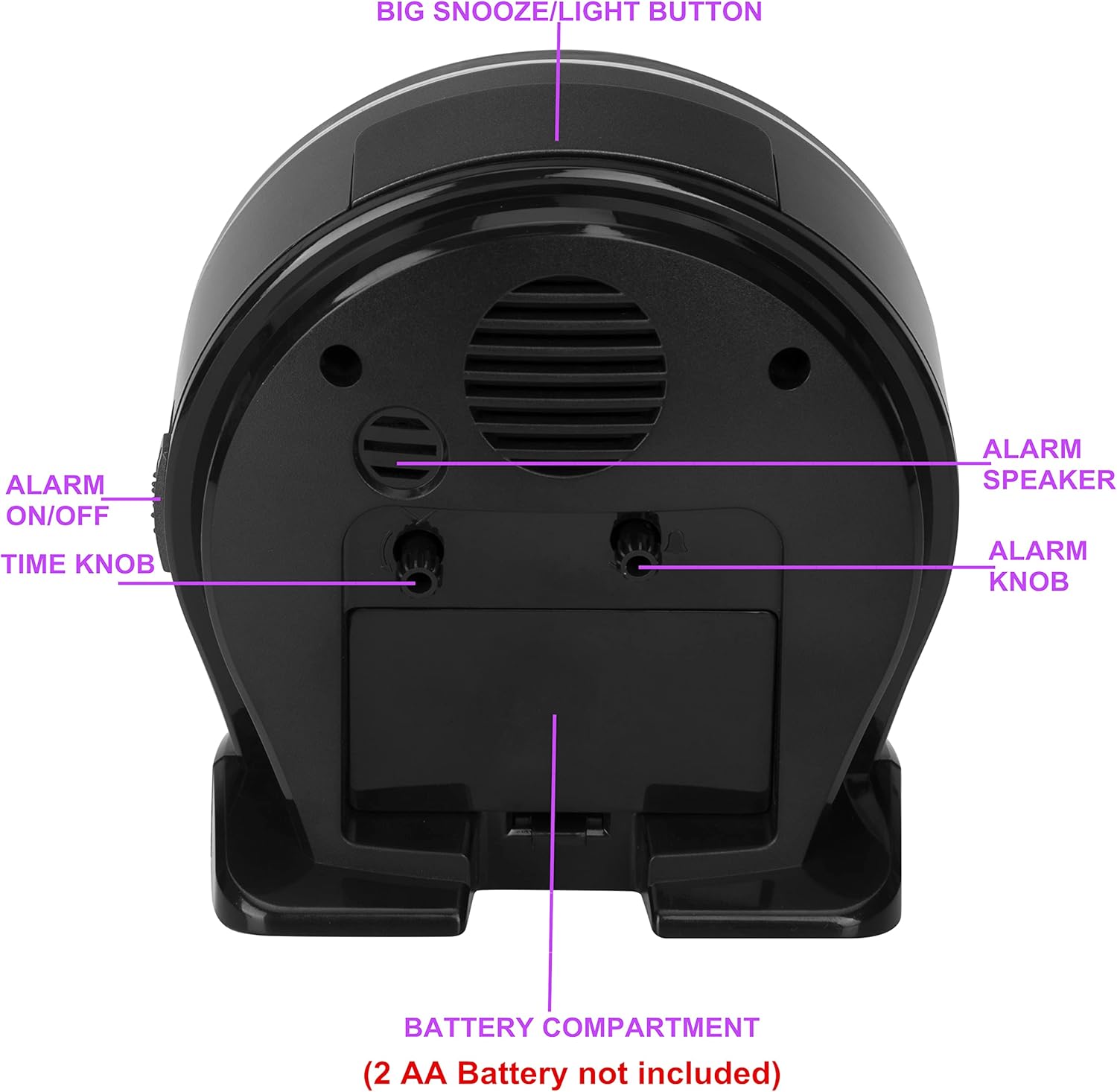
Figure 4.1: Clock face illuminated by the LED backlight.
5. Maintenance
5.1 Cleaning
To clean the clock, wipe it with a soft, dry cloth. Do not use abrasive cleaners or immerse the clock in water.
5.2 Battery Replacement
Replace the batteries when the clock hands slow down, the alarm sound weakens, or the backlight dims. Always replace both AA batteries simultaneously with new ones, observing correct polarity.
6. Troubleshooting
- Clock not working or losing time:
- Check if batteries are installed correctly with the right polarity.
- Replace old batteries with new AA batteries.
- Ensure carbon-zinc batteries are used for optimal performance.
- Alarm not sounding:
- Verify that the Alarm ON/OFF Switch is in the 'ON' position.
- Check if the alarm time is set correctly.
- Replace batteries if they are low.
- Backlight not working:
- Ensure batteries are not depleted. Replace if necessary.
7. Specifications
| Feature | Detail |
|---|---|
| Brand | EASIBEST |
| Model | B0BDY43LD3 |
| Display Type | Analog |
| Power Source | 2 x AA Batteries (not included) |
| Special Features | Cordless, Crescendo Alarm, Easy to Read Dial, Non-ticking, Super LED light |
| Product Dimensions | 2.55"W x 4.72"H (approx. 6.48 cm W x 11.99 cm H) |
| Item Weight | 7.7 ounces (approx. 0.22 kg) |
| Material | Hard Plastic |
| Operation Mode | Manual |
8. Safety Information
- Do not mix old and new batteries.
- Do not mix alkaline, standard (carbon-zinc), or rechargeable (nickel-cadmium) batteries.
- Remove batteries if the product is not to be used for an extended period.
- Dispose of used batteries properly according to local regulations.
- Keep the clock away from extreme temperatures, direct sunlight, and water.
9. Warranty and Support
For warranty information or technical support, please refer to the contact details provided with your purchase or visit the official EASIBEST website. Please have your model number (B0BDY43LD3) available when contacting support.