
1. Introduction
This manual provides instructions for the Generic Voice Remote Control, designed as a replacement for specific EKO and Continental Edision television models. This remote control operates using infrared technology and does not require complex setup or programming. It is important to verify that your television model is listed as compatible to ensure full functionality.
Please note that this is a replacement remote and may not offer all functions present on your original television remote control. It is not a universal remote control.
2. Safety Information
- Keep batteries out of reach of children.
- Do not mix old and new batteries, or different types of batteries.
- Remove batteries if the remote control will not be used for an extended period to prevent leakage.
- Dispose of used batteries according to local regulations.
3. Package Contents
- 1 x Generic Voice Remote Control
Batteries are not included and must be purchased separately.
4. Setup
4.1 Battery Installation
- Open the battery compartment cover on the back of the remote control.
- Insert two (2) AAA batteries, ensuring the positive (+) and negative (-) terminals align correctly with the markings inside the compartment.
- Close the battery compartment cover securely.

Image: Back view of the remote control with the battery compartment open, illustrating the correct orientation for AAA battery insertion.

Image: Angled back view of the remote control, demonstrating the open battery compartment and the placement of two AAA batteries.
4.2 Initial Use
Once batteries are installed, the remote control is ready for use. No pairing, programming, or code entry is required. Simply point the remote control towards your television and begin operation.
5. Operating Instructions
Familiarize yourself with the buttons on your remote control. Below is a general guide to common functions:

Image: Front view of the remote control, displaying the layout of all buttons.
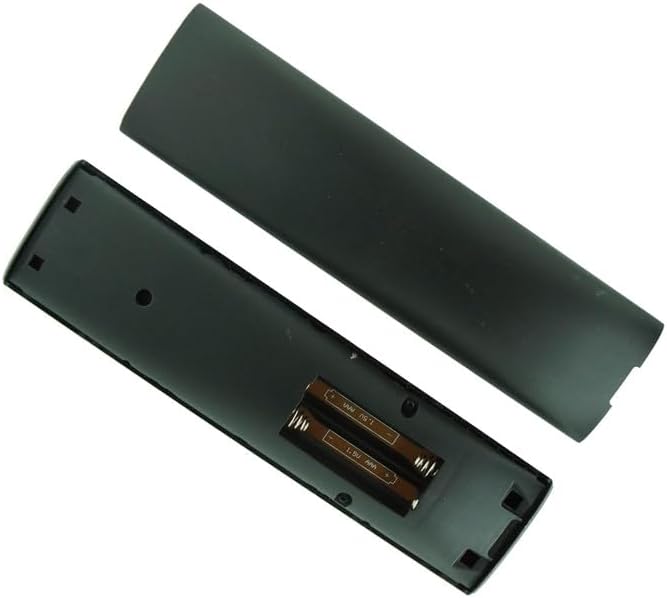
Image: Angled view of the remote control, showing the NET and YouTube dedicated application buttons.
- Power Button (Red): Turns the television on or off.
- Input Button: Cycles through available input sources (HDMI 1, HDMI 2, AV, etc.).
- Subtitles Button: Toggles subtitles on or off.
- Play/Pause, Fast Rewind, Fast Forward: Media playback controls.
- Volume Mute Button: Mutes or unmutes the television audio.
- Text Button: Accesses teletext or similar text-based services.
- Guide Button: Displays the electronic program guide (EPG).
- Aspect Button: Adjusts the screen aspect ratio.
- Navigation Buttons (Up, Down, Left, Right): Navigates menus and selections.
- OK Button: Confirms selections or opens menus.
- Back Button: Returns to the previous screen or menu.
- Home Button: Accesses the television's home screen or smart TV interface.
- Menu Button: Opens the television's main settings menu.
- Volume Up/Down Buttons: Adjusts the audio volume.
- Channel Up/Down Buttons: Changes television channels.
- Voice Button (Google Assistant icon): Activates voice control functionality (if supported by your TV model). Press and hold to speak commands.
- Number Buttons (0-9): Directly enters channel numbers or other numerical inputs.
- Info Button: Displays information about the current program or content.
- Colored Buttons (Red, Green, Yellow, Blue): These buttons typically correspond to specific functions within menus or applications, as indicated on the TV screen.
- NET/YouTube Buttons: Direct access buttons for Netflix and YouTube applications (if supported by your TV model).
6. Troubleshooting
- Remote not responding:
- Ensure fresh AAA batteries are correctly installed.
- Check for any obstructions between the remote control and the TV's infrared sensor.
- Point the remote directly at the TV.
- Some functions do not work:
- This remote is a replacement and may not support all advanced functions of your original TV remote.
- Verify your TV model is explicitly listed as compatible.
- Voice control not working:
- Ensure your TV model supports voice control via its remote.
- Check TV settings for voice control activation.
7. Specifications
| Feature | Detail |
|---|---|
| Product Type | Replacement Voice Remote Control |
| Brand | Generic |
| Connectivity Technology | Infrared (IR) |
| Compatible Devices | EKO K60USG, K42FSG, K650USGQ, K580USGQ, K550USGQ, K750USG, K70USG, K65USG, K32HSG, K700USG; Continental Edision CELED43SAFHD20B7, CEQLED50SA20B7, CEQLED55SA20B7, CEQLED55SABFB7 TVs |
| Batteries Required | 2 x AAA (not included) |
| Manufacturer | SZHKHXD |
| ASIN | B0BDV6WXGC |
8. Maintenance
- Clean the remote control regularly with a soft, dry cloth.
- Avoid using liquid cleaners or abrasive materials.
- Keep the remote control away from direct sunlight, heat sources, and moisture.
9. Warranty and Support
As this is a Generic branded product, specific warranty information may vary. For any support inquiries, troubleshooting assistance beyond this manual, or warranty claims, please contact the seller directly through your purchase platform.