
1. Introduction
Thank you for choosing the Vincent Audio SV-237MKII Hybrid Stereo Integrated Amplifier. This manual provides essential information for the safe and optimal operation of your new audio component. The SV-237MKII combines the sonic characteristics of vacuum tubes with the power and efficiency of solid-state amplification, offering a rich and dynamic listening experience. Please read this manual thoroughly before connecting or operating the device.
2. Safety Instructions
To ensure safe operation and prevent damage, please observe the following safety precautions:
- Power Supply: Connect the amplifier only to an AC power outlet with the correct voltage as indicated on the rear panel. Ensure the power cord is securely plugged in.
- Ventilation: Do not block ventilation openings. Allow adequate space around the unit for proper airflow to prevent overheating.
- Moisture: Do not expose the unit to rain, moisture, or excessive humidity. Do not place objects filled with liquids, such as vases, on the unit.
- Foreign Objects: Do not insert any objects into the unit's openings. This could cause electric shock or damage.
- Servicing: Do not attempt to service this unit yourself. Refer all servicing to qualified service personnel.
- Cleaning: Disconnect the power cord before cleaning. Use a soft, dry cloth. Do not use liquid or aerosol cleaners.
- Placement: Place the unit on a stable, level surface away from direct sunlight, heat sources, and strong magnetic fields.
3. Package Contents
Please check that all items are present in the packaging:
- Vincent Audio SV-237MKII Hybrid Stereo Integrated Amplifier
- Remote Control (VRC-12)
- Power Cord
- Bluetooth Antenna
- User Manual
4. Product Features
The Vincent Audio SV-237MKII amplifier incorporates advanced features for superior audio performance:
- "MKII" version with Bluetooth 5.0 for high-quality wireless audio streaming.
- Integrated Burr Brown PCM 5102 24/192 DAC for high-resolution digital audio inputs.
- Hybrid vacuum tube and transistor design for a balanced sound signature.
- Powerful output: 150 watts RMS into 8 ohms, 250 watts RMS into 4 ohms.
- First 10 watts operate in pure 'Class A' mode for exceptional clarity and warmth.
- Tube complement: 1 x 12AX7 and 2 x 6N1P-EV.
- Comprehensive front panel controls: on/off, volume, input selection, treble, bass, tone control bypass switch, loudness.
- Multiple inputs: 3 x stereo RCA, 1 x optical digital, 1 x coaxial digital, Bluetooth 5.0.
- Outputs: 1 x stereo RCA Rec Out, 1 x stereo RCA Pre out, 2 x 3.5 mm Jack (Power Control).
- Four pairs of five-way speaker binding posts for bi-wiring capability.
- Wireless remote control (VRC-12) included for convenient operation.
5. Controls and Connections
5.1 Front Panel Overview
The front panel provides access to all primary controls for the amplifier.
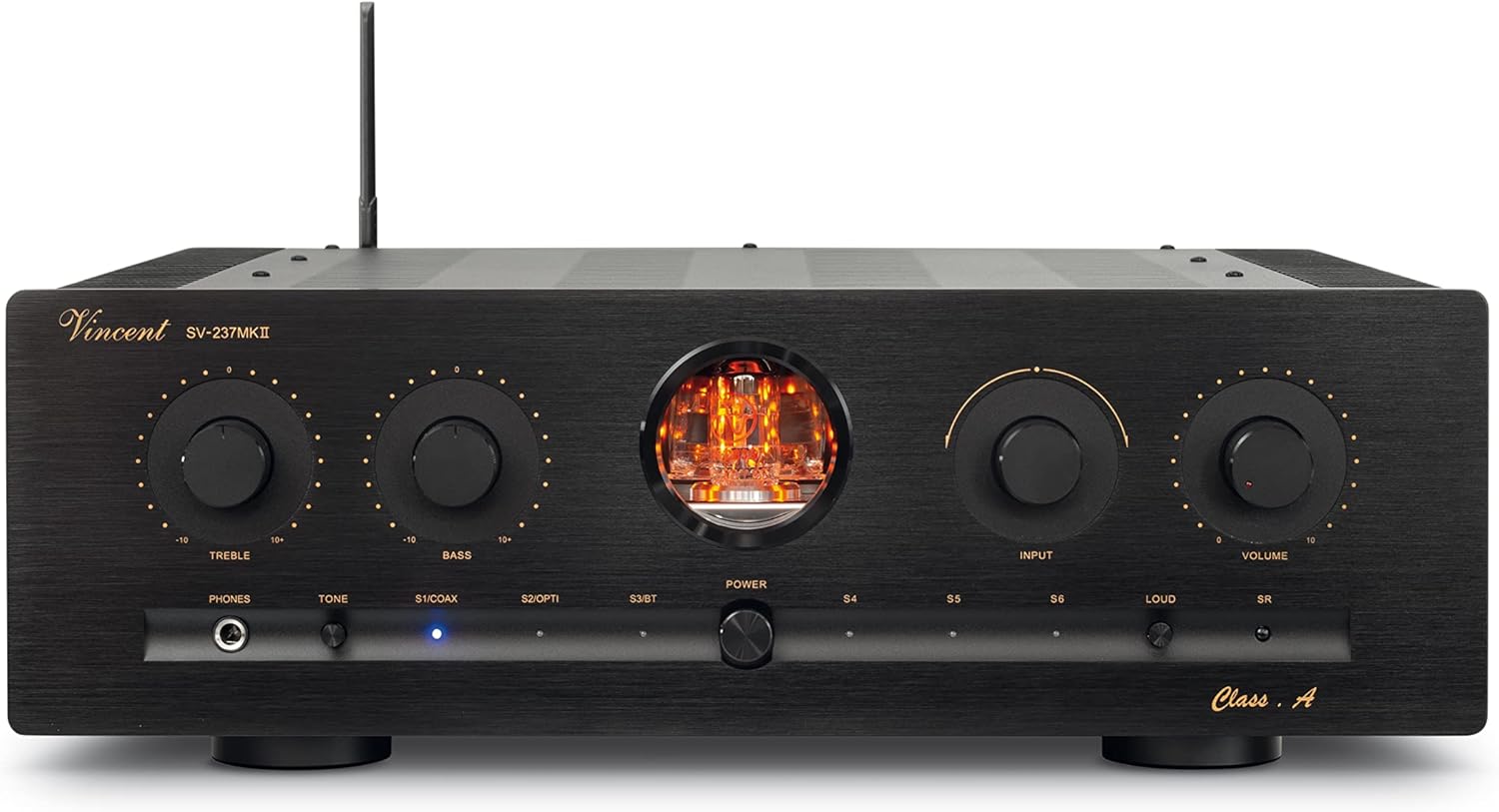
Image: Front view of the Vincent Audio SV-237MKII Hybrid Stereo Integrated Amplifier, showcasing its elegant black finish, central vacuum tube window, and various control knobs and buttons.

Image: Angled front view of the Vincent Audio SV-237MKII, highlighting the side heat sinks and the illuminated vacuum tubes visible through the front panel window.
- PHONES: 6.3mm headphone output jack.
- TREBLE: Adjusts high-frequency response.
- BASS: Adjusts low-frequency response.
- TONE: Activates/bypasses the treble and bass tone controls.
- DIG/COAX: Selects coaxial digital input.
- DIG/OPTI: Selects optical digital input.
- POWER: Main power switch for the amplifier.
- INPUT: Rotary knob to select audio input sources (S1, S2, S3, S4, S5, S6).
- VOLUME: Master volume control knob.
- LOUD: Activates loudness compensation for enhanced bass and treble at low volumes.
- SR: Sensor for the remote control.
- Vacuum Tube Window: Displays the illuminated vacuum tubes during operation.
5.2 Rear Panel Connections
The rear panel provides all necessary connections for your audio sources, speakers, and power.

Image: Rear view of the Vincent Audio SV-237MKII amplifier, showing the various input/output terminals, speaker binding posts, and power inlet.
- DIGITAL IN: Optical (S6/OPTI) and Coaxial (S5/COAX) digital audio inputs.
- INPUT (S1-S4): RCA stereo analog inputs for various audio sources.
- REC OUT: RCA stereo analog output for recording devices.
- PRE OUT: RCA stereo analog pre-amplifier output for connecting to a separate power amplifier or subwoofer.
- SPEAKERS (4-8Ω): Four pairs of five-way speaker binding posts for connecting left and right speakers, supporting bi-wiring.
- AC INLET: Power cord connection.
- VOLTAGE SELECTOR: Switch to select operating voltage (110V/120V or 220V/240V). Ensure this is set correctly for your region before connecting power.
- POWER CONTROL (3.5mm Jack): Control outputs for connecting to other Vincent Audio components for synchronized power on/off.
- S3/BT ANT: Connection point for the Bluetooth antenna.
5.3 Remote Control (VRC-12)
The included remote control provides convenient operation of the amplifier from a distance.

Image: The Vincent VRC-12 remote control, a sleek black unit with buttons for mute, dimmer, input selection (S1-S6), and volume control.
- MUTE: Mutes/unmutes audio output.
- DIMMER: Adjusts the brightness of the front panel display/tube illumination.
- S1-S6: Direct input selection buttons.
- VOLUME ▲/▼: Increases/decreases the master volume.
6. Setup
Follow these steps to set up your SV-237MKII amplifier:
- Unpacking: Carefully remove the amplifier and all accessories from the packaging. Retain the packaging for future transport or storage.
- Placement: Place the amplifier on a stable, level surface with adequate ventilation around it. Avoid placing it near heat sources or in direct sunlight.
- Voltage Selection: Before connecting the power cord, verify that the VOLTAGE SELECTOR switch on the rear panel is set to the correct voltage for your region (110V/120V or 220V/240V). Incorrect voltage selection can cause severe damage.
- Connect Speakers: Connect your speakers to the SPEAKERS binding posts on the rear panel. Ensure correct polarity (+ to + and - to -) for both channels. The SV-237MKII supports bi-wiring; refer to your speaker manual for bi-wiring instructions if applicable. The amplifier is designed for speakers with an impedance between 4 and 8 ohms.
- Connect Audio Sources:
- Analog Sources (CD Player, Turntable with Preamp, etc.): Connect RCA cables from your source components to the INPUT (S1-S4) jacks.
- Digital Sources (TV, Blu-ray Player, etc.): Connect optical cables to the S6/OPTI input or coaxial cables to the S5/COAX input.
- Connect Bluetooth Antenna: Screw the provided Bluetooth antenna onto the S3/BT ANT connector on the rear panel.
- Power Connection: Once all audio connections are made, connect the supplied power cord to the AC INLET on the rear panel and then to a wall outlet.
7. Operating Instructions
This section details the basic operation of your SV-237MKII amplifier.
- Power On: Press the POWER button on the front panel. The vacuum tubes will glow, indicating the amplifier is warming up. This process may take a few moments.
- Input Selection: Rotate the INPUT knob on the front panel or use the S1-S6 buttons on the remote control to select your desired audio source. For Bluetooth, select S3. For optical, select S6/OPTI. For coaxial, select S5/COAX.
- Volume Adjustment: Use the VOLUME knob on the front panel or the VOLUME ▲/▼ buttons on the remote control to adjust the listening level. Start with a low volume and gradually increase it to a comfortable level.
- Tone Controls:
- TREBLE / BASS: Adjust these knobs to fine-tune the high and low frequencies to your preference.
- TONE: Press the TONE button to activate or bypass the treble and bass controls. When bypassed, the signal path is shorter and purer.
- Loudness: Press the LOUD button to activate loudness compensation. This feature boosts bass and treble frequencies at low listening volumes to compensate for the human ear's reduced sensitivity to these frequencies at lower sound pressure levels.
- Headphone Output: Connect headphones to the PHONES jack on the front panel. Connecting headphones will mute the speaker outputs.
- Bluetooth Pairing:
- Select the S3 input on the amplifier.
- On your Bluetooth device (smartphone, tablet, etc.), enable Bluetooth and search for available devices.
- Select "Vincent SV-237MKII" from the list of devices.
- Once paired, audio from your device will stream wirelessly to the amplifier.
- Power Off: Press the POWER button again to turn off the amplifier.
8. Maintenance
Proper maintenance ensures the longevity and performance of your amplifier.
- Cleaning: Disconnect the power cord before cleaning. Use a soft, dry, lint-free cloth to wipe the exterior surfaces. Do not use abrasive cleaners, solvents, or chemical sprays.
- Ventilation: Periodically check that the ventilation openings are clear of dust and debris. Use a soft brush or compressed air to gently clean them if necessary.
- Tube Replacement: The vacuum tubes have a finite lifespan. If you notice a degradation in sound quality or unusual noise, the tubes may need replacement. This should be performed by qualified service personnel or an experienced technician.
- Storage: If storing the amplifier for an extended period, disconnect it from power, clean it, and store it in its original packaging in a cool, dry place.
9. Troubleshooting
If you experience issues with your SV-237MKII, refer to the following common problems and solutions:
| Problem | Possible Cause | Solution |
|---|---|---|
| No power | Power cord not connected; Power outlet not active; Amplifier power switch off; Incorrect voltage selection. | Ensure power cord is securely plugged in; Check wall outlet with another device; Turn on the POWER switch; Verify VOLTAGE SELECTOR is correct. |
| No sound | Incorrect input selected; Volume too low; Speakers not connected properly; Mute function active; Source device not playing. | Select the correct input; Increase volume; Check speaker connections (polarity); Deactivate MUTE on remote; Ensure source device is playing audio. |
| Distorted sound | Input signal too strong; Speaker impedance mismatch; Damaged cables; Faulty tubes. | Reduce source device output volume; Ensure speakers are 4-8Ω; Check and replace cables if damaged; Consult service for tube inspection/replacement. |
| Humming or buzzing noise | Ground loop issue; Nearby interference; Loose connections. | Try plugging components into the same power strip; Move amplifier away from other electronics; Check all cable connections. |
| Bluetooth not connecting | S3 input not selected; Device too far; Pairing mode not active; Interference. | Select S3 input; Ensure device is within range; Put device in pairing mode; Restart amplifier and device. |
If the problem persists after trying these solutions, please contact Vincent Audio customer support or a qualified service technician.
10. Specifications
Technical specifications for the Vincent Audio SV-237MKII Hybrid Stereo Integrated Amplifier:
| Feature | Specification |
|---|---|
| Frequency Response | 20 Hz - 20 kHz ±0.5 dB; 20 Hz - 50 kHz ±2 dB |
| Max Output Power (8 Ohm) | 2 x 150 Watt (RMS) |
| Max Output Power (4 Ohm) | 2 x 250 Watt (RMS) |
| Max Output Power Class A (8 Ohm) | 2 x 10 Watt (RMS) |
| Input Sensitivity | 300 mV |
| Input Impedance | 47 kOhm |
| Total Harmonic Distortion (THD) | < 0.1% (1 kHz, 1W) |
| Signal-to-Noise Ratio | > 90 dB |
| Tube Complement | 1 x 12AX7, 2 x 6N1P-EV |
| Digital Inputs | 1 x Optical, 1 x Coaxial (Burr Brown PCM 5102 24/192 DAC) |
| Wireless Connectivity | Bluetooth 5.0 |
| Dimensions (W x H x D) | 16.8" x 6" x 17" (42.7 cm x 15.2 cm x 43.2 cm) |
| Weight | 45 lb (20.4 kg) |
| Power Consumption | 500W (Max) |
11. Warranty and Support
Vincent Audio products are designed for reliability and performance. For warranty information specific to your region and purchase, please refer to the documentation provided with your amplifier or contact your authorized Vincent Audio dealer.
For technical support, service, or inquiries, please visit the official Vincent Audio website or contact their customer service department. You can also find more information and support resources on the Vincent Audio Store on Amazon.