
Myatu MYT-26
Myatu MYT-26 Electric Mountain Bike User Manual
Model: MYT-26
1. Introduction and Safety Information
Thank you for choosing the Myatu MYT-26 Electric Mountain Bike. This manual provides essential information for the safe assembly, operation, and maintenance of your e-bike. Please read this manual thoroughly before your first ride and retain it for future reference. Always prioritize safety by wearing a helmet and appropriate protective gear, and adhere to all local traffic laws and regulations.
Important Safety Warnings:
- Always wear a helmet and appropriate safety gear when riding.
- Ensure all components are correctly assembled and secured before each ride.
- Regularly check tire pressure, brake function, and battery charge.
- Do not operate the e-bike under the influence of alcohol or drugs.
- Be aware of your surroundings and ride defensively.
- Avoid riding in adverse weather conditions or on excessively rough terrain if you are not experienced.
2. Package Contents
Upon unpacking, please verify that all the following items are included in your package:
- Myatu MYT-26 Electric Mountain Bike (partially assembled)
- Battery Charger
- Installation Tool Kit
- User Instruction Manual (this document)
If any items are missing or damaged, please contact Myatu customer support immediately.
3. Setup and Assembly
Your Myatu MYT-26 e-bike comes partially assembled. The following steps outline the general assembly process. Refer to the detailed diagrams and instructions provided in the included installation tool kit for specific guidance.
- Unpacking: Carefully remove all components from the packaging. Retain packaging materials for potential future transport or returns.
- Front Wheel Installation: Attach the front wheel to the fork, ensuring the disc brake rotor aligns correctly with the caliper. Secure the quick-release skewer or axle nuts firmly.
- Handlebar Installation: Mount the handlebar onto the stem, ensuring it is centered and the brake levers and shifters are in a comfortable position. Tighten all bolts securely.
- Seat Post and Saddle Installation: Insert the seat post into the frame's seat tube. Adjust the saddle height to a comfortable and safe riding position, then tighten the quick-release lever or bolt.
- Pedal Installation: Identify the left (L) and right (R) pedals. The left pedal threads counter-clockwise, and the right pedal threads clockwise. Apply a small amount of grease to the threads and tighten them securely with a wrench.
- Battery Installation: If the battery is not pre-installed, slide it into its designated slot on the frame and lock it into place using the provided key.
- Pre-Ride Checks: Before your first ride, double-check all bolts, nuts, and quick releases for tightness. Ensure brakes are functioning correctly and tires are inflated to the recommended pressure.

4. Components Overview
Familiarize yourself with the main components of your Myatu MYT-26 e-bike:
- Frame: Durable aluminum alloy frame.
- Wheels: 26-inch wheels suitable for mountain biking.
- Motor: 250W rear hub motor for electric assistance.
- Battery: Removable 36V 12.5Ah Lithium battery, integrated into the frame.
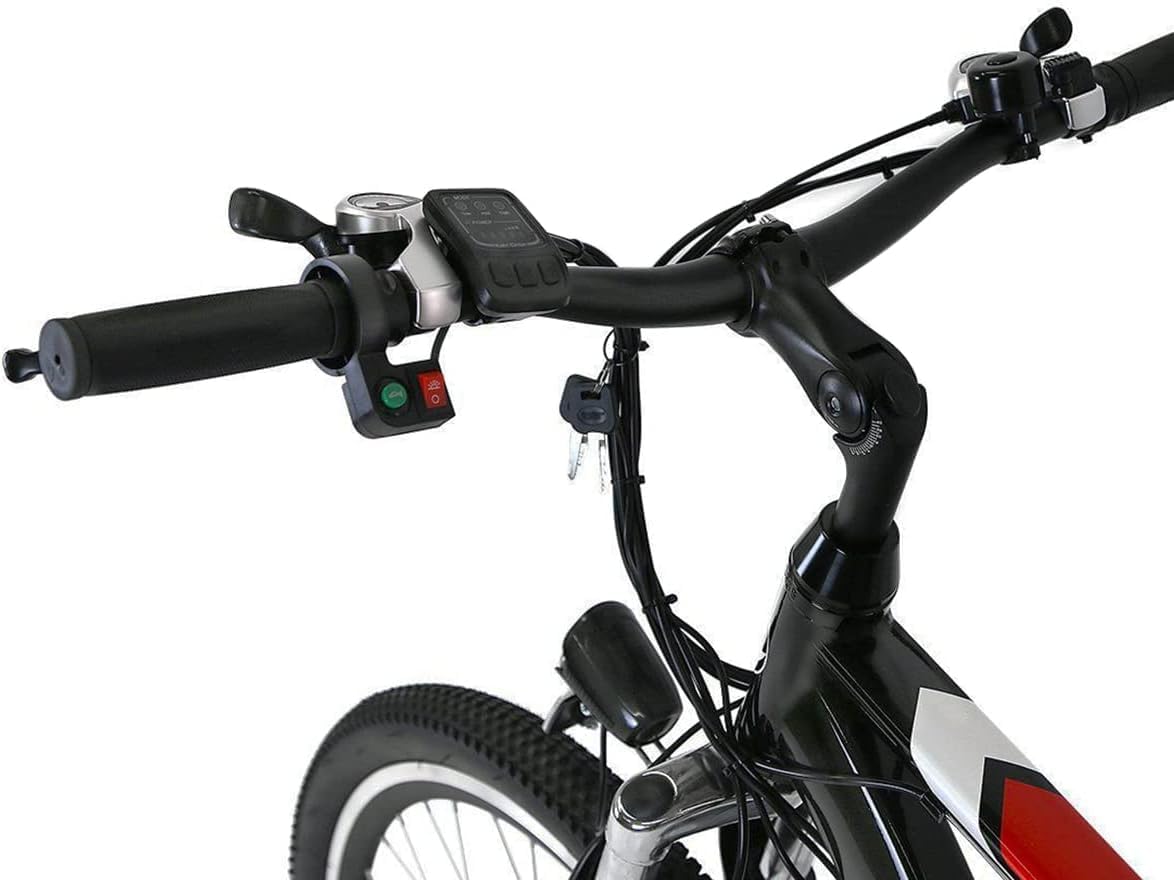
- Display/Controller: Handlebar-mounted unit to control power, assist levels, and view ride data.
- Gears: Shimano 7-speed derailleur system for varied terrain.
- Brakes: Front and rear mechanical disc brakes for reliable stopping power.
- Suspension: Front suspension fork to absorb shocks.

5. Battery Information
The Myatu MYT-26 is equipped with a high-capacity lithium-ion battery. Proper care and charging are crucial for its longevity and performance.
Battery Specifications:
- Type: 36V 12.5Ah Lithium-ion
- Removable: Yes, for convenient charging and security.
- Charging Time: Approximately 4-6 hours for a full charge.
- Cycle Life: Rated for approximately 500 charge cycles.
- Range: Up to 50 miles (80 km) on pedal-assist mode, depending on terrain, rider weight, and assist level.
Charging the Battery:
- Ensure the e-bike is turned off.
- The battery can be charged while installed on the bike or removed. To remove, unlock it with the key and slide it out.
- Connect the charger to the battery's charging port.
- Plug the charger into a standard electrical outlet.
- The charger indicator light will typically show red during charging and turn green when fully charged.
- Once fully charged, disconnect the charger from the outlet first, then from the battery.
Battery Care:
- Avoid completely draining the battery. Charge it regularly, even if not used frequently.
- Store the battery in a cool, dry place, away from direct sunlight and extreme temperatures.
- Do not expose the battery to water or moisture.
- Use only the original Myatu charger provided with your e-bike.

6. Operating Instructions
Powering On/Off:
To power on the e-bike, press and hold the power button on the handlebar control panel (refer to Figure 4.1). The display will illuminate. To power off, press and hold the same button until the display turns off.
Pedal Assist System (PAS):
The Myatu MYT-26 features a pedal-assist system that provides motor power as you pedal. Use the '+' and '-' buttons on the control panel to select your desired assist level. Higher levels provide more motor assistance, while lower levels conserve battery life.
Shifting Gears:
Your e-bike is equipped with a Shimano 7-speed gear system. Use the shifter on the right handlebar to change gears. Shift to lower gears for easier pedaling on inclines and higher gears for faster speeds on flat terrain. Always ease off the pedals slightly when shifting to ensure smooth transitions.
Braking:
The e-bike features front and rear mechanical disc brakes. The left lever controls the front brake, and the right lever controls the rear brake. Apply both brakes simultaneously and smoothly for effective stopping. Avoid sudden, hard braking, especially with the front brake, to prevent loss of control.

7. Maintenance
Regular maintenance is essential to ensure the safety, performance, and longevity of your Myatu MYT-26 e-bike.
Routine Checks (Before Each Ride):
- Tires: Check tire pressure and inspect for any cuts or punctures.
- Brakes: Ensure brake levers are firm and responsive, and brake pads are not excessively worn.
- Bolts & Fasteners: Verify all critical bolts (handlebars, stem, seat post, wheels) are tight.
- Battery: Check battery charge level.
Regular Maintenance (Weekly/Monthly):
- Cleaning: Clean the bike regularly with a damp cloth. Avoid high-pressure washing, especially near electrical components.
- Chain: Clean and lubricate the chain regularly, especially after riding in wet or dusty conditions.
- Brake Pads: Inspect brake pads for wear and replace them when necessary.
- Gears: Check gear shifting for smoothness and adjust if needed.
- Battery Terminals: Keep battery terminals clean and dry.
For complex repairs or adjustments, it is recommended to consult a professional bicycle mechanic.
8. Troubleshooting
This section addresses common issues you might encounter with your Myatu MYT-26 e-bike. For problems not listed here, please contact customer support.
| Problem | Possible Cause | Solution |
|---|---|---|
| E-bike does not power on. | Battery is not charged or not properly installed. | Ensure battery is fully charged and securely locked into place. Check power button connection. |
| Motor not providing assist. | Low battery, assist level set to zero, or sensor issue. | Charge battery. Increase assist level on the display. Check pedal assist sensor for obstructions. |
| Brakes feel weak or spongy. | Brake pads worn, cable stretched, or improper adjustment. | Inspect brake pads for wear and replace if necessary. Adjust brake cable tension. Consult a mechanic if issue persists. |
| Gears are not shifting smoothly. | Derailleur out of adjustment, dirty chain, or damaged cable. | Clean and lubricate the chain. Adjust derailleur limits and cable tension. |
9. Specifications
Detailed technical specifications for the Myatu MYT-26 Electric Mountain Bike:
| Feature | Specification |
|---|---|
| Model | MYT-26 |
| Bike Type | Electric Mountain Bike |
| Wheel Size | 26 inches |
| Motor | 250W Rear Hub Motor |
| Max Speed (Motor Assist) | 25 km/h (15.5 mph) |
| Battery | 36V 12.5Ah Removable Lithium-ion |
| Charging Time | 4-6 hours |
| Range (Pedal Assist) | Up to 50 miles (80 km) |
| Gears | Shimano 7-Speed |
| Brakes | Front and Rear Mechanical Disc Brakes |
| Frame Material | Aluminum |
| Recommended Rider Height | 158-190 cm (5.2-6.2 ft) |
| Bike Weight (with battery) | 26.5 kg (58.4 lbs) |
| Max Load Weight | 100 kg (220 lbs) |
| Minimum/Maximum Seat Height | 80-107 cm |

10. Warranty and Support
Myatu provides a limited warranty for its products. Please refer to the warranty card included with your purchase or visit the official Myatu website for detailed warranty terms and conditions. For technical support, spare parts, or any inquiries regarding your Myatu MYT-26 Electric Mountain Bike, please contact Myatu customer service through the contact information provided on the official website or your purchase documentation.
When contacting support, please have your model number (MYT-26) and proof of purchase readily available.