
intendvision HT601B Gas Sniffer
intendvision HT601B Gas Leak Detector User Manual
Model: HT601B Gas Sniffer
1. Introduction
The intendvision HT601B Gas Leak Detector is a portable and highly sensitive device designed to detect a wide variety of combustible gases. This manual provides detailed instructions on how to set up, operate, maintain, and troubleshoot your gas leak detector to ensure safe and effective use.
2. Important Safety Information
WARNING: This device is a detection tool and should not be used as a substitute for proper safety procedures or professional gas leak inspection. Always ensure adequate ventilation when investigating potential gas leaks.
- Do not expose the device to extreme temperatures or humidity.
- Do not attempt to repair or modify the device yourself. Refer all servicing to qualified personnel.
- Ensure batteries are inserted correctly and are of the specified type.
- Keep the sensor probe clean and free from obstructions.
- This device detects combustible gases. It does not detect carbon monoxide or other non-combustible gases.
3. Product Overview and Components
The HT601B Gas Leak Detector features a flexible gooseneck probe for reaching confined spaces, an LCD display for clear readings, and intuitive buttons for operation.
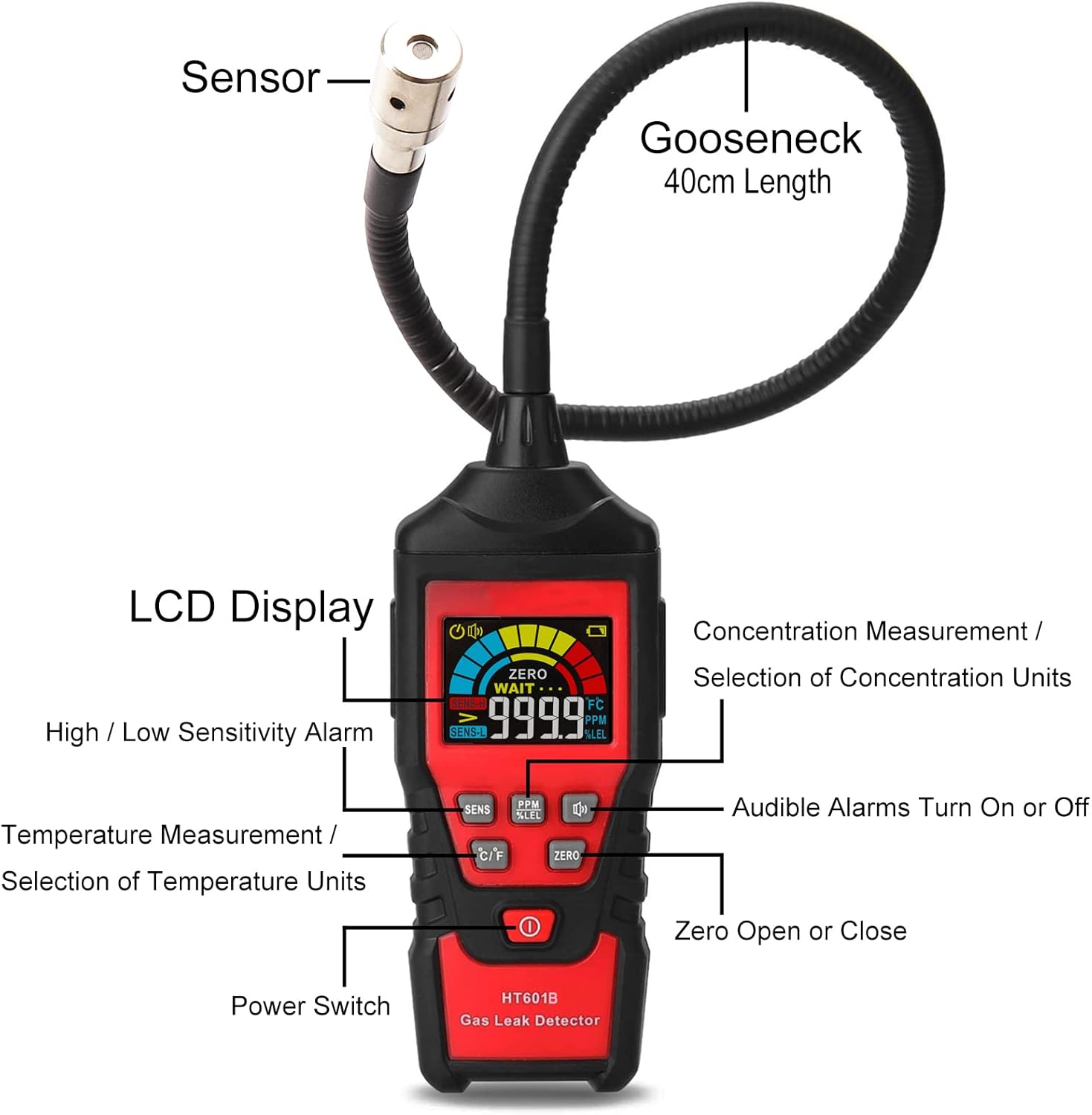
Figure 3.1: HT601B Gas Leak Detector with labeled parts. Key components include the sensor at the tip of the 40cm gooseneck, the LCD display, and buttons for sensitivity adjustment, unit selection (PPM/LEL), audible alarm control, zeroing, and power.
- Sensor: Located at the tip of the gooseneck, detects gas concentrations.
- Gooseneck: Flexible probe (approx. 16 inches / 40cm) for reaching difficult areas.
- LCD Display: Shows gas concentration (PPM/LEL), sensitivity level, battery status, and temperature.
- SENS Button: Toggles between high and low sensitivity modes.
- PPM/LEL Button: Switches between parts per million (PPM) and Lower Explosive Limit (LEL) concentration units.
- MUTE Button: Turns the audible alarm on or off.
- C/F Button: Selects Celsius or Fahrenheit for temperature measurement.
- ZERO Button: Calibrates the sensor to the current ambient air, setting it as the zero point.
- Power Switch: Turns the device on or off.
4. Setup
4.1 Battery Installation
The HT601B Gas Leak Detector requires 3 AAA batteries (not included).
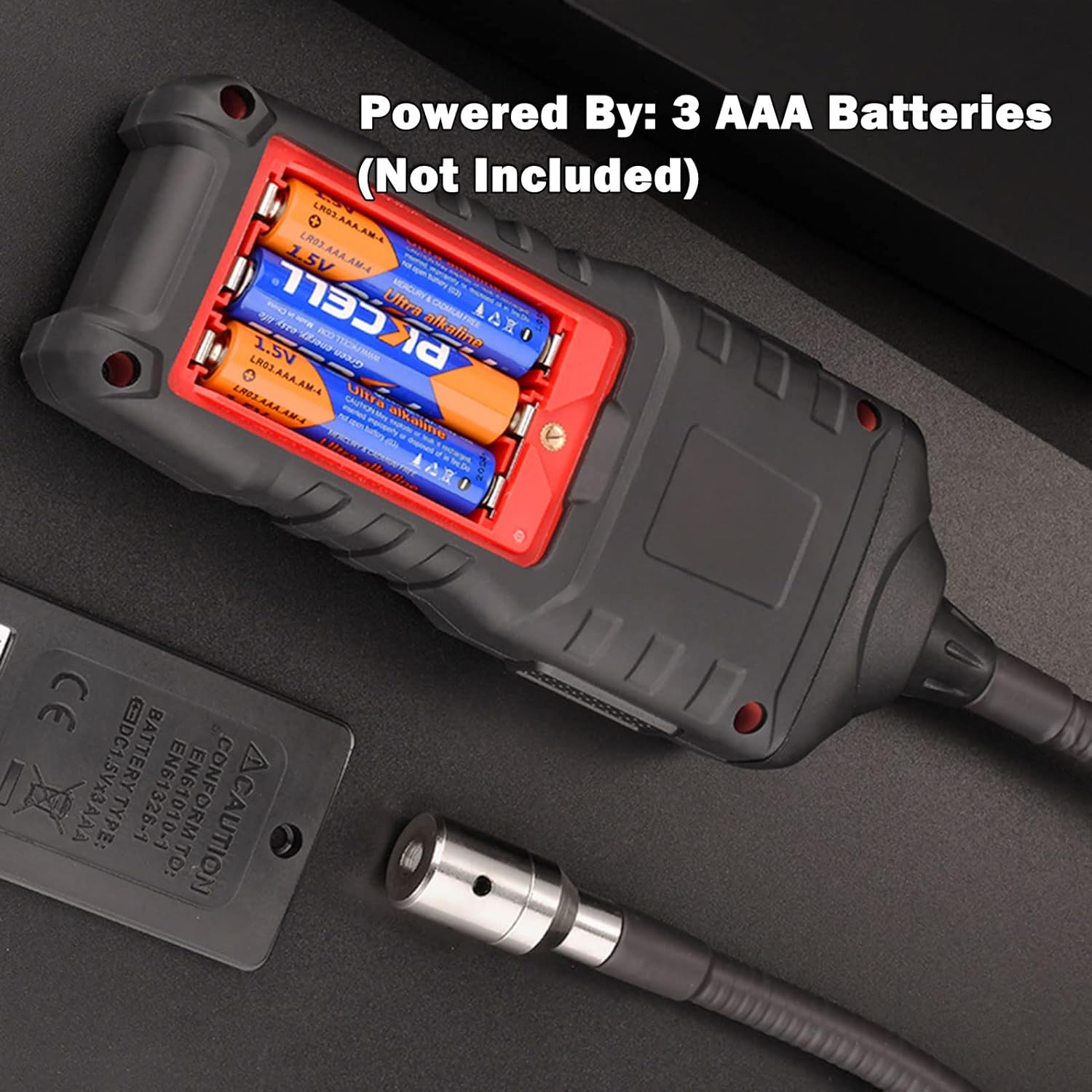
Figure 4.1: Battery compartment for 3 AAA batteries.
- Locate the battery compartment cover on the back of the device.
- Slide the cover open.
- Insert 3 AAA batteries, ensuring correct polarity (+/-) as indicated inside the compartment.
- Close the battery compartment cover securely.
5. Operating Instructions
5.1 Powering On/Off
- To power on: Press and hold the Power Switch button until the LCD screen illuminates. The device will undergo a warm-up period (approx. 30 seconds) indicated by "WAIT..." on the display.
- To power off: Press and hold the Power Switch button until the screen turns off. The device also features an auto power-off function after approximately 10 minutes of no operation or measurement signal to conserve battery life.
5.2 Zeroing the Sensor
Before each use, or if the ambient gas concentration changes significantly, it is recommended to zero the sensor in a clean, gas-free environment.
- Ensure the device is in a fresh air environment, free from any gas sources.
- Press the ZERO button. The display will show "ZERO" and then return to 00.00 PPM/LEL, indicating successful calibration.
5.3 Gas Detection Procedure

Figure 5.1: Using the HT601B Gas Leak Detector to pinpoint leaks in piping.
- Power on the device and allow it to warm up and zero in a clean air environment.
- Slowly move the sensor probe towards the suspected gas leak area.
- Observe the LCD display for increasing gas concentration readings (PPM or LEL) and listen for the audible alarm. The bargraph on the display will also indicate the concentration level.
- The alarm frequency and intensity will increase with higher gas concentrations.
- Pinpoint the exact source of the leak by moving the probe slowly around the area where the highest readings are observed.
5.4 Sensitivity Adjustment
The device offers two sensitivity levels:
- High Sensitivity: Use for detecting small gas leaks or trace amounts. Press the SENS button to activate.
- Low Sensitivity: Use for detecting larger explosive gas leaks or when high concentrations are expected. Press the SENS button again to switch.
5.5 Alarm Functions
The HT601B provides both audible and visual alarms:
- Audible Alarm: A beeping sound that increases in frequency with higher gas concentrations. Press the MUTE button to toggle the audible alarm on/off.
- Visual Alarm: The LCD display shows a bargraph that fills up as gas concentration increases, providing a visual indication of the leak severity.
6. Applications
The HT601B Gas Leak Detector is versatile and can detect a wide range of flammable gases, making it suitable for various applications in homes, RVs, and industrial settings.

Figure 6.1: The HT601B can detect numerous combustible gases including Methane, Propane, Acetone, Benzene, Ethanol, and Gasoline.

Figure 6.2: Wide range of applications for the gas leak detector.
Common gases detected include:
- Acetone, Acetylene, Alcohol, Ammonia, Benzene, Butane, Ethanol, Ethylene Oxide, Gasoline, Hexane, Hydrogen, Methane, Naphtha, Natural Gas, Paint Thinners, Propane, Solvents, and more.
Typical application areas:
- Residential: Kitchens (gas stoves, ovens), basements, water heaters, furnaces, RVs, trailers, campers.
- Industrial/Commercial: Gas pipelines, propane tank stations, exhaust gas detection, fuel leaks.
7. Maintenance
- Cleaning: Wipe the device with a soft, dry cloth. Do not use abrasive cleaners or solvents.
- Sensor Care: Keep the sensor tip clean and free from dust or debris. Avoid touching the sensor directly.
- Storage: Store the device in a cool, dry place away from direct sunlight and extreme temperatures. If storing for extended periods, remove the batteries to prevent leakage.
- Battery Replacement: Replace batteries when the low battery indicator appears on the LCD display.
8. Troubleshooting
| Problem | Possible Cause | Solution |
|---|---|---|
| Device does not power on. | Dead or incorrectly installed batteries. | Check battery polarity; replace with new AAA batteries. |
| Inaccurate readings or constant alarm. | Sensor not zeroed in clean air; sensor contaminated; high ambient gas concentration. | Move to a clean air environment and press ZERO button. Clean sensor if necessary. Investigate potential gas source. |
| No audible alarm. | Audible alarm is muted. | Press the MUTE button to unmute the alarm. |
| Slow response time. | Sensor needs warm-up; low battery. | Allow adequate warm-up time. Replace batteries if low. |
9. Technical Specifications

Figure 9.1: Detailed specifications of the HT601B Gas Leak Detector.
| Feature | Specification |
|---|---|
| Gas Measuring Range | 50-10000 PPM / 0.00-20.00% LEL (Methane Calibration) |
| Detected Gases | Acetone, Acetylene, Alcohol, Ammonia, Benzene, Butane, Ethanol, Ethylene Oxide, Gasoline, Hexane, Hydrogen, Methane, Naphtha, Natural Gas, Paint Thinners, Propane, Solvents, etc. |
| Accuracy | ±10% F.S. (Methane) |
| Sensitivity | <50 PPM (Methane) |
| Response Time | <2 seconds |
| Warm-up Time | Approx. 30 seconds |
| Display | Digital & Bargraph LCD Color Display |
| Alarm Mode | Visible & Audible |
| Power Source | 3 x 1.5V AAA Batteries (Not Included) |
| Product Dimensions | 6.02"H x 2.36"D x 1.18"W |
| Item Weight | 8.8 ounces |
| Gooseneck Length | Approx. 16 inches |
10. Warranty and Customer Support
Intendvision offers a 36-Month Warranty for the HT601B Gas Leak Detector. For any questions, technical assistance, or warranty claims, please contact Intendvision customer service. Refer to the product packaging or the official Intendvision website for contact details.
Ask a question about this manual
Ask about setup, troubleshooting, compatibility, parts, safety, or missing instructions. Manuals+ will review the question and use this page’s manual context to help answer it.