
HY-101-DHG
Wireless Portable Bluetooth Speaker User Manual
Model: HY-101-DHG
1. Product Overview
The Generic HY-101-DHG Wireless Portable Bluetooth Speaker delivers powerful, distortion-free sound with enhanced bass, perfect for various settings including home, dorm rooms, kitchens, bathrooms, cars, and parties. It features a unique design with adjustable RGB colorful streamer ring lights and intuitive controls for a dynamic audio-visual experience.

Figure 1.1: Front view of the HY-101-DHG Bluetooth Speaker, showcasing its sleek design and integrated RGB lighting.
2. Key Features
- RGB Colorful Light Show & Volume Knob Design: Features a unique top volume knob and adjustable 7 RGB colorful streamer ring light. Colors change smoothly with 4 light movement modes. The LED ring light flashes with the rhythm, creating a pulsing light show.
Video 2.1: Demonstration of the Bluetooth Speaker's RGB Colorful Light Show and volume knob functionality.
- Latest Bluetooth 5.1 & Wide Compatibility: Built with Bluetooth 5.1 technology for optimized transmission and connection, providing an incredible 59 feet wireless range. Easily connects to smartphones, MP3 players, TVs, and laptops. Supports SD/TF card.

Figure 2.1: Illustration of the speaker's wireless range, demonstrating its connectivity capabilities within a 10-meter radius.
- Enhanced Bass & 360° Surround Sound: Delivers loud, well-balanced sound with minimal distortion through 3 drivers and Tronsmart proprietary SoundPulse patented technology. A short press of the SP button enhances bass. Supports pairing of two speakers for 60W true stereo sound.

Figure 2.2: Internal diagram highlighting the 30W subwoofer and two 10W mid-tweeters for powerful bass and clear sound.

Figure 2.3: The speaker positioned in a living room, illustrating its ability to deliver room-filling sound.
- Personalized EQ & Hands-Free Calling: Customize sound with the Tronsmart APP and enjoy 6 audio effects. Double press the "Play/Pause" button to activate voice assistants like Siri or Google Assistant.
- Long-lasting Battery: Equipped with a 10000mAh battery for extended playback.

Figure 2.4: Visual representation of the speaker's 10000mAh battery capacity, ensuring long hours of music playback.
- 15-Degree Bevel Design: Engineered with a 15-degree bevel to direct music directly to the eardrum, enhancing the listening experience.
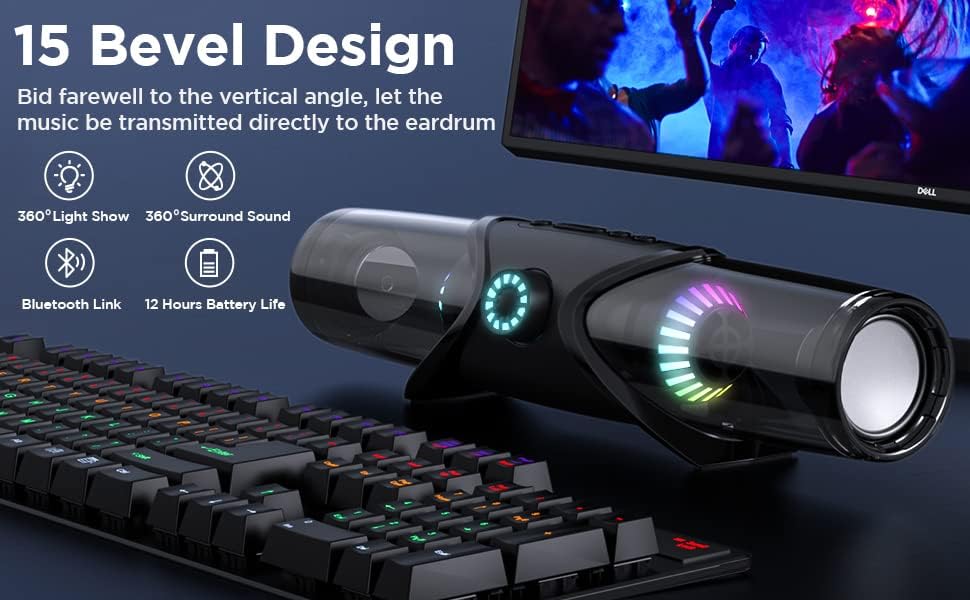
Figure 2.5: The speaker's 15-degree bevel design, optimized for direct sound projection, shown in a desktop setup.
3. Setup Guide
3.1. Unboxing and Initial Charge
- Carefully remove the speaker and all accessories from the packaging.
- Locate the USB charging cable.
- Connect the USB cable to the speaker's charging port (USB-C or Micro USB, refer to specific port on device) and the other end to a compatible USB power adapter (not included) or a computer's USB port.
- Allow the speaker to fully charge before first use. The LED indicator will change to indicate full charge.
3.2. Included Components
The package typically includes:
- HY-101-DHG Bluetooth Speaker
- USB Charging Cable
- Auxiliary Audio Cable
- User Manual (this document)
- MIC (as per specifications)
4. Operating Instructions
4.1. Power On/Off
- To Power On: Press and hold the Power button (usually marked with Ⓞ) for 2-3 seconds until the indicator lights illuminate and you hear an audible prompt.
- To Power Off: Press and hold the Power button for 2-3 seconds until the indicator lights turn off.
4.2. Bluetooth Pairing
- Ensure the speaker is powered on and in Bluetooth pairing mode (indicated by a flashing blue LED).
- On your device (smartphone, tablet, computer), enable Bluetooth and search for available devices.
- Select "HY-101-DHG" (or similar name) from the list of found devices.
- Once paired, the speaker will provide an audible confirmation, and the blue LED will stop flashing.
4.3. Audio Playback
- Volume Control: Rotate the large volume knob on the front of the speaker clockwise to increase volume, counter-clockwise to decrease.
- Play/Pause: Press the Play/Pause button (►▮▮) once to play or pause audio.
- Next Track: Press the "Next Track" button (►►) once to skip to the next song.
- Previous Track: Press the "Previous Track" button (◄◄) once to go to the previous song.
4.4. Light Mode Control
- Press the Light Mode button (often marked with a lightbulb icon) to cycle through the 4 available light movement modes and various color presets.
4.5. Auxiliary Input (AUX)
- Connect one end of the provided 3.5mm auxiliary cable to the AUX port on the speaker and the other end to the audio output of your device.
- The speaker will automatically switch to AUX mode.
4.6. SD/TF Card Playback
- Insert a compatible SD or TF card with audio files into the designated slot on the speaker.
- The speaker will automatically detect and begin playing music from the card.
4.7. Hands-Free Calling
- When connected via Bluetooth, incoming calls will be routed through the speaker.
- Press the Play/Pause button once to answer an incoming call.
- Press the Play/Pause button again to end a call.
- Double press the Play/Pause button to activate your device's voice assistant (Siri, Google Assistant, etc.).
4.8. True Wireless Stereo (TWS) Pairing
To achieve 60W true stereo sound, you can pair two HY-101-DHG speakers together:
- Ensure both speakers are powered off.
- Power on both speakers. They will enter Bluetooth pairing mode.
- On one of the speakers (this will be the primary speaker), double-press the TWS button (often integrated with another function or a dedicated button).
- The speakers will automatically connect to each other. Once connected, the primary speaker's LED will flash slowly, and the secondary speaker's LED will be solid.
- Now, connect your device to the primary speaker via Bluetooth as described in section 4.2.
5. Maintenance
- Cleaning: Use a soft, dry cloth to clean the speaker's surface. Do not use abrasive cleaners or solvents.
- Storage: Store the speaker in a cool, dry place away from direct sunlight and extreme temperatures.
- Battery Care: To prolong battery life, avoid fully discharging the speaker frequently. Recharge it regularly, even if not in use for extended periods.
- Water Resistance: This product is NOT waterproof. Avoid exposure to water or high humidity.
6. Troubleshooting
| Problem | Possible Cause | Solution |
|---|---|---|
| Speaker does not power on. | Low battery; Power button not held long enough. | Charge the speaker fully. Press and hold the Power button for 2-3 seconds. |
| Cannot pair via Bluetooth. | Speaker not in pairing mode; Device Bluetooth off; Too far from device. | Ensure speaker is flashing blue. Turn device Bluetooth off/on. Move closer to speaker (within 59 ft). |
| No sound. | Volume too low; Incorrect input mode; Device not playing. | Increase speaker and device volume. Ensure correct input (Bluetooth, AUX, SD/TF). Check device playback. |
| Poor sound quality/distortion. | Device too far; Obstructions; Volume too high. | Move device closer. Remove obstructions. Reduce volume. |
| TWS pairing failed. | Speakers not in TWS pairing mode; Too far apart. | Ensure both speakers are powered on and double-press TWS button on one. Keep speakers close during pairing. |
7. Specifications
| Feature | Detail |
|---|---|
| Brand | Generic |
| Model Name | HY-101 |
| Item Model Number | HY-101-DHG |
| Speaker Type | Woofer |
| Special Feature | Portable |
| Controller Type | App Control, Button, Voice Control |
| Surround Sound Channel Configuration | 5.1 |
| Color | Black |
| Included Components | MIC |
| Product Dimensions | 10"D x 4.2"W x 4.1"H |
| Is Waterproof | FALSE |
| Power Source | Battery Powered |
| Connectivity Protocol | Bluetooth |
| Connectivity Technology | Bluetooth |
| Speaker Maximum Output Power | 60 Watts (when paired in TWS) |
| Item Weight | 1.81 pounds |
| UPC | 705708658927 |
8. Warranty and Support
For warranty information and customer support, please refer to the contact details provided on the product packaging or the official Generic website. Keep your purchase receipt for warranty claims.
For further assistance, please contact Generic customer service.
Ask a question about this manual
Ask about setup, troubleshooting, compatibility, parts, safety, or missing instructions. Manuals+ will review the question and use this page’s manual context to help answer it.