
1. Introduction
This manual provides detailed instructions for the safe and effective use of the Yuecoom PEAKMETER PM6612 and PM6612L Digital Light Meters. These devices are designed for measuring visible light intensity, commonly known as illuminance, in Lux (lx) or Foot-candles (FC). The PM6612/PM6612L series features a user-friendly interface, compact design, and a backlit LCD for clear readings in various lighting conditions. Please read this manual thoroughly before operating the device.
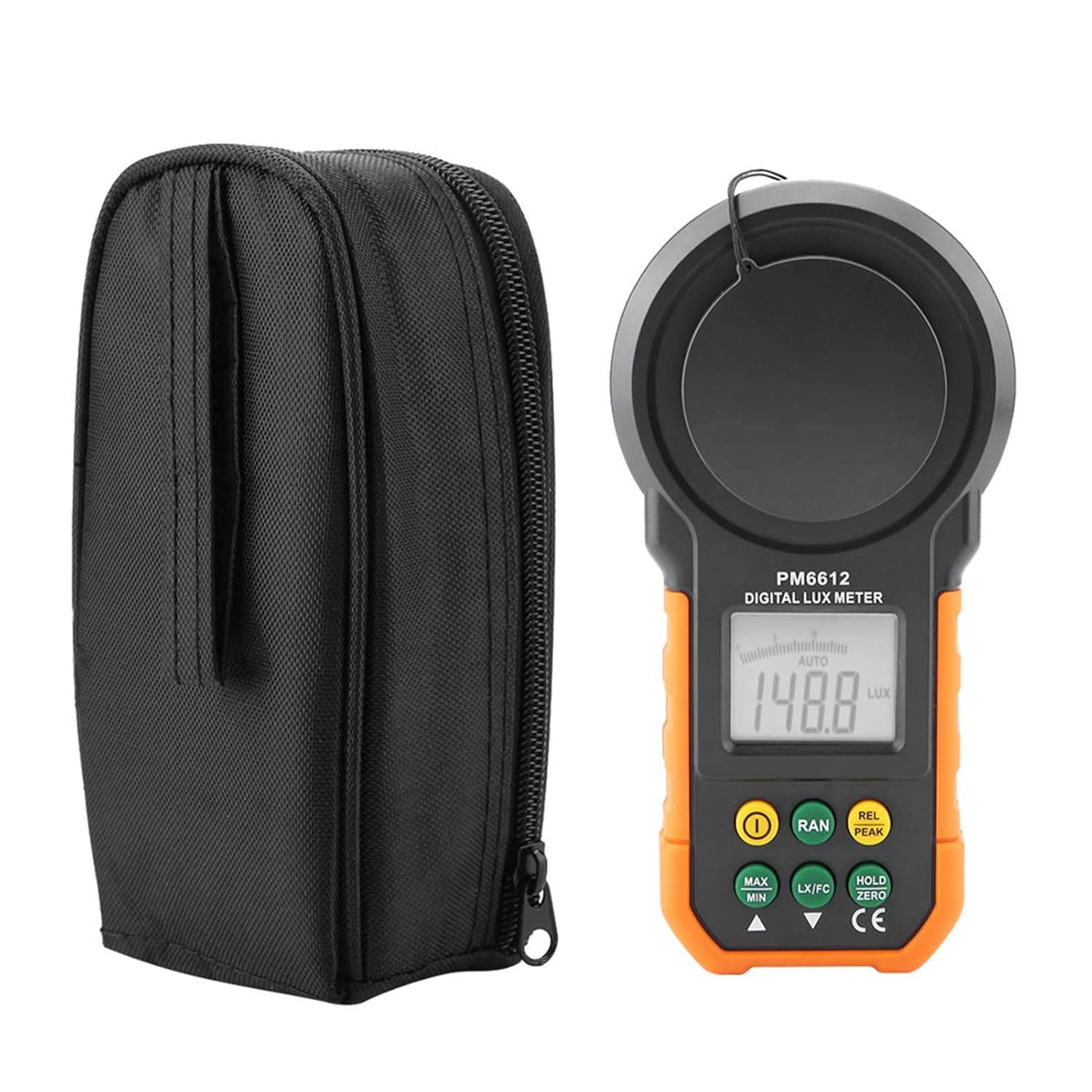
Figure 1: PEAKMETER PM6612 Digital Light Meter and its protective carrying case.
2. Features
The PEAKMETER PM6612/PM6612L Digital Light Meter offers a range of features for accurate and convenient light measurement:
- User-Friendly Interface: Simple key-press activation with an audible buzzer confirmation.
- Compact Design: Lightweight and portable for easy handling and transport.
- Backlit LCD Display: Ensures clear readability of measurements in low-light environments.
- Wide Measurement Range: Capable of measuring up to 200,000 Lux or 20,000 Foot-candles.
- Unit Selection: Easily switch between Lux (lx) and Foot-candle (FC) units.
- Data Hold Function: Freezes the current measurement on the display for easy recording.
- MAX/MIN Function: Records and displays the maximum and minimum measured values.
- Auto Range & Manual Range: Provides flexibility for different measurement scenarios.
- Auto Power Off: Conserves battery life by automatically shutting down after a period of inactivity.
- Analog Bar Indication: Offers a visual representation of light intensity.
- PM6612L Specific Features: Includes light source adjustment function and support for various monochromatic visible light measurements.
3. Specifications
| Parameter | Specification |
|---|---|
| Model | PM6612, PM6612L (Optional) |
| Measurement Range | 0 ~ 200,000 Lux / 0 ~ 20,000 FC |
| Accuracy | ±3% |
| Resolution | 0.01 Lux / 0.01 FC |
| Display | 2000 counts LCD with Backlight |
| Power Supply | 1 x 9V 6F22 Battery (not included) |
| Material | ABS |
| Dimensions (L*W*H) | 17 x 8.5 x 4.6 cm (6.7 x 3.3 x 1.8 inches) |
| Weight | Approx. 310g (10.9 oz) |
| Color | Black & Orange |

Figure 2: Dimensions of the PEAKMETER PM6612 Digital Light Meter.
4. Setup
4.1 Battery Installation
The PM6612/PM6612L requires one 9V 6F22 battery (not included) for operation. Follow these steps to install the battery:
- Ensure the device is powered off.
- Locate the battery compartment cover on the back of the device.
- Use a screwdriver to loosen the screw securing the battery cover.
- Remove the battery cover.
- Connect a new 9V battery to the battery clip, observing correct polarity (+ and -).
- Place the battery into the compartment.
- Replace the battery cover and tighten the screw.

Figure 3: Open battery compartment for 9V battery installation.
5. Operating Instructions
5.1 Power On/Off
- To power on the device, press the Power button (
 ). A short beep will confirm activation.
 - To power off the device, press and hold the Power button until the display turns off.
5.2 Taking a Measurement
- Remove the protective cap from the light sensor.
- Point the light sensor towards the light source or area where you wish to measure illuminance.
- The current light intensity will be displayed on the LCD screen.

Figure 4: The light meter actively measuring illuminance in an indoor setting.
5.3 Unit Selection (Lux/FC)
Press the LX/FC button to toggle between Lux (lx) and Foot-candle (FC) measurement units.
5.4 Data Hold Function
To freeze the current reading on the display, press the HOLD/ZERO button. Press it again to release the hold function and resume live measurements.
5.5 MAX/MIN Function
Press the MAX/MIN button to activate the maximum/minimum recording mode. The display will cycle through the maximum, minimum, and current readings. Press again to exit this mode.
5.6 Backlight
The LCD backlight automatically activates in low light conditions. There is no manual control for the backlight.
5.7 Auto Power Off
The device is equipped with an auto power-off feature to conserve battery life. It will automatically shut down after a period of inactivity. To disable this feature, refer to the full product manual if available, or contact support.
5.8 PM6612L Specific Functions
For the PM6612L model, additional functions include light source adjustment and measurement of various monochromatic visible light. Refer to the specific PM6612L documentation for detailed instructions on these advanced features.
6. Maintenance
6.1 Cleaning
- Wipe the device with a dry, soft cloth.
- Do not use abrasive cleaners or solvents.
- Keep the light sensor clean and free from dust or obstructions to ensure accurate readings.
6.2 Battery Replacement
When the low battery indicator appears on the display, replace the 9V battery as described in Section 4.1. Remove the battery if the device will not be used for an extended period to prevent leakage.
6.3 Storage
Store the device in a cool, dry place, away from direct sunlight and extreme temperatures. Always place the protective cap over the light sensor when not in use.
7. Troubleshooting
If you encounter issues with your PEAKMETER PM6612/PM6612L, refer to the following common problems and solutions:
| Problem | Possible Cause | Solution |
|---|---|---|
| Device does not power on | Low or dead battery; incorrectly installed battery. | Replace the 9V battery; ensure correct polarity during installation. |
| Inaccurate readings | Dirty sensor; sensor obstructed; incorrect unit selected. | Clean the light sensor; ensure no obstructions; verify Lux/FC unit setting. |
| Display is dim or blank | Low battery; device not powered on. | Replace the 9V battery; press the Power button to turn on the device. |
| Buzzer not working | Internal fault. | Contact customer support for assistance. |
8. Warranty and Support
This product is manufactured by Yuecoom. For warranty information, technical support, or service inquiries, please refer to the documentation included with your purchase or visit the official Yuecoom website. Keep your purchase receipt as proof of purchase for warranty claims.
