
Introduction
This manual provides essential instructions for the safe and efficient use of your BRUNNER Aspair Dual NG rechargeable multi-purpose vacuum cleaner. Please read this manual thoroughly before operating the device and retain it for future reference. The Aspair Dual NG is designed for versatile cleaning with powerful 5.5 kPa suction, a 100W motor, and a washable HEPA filter, offering both wet and dry cleaning capabilities.
Product Overview and Components
The BRUNNER Aspair Dual NG is a compact and lightweight handheld vacuum cleaner. It comes with various accessories to enhance its cleaning versatility.

Image: The BRUNNER Aspair Dual NG handheld vacuum cleaner shown with its charging base. Dimensions are indicated as approximately 41 cm in length and 12 cm in width/height.
Included Accessories:
- Crevice Nozzle: For reaching narrow gaps and tight spaces.
- Cleaning Brush: For agitating and removing stubborn dirt from surfaces.
- Round Brush: For general cleaning and delicate surfaces.
- Liquid Nozzle (Squeegee): For vacuuming liquids.
- Extension Tubes: To convert the handheld unit into a floor vacuum.
- Carrying Case: For convenient storage and transport.

Image: Close-up view of the brush tool, crevice tool, and squeegee accessory, demonstrating their application for cleaning pet hair from upholstery, debris from car seats, and spilled liquids from a floor.

Image: The BRUNNER Aspair Dual NG vacuum cleaner assembled with extension tubes and a floor brush, transforming it into a floor vacuum. The total length is approximately 122 cm.
Setup
Charging the Battery:
The device features a Li-ion battery for cordless operation. Before first use, fully charge the battery. The charge indicator will provide status.
- Connect the vacuum to the 230V charger for standard wall outlet charging.
- Alternatively, use the 12V charging cable (180 cm) for charging in vehicles or other 12V power sources.
Docking Station Installation:
The charging station offers flexible placement options:
- Freestanding: Place the docking station on any flat, stable surface.
- Wall-Mounted: Secure the docking station to a wall using appropriate fasteners (not included) for convenient storage and charging.

Image: Illustrations of the docking station in both freestanding and wall-mounted configurations, highlighting the 230V and 12V charging options. The vacuum is shown docked for charging.

Image: An infographic detailing key specifications: dimensions (12 x 41/122 x 12 cm), weight (1 kg), Li-ion 2000 mAh / 11.1 V battery, 100 W / 5.5 kPa power, 500 ml powder / 120 ml liquids tank capacity, 5.5 hours charging time, and 13 minutes work time.
Operating Instructions
Power On/Off:
Locate the ON/OFF button on the handle of the vacuum cleaner. Press it to start or stop the device.
Dry Vacuuming:
Attach the desired accessory (crevice nozzle, cleaning brush, or round brush) directly to the vacuum's suction inlet. For floor cleaning, connect the extension tubes and the floor brush. Turn on the vacuum and move it over the surface to be cleaned.
Wet Vacuuming:
For vacuuming liquids, attach the liquid nozzle (squeegee) to the suction inlet. Ensure the dust tank is empty before wet vacuuming. Do not exceed the maximum liquid capacity of 120 ml. After wet vacuuming, empty and clean the tank immediately.
Using Accessories:
- Crevice Nozzle: Ideal for cleaning car interiors, corners, and edges.
- Cleaning Brush/Round Brush: Suitable for upholstery, carpets, and general surface cleaning.
- Extension Tubes & Floor Brush: Assemble these to use the device as a stick vacuum for larger floor areas.
Maintenance
Regular maintenance ensures optimal performance and extends the lifespan of your vacuum cleaner.
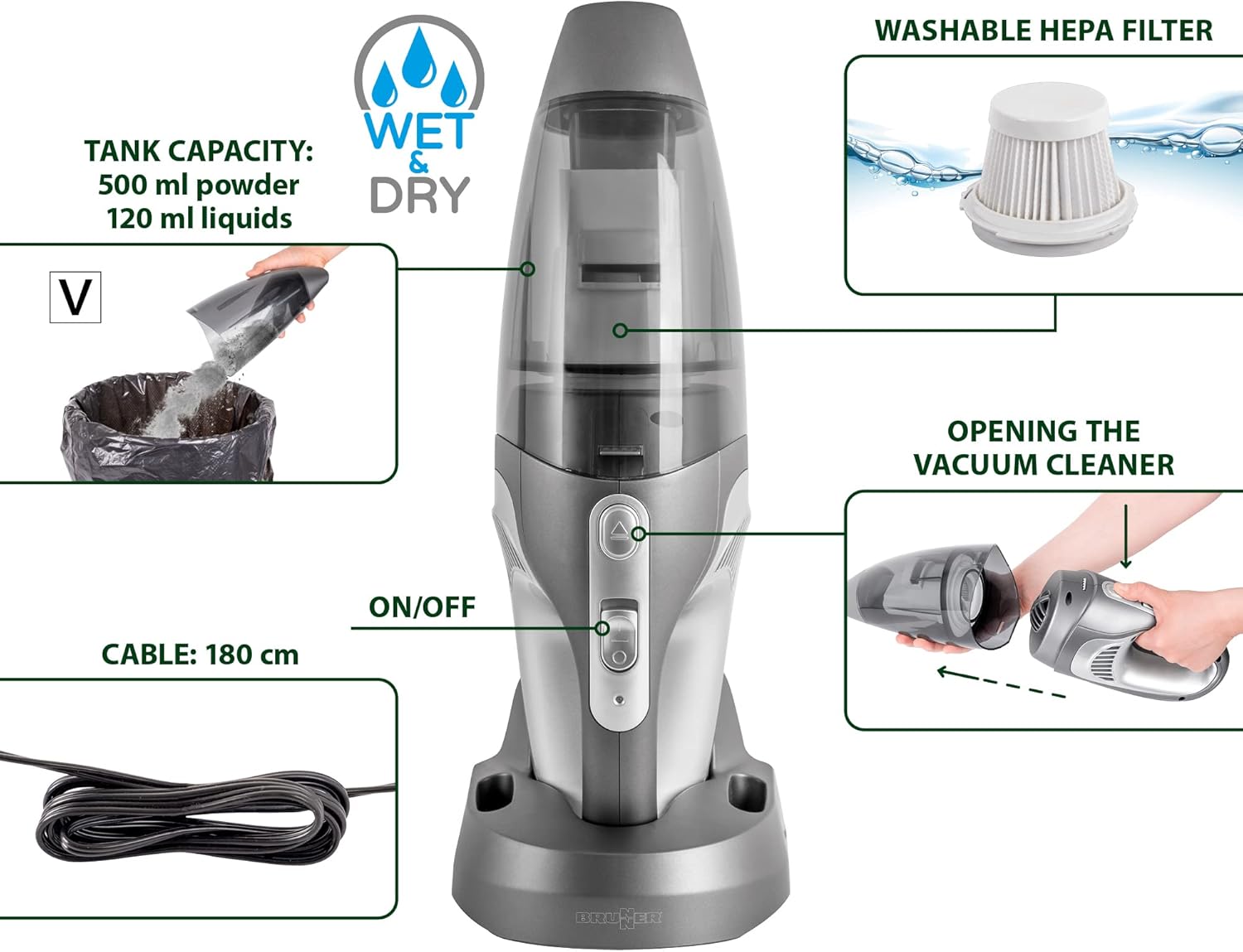
Image: A detailed diagram of the vacuum cleaner, indicating the ON/OFF switch, the 180 cm charging cable, the 500 ml powder and 120 ml liquid tank capacity, the washable HEPA filter, and the method for opening the vacuum to access the tank and filter.
Emptying the Dust Tank:
The dust tank has a capacity of 500 ml for dry debris and 120 ml for liquids. To empty, detach the front section of the vacuum cleaner as shown in the product overview image. Dispose of collected debris or liquids responsibly.
Cleaning the HEPA Filter:
The BRUNNER Aspair Dual NG is equipped with a washable HEPA filter. For best performance, clean the filter regularly, especially after vacuuming fine dust or liquids. To clean:
- Remove the filter from the dust tank.
- Rinse the filter under running water until clean.
- Allow the filter to air dry completely before reinserting it into the vacuum cleaner. Do not use the vacuum with a wet filter.
Troubleshooting
If you encounter issues with your BRUNNER Aspair Dual NG, please review the following common problems and solutions:
- No Power: Ensure the battery is fully charged. Check the charging cable and adapter connections.
- Reduced Suction: Check if the dust tank is full and needs emptying. Inspect the HEPA filter for blockages and clean it if necessary. Ensure all attachments are securely fitted.
- Unusual Noise: Turn off the vacuum immediately. Check for any foreign objects lodged in the nozzle or suction path.
If the problem persists after attempting these solutions, please contact BRUNNER customer support for further assistance.
Specifications
- Model: 0436025N
- Power: 100 W
- Suction Power: 5.5 kPa
- Battery: Li-ion 2000 mAh / 11.1 V
- Charging Input: 230V AC / 12V DC (180 cm cable)
- Charging Time: Approximately 5.5 hours
- Operating Time: Approximately 13 minutes
- Dust Tank Capacity: 500 ml (powder)
- Liquid Tank Capacity: 120 ml (liquids)
- Filter Type: Washable HEPA Filter
- Product Dimensions (Handheld): Approximately 12 x 41 x 12 cm
- Product Dimensions (with Extension Tubes): Approximately 12 x 122 x 12 cm
- Item Weight: 1 kg
- Special Features: Compact, Lightweight, Wet & Dry Functionality
- Recommended Surfaces: All floor types
Warranty and Support
For information regarding the product warranty, please refer to the documentation provided at the time of purchase or contact your retailer. For technical support or inquiries not covered in this manual, please visit the official BRUNNER website or contact their customer service department.


