
1. Introduction
Thank you for choosing the Vekkia Folding Music Stand Light MST42. This portable, rechargeable LED lamp is designed to provide optimal illumination for music sheets, pianos, and reading, featuring adjustable brightness and color temperature settings. Please read this manual thoroughly before use to ensure proper operation and maintenance.
2. Safety Information
- Do not expose the device to extreme temperatures or direct sunlight.
- Keep the device away from water and other liquids.
- Do not attempt to disassemble or repair the device yourself. Contact customer support if service is required.
- Use only the provided USB-C cable for charging.
- Keep out of reach of children.
3. Package Contents
- Vekkia Folding Music Stand Light MST42 ×1
- Storage Bag ×1
- 8.2ft USB-C Power Cable ×1
- User Manual ×1
4. Product Features
- 180° Scissor-Style Lighting Head: Patented design for full-page illumination with extendable arms.
- 42 SMD LEDs: Provides wide and uniform lighting.
- 5 Brightness Levels & 3 Color Temperatures: Customize your lighting from warm to white, bright to soft.
- Professional Broadbeam with Anti-Glare Shield: Directs light onto the music sheet, preventing glare for the audience.
- Lightweight & Portable: Weighs only 8.5oz, includes a storage bag for easy transport.
- Strong Clip-on Design: Clamp opens up to 2.36 inches with anti-slip rubber strips for secure attachment and surface protection. Can also stand independently.
- Rechargeable 2500mAh Li-ion Battery: Up to 60 hours of use on the lowest brightness setting. Charges via USB-C.
- Memory Function: Remembers the last used brightness and color temperature settings.
5. Component Identification
- Lighting Heads: Two adjustable LED panels.
- Gooseneck: Flexible arm for positioning the light.
- Clip: Securely attaches the light to various surfaces.
- Power Button: Controls power, brightness, and color temperature.
- USB-C Charging Port: For recharging the internal battery.
- Battery Indicator Lights: Shows charging status and battery level.

Figure 1: Power Button and Lighting Options

Figure 2: Charging Port and Clip Details
6. Setup and Installation
- Unfold the Light: Gently unfold the 180° scissor-style lighting heads.
- Attach the Clip: The robust clip can open up to 2.36 inches. Securely attach it to your music stand, piano, desk, or other suitable surface. The rubber strips on the clip prevent slipping and protect surfaces from scratches.
- Adjust Position: Use the flexible gooseneck to position the light heads for optimal illumination of your music sheets or reading material. The light heads can also be adjusted independently.

Figure 3: Light in use on a music stand
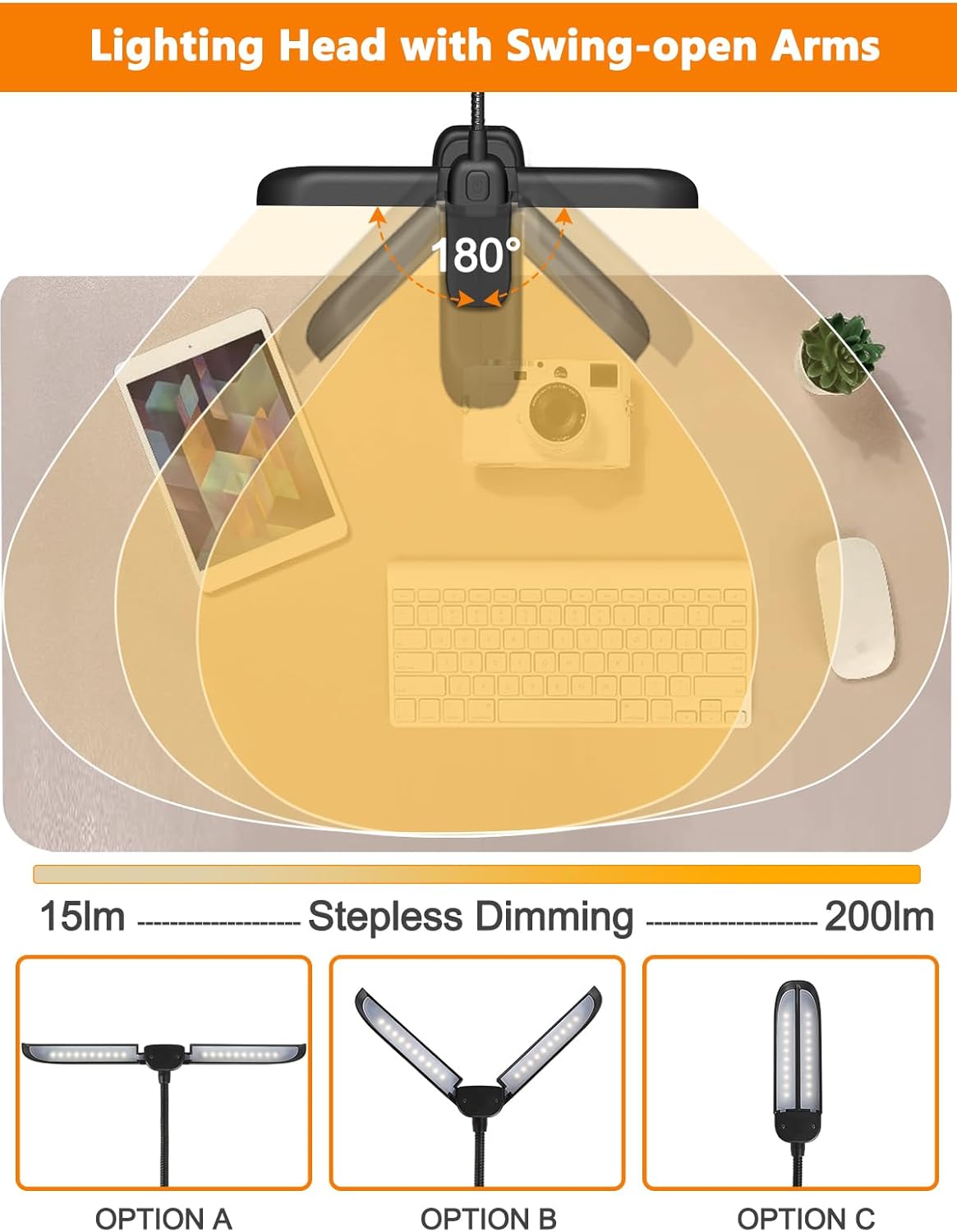
Figure 4: Adjustable Lighting Head
7. Operating Instructions
- Power On/Off: Long press the power button (refer to Figure 1) to turn the light on or off.
- Adjust Brightness: Short press the power button to cycle through 5 brightness levels.
- Change Color Temperature: Long press the power button to switch between 3 color temperature modes (Warm, White, Nature). The light will remember your last setting.
8. Charging the Device
The Vekkia Music Stand Light is equipped with a rechargeable 2500mAh Li-ion battery. When the battery is low, the indicator lights will signal the need for charging.
- Connect the provided USB-C cable to the charging port on the device (refer to Figure 2).
- Plug the other end of the USB-C cable into a compatible USB power source (e.g., computer, power bank, 5V phone charger - AC adapter not included).
- The battery indicator lights will show the charging progress. Once fully charged, the lights will indicate completion.
- A full charge provides up to 60 hours of illumination at the lowest brightness setting.
9. Care and Maintenance
- Cleaning: Wipe the light with a soft, dry cloth. Do not use abrasive cleaners or solvents.
- Storage: When not in use, fold the light heads and store the device in the included storage bag to protect it from dust and damage.
- Battery Longevity: To prolong battery life, avoid fully discharging the battery frequently. Charge the device regularly, even if not in constant use.

Figure 5: Portable and Foldable Design

Figure 6: Compact Storage
10. Troubleshooting
| Problem | Possible Cause | Solution |
|---|---|---|
| Light does not turn on. | Battery is depleted. | Charge the device using the provided USB-C cable. |
| Light does not charge. | Faulty cable or power source. | Try a different USB-C cable or power adapter. Ensure the cable is securely connected. |
| Light flickers or is dim. | Low battery or incorrect brightness setting. | Charge the device. Short press the power button to increase brightness. |
| Light does not stay clipped. | Surface too thick or unstable. | Ensure the surface is within the 2.36-inch clip capacity and is stable. Adjust the clip for a firm grip. |
11. Specifications
| Feature | Detail |
|---|---|
| Model Number | MST42 |
| Light Source Type | LED (42 beads) |
| Brightness | Up to 180 Lumens |
| Color Temperatures | 3 modes (Warm, White, Nature) |
| Brightness Levels | 5 levels |
| Power Source | Battery Powered (2500mAh Li-ion) |
| Charging Port | USB-C |
| Battery Life | Up to 60 hours (low brightness) |
| Item Weight | 11 ounces |
| Product Dimensions | 5"D x 2"W x 19"H (unfolded) |
| Material | Plastic, Rubber (base) |
| Max Clip Opening | 2.36 inches |
12. Warranty and Support
Vekkia products are designed for reliability and performance. For warranty information, technical support, or customer service inquiries, please refer to the contact details provided with your purchase or visit the official Vekkia website. Please retain your proof of purchase for warranty claims.