Introduction
Thank you for choosing the HEXANT 88-Key Hammer Weighted Digital Keyboard Piano. This manual provides essential information for the proper setup, operation, and maintenance of your new instrument. Please read it thoroughly before use to ensure optimal performance and longevity.
This digital piano features 88 hammer-weighted keys designed to simulate the feel of an acoustic piano, adjustable velocity sensitivity, and touch response. It includes a 3-pedal unit (sustain, soft, sostenuto) and 2x20W amplifiers for an enhanced playing experience. The multi-functional keyboard offers a clear LCD screen for various controls, including volume adjustment, multi-tone selection, recording, playback, and dual keyboard split functions.

Figure 1: HEXANT 88-Key Hammer Weighted Digital Keyboard Piano
Setup Instructions
The HEXANT digital piano is designed for straightforward assembly. Follow these steps to set up your instrument:
- Unpack Components: Carefully remove all components from the packaging. Verify that all parts listed in the packing list are present.
- Attach Legs: Securely attach the four sturdy wooden legs to the base of the piano using the provided bolts and tools. Ensure each leg is firmly tightened.
- Connect Pedal Unit: Connect the 3-pedal unit cable to the designated port on the underside of the piano.
- Position the Piano: Place the assembled piano in your desired location, ensuring it is on a stable, level surface.
- Connect Power Adapter: Plug the AC adapter into the piano's power input and then into a suitable wall outlet.

Figure 2: Disassembled piano components

Figure 3: Assembled piano with pedal unit
Operating Instructions
This section details the various functions and features of your HEXANT digital piano.
Keyboard Features
- Hammer Weighted Keys: The 88 keys are hammer-weighted to provide a realistic acoustic piano feel. Adjust velocity sensitivity and touch response to suit your playing style.
- 3-Pedal Unit: The included pedal unit features sustain, soft, and sostenuto pedals for expressive playing.

Figure 4: Hammer Weighted Key Mechanism
Control Panel Functions
The multi-functional control panel with its LCD screen allows access to various settings and features:
- Volume Adjustment: Use the dedicated controls to adjust the overall sound volume.
- Multi-Tone Selection: Choose from 480 tones and 128 standard GM tones to vary your sound.
- Rhythm Selection: Access 200 present rhythms to accompany your playing.
- Demo Songs: Explore 80 built-in demo songs.
- Recording & Playback: Record your performances and play them back.
- Double Keyboard Split Function: Divide the keyboard into two sections for different instrument sounds or for duet playing.
- Metronome: Utilize the built-in metronome for timing practice.
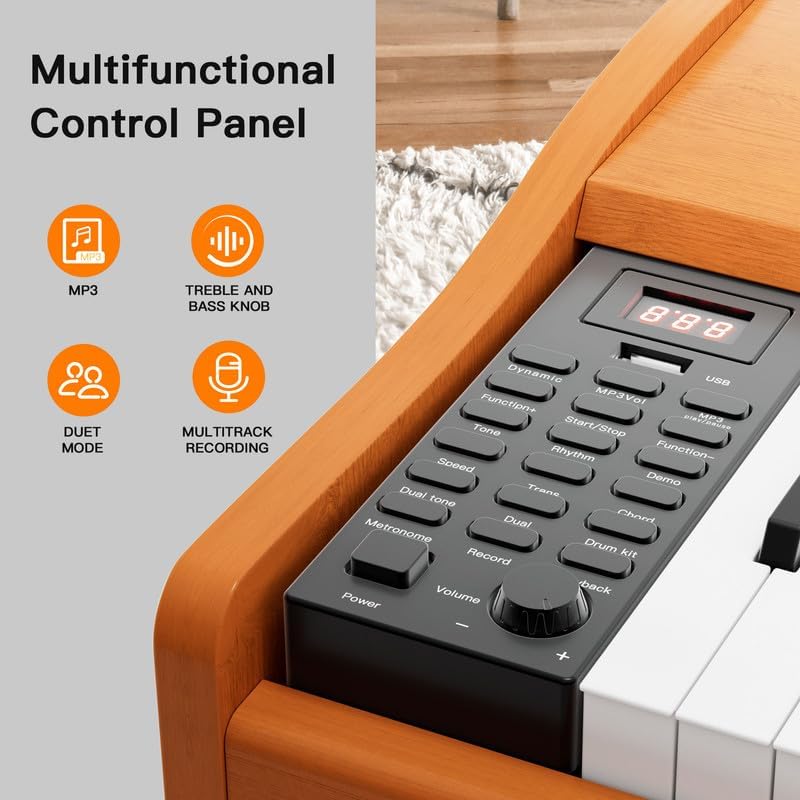
Figure 5: Multi-functional Control Panel
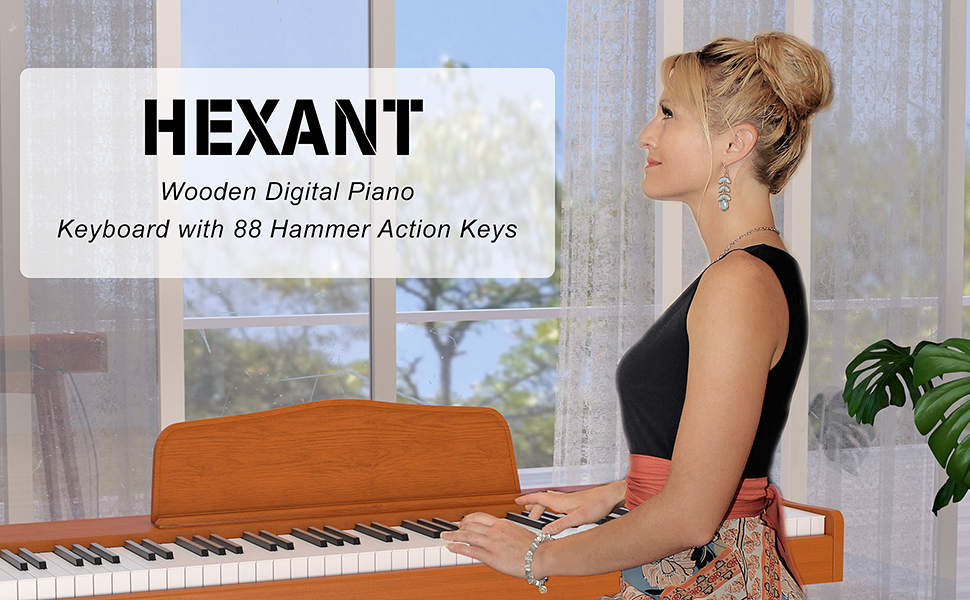
Figure 6: Powerful Presets Overview
Connectivity
The piano offers various connectivity options:
- USB Port: Connect to a computer or other MIDI-compatible devices for recording or using music software.
- Headphone Jacks: Two 3.6mm headphone jacks are available for private practice.
- Audio Input/Output: Use the 6.36mm jacks for connecting external audio sources or outputting sound to external amplification systems.
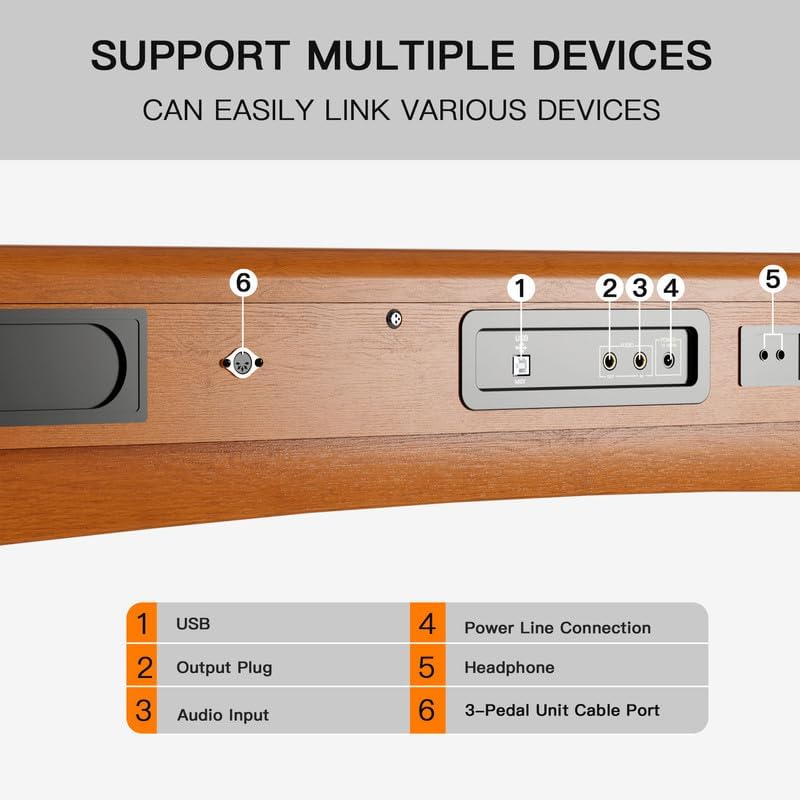
Figure 7: Connectivity Ports
Maintenance
Proper care will ensure the longevity and optimal performance of your digital piano.
- Cleaning: Use a soft, dry cloth to wipe down the surface of the piano. For stubborn marks, a slightly damp cloth can be used, followed immediately by a dry cloth. Avoid abrasive cleaners or solvents.
- Key Care: Keep the keys clean and free from dust. Do not use excessive force when playing.
- Environment: Place the piano in a stable environment, away from direct sunlight, extreme temperatures, and high humidity.
- Power Off: Always turn off the piano and unplug it from the power source when not in use for extended periods or during electrical storms.
Troubleshooting
If you encounter any issues with your HEXANT digital piano, please refer to the following common troubleshooting tips:
- No Sound:
- Ensure the power adapter is securely connected and the piano is turned on.
- Check the master volume level.
- If headphones are connected, ensure they are fully plugged in and functioning correctly. Disconnect headphones to check speaker output.
- Keys Not Responding / Sticky Keys:
- Gently clean around the affected keys with a soft, dry cloth.
- Ensure no foreign objects are lodged between the keys.
- Unusual Sounds or Rhythms:
- Power off the piano, wait a few seconds, and then power it back on. This can resolve temporary software glitches.
- Check if any specific demo songs or rhythms are accidentally activated.
- Pedals Not Functioning:
- Ensure the pedal unit cable is securely connected to the piano.
If the issue persists after attempting these steps, please contact HEXANT customer support for further assistance.
Specifications
| Feature | Detail |
|---|---|
| Brand | HEXANT |
| Model Name | HEXANT Wood Digital Hammer Weighted Piano |
| Model Number | 1 |
| Number of Keys | 88 |
| Key Type | Hammer Weighted |
| Product Dimensions | 13.4"D x 28.5"W x 13.4"H |
| Item Weight | 53.7 pounds |
| Color | Wood (Hammer Weighted) |
| Power Source | AC Adapter |
| Connectivity Technology | USB |
| Connector Types | 3.6mm Jack, 6.36mm Jack, USB |
| Special Features | Digital Display, Digital Effects, Headphone Jack, Touch-Sensitive Keys, Weighted Keys |
| Polyphony | 64 |
| Tones | 480 (128 standard GM tones) |
| Rhythms | 200 |
| Demo Songs | 80 |

Figure 8: Product Dimensions
Warranty and Support
For product support, warranty claims, or any inquiries, please contact HEXANT customer service directly. Information regarding specific warranty periods and terms can be found on the product's purchase page or by contacting the manufacturer.
Return Policy: This product is eligible for a refund or replacement within 30 days of purchase, subject to the seller's return policy.
Protection Plans: Extended protection plans may be available from third-party providers. Please refer to your purchase details for information on these optional plans.