
ALISENED B0BD3NWZFM
ALISENED 31.5" Small Computer Desk with Hutch Instruction Manual
Model: B0BD3NWZFM
Introduction
This manual provides detailed instructions for the assembly, operation, and maintenance of your ALISENED 31.5" Small Computer Desk with Hutch. Please read this manual carefully before assembly and retain it for future reference. Proper assembly and care will ensure the longevity and functionality of your desk.
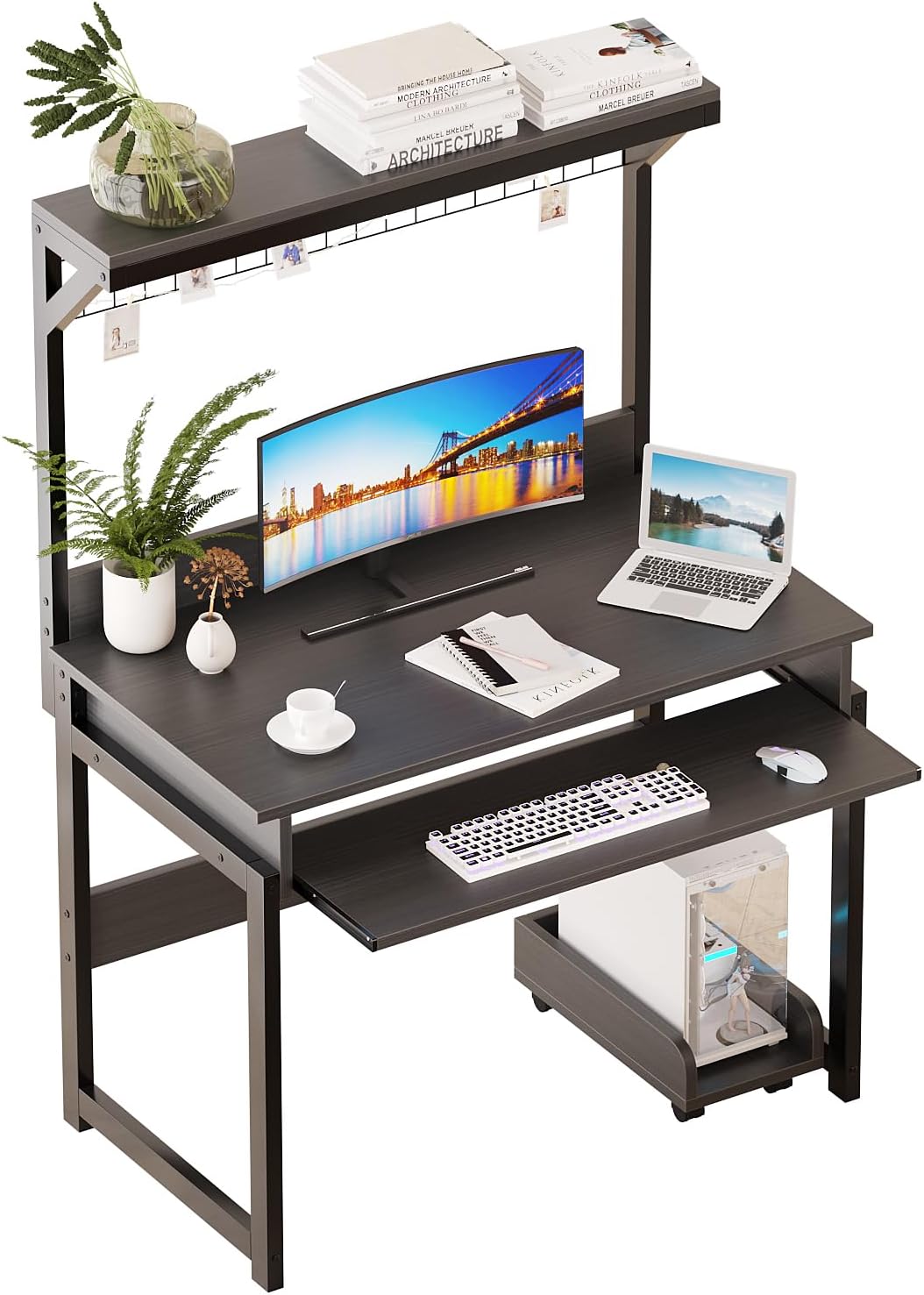
Figure 1: Assembled ALISENED 31.5" Small Computer Desk with Hutch.
Safety Information
- Always assemble the desk according to the provided instructions.
- This desk is designed for adult use.
- The maximum weight recommendation for this desk is 60 kilograms (approximately 132 lbs). Do not exceed this limit.
- Do not allow children to use or play on the desk to prevent injury.
- Ensure all screws and fasteners are securely tightened before use. Periodically check and re-tighten as needed.
- Place the desk on a flat, stable surface to prevent tipping.
- Keep small parts away from children during assembly to avoid choking hazards.
Package Contents
Before beginning assembly, verify that all parts listed below are present and undamaged. If any parts are missing or damaged, please contact customer support.
- Desk Panels (Main desktop, hutch shelves, keyboard tray, CPU stand)
- Metal Frame Components
- Hardware (Screws, bolts, cam locks, casters for CPU stand)
- Assembly Tools (Screwdriver, Allen wrench - typically included)
- Instruction Manual
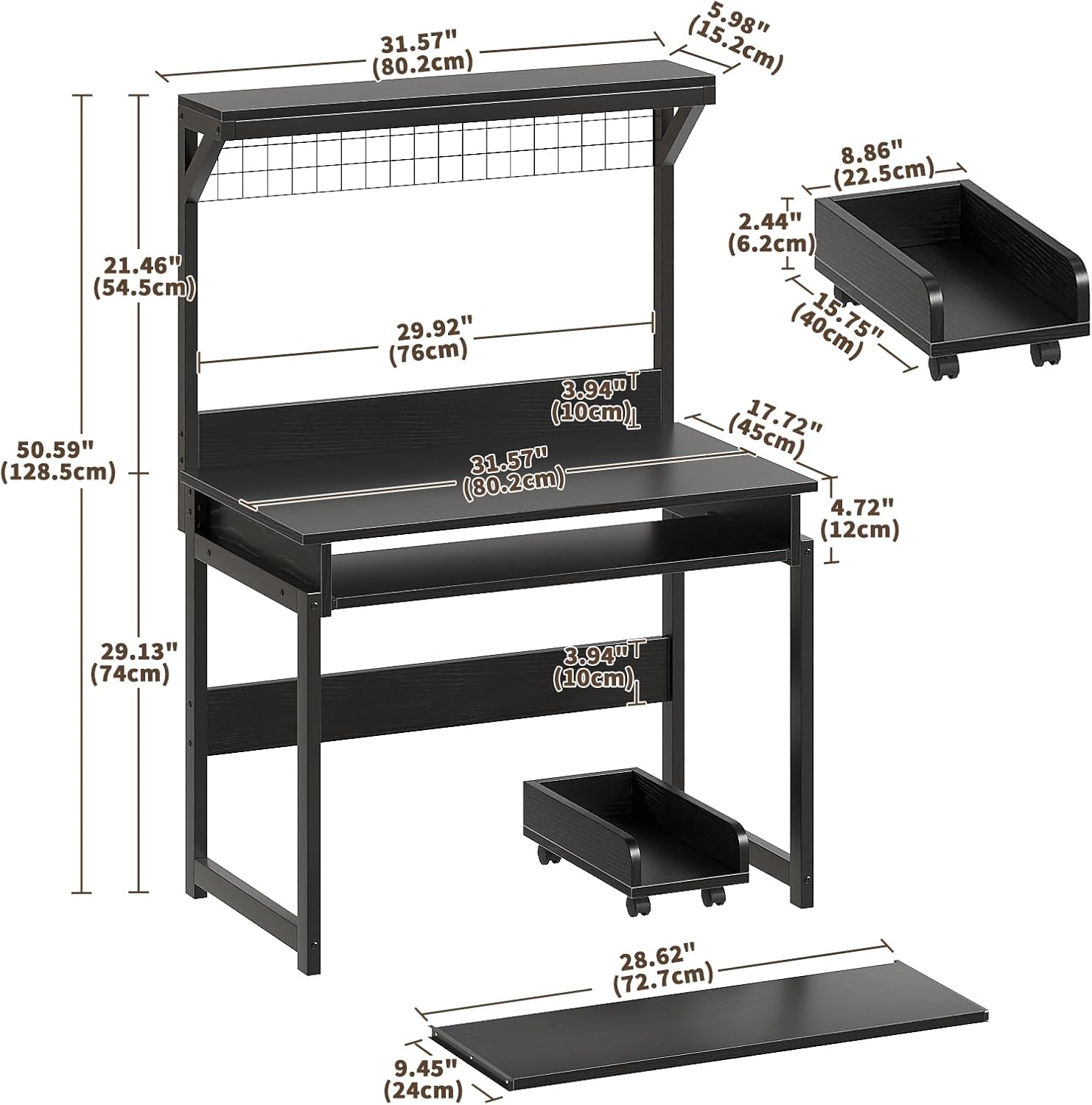
Figure 2: Desk dimensions and components overview.
Assembly Instructions
Follow these steps carefully for proper assembly. It is recommended to assemble the desk on a soft, clean surface to prevent scratches.
Step 1: Prepare the CPU Stand
Attach the casters to the base of the CPU stand using the provided screws. Ensure they are securely fastened for mobility.
Video 1: Demonstrates the unboxing and initial assembly steps, including attaching casters to the CPU stand.
Step 2: Assemble the Main Desk Frame
Connect the metal frame components using the designated screws and cam locks. Pay attention to the orientation of each piece as shown in the diagrams. Ensure all connections are tight.

Figure 3: Detailed view of desk features and components during assembly.
Step 3: Install the Keyboard Tray and Hutch
Slide the keyboard tray into its designated rails beneath the main desktop. Attach the hutch frame to the top of the main desk using the provided hardware. Secure the top hutch shelf to the hutch frame.
Video 2: Provides a vertical view of the desk assembly, highlighting the installation of the keyboard tray and hutch.
Step 4: Final Checks
Once all components are assembled, gently shake the desk to ensure stability. Re-tighten any loose screws if necessary. Place the CPU stand in its designated area.
Operating Instructions
- Keyboard Tray: The keyboard tray slides in and out for convenient access to your keyboard and mouse. Ensure no obstructions are present when sliding.
- Hutch: The top hutch provides additional storage for small items, books, or decorative elements. The metal grid can be used for hanging notes or small accessories.
- CPU Stand: The mobile CPU stand allows for easy placement and access to your computer tower, keeping it off the floor and improving airflow.

Figure 4: The desk in a typical home office setup, showcasing its functionality.
Maintenance
- Cleaning: Wipe the desk surfaces with a soft, damp cloth. Avoid harsh chemicals or abrasive cleaners that may damage the finish.
- Spills: Clean up spills immediately to prevent staining or damage to the engineered wood surface.
- Fasteners: Periodically check all screws and bolts to ensure they remain tight. Re-tighten as necessary to maintain stability.
- Placement: Avoid placing the desk in direct sunlight or near heat sources to prevent warping or discoloration.
Troubleshooting
| Problem | Possible Cause | Solution |
|---|---|---|
| Desk is wobbly or unstable. | Loose fasteners; uneven floor. | Check and tighten all screws and bolts. Ensure the desk is on a level surface. |
| Keyboard tray does not slide smoothly. | Rails are dirty or misaligned. | Clean the rails and ensure they are properly aligned. Apply a small amount of silicone lubricant if needed. |
| Missing parts during assembly. | Packaging error. | Contact ALISENED customer support with your purchase details and the specific missing parts. |
| Sharp edges on metal rails (keyboard platform). | Manufacturing variation. | Exercise caution when using the keyboard tray. Consider applying edge protectors if desired. |
Specifications
| Brand: | ALISENED |
| Model: | 31.5" Small Computer Desk with Hutch |
| Product Dimensions (L x W x H): | 31.5"D x 18.5"W x 50.8"H (79.9 x 46.9 x 129 CM) |
| Material: | Engineered Wood (Desk Panel), Metal (Frame) |
| Color: | Black |
| Item Weight: | 15.42 Kilograms (approx. 34 lbs) |
| Maximum Weight Recommendation: | 60 Kilograms (approx. 132 lbs) |
| Special Features: | Keyboard Tray, Open Hutch, CPU Stand with Casters |
| Assembly Required: | Yes |
Warranty and Support
This product comes with a limited warranty. For specific warranty details or if you have any questions, require assistance with assembly, or need to report missing/damaged parts, please contact ALISENED customer support. Refer to your purchase documentation for contact information or visit the official ALISENED website.
You can visit the ALISENED Store for more information: ALISENED Store